

InscryptionOnline
Player-versus-player multiplayer for Inscryption. All three acts, Steam lobbies, deck builder with sigils and a draw order you set.Inscryption Online
Networked player-versus-player for Inscryption, running inside the real game client.
Everything that existed before this was either local hotseat, a Tabletop Simulator table, or a browser/Godot reimplementation of the card game. This is the actual game, over the network, against another person.
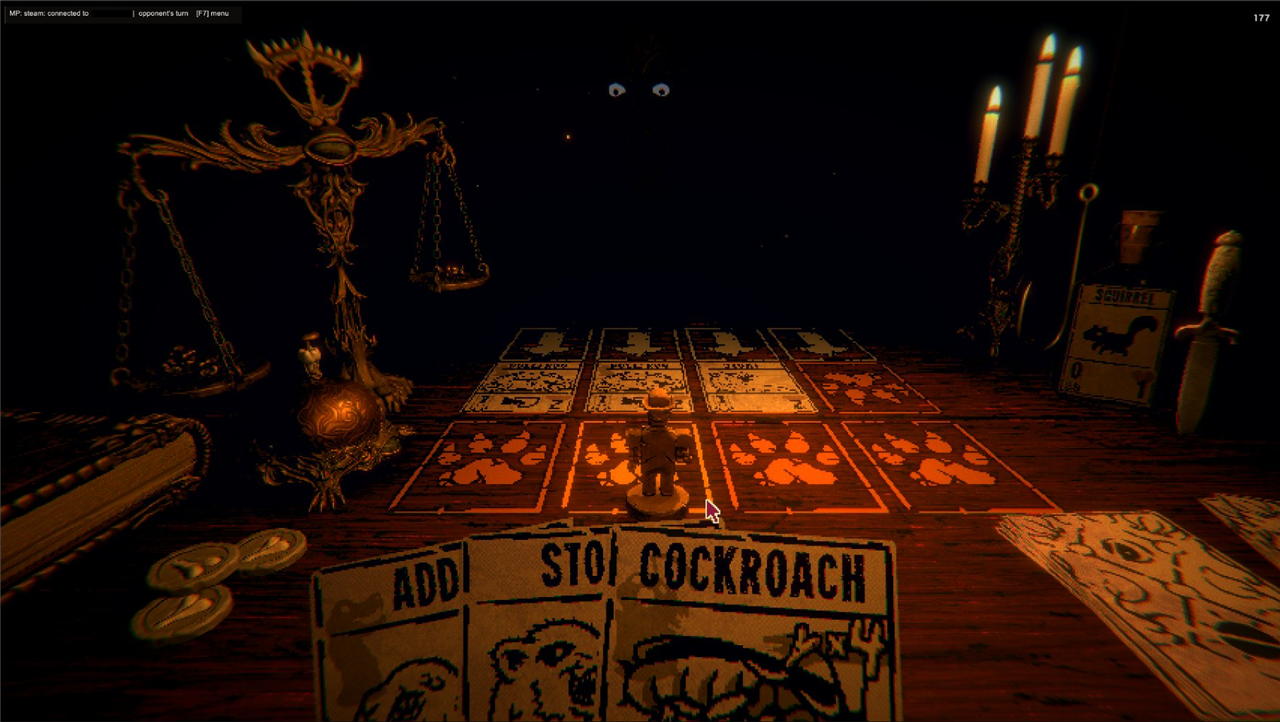 A match between two players - the opponent's board, turn indicator, and your hand.
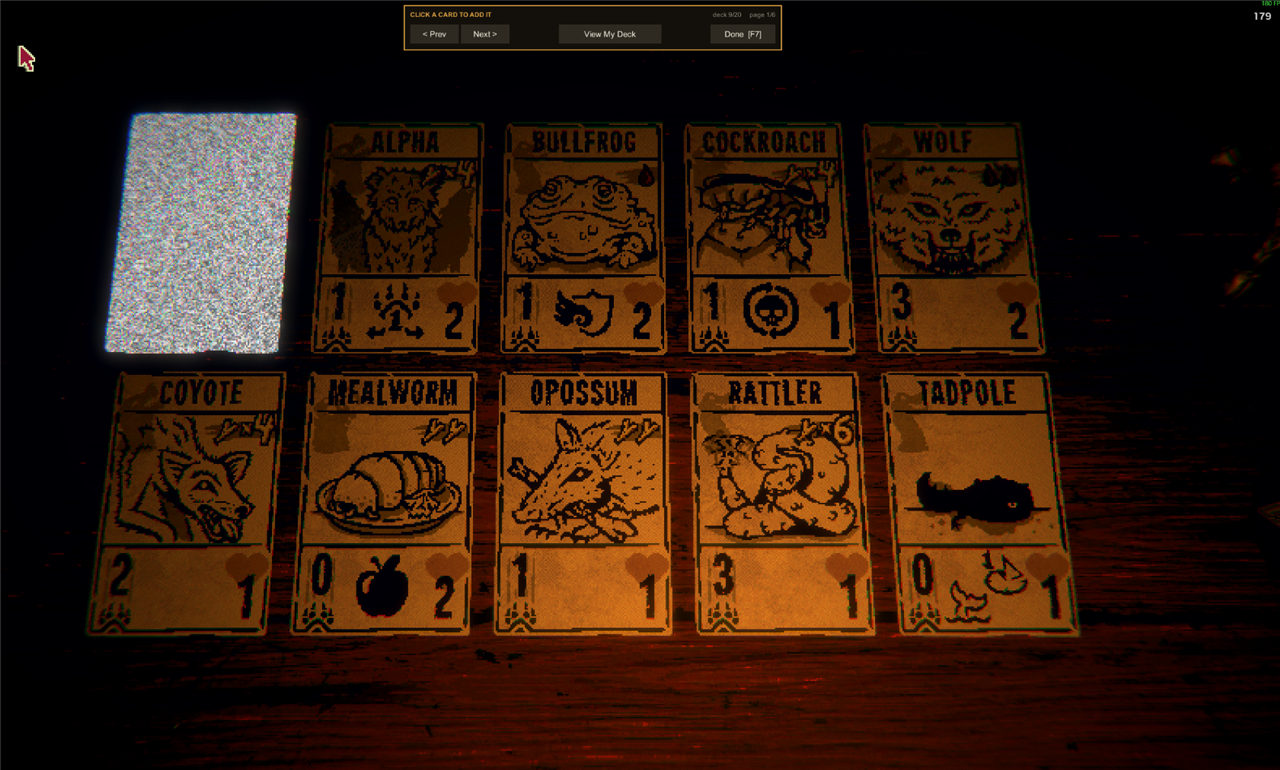 Deck building uses the game's own card table.
What works
- All three acts. Play on Leshy's table, the GBC pixel game, or P03's board. The host picks; both clients load the same act. Each act keeps its own deck.
- Steam lobbies and P2P — host, browse, join. No IPs, no port forwarding, no master server. Verified across two machines on two Steam accounts.
- Direct IP / LAN as a fallback for non-Steam copies.
- Standalone versus mode launched from the main menu. No campaign run required, no map node consumed, and saving is disabled for the duration so a match can never touch your save.
- Real turn order with a turn indicator; cards appear on the opponent's board as they are played.
- Authoritative board sync each turn, carrying each card's attack, health and any sigils it has picked up — so a buffed or damaged card reads the same on both screens.
- Nine match rules, set by the host and played by both: card draw (random or in deck order), damage to win, starting hand, draws a turn, deck size, sigils a card, side pile, who goes first, and starting bones. Default is always one click away.
- A lobby. Both players by name with their own ready state; the match starts the moment it reads 2/2. In a match the top of the screen carries the score: both names, both leads, and whose turn it is.
- Chat in the corner of the screen, and fixed phrases on the number keys during a match.
- Deck builder using the game's own 3D card table, paged, persisted to disk — one deck per act, each restricted to cards that act can actually draw and pay for. The deck has an order you can set, which is the order it is dealt in under the in-order rule.
- Sigils on your own cards. Put extra sigils on any card in your deck. The picker shows that card wearing each sigil, so you choose by looking at cards rather than reading a list, and only sigils the act can actually draw are offered.
- A multiplayer card on the title screen — drag it into the slot to open the menu, alongside New Game and the rest.
- Clean match end on both clients, back to the main menu with the result.
Install
- Steam → Library → right-click Inscryption → Manage → Browse local files
- Extract
InscryptionMP-install.zipinto that folder, next toInscryption.exe:Inscryption.exe winhttp.dll doorstop_config.ini BepInEx/plugins/InscryptionMP.dll - Launch the game and press F7.
Version compatibility. The handshake carries a protocol version, and a newer client speaks an older one's dialect rather than refusing it:
| Your build | Plays against |
|---|---|
| 1.5.x | 1.5.x, and 1.1.x–1.4.x without the newer extras |
| 1.4.x | 1.4.x–1.5.x, and 1.1.x–1.3.x without the newer extras |
| 1.3.x | 1.3.x–1.5.x, and 1.1.x–1.2.x without the newer extras |
| 1.1.x–1.2.x | each other, and 1.3.x–1.5.x |
| 1.0.x | nothing newer |
Against a pre-1.5 peer there are no match rules — they cannot be told what the rules are, so the match is played under the defaults whatever the host picked, and the panel says so. Against a pre-1.4 peer there is also no lobby vote, so the panel falls back to the older rule where either player starts and both are pulled in. Against a pre-1.3 peer you additionally lose stat corrections, synced sigils and Sniper aiming; the match works, there is just information their client never sends. 1.0.x is refused outright because it predates act negotiation, so the two clients would load different scenes. Mismatches are reported at the handshake, not halfway into a match.
Playing
- One player clicks Host Lobby, the other clicks Find Games and picks the lobby. The list keeps itself up to date while it is open, a lobby with two people in it stops being offered to anyone else, and picking one sets your act vote to the act it advertises.
- Both players pick an act. The tally under the buttons says who wants what; the match can only be the one you both chose, and each of you plays your own deck for it.
- The host sets the match rules, on their own screen. Nine of them; both of you play under the same set, and the other player can read them before agreeing. Changing one takes both players out of ready, so nobody starts a match under rules they didn't see.
- Both players press READY. The first press commits you and says so —
1/2— and the match starts once the second one lands. Pressing again takes it back. - Whoever the rules say takes the first turn. Ring the bell to pass.
F7 menu · F8 ready up · F12 abort out of anything · 1-6 say something in a match · chat lives in the bottom right corner
Deck building
F7 → EDIT DECK. Browse all cards and click to add. In View My Deck, clicking a
card selects it — the bar then offers Add Sigils or Delete Card, and a strip along
the bottom shows where it sits in the deck with Move Earlier and Move Later. Decks
are 6–20 cards, stored per act in BepInEx/config/inscryptionmp-deck-act1.txt (and -act2,
-act3), one card per line as CardName or CardName:Sigil,Sigil. The file's order is the
deck's order, so it can be rearranged in a text editor too.
The second pile. Act 1 keeps ten squirrels beside your deck and Act 3 ten empty vessels, and you can draw from either one on any turn instead of your own deck — the same as the campaign, and the reason a deck full of blood costs is playable at all. Both players get the same pile: the campaign turns Act 1's squirrels into bees once you have found the figurine, and a 1/1 flier against a 0/1 squirrel is not a difference two people should discover halfway through a match. Squirrels can also go in the deck proper, which is what the starter deck's three are.
Sigils. A card may show two in total, its own included — a card printed with one takes one more. Chosen from what the game itself considers graftable: Act 1 and 2 offer Leshy's totem set, Act 3 offers P03's. Two is the engine's limit rather than a balance decision — Act 2 keeps one icon layout per sigil count, and a card carrying more than the layouts cover draws none at all.
Each act offers the cards that belong to it: Leshy's creatures in Act 1, all four scrybes in Act 2's GBC game, P03's machines in Act 3. Cards an act can't pay for are left out, so an Act 1 deck can't smuggle in energy costs. Act 2 and Act 3 cards are drawn on Act 1's table while you browse, so their pixel art appears a little blocky there — in a match they render natively.
Each player brings their own deck. Decks are never synchronised — the peer only ever
resolves a card name through the game's own card table. A name it doesn't know is skipped
with a line in the log, rather than being trusted the way CardLoader.GetCardByName trusts
it (see NOTES.md).
The card pool ignores campaign progression on purpose: a versus deck shouldn't be gated behind someone's single-player unlocks.
How it works
Each client runs an ordinary single-player battle in which it is the player and the opponent is driven by the network instead of the AI. A card the peer plays into their slot N materialises in our opponent slot N. The engine's own combat resolution runs untouched.
That is the whole trick, and it falls out of Opponent being abstract with a virtual
QueueNewCards(). It holds for every act, because each act's opponent derives from that
same base — Part1Opponent, PixelOpponent and Part3Opponent are all replaced the
same way.
What differs between acts is everything around the battle, and that is where the work
went: Act 1 and Act 3 are explorable scenes with a GameFlowManager while Act 2's
GBC_CardBattle has none, each act draws from its own deck store, and each renders cards
through a different displayer. Those differences live in ActInfo.cs rather than being
special-cased at every call site.
See NOTES.md for the engine details and the bugs that cost real time — including the
ones worth knowing before you write an Inscryption mod of your own.
Not done
- All three acts have been played across two machines and two Steam accounts, and every release is now played through again on all three by two clients driving themselves. Act 1 still has the most human hours on it by a wide margin.
- Each client is authoritative over its own board, which is inherent to peer-to-peer with no referee. Play with people you trust: this is built for playing with friends, not for competitive or ranked play.
- No consumable items. The Pliers, the Dagger and the rest deal damage straight to the scales that the other player never hears about, and the Dagger writes to the save file's story events. A match carries none until they can be synced properly.
- One match rule so far. The wire format takes as many as we like — it is a key=value list an older build skips what it doesn't know from — so this is a place to put ideas.
- Some rarer card effects may not replicate perfectly on the opponent's screen. Please report anything that looks wrong.
Building
tools/deploy.sh          # build + install into every local copy of the game
tools/test-all.sh        # unit tests, then a real match on each act, start to finish
tools/test-all.sh --quick   # just the build and the wire-format tests
tools/peer.py            # scripted opponent for testing without a second client
test-all.sh launches two real game clients and has them play each other with nobody at
either keyboard — see src/Autopilot.cs, which is inert unless INSCRYPTIONMP_AUTOPILOT is
set in the environment. It needs a second copy of the game; the paths are at the top of
tools/match-test.sh.
Requires the .NET SDK. BepInEx packages come from https://nuget.bepinex.dev/v3/index.json
(see NuGet.config) — they are not on nuget.org.
AI disclosure
Most of this mod's code was written by Claude Opus 5 (Anthropic), working with the author across a handful of extended sessions: the author drove the design, tested every build against a second machine, and found a good number of the bugs.
Disclosed per Thunderstore's policy on LLM and AI-generated files
(https://wiki.thunderstore.io/llms-and-ai-generated-files). The same disclosure is
present in the assembly metadata (AI_Assisted_Creation, AI_Model_Vendor,
AI_Model), and every commit in the repository carries a Co-Authored-By trailer.