
You are viewing a potentially older version of this package. View Latest Version
MonsterPathVisualisation
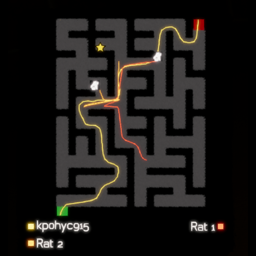
Shows player and monster paths, icons, deaths, and timeline controls on the Labyrinthine end-game map.Monster Path Visualisation
Draws player and monster movement on the Labyrinthine case-end map and gives extra control on visuals.
Features
- Records player movement during the map.
- Records monster movement during the map.
- Draws player and monster paths on the case-end map.
- Shows monster and player icons when enabled from the end-map controls.
- Keeps death skulls visible when scrubbing the timeline.
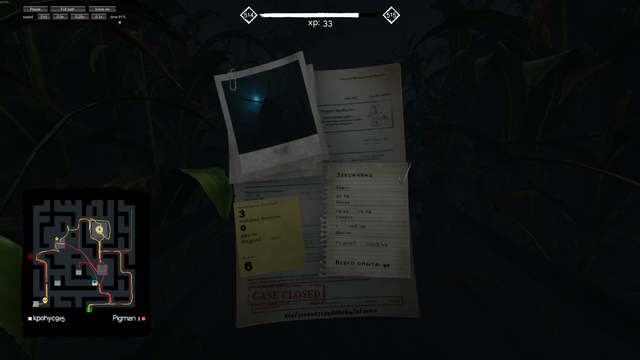
- Adds pause/resume, full-path/current-position mode, icon toggle, timeline scrubber, and playback speed buttons.
- Reuses the game's native end-map actor labels and extends them with native cloned rows when there are more actors than the game normally exposes.
- Lets you click actor labels to hide/show individual paths.
- Uses dense locally recorded player trails for smoother path drawing.
Requirements
- Labyrinthine
- MelonLoader
Install
Install through Thunderstore/r2modman, or manually place MonsterPathVisualisation.dll in the game's Mods folder.
The package also includes an img folder with monster icons. Keep that folder next to the DLL so the icon toggle can use them.
Controls
The case-end map gets extra controls:
Pause/Resume: stop or continue playback.Full path/Dots: switch between full trails and current-position markers.Icons on/Icons off: switch monster markers between icons and colored dots.1x,0.5x,0.25x,0.1x: playback speed.- Timeline slider: scrub to a specific point in the run.
- Actor labels: click a label to hide/show that actor's path.
Configuration
Settings are created under UserData\MelonPreferences.cfg after first launch.
Important options:
VerboseLogs: troubleshooting logs for monster lookup, icons, labels, and end-map drawing.DebugPlayerPath: focused troubleshooting logs for player paths, player names, deaths, and avatars.
Normal play should keep both options disabled.
Notes
- Tested locally on Windows with Labyrinthine and MelonLoader
0.7.2.