
You are viewing a potentially older version of this package. View Latest Version

A flexible customization mod that works with other mods. Now comes with a WEB UI! All configs are disabled by default. Please request features or report issues here. Configs are generated after you host or join a game
StartOfRound.ChangeLevel with a priority of 200. You can add your own prefix(with a higher priority value) or postfix to ensure that your prices are set properly.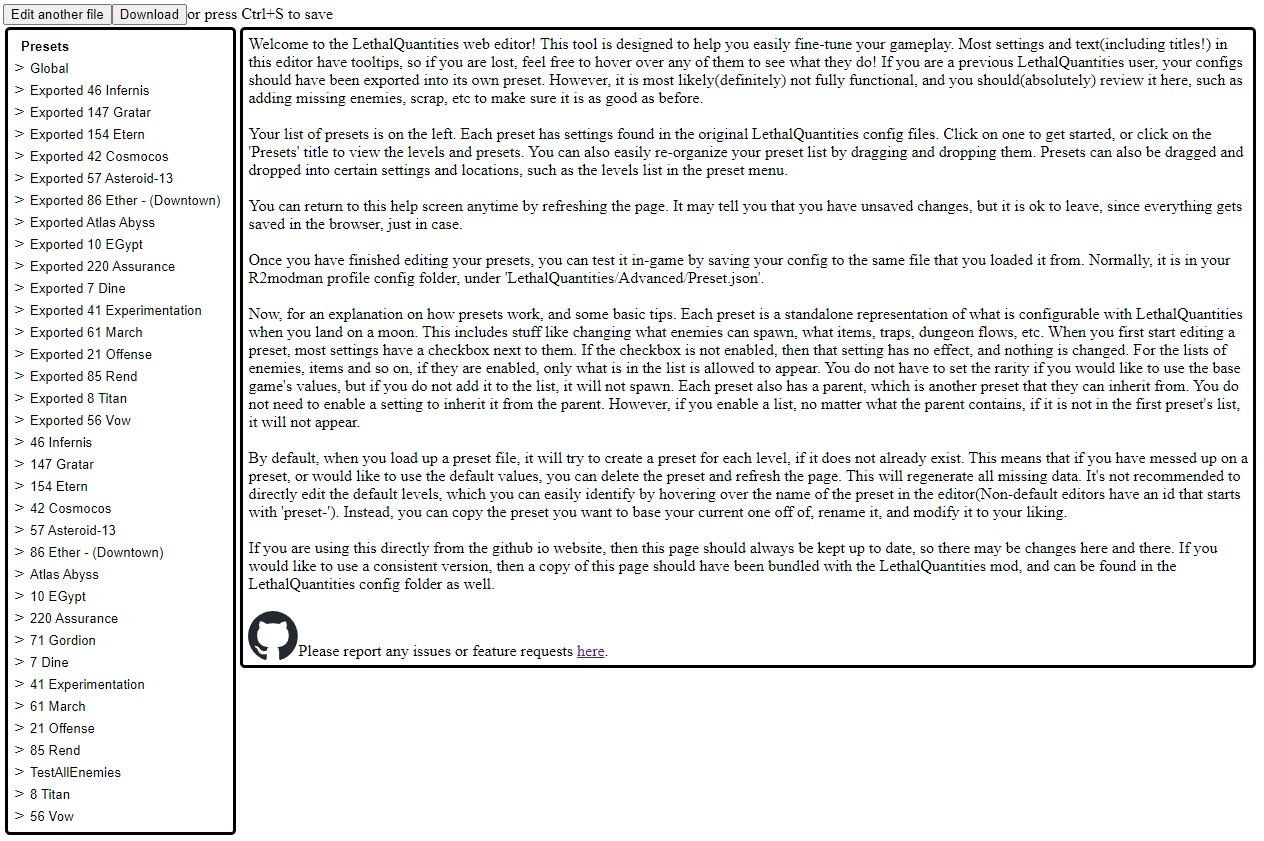
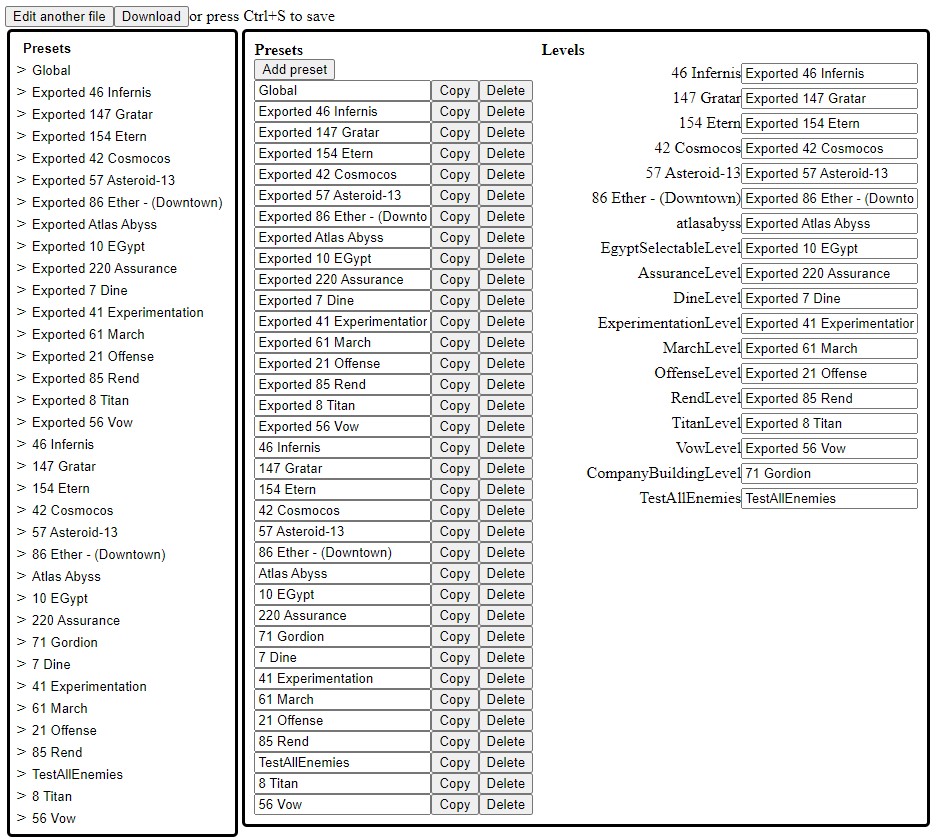
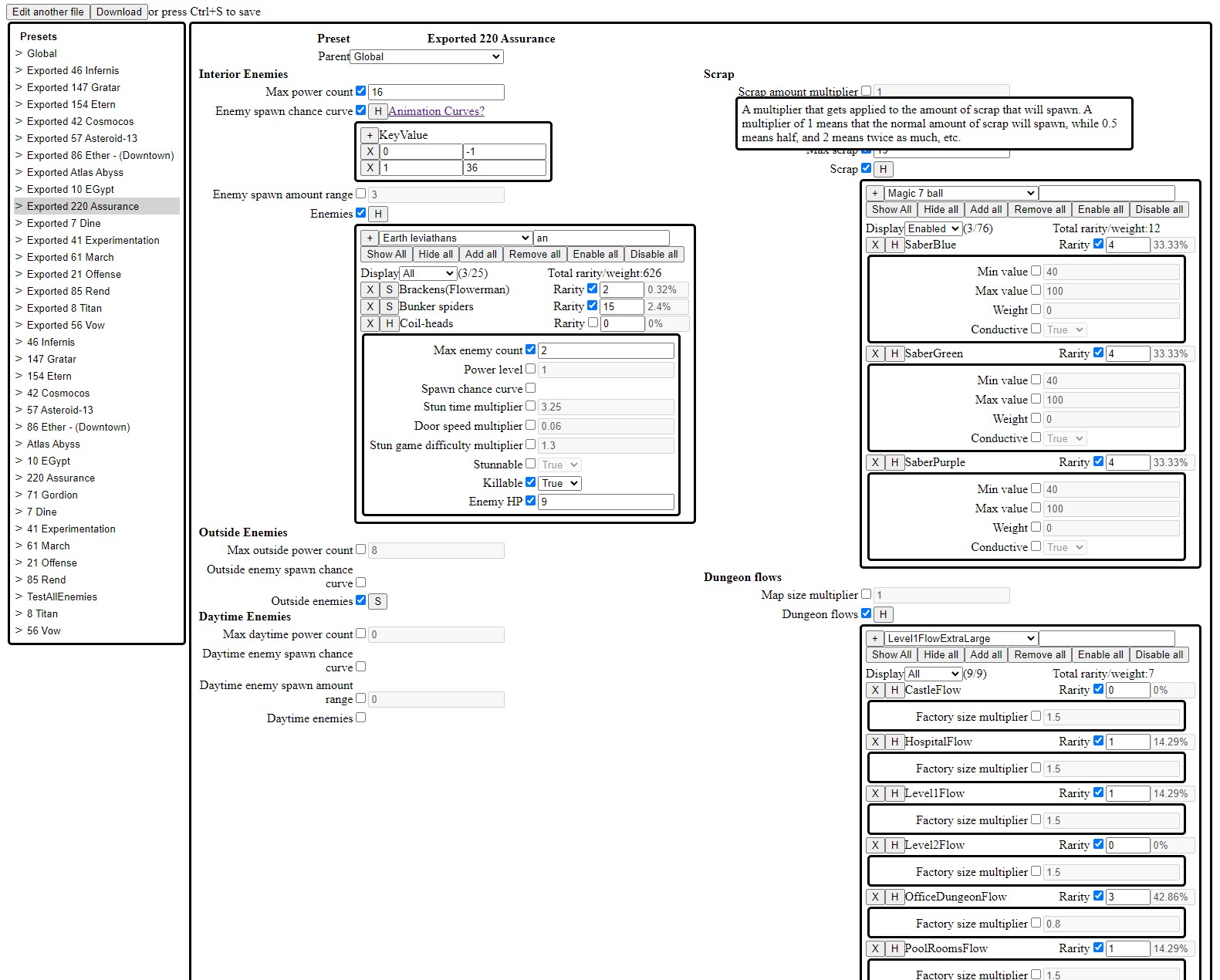
Configuration is now managed through the web UI. The old config files are deprecated and should not be used. To use the new web UI, first host or join a game, then edit the LethalQuantities/Advanced/Preset.json
file in the config folder with the web UI. Once complete, download and save it to the same file(LethalQuantities/Advanced/Preset.json), and restart the game.
However, in the case that you need to or can only use the config files, you can enable the UseLegacy option in the global config to allow the legacy configuration files to take priority over whatever is set through the web UI.
You must host or join a game at least once to generate the configuration files. Any missing or deleted files will be generated with the default options. By default, the only file that is generated is Configuration.cfg. You must enable global config files and individual moon config files in order to modify anything.
Configuration.cfg - Enable/disable other configuration files hereGlobal/local option inheritance
This mod uses global/local config files to reduce the amount of configuration and files required. For certain options in the configs, you can use the value DEFAULT(case insensitive) to use the vanilla value that would normally be used. For certain options in the moon config files, you can use the option GLOBAL(case insensitive) to use values in the global config files. If the global config file is DEFAULT, then it will use the vanilla value. If the global config does not normally have a default value, for example, rarity(since it's moon specific), then it will use the moon's default value. So, if a moon has GLOBAL for an enemy's rarity, and the global config does not exist or has DEFAULT, then it is the same as if the moon option is DEFAULT. Moons have higher priority over global config options, so if both have a value set, the moon's value will be used instead. For options that allow GLOBAL, a blank value is the same as GLOBAL, and for options that allow DEFAULT but not GLOBAL, a blank value is the same as DEFAULT. If a global config file is disabled, then it will have no effect on moon options that are set to GLOBAL and is equivalent to DEFAULT. A value of DEFAULT should not override values set by other mods.
Complex config types:
AnimationCurve - Represents a curve comprised of Keyframes. Each frame represents a key, and a value at that key(generally time). For more information, and a visual representation, check out the mechanics.
key:value) separated by commasGLOBAL or no value uses the global valueDEFAULT uses the default local valueDEFAULT or no value uses the default valueDEFAULT or empty will be used directlyThere are 3 different enemy configuration files:
Enemies.cfg - Responsible for all enemies that spawn inside.DaytimeEnemies.cfg - Responsible for enemies that can spawn outside, but normally passive ones.OutsideEnemies.cfg - Responsible for all enemies that can spawn outside, but normally hostile ones.These configuration files do not interfere with each other, meaning enemies spawned based on one config will not count towards settings from another config(such as MaxEnemyCount, EnemyHp, etc).
Options
MaxPowerCount - Maximum total power allowed for this category of enemies. Different enemy types have different power levels. The total power of a level is the sum of the power levels of all existing enemies.SpawnAmountCurve - An AnimationCurve with a key ranging from 0 to 1. The key represents the percentage of time progressed in the current level. The value is the amount of enemies to spawn at the given time.
0:-3, .6:1.5, 1:15 would mean that for the first 60% of the day, almost no enemies are going to spawn, but for the last 40%, a lot will spawn.SpawnAmountRange - The range of enemies that can spawn. A value of 3 means that 3 more or 3 less enemies can spawn, based on the value returned by the SpawnAmountCurve. Not available for outside enemy configs. This value must be greater than or equal to the amount of days at the start of the quota divided by 2, rounded up.MaxEnemyCount - The total amount of enemies of the given type that can spawnPowerLevel - How much power an enemy of the given type counts forSpawnCurve - An AnimationCurve from 0 to 1. The key represents the percentage of time progressed, much like SpawnChanceCurve. The value normally ranges from 0 to 1, and is multiplied by Rarity to find the weight. For more information, view the Spawn Logic section belowStunTimeMultiplier - The multiplier for how long an enemy can be stunned.DoorSpeedMultiplier - The multiplier for how long an enemy takes to open a door.StunGameDifficultyMultiplier - I don't know what this option does.Stunnable - Whether or not this enemy can be stunned.Killable - Whether or not this enemy can die.EnemyHp - The amount of health an enemy has. A shovel does 1 hit of damage by default.SpawnFalloffCurve - An AnimationCurve describing the multiplier to use when determining the value of SpawnChanceCurve, dependent on the number of existing enemies with the same type divided by 10. Not available for the daytime enemy configs.UseSpawnFalloff - If true, then the resulting value from the SpawnFalloffCurve will be multiplied with the value from SpawnCurve. Not available for the daytime enemy configs.<enemy type> - The weight given to this enemy vs other enemies. If you do not want the enemy to spawn, set the rarity to 0. A higher rarity increases the chances for an enemy to spawn. The chance of this enemy spawning is the rarity of this enemy divided by the rarity of all the enemy types combined.Exceptions:
OutsideEnemies.cfg option SpawnChanceRange has a hardcoded value of 3 in-game, and cannot be changedDaytimeEnemies.cfg does not use SpawnFalloffCurve when calculating the total rarity.There is 1 scrap configuration file.
Scrap.cfg - Responsible for all scrap generationThese configuration values can be set per moon. Store items and items share the same spawning pool and are not separate.
Options
MaxScrapCount - Maximum total number of scrap items generated in a level, inclusive.MinScrapCount - Minimum total number of scrap items generated in a level, exclusive.ScrapValueMultiplier - Multiplies the value of a scrap item by this multiplier.ScrapAmountMultiplier - Multiplies the total number of scrap on a level by this multiplier.MinValue - The minimum value of this item, inclusive. Only available for scrap items.MaxValue - The maximum value of this item, exclusive. Only available for scrap items.Weight - The weight of the item. The real in-game weight can be calculated with the formula: pounds = (value - 1) * 100. For example, a value of 1.18 is 18lbs. Can only be set in the global scrap config.Conductive - Whether or not the item can be struck by lightning.<item name> - The weight of this item, relative to the total weight of all items. A higher rarity increases the chances for an item to spawn. Includes store items. The chance of this item spawning is the rarity of this item divided by the rarity of all the items combined.There is 1 dungeon generation configuration file.
DungeonGeneration.cfg - Responsible for configuring values that affect dungeon generationThese configuration values are set per moon. They should theoretically support custom dungeon flows.
Options
MapSizeMultiplier - A multiplier for how large the dungeon generation should be. Cannot be set per-flowFactorySizeMultiplier - A multiplier for how large the dungeon generation should be for this flow.<dungeon flow name> - The weight of this flow, relative to the total weight of all flows. A higher rarity increases the chances for this flow to be used. May not work with custom dungeon flows since LethalLevelLoader forcefully overrides this.There is 1 trap configuration file
Traps.cfg - Responsible for configuring how many traps can spawn insideThese configuration values are set per moon. They support custom traps.
Options
SpawnAmount - The amount of this trap to spawn. This is an AnimationCurve, where 'Y Axis is the amount to be spawned; X axis should be from 0 to 1 and is randomly picked from.'There is 1 price configuration file
Prices.cfg - Responsible for configuring pricing per moonThese configuration files are set per moon. They support custom moons.
Options
TravelCost - The amount in credits that it costs to travel to this moon. Note that you cannot travel to the moon you are currently on, so it has no real effect. You can charge to go to The Company Building, but it does not display until you confirm.The enemy spawn logic in Lethal Company is a bit complex, and there are many additional variables that I did not make configurable. It would require a fairly large recode, and it would be more likely to cause problems with other mods. That said, here are some basic things to keep in mind when configuring enemy spawning:
weight of enemy type / total weight, where the total weight is the sum of the weights of all enemy typesrarity * spawn chance at the current time . If UseSpawnFalloff is enabled(like baboon hawks), then it is rarity * spawn chance at the current time * spawn falloff multiplier at the current time. Spawn falloff multiplier has a curve with a key that is the total amount of that mob / 10.