You are viewing a potentially older version of this package. View Latest Version

Ultimate Scanner
V81 Ultimate ScannerUltimate Scanner
Mod that combines CruiserScrapCounter, UiSellTracker and ShipLootCruiser into 1 singular mod and adds a bit more customizability to each.
First release as Ultimate Scanner. If you tested an earlier build called UltimateScan or Ultimate_Scanner, remove it first. Your old settings file is picked up and copied over automatically.
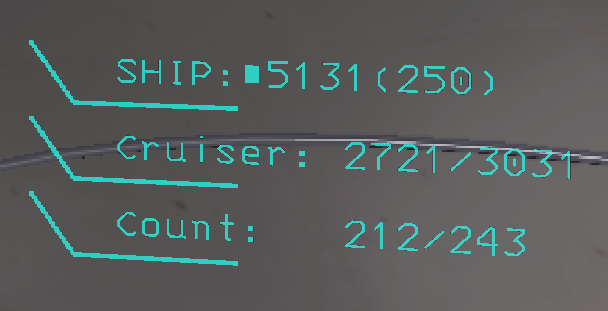
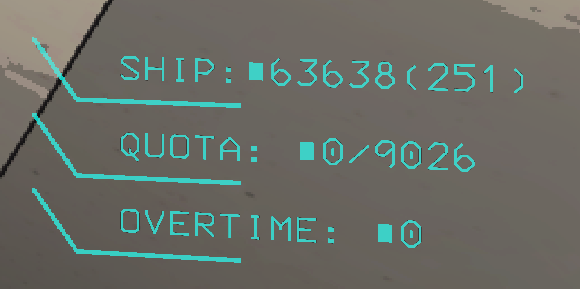
Configs
- Change the name of each mod's text, e.g.
Cruiser: {0}/{1}- "Cruiser" can be changed to something else, same for the QUOTA / OVERTIME names - One
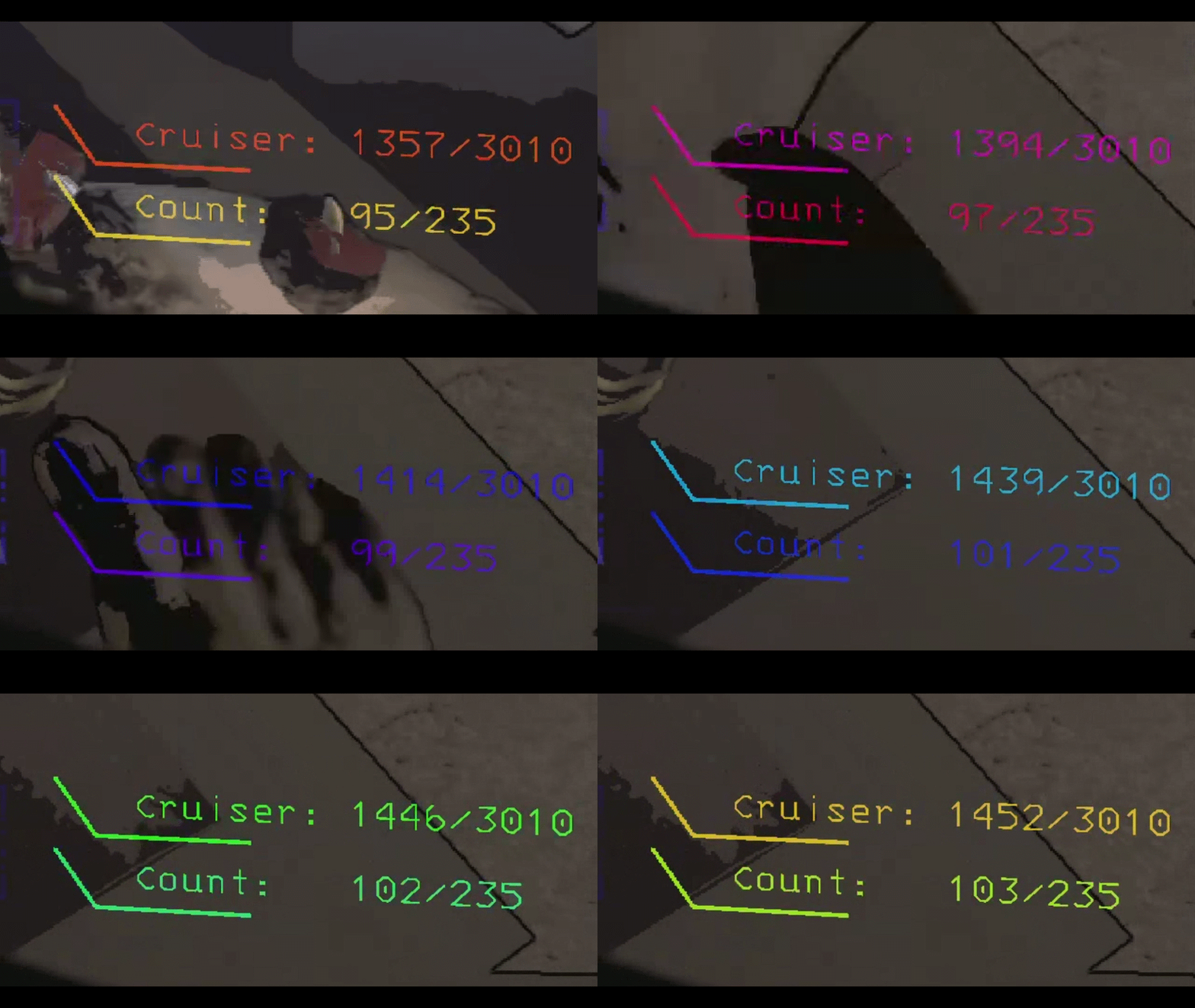
Offset(x, y) per mod; one shared Display Time and AutoDisplay Interval - Change the color of each row's text and line in one setting:
#FF0000, #00FF00 - Color modes: Normal, Rainbow, RGB, Fire, Ocean, Neon, Sunset, Toxic, Ice, Gold, Disco, Negative (the opposite of the screen behind the text), Random (new mode every day) and TrueRandom (new mode on every right-click)
- Ship line format with item count, e.g.
SHIP:${value}({count}) - AutoDisplay: no right-click needed. Inside the ship you see the ship total, at the Company the quota, outside the ship on a moon the Cruiser counter. Updates instantly when loot moves. Works while dead too (
DeadDisplay). Right-click still refreshes instantly - Show Anywhere (ShipLootCruiser): show the ship total from anywhere
- AutoTerminalScan: the scan at the start of every day goes to everyone's chat when you are the host, and to your own chat when you are a client (you may see it twice if the host posts one too). The scheduled scans are host only (or use
/autoscan):Interval Scanfor the scan andCruiser Interval Scanfor the Cruiser report, each a schedule of in-game times (7am, 10pm) or hour intervals (2= every 2 in-game hours). Optional Cruiser report. Message formats and the chat color are configurable. The day-start scan runsDayStartDelayseconds after the ship doors start opening, like abu.AutoScan Scan Bodies(off, in the shared section): player bodies are never counted - not by/scan,/scan -c, the chat scans, the Cruiser counter or the ship total - unless you turn it on/overtimeat the Company posts the overtime bonus to everyone (Overtime Bonus: 123); with no overtime it only tells you privately/autoscanturns the scheduled in/out scan (Interval Scan, default every hour) on or off for this game only./autoscan -cdoes the same for the Cruiser scan (Cruiser Interval Scan, default every hour). The two are separate, they only run together if you use both.on/offcan be added (/autoscan -c off). The settings file is not changed, so the next game starts withChatAutoScan/AutoCruiserScanas set there (default off). The host's scans go to everyone's chat, a client's to its own chat- FinalScan (on by default): when the ship starts leaving (lever pulled or autopilot) the final stats of the moon go to chat as one line that wraps, e.g.
Collected: 10/21Value: 1000/2100. Only loot of this moon counts: what was already in the ship when you landed (from earlier moons) is left out. Collected = put in the ship today, plus the items in a Cruiser that is magneted to the ship. Items in a Cruiser that is not magneted are not collected (they stay on the moon, so they only count in the total). The message is theFinalScan Formatsetting./finalscanswitches it off for the game you are in,/finalscanagain switches it back on (on/offcan be added). The setting itself is not changed: leaving the lobby or restarting the game puts it back to what the settings say (on). The host's message goes to everyone's chat, a client's to its own chat. If you join in the middle of a day, it counts from the moment you arrive - Chat commands for everyone (needs ChatCommandAPI):
/scan(loot inside / outside the facility) and/scan -c(Cruiser report), posted to all players. They also work while the ship is leaving, for the final stats. With no Cruiser on the moon,/scan -cjust answers youCruiser Unavailable - Moons without scrap (the Company building, Galetry) are skipped automatically
- Config changes apply while the game is running (colors on the next scan)
Config file
The settings file is BepInEx/config/Crispy_Depression.Ultimate_Scanner.cfg. Every setting, with its description and default:
Sections

0 Shared Config All Mods

Display Time
How long each HUD stays on screen after it is shown, in seconds (all three mods).
Setting type: Single
Default value: 10
Acceptable value range: From 1 to 30

AutoDisplay
HUDs show by themselves: ship total in the ship, Cruiser counter outside on a moon, quota at the Company. Off = right-click only.
Setting type: Boolean
Default value: true

AutoDisplay Interval
Backup refresh in seconds. HUDs already update the moment loot moves.
Setting type: Single
Default value: 1
Acceptable value range: From 0.5 to 10

Scan Bodies
Count player bodies in every scan and HUD (/scan, /scan -c, chat scans, Cruiser counter, ship total). Off = bodies are never counted.
Setting type: Boolean
Default value: false

DeadDisplay
While dead, keep showing the HUDs: ship total + Cruiser counter on a moon, ship total + quota at the Company.
Setting type: Boolean
Default value: true

1 CruiserScrapCounter

Format
{0} cruiser value, {1} moon value, {2} cruiser items, {3} moon items. \n = new line.
Setting type: String
Default value: Cruiser: {0}/{1}\nCount:   {2}/{3}

Cruiser Color
Text color, line color, e.g. #00F2E6, #00F2E6. Only 1 color = used for both text and line. Empty = game default.
Setting type: String
Default value: #00F2E6, #00F2E6

Count Color
Text color, line color, e.g. #00F2E6, #00F2E6. Only 1 color = used for both text and line. Empty = game default.
Setting type: String
Default value: #00F2E6, #00F2E6

Offset
Move the text: x, y (+x = right, +y = up). Example: 0, 0
Setting type: String
Default value: 0, 0

2 UiSellTracker

Labels
Names before the quota and before the overtime, separated by a comma.
Setting type: String
Default value: QUOTA, OVERTIME

Quota Color
Text color, line color, e.g. #00F2E6, #00F2E6. Only 1 color = used for both text and line. Empty = game default.
Setting type: String
Default value: #00F2E6, #00F2E6

Overtime Color
Text color, line color, e.g. #00F2E6, #00F2E6. Only 1 color = used for both text and line. Empty = game default.
Setting type: String
Default value: #00F2E6, #00F2E6

Offset
Move the text: x, y (+x = right, +y = up). Example: 0, 0
Setting type: String
Default value: 0, 0

3 ShipLootCruiser

Format
{value} ship value, {count} item count. \n = new line.
Setting type: String
Default value: SHIP:${value}({count})

Color
Text color, line color, e.g. #00F2E6, #00F2E6. Only 1 color = used for both text and line. Empty = game default.
Setting type: String
Default value: #00F2E6, #00F2E6

Show Anywhere
Show the ship total from anywhere, not only in the ship.
Setting type: Boolean
Default value: false

Cache Seconds
Reuse the last count for this many seconds (0 = always recount).
Setting type: Single
Default value: 0

Offset
Move the text: x, y (+x = right, +y = up). Example: 0, 0
Setting type: String
Default value: 0, 0

3 ShipLootCruiser General

Color Mode
Normal = your colors. Negative = opposite of the screen. Random = new mode every day. TrueRandom = new mode every right-click. The rest are animated.
Setting type: String
Default value: Rainbow
Acceptable values: Normal, Rainbow, RGB, Negative, Fire, Ocean, Neon, Sunset, Toxic, Ice, Gold, Disco, Random, TrueRandom

Rainbow Speed
Speed of the animated modes (color cycles per second).
Setting type: Single
Default value: 1

Log Scan Time
Log how long each ship scan takes.
Setting type: Boolean
Default value: false

Debug Color Cycle
Debug: each right-click shows the next color mode (chat says which).
Setting type: Boolean
Default value: false

AutoTerminalScan

ChatAutoScan
Send the scan to everyone's chat on the Interval Scan schedule.
Setting type: Boolean
Default value: false

Interval Scan
In-game times (7am, 8pm) and/or hours between scans (2 = every 2 hours). Comma separated.
Setting type: String
Default value: 1

AutoCruiserScan
Send the Cruiser counter to everyone's chat on the Cruiser Interval Scan schedule.
Setting type: Boolean
Default value: false

FinalScan
Send the final stats to chat when the ship starts leaving (lever or autopilot). /finalscan turns it off or on for one game only.
Setting type: Boolean
Default value: true

FinalScan Format
Final stats message, only loot of this moon. Collected = put in the ship today (and in a Cruiser magneted to it). <nobr> keeps a part on one line.
Setting type: String
Default value: <nobr>Collected: {collectedamount}/{totalamount}</nobr> <nobr>Value: {collectedvalue}/{totalvalue}</nobr>

Cruiser Interval Scan
Same as Interval Scan, for the Cruiser scan. 1 = every hour.
Setting type: String
Default value: 1

AutoTerminalScanDayStart
One scan at the start of every day. Host: to everyone's chat. Client: to your own chat.
Setting type: Boolean
Default value: true

DayStartDelay
Seconds after the ship doors open until the day-start scan. It also waits for the ship to land (values are final then).
Setting type: Single
Default value: 2.5

Scan Format
{insideamount} {outsideamount} {insidevalue} {outsidevalue} = scrap inside / outside the facility. Ship and Cruiser loot is not counted.
Setting type: String
Default value: In/Out:{insideamount}/{outsideamount} Value:{insidevalue}/{outsidevalue}

Cruiser Scan Format
{insidecruiseramount} {totalinterior} {Cruiseramount} {TotalinteriorCount} = Cruiser value, moon value, Cruiser items, moon items.
Setting type: String
Default value: Cruiser:{insidecruiseramount}/{totalinterior} Count:{Cruiseramount}/{TotalinteriorCount}

Announce Color
Color of the chat messages, hex e.g. FFFF00. Empty = chat default.
Setting type: String
Default value: #FFFF00
Credits
- ChatCommandAPI by baer1 (required)
- CruiserScrapCounter by Crispy_Depression
- ShipLootCruiser by HQHQTeam, a fork of ShipLoot by tinyhoot
- UISellTracker by SlapItNow: the UiSellTracker rows (quota and overtime at the Company) are based on it. Used and modified with permission: permission. UISellTracker itself credits NutNutty (item value tracking in the original SellTracker) and tinyhoot (UI elements from ShipLoot)
License notice for the bundled MIT-licensed ShipLoot code is in THIRD_PARTY_LICENSES.txt.