

ValueDisplay
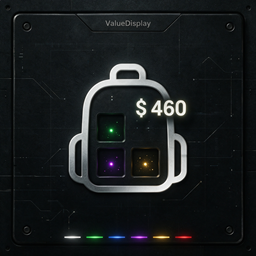
Shows each inventory slot's scrap price and the total value of carried scrap on the HUD. Pure client-side, depends only on BepInEx. Default language: en. 8 languages supported.ValueDisplay
A HUD enhancement mod for Lethal Company (BepInEx 5) that shows the scrap price of each inventory slot directly below the slot (plain value number, e.g. 34) and the total value of all carried scrap above the inventory (e.g. Total: 520). Slot prices only appear when the slot holds a valuable scrap item (isScrap == true and scrapValue > 0); empty slots and tool items (flashlight, shovel, gun, etc.) show nothing.
A pure client-side mod. The only dependencies are BepInEx and Harmony — no other prerequisites, no network code, no save file changes.
Features
- Slot price display: the exact scrap value under each inventory slot, as a plain number.
- Carried total value: the sum of all scrap in your inventory, displayed above the inventory; hidden when the total is 0.
- Hotkey toggle: press a configurable key (default
Insert, supports modifiers such asCtrl+I/Alt+V) to show or hide all price texts in real time. - Independent font sizes: slot price and total value font sizes are configured separately (defaults 10 and 8).
- Optional rarity colors: off by default (white text); when enabled, values are colored white → green → blue → purple → gold → red with configurable thresholds (defaults 30/60/90/120/150), independently for slot prices and the total value.
- Localization: all UI text is read from language files. 8 languages are bundled — en, zh-CN, ru, pl, la, fr, pt, es — switchable via config; falls back to built-in English if a file is missing or unreadable.
- Stable positioning: all text is attached under
HUDManager.HUDContainer(no rotation, no scaling) and repositioned every frame from the slot's world position, so prices never flicker or tilt. Designed for the vanilla v81 slot layout.
Configuration
Config file: BepInEx/config/ValueDisplay.cfg (generated on first launch; restart the game after editing).
| Key | Section | Default | Description |
|---|---|---|---|
Language |
General |
en |
UI language file to load (ValueDisplay_<lang>.lang next to the DLL). Built-in: en, zh-CN, ru, pl, la, fr, pt, es; any custom name (e.g. de → ValueDisplay_de.lang) also works. |
ToggleKey |
General |
Insert |
Hotkey to show/hide all price texts in real time. |
ShowSlotValue |
Display |
true |
Show the scrap price below each inventory slot. |
ShowTotalValue |
Display |
true |
Show the total value of carried scrap above the inventory. |
SlotFontSize |
Display |
10 |
Font size of the slot price text. |
TotalFontSize |
Display |
8 |
Font size of the total value text. |
SlotColorEnabled |
Display |
false |
Color slot prices by value tier. |
TotalColorEnabled |
Display |
false |
Color the total value by value tier. |
ColorThresholdGreen |
Display |
30 |
Values >= threshold are colored green. |
ColorThresholdBlue |
Display |
60 |
Values >= threshold are colored blue. |
ColorThresholdPurple |
Display |
90 |
Values >= threshold are colored purple. |
ColorThresholdGold |
Display |
120 |
Values >= threshold are colored gold. |
ColorThresholdRed |
Display |
150 |
Values >= threshold are colored red. |
Color Tiers
When SlotColorEnabled / TotalColorEnabled is enabled, the highest tier matched by value >= threshold is applied:
| Value range | Color |
|---|---|
>= ColorThresholdRed (default 150) |
Red (1.00, 0.20, 0.20) |
>= ColorThresholdGold (default 120) |
Gold (1.00, 0.84, 0.00) |
>= ColorThresholdPurple (default 90) |
Purple (0.70, 0.30, 1.00) |
>= ColorThresholdBlue (default 60) |
Blue (0.25, 0.55, 1.00) |
>= ColorThresholdGreen (default 30) |
Green (0.20, 0.90, 0.20) |
| otherwise | White (default) |
Slot prices are colored by the single item's scrapValue; the total value is colored by the sum of carried scrap. The two settings are independent.
Languages
Language files must sit next to ValueDisplay.dll (i.e. BepInEx/plugins/ValueDisplay/) and follow the naming ValueDisplay_<lang>.lang, where <lang> is the value of the Language config option.
Bundled language files:
| File | Language |
|---|---|
ValueDisplay_en.lang |
English |
ValueDisplay_zh-CN.lang |
Simplified Chinese |
ValueDisplay_ru.lang |
Russian |
ValueDisplay_pl.lang |
Polish |
ValueDisplay_la.lang |
Latin |
ValueDisplay_fr.lang |
French |
ValueDisplay_pt.lang |
Portuguese |
ValueDisplay_es.lang |
Spanish |
File format is simple key=value lines; lines starting with # or ; are comments; {0} is the value placeholder:
# ValueDisplay English language file
slot_value_format={0}         # slot price text (plain number, e.g. 34)
total_value_format=Total: {0} # total value text
scanned_value_format=Scanned: {0}
Supported keys:
| Key | Description | Example |
|---|---|---|
slot_value_format |
Slot price text ({0} = value) |
34 |
slot_value_unknown |
Text when a slot's value is unknown | ??? |
total_value_format |
Carried total value text | Total: 520 |
scanned_value_format |
Scanned value text | Scanned: 120 |
If the configured language file is missing, unparseable or unreadable, the mod falls back to the built-in English text.
Installation
- Install BepInEx 5 (this mod is built against BepInEx 5 + Harmony).
- Put
ValueDisplay.dlland the language files (ValueDisplay_*.lang) intoBepInEx/plugins/ValueDisplay/. - Launch the game; the config file is generated on first start.
Building from Source
Requirements: .NET SDK (net48 target, e.g. SDK 8/10) + a local Lethal Company install with BepInEx 5.
-
Get the project files:
ValueDisplay.csproj,Plugin.cs,Translation.cs,ValueHudController.cs,HudManagerPatch.cs,ScanNodePatch.cs. -
Adjust reference paths in
ValueDisplay.csprojif needed:BepInEx.dll/0Harmony.dll:<your BepInEx dir>/BepInEx/core/Assembly-CSharp.dll,Unity.Netcode.Runtime.dll,UnityEngine*.dll,Unity.TextMeshPro.dll:<game dir>/Lethal Company_Data/Managed/
-
Build:
dotnet build -c Release -
Copy
bin/Release/net48/ValueDisplay.dllplus the.langfiles intoBepInEx/plugins/ValueDisplay/.
Technical Notes
- Entry point:
ValueDisplayPlugin(BepInPluginGUID:ValueDisplay, version0.0.1). - Mounting: a Harmony postfix on
HUDManager.Startidempotently creates aValueHudControllerunderHUDManager.HUDContainer; no startup delay. - Translation: the static
Translationclass loadsValueDisplay_<lang>.langat startup and caches the text dictionary;ValueHudControllerfetches formatted text viaTranslation.Getevery frame. - Refresh:
ValueHudController.Updatewalks the local player'sItemSlotsevery frame and updates slot/total texts byisScrap && scrapValue > 0. - This mod does not modify game files, does not inject into other mods, and produces no network synchronization.
Credits
- QualityCompany by Um_no — the original HUD UI layout concept that inspired the slot positioning approach.
- QualityCompanyFork by amonraa — maintained fork referenced for the rotation-corrected HUD anchoring idea.
Thank you for the great ideas!