RuntimeIcons BetterRotations
An addon for RuntimeIcons to make items look better in your inventory. Supports items from Wesley's Moons as well as many other mods!What does this do?
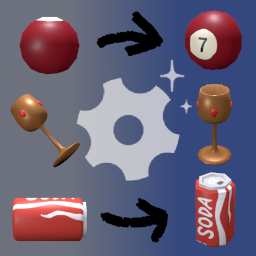
If you've ever used the original RuntimeIcons by itself and found that some items look weird or are facing the wrong way in their icons, then this is for you.
This specifies new rotation angles for many different items from the game, as well as items from over 100 other mods, to make sure they look nice in the hotbar (Using the built-in overrides system RuntimeIcons has).
Here's a quick example of these new rotations:

Also some in-game screenshots:
Click to show in-game screenshots


Which mods are supported?
I've set up a wiki page listing out everything i've added item rotations for, including the version number of when I did it. If a mod has since updated, adding more scrap items that I haven't covered yet (or if you know of a scrap mod that i've never seen before), feel free to let me know in the modding discord.
There's also HoneeItemIcons which takes a different, hand-drawn approach to item icons with much less mod support. If your modpack is a lot smaller (or even vanilla), consider trying this! If used alongside RuntimeIcons_BetterRotations, Honee's icons will take priority for conflicting items.
Special icons
Certain mods contain items with functionality beyond the usual, such as Wesley's Moons. These items are marked with a different symbol in the inventory, and you might think at first that changing those icons is a bad idea. To strike a good balance, I've kept that different symbol in the corner of these special items so you can still see at-a-glance what an item is as well as its functionality:
(Each category of special item from Wesley's Moons)
Click to show more examples of special icons
- Each
AP Apparatusitem from Archipelago Scrap
Manuland VHSfrom Kenji's Moons
Strange Deviceand the 3 cartridges from SellBodiesFixed
- A couple drink items from Lethal Pyrkon


However, if you prefer not to have these "mini-icons" visible for one reason or another (Such as if you're playing without Wesley's story progression enabled), I recommend also using my BetterRotations_NoMiniIcons addon which will make these icons look like any other item.
Consistency/Standardization in appearance
Even if items normally have a non-gear inventory icon (such as the base-game store equipment), I replace the icons of them as well in order to have the same consistency in lighting/style as any other scrap item:

When it comes to items that share similar purposes or appearances (modded or not), I try my best to angle them in ways that are familiar and consistent with how other items of that type look. For example, if an item is a long melee weapon that's swung like a shovel, I'll rotate the item in the same way as the shovel (unless it has a drastically different shape that requires a unique angle to look good). Same with items that are similar to keys, knives, boxes/cubes, papers, flashlights, guns, apparatuses, etc.

Credits
Credits to TheMatty for making the original RuntimeIcons and implementing such a nice system to be used by others, as well as for helping me understand how that system works to make this addon better.
Credits to the items depicted in the included image files go to their respective creators.
Thanks to each of the modders out there making these scrap mods, it's all really great stuff and it makes me happy to contribute in some way to try making the experience using them a bit better.
HUGE thanks to mr_hat for helping speed up my process for figuring out item rotations, it was an extremely nice thing of him to do and i appreciate it a lot.