

ExitLineFromEnteredDoor
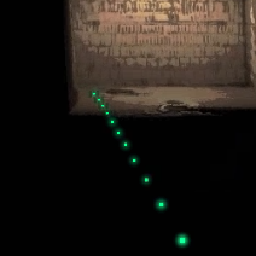
Scan to drop a trail of tiny pixels leading to the facility door you entered through. Green for the main entrance, red for a fire exit, denser the closer you get. Client-side.ExitLineFromEnteredDoor
The ship's terminal radar draws a green line from the player it's watching to the facility exit — but only the person at the monitor ever sees it. This mod gives you that guidance inside the facility: scan, and a subtle trail of tiny green dots on the floor shows the way back out.
- Scan to drop the trail. Right-click scan and the trail appears along the navmesh
route from where you scanned to your exit — it stays put (each scan re-anchors it),
flows toward the door for a moment, settles still, and fades out after ~5 seconds.
(
OnlyShowAfterScan=falseswitches to an always-on trail that follows you.) - The density points the way. Dots are packed tight next to the exit door and spread out the farther the path is from it — even a static glimpse tells you the direction.
- Green for the main entrance, red for a fire exit. The color tells you which way out you're being led before you've walked a step. Both colors are configurable.
- Subtle by design. Tiny floor-hugging pixel squares (size, height, spacing, and color all configurable), with a gentle breathing glow.
- Leads to the door you entered through (by default). If that's unknown — say you got teleported in — it falls back to the closest exit. Config can switch to closest-door or all-doors mode.
- Mineshaft aware. Deep in the mines, the trail leads you to the elevator first, just like the real radar's line does.
- Fully client-side. No networking, nothing required on other players, no other mods needed beyond BepInEx.
Config
Editable in r2modman's config editor (BepInEx/config/Haaylo.ExitLineFromEnteredDoor.cfg).
| Setting | Default | What it does |
|---|---|---|
General / Enabled |
true |
Master switch. |
General / DoorMode |
EnteredDoor |
EnteredDoor, ClosestDoor, or AllDoors. |
Conditions / RequirePlayerInShip |
false |
Only show the line while a living player is in the ship. |
Conditions / RequireShipCameraOnYou |
false |
Only show the trail while the ship's map screen is on and targeting you. |
Visuals / LineHeight |
0.1 |
How high above the floor the dots sit. |
Visuals / DotSize |
0.04 |
Dot diameter in meters. |
Visuals / DotColorMainEntrance |
62FF71 |
Dot color when heading for the main entrance (RGB hex). |
Visuals / DotColorFireExit |
FF4D4D |
Dot color when heading for a fire exit (RGB hex). |
Visuals / DotSpacingNear / DotSpacingFar |
0.4 / 2 |
Dot spacing at the door / far from it. |
Visuals / DotSpacingFarDistance |
40 |
Meters from the door where spacing is sparsest. |
Visuals / BreathePeriod / BreatheStrength |
2.5 / 0.35 |
Breathing speed and depth. |
Scan / PulseOnScan |
true |
Flow toward the exit after a scan, easing back to static. |
Scan / PulseDuration / FlowSpeed / PulseBrightness |
3 / 4 / 1 |
Flow length, peak speed, brightness kick. |
Scan / OnlyShowAfterScan |
true |
Snapshot mode: reveal a trail anchored where you scanned, for a window after each scan. |
Scan / ShowDurationAfterScan |
5 |
Length of that window (fades out at the end). |
The two Conditions settings default to off so the trail just works — turn them on
for the "someone must be watching the monitor" experience.
Notes
- The vanilla radar only ever points to the main entrance; this mod tracks the door you actually came in through (fire exits included).
- Dead/spectating players don't get a line, matching the radar's behavior.
- There's deliberately no "mirror onto the ship monitor" option: anyone watching the monitor already gets the game's own exit line for whoever the radar is targeting, and a client-side mod can't add anything to other players' monitors anyway.
Building from source
Run .\build.ps1 (optionally -Deploy to copy into your r2modman profile, -Package
to produce the Thunderstore zip). It compiles directly against your local game and
BepInEx DLLs with the Roslyn compiler from Visual Studio — no SDK or NuGet needed.