
AutoUpgradeForked
Automatically selects weapon and tome upgrades during level-ups with named loadouts, configurable hotkeys, weighted scoring, and a Show Only Unlocked toggle.AutoUpgrade
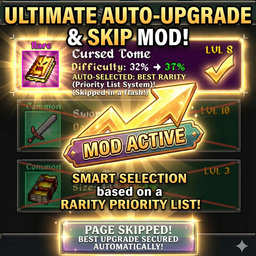
Automatically selects weapon and tome upgrades during level-ups based on a configurable priority list for Megabonk.
Features
- Automatic upgrade selection based on your priority order
- Named loadouts you can save, load, and delete in-game
- Configurable hotkeys for opening the menu and toggling auto-selection
- Weighted selection scoring using priority, rarity, new-item bonus, and max-level penalty
- "Show Only Unlocked" toggle that filters the Add Items lists to weapons and tomes you have actually unlocked
- Alias-aware matching for inconsistent internal and display item names
- Per-item max level caps
- Notification log showing what was selected and what choices were available
- Manual fallback when no configured item matches the current roll
Default Hotkeys
F1toggles the AutoUpgrade menuF2toggles automatic upgrade selection on or off
Both hotkeys can be changed in the generated BepInEx config file.
Generated config file:
BepInEx/config/EDGE_AutoUpgrade.cfg
Installation
- Install BepInExPack_Megabonk.
- Install AutoUpgrade through Thunderstore or place the files in your
BepInEx/pluginsfolder. - Start the game once to generate the config.
- Press
F1in-game to open the AutoUpgrade menu.
Usage
- Open the menu with
F1. - Add weapons and tomes from the discovered item lists.
- Reorder items to define your priority.
- Set max levels where needed.
- Save the current setup as a named loadout if you want multiple builds.
- Leave auto-selection enabled, or toggle it instantly with
F2.
Configuration
The generated config file includes:
AutoSelectionEnabledShowOnlyUnlockedToggleMenuHotkeyToggleAutoSelectionHotkeyPriorityOrderWeightRarityWeightNewItemWeightAtMaxPenalty
You can tune these values through BepInEx configuration or compatible mod manager UI.
Default scoring highlights:
NewItemWeight = 500PriorityOrderWeight = 100RarityWeight = 25AtMaxPenalty = 200
Changelog
All notable changes to AutoUpgrade will be documented in this file.
[1.4.0] - 2026-03-26
Added
- "Show Only Unlocked" toggle in the Add Items section
- When enabled, only weapons and tomes the player has unlocked appear in the item lists
- Toggle state persisted via the
ShowOnlyUnlockedconfig entry
Changed
- Replaced UnlockUtility.GetAvailableWeapons()/GetAvailableTomes() with per-item MyAchievements.IsAvailable() filtering
- Simplified item discovery to always fetch from DataManager and filter individually
[1.3.1] - 2026-03-24
Changed
- Raised the default
NewItemWeightfrom 150 to 500 so missing build pieces are favored more aggressively - Renamed the generated config file to
EDGE_AutoUpgrade.cfg - Added automatic migration from
anro_AutoUpgrade.cfgto the new config filename - Updated repository and Thunderstore documentation for the new config name and scoring defaults
[1.3.0] - 2026-03-24
Added
- Named loadout save, load, and delete support for priority lists
- Configurable hotkeys for toggling the menu and auto-selection through BepInEx config
- Weighted auto-selection scoring with configurable priority, rarity, new-item, and max-level weights
- Unlock-aware item discovery that filters out weapons and tomes you cannot currently use
Changed
- Auto-selection enabled state now persists between sessions
- Priority saves now stay in sync with the active named loadout
- Thunderstore package metadata updated for the expanded feature set
[1.2.1] - 2026-03-24
Fixed
- CRITICAL DISPLAY NAME FIX: Fixed weapon and tome name discovery to use display names instead of internal names
- Root Cause: Mod was discovering internal names from DataManager but level-up screen shows different names
- Examples Fixed:
- "Lightningstaff" (internal) → "Lightning Bolt" (display) ✅
- "Flamewalker" (internal) → "Flame Walkers" (display) ✅
- Solution: Modified discovery to use
weapon.GetName()andtome.GetName()for display names - UI Update: Items in "Add Items" section now show the correct display names that match level-up screen
- Backward Compatibility: Existing priority lists are automatically migrated to use display names
Technical Changes
- Updated
DiscoverItems()in UI to prioritize display names over internal names - Added debug logging to show discovered names vs level-up names for troubleshooting
- Improved name matching reliability between discovery and selection phases
Changed
- Priority lists now store display names (what users see) instead of internal names
- UI "Add Items" section shows actual display names from the game
[1.1.0] - 2024-01-XX
Added
- Multi-word weapon name support (e.g., "Magic Wand", "Fire Staff")
SplitCamelCase()utility method for proper name formatting- Enhanced weapon name detection with automatic camelCase-to-spaced conversion
Fixed
- Fixed weapon name matching for two-word weapons
- Improved
FormatItemName()to properly handle all weapon naming formats - Corrected
IsItemAvailable()andGetCurrentLevel()to use new naming logic
Changed
- Updated documentation with clearer examples
[1.0.0] - 2024-01-XX
Added
- Initial release
- Automatic upgrade selection based on priority list
- Support for weapons and tomes
- Rarity-based selection with priority ordering
- Visual notifications for selected upgrades
- Configuration file system
- New item detection and priority handling
- Manual selection fallback
Credits
Made by anro. Fix by me.
For full release history, see the GitHub changelog.