You are viewing a potentially older version of this package. View Latest Version
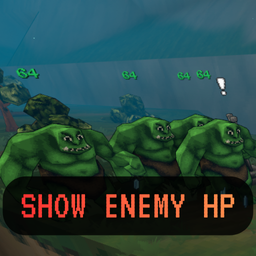
Real-time HP above every enemy.
No more guesswork—see exact health values during combat with clean, readable UI.
Tested on: Megabonk v1.0.19
Loader support: MelonLoader v0.7.1 and **BepInEx 6 **
ShowEnemyHP.cfg without restarting.⚠️ Do not use MelonLoader and BepInEx in the same game folder.
Use separate installs or a manager like r2modman (BepInEx profiles are isolated).
ShowEnemyHp.dll into your profile:…\r2modmanPlus-local\Megabonk\profiles\<YourProfile>\BepInEx\plugins\Logs: …\BepInEx\LogOutput.log
ShowEnemyHp.dll into:…\Megabonk\Mods\Logs: …\MelonLoader\Latest.log
The mod writes an annotated config on first run:
…\UserData\ShowEnemyHP.cfg (for MelonLoader)
…\BepInEx\config\ShowEnemyHP.cfg (for BepInEx)
Scale (float) — world-space scale of the HP canvas
Range: 0.005–0.200 (default 0.03)
VerticalOffset (float) — vertical offset from the enemy head position
Range: -5.0–5.0 (default -0.25)
ColorScheme (enum) — gradient used to render HP
Options: Classic, Cosmic, Electric, Aurora
Default: Classic
Font (string) — TMP font asset selection (whitelisted)
Options: Default, NotoSansSC (falls back to Default if Noto is missing)
# Show Enemy HP configuration

# Scale adjusts the size of the floating HP canvas.
#   Range: 0.005 – 0.200 (default 0.03)
Scale = 0.03

# VerticalOffset moves the label relative to the enemy head (positive is up).
#   Range: -5.0 – 5.0 (default -0.25)
VerticalOffset = -0.25

# ColorScheme controls the HP gradient.
#   Options: Classic, Cosmic, Electric, Aurora
ColorScheme = Electric

# Font selects the TextMeshPro font asset used for HP numbers.
#   Options: Default, NotoSansSC
Font = NotoSansSC
No HP shown in-game
MelonLoader/Latest.log for “Show Enemy HP”.BepInEx/LogOutput.log for the plugin entry.Config changes not applying
ShowEnemyHp.dll from Mods/ (Melon) or BepInEx/plugins/ (BepInEx).UserData/ShowEnemyHP.cfg.1.0.0