LocalMapMarkers
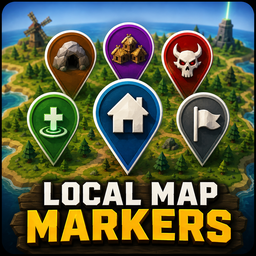
Place custom markers on Muck's map for houses, caves, villages, revives, bosses and more. Works without MuckSaveGame, with optional per-save persistence when it is installed.Local Map Markers
Local Map Markers lets you place your own markers directly on Muck's map.
MuckSaveGame is optional. The mod works on its own in session-only mode, while installing MuckSaveGame enables marker persistence for saved games.
Marker Types
Six marker types are available:
- House
- Cave
- Village
- Revive
- Boss
- Generic
Controls
1–6— Select marker typeLMBclick — Place the selected markerRMBclick — Remove the nearest local map markerMouse Wheel— Zoom the map
The selected marker and control guide are shown in the top-left corner while the map is open.
Persistence
With MuckSaveGame
- Markers are associated with the corresponding saved game.
- Loading a save restores its markers.
- Starting a new game with the same seed as an existing save still starts with an empty marker map.
- Saving that new game makes its current markers the persistent marker set for that save.
Without MuckSaveGame
- Local Map Markers still works normally.
- Markers remain available for the current session only.
- They are cleared when the session ends.
Multiplayer
Markers are local to each player and are not synchronized over the network.
Installation
Thunderstore / r2modman
Install LocalMapMarkers normally through your mod manager. BepInEx will be installed as a dependency if needed.
Manual Installation
- Install
BepInExPack_Muck. - Place
LocalMapMarkers.dllinBepInEx/plugins/LocalMapMarkers/. - Launch Muck.