Ryssles Artbag
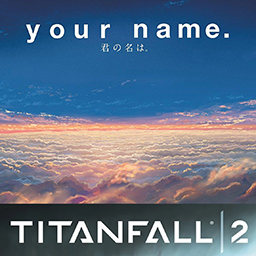
This mod enhances visual interface of Titanfall 2This is a mod themed around the films "Your Name." and "Weathering With You", designed to optimize the visual interface of Titanfall 2, replacing the main menu background & music, loading images, loading icons, and multiplayer lobby backgrounds, while also removing clutter from the main menu and increasing chat box font size for better readability.
This mod requires the Northstar or Ion Framework to run, no additional prerequisite mods are required. It is recommended to use graphics enhancement mods or edit your cfg file to disable blur.
The Main Menu , Loading Image , Loading Icon and Multiplayer Lobby Background folders include prebuilt main menu backgrounds &music, loading images, loading icons and multiplayer lobby backgrounds, for you to select and customize your favorite interface.
Installation
Move the folder Art Bag & Graphics Enhancement into Steam\steamapps\common\Titanfall2\R2Vanilla\mods.
Uninstallation
Simply delete the entire Art Bag folder inside your mods directory.
Default Configuration
Main Menu: menu_act01_Weathering with You
Loading Image: MyBG_Taki_Sakura & Tokyo (16:9)
Loading Icon: spinner_Taki_Running
Multiplayer Lobby Background: menu_gradien_Hina_Pray
Customization Guide
*Replace Main Menu Background Music:
*Rename your desired movie file (.bik format) to menu_act01, then place it inside Art Bag\mod\media to overwrite the original file.
*Replace Loading Screen Background Image:
*Rename your desired image file (.vtf format) to MyBG, then place it inside Art Bag\mod\materials\vgui to overwrite the original file.
*Replace Loading Icon:
*Rename your desired image file (.vtf format) to spinner, then place it inside Art Bag\mod\materials\vgui to overwrite the original file.
*Replace Multiplayer Lobby Background
*Rename your desired image file (.vtf format) to menu_gradien, then place it inside Art Bag\mod\materials\ui\menu\common to overwrite the original file.
Critical Warnings
*Do NOT stay idle on the main menu for extended time listening to music!!! You will encounter static audio noise artifacts!!!You can resolve this audio bug by entering Multiplayer mode or Campaign and returning to main menu afterwards.
*The multiplayer lobby background will only appear clear after editing your cfg file to disable blur.
*Multiplayer lobby background may become overexposed due to built-in lobby lighting. Restarting the game has a 50% chance to fix overexposure issues.This feature may conflict with Graphics Enhancement mods or mods that modify game .cfg files.
*The mod conflict with some graphics enhancement mods and mods that modify cfg files: while Stim ability is active, the color of the left half of the screen would be affected by the dominant color of the multiplayer lobby background.
If this tint issue bothers you, delete folder Art Bag\mod\models , but multiplayer lobby background function will stop working after deletion.
*Loading screens in the campaign mode will also be replaced with "loading image". Uninstall this mod if you dislike this change.