
BetterServerBrowser
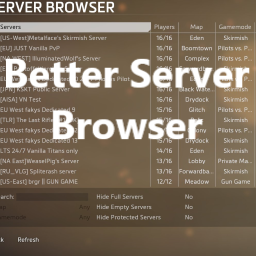
An enhanced mod that revolutionizes the game's server browser menu, offering a streamlined and immersive experience.Better Server Browser
This mod aims to enhance the game's server browser menu. While the original menu is well-designed, certain details have been frustrating, such as :
- the cumbersome map and game mode filters,
- the small join server button that doesn't encompass the entire text,
- the search server button overlapping the text entry.
All these elements have been fixed, along with the addition of new filters and a revamped server details panel.
Interesting thing to know:
-
The scroll bar (for the server details) automatically hides and appears as needed.
-
The search entry automatically resizes its width to fit the text inside the label.
Before:
After :
-
Now, if you left-click on the Server description or required mod, you can scroll up and down to navigate through the displayed text, if it's possible.
This mod is a "copy" of the NorthstarMods' Pull Request: https://github.com/R2Northstar/NorthstarMods/pull/645
If you have any suggestions, ideas, or encounter bugs, feel free to comment on the PR, send a message to Northstar's Discord server (ᚖ 𝔸𝕝𝕡𝕙𝕒 𝔾𝕒𝕞𝕚𝕟𝕘 ᚖ#5720 or triton_supreme), or create an issue on the mod's GitHub page.
Translations
| Languag | Contributor |
|---|---|
| English | ChatGPT |
| French | triton_supreme (ᚖ 𝔸𝕝𝕡𝕙𝕒 𝔾𝕒𝕞𝕚𝕟𝕘 ᚖ#5720) (ME) |
| German | ChatGPT |
| Italian | ChatGPT |
| Japanese | ChatGPT |
| Portuguese | ChatGPT |
| Russian | ChatGPT |
| Spanish | ChatGPT |
| Traditional Chinese | ChatGPT |