NOTacMap
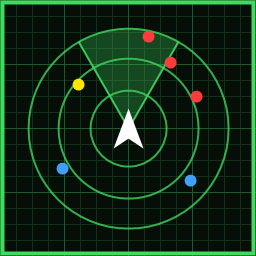
Live tactical map for a second monitor. Units, airbases, missile locks and warnings, trails, and your weapon's range in a browser page that opens when the game starts. Nothing to set up per map.Changelog
1.2.1
New
- A "? help" button next to the legend explains the map: quick start, the colors and symbols, FILTER and DISPLAY, the phone or tablet view, and what to check when something is wrong
- A "New link" button in DEVICES makes a new phone link and cuts off every device that has the old one, without restarting the game
- The phone settings have their own DEVICES button now, and DISPLAY is grouped into Text, Map, Page and Colors
- The QR code and the link stay hidden until you press "Show QR code and link", and hide again after 2 minutes
Better
- Every setting in the BepInEx config has a plain-language description
- If you use the access switch just as the game is closing, the page says the game is closing instead of blaming Windows
- The README is shorter
Security
- In current browsers, other websites can't use up the map's few connection slots any more: the live stream only answers the map page itself
- A device on your network can use at most 3 live streams and 32 requests at a time
1.2.0
New
- Open the map on a phone or tablet on your home network. Off by default: pick "On another device" when the map page opens, or use the switch in DISPLAY > Phone / tablet. The page works with touch (drag to pan, pinch to zoom, fullscreen button) and has a landscape layout
- The map page on the PC first asks where you want to see the map. "On another device" turns on access from other devices after a short prompt and shows a QR code and the link. It draws no map on the PC. "Remember my choice" skips the question and the prompt next time. The switch in DISPLAY turns it off again without restarting the game. It stays on after a restart until you do
- The link follows your PC if it changes network or address while the game is running
- Tap the legend to open or close it
- Colors are picked from a honeycomb palette, with RGB and hex boxes for exact values
- A dark outline behind the map's text so it stays readable over the terrain. Switch it off in DISPLAY
- Text and lines are drawn at the screen's real pixel density, so they are sharp on a phone. Switch it off in DISPLAY if it costs too much
- A "Send feedback or report a bug" link at the bottom of DISPLAY
Security
- LAN access only accepts devices on private network addresses, and they need the secret in the link. The phone remembers it with a cookie afterwards. Saving settings only works from the PC. Delete LanToken from the config and restart the game to cut off old links
- The connection is plain HTTP, so use it at home and not on public wifi
1.1.1
Better
- Big drop in how much the map costs your FPS. It redraws 8 times a second while nothing happens (changeable under DISPLAY) and goes faster while you pan, zoom or something animates
- Units off screen are no longer drawn, and standing structures no longer get trails
- Each update from the game is roughly 25 to 60% smaller, depending on the map
- Sleep and wake: a tab that has been hidden for 10 seconds stops asking for updates, and wakes up again when you come back. Can be turned off under DISPLAY
- The theme loads by itself once you're in a mission, no manual reload
- Your name label and the speed/altitude block no longer overlap
Security
- Other websites can't read the map or overwrite your saved settings anymore
- Settings saves are limited to 64 KB of valid JSON, and only 8 tabs can connect at once
1.1.0
New
- Weapon range ring around your aircraft. A circle that becomes a cone once you mark a target
- Unit trails, with a Trails folder in FILTER to pick which kinds
- LOST marker when you lose contact with a marked target, and a snap when you pick it up again
- A ring and a snapping line when a missile loses its lock on an aircraft (yours and teammates')
- Runway approach lines
- Editable map colors, grid on/off, dark mode and real names/callsigns, all in the panels. No more URL options
- The tab closes itself when the game closes. Double-click the map for fullscreen
Better
- With several missiles out, only the closest one gets the full lock label and the rest are small rings (+N). Labels no longer pile up
- Marked targets and locks use the game's own tracker, so they don't show where a target really is after you've lost it
- Teammate callsigns stay the same after a respawn
- Ejected pilots are hidden by default
- Human teammates are yellow, AI and structures blue
- Missile warnings stack instead of overlapping
1.0.0
First release.