

Unity Explorer Tree Snapshooter
A mod that captures GameObject hierarchy and component state to text files. Useful for Debugging with AI.
| Last updated | a day ago |
| Total downloads | 3 |
| Total rating | 0 |
| Categories | |
| Dependency string | GymMed-Unity_Explorer_Tree_Snapshooter-0.0.1 |
| Dependants | 0 other packages depend on this package |
This mod requires the following mods to function

sinai-dev-UnityExplorer
An in-game UI for exploring, debugging and modifying Unity games.
Preferred version: 4.8.2README
UnityExplorer Tree Snapshooter




A mod that captures GameObject hierarchy and component state to text files. Useful for Debugging with AI.
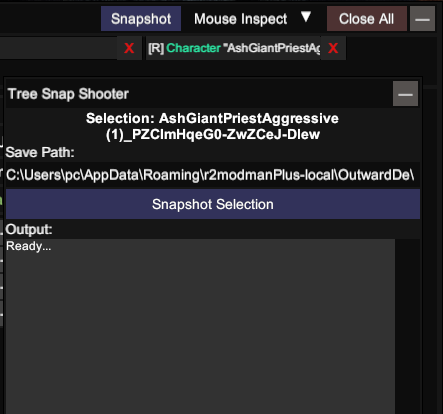
Preview
Dependencies
This mod requires:
- UnityExplorer - Required for the Inspector panel
- UniverseLib - UI framework used by UnityExplorer
How It Works
- Harmony Patch - Patches
InspectorPanel.ConstructPanelContentto add a "Snapshot" button in UnityExplorer's Inspector title bar - UI Panel - Opens
SnapShooterPanelwith:- Current selection name and instance ID
- Save path input field (editable)
- "Snapshot Selection" button
- Log output area
- Snapshot Process - When clicking "Snapshot Selection":
- Gets the currently inspected GameObject from UnityExplorer's InspectorManager
- Builds the parent chain (path from scene root to selected object)
- Builds the children hierarchy (all descendants with instance IDs)
- Reads all component state via reflection for each GameObject
- Formats and saves to text file
How to Use
- Install UnityExplorer and this mod in
Game/BepInEx/plugins/ - Open UnityExplorer (default key: F7)
- Select a GameObject in the Inspector panel
- Click the "Snapshot" button in the Inspector title bar
- Edit the save path if desired, or use the default location
- Click "Snapshot Selection" to save
Snapshot Details
The snapshot output includes:
1. Parent Hierarchy
=== PARENT HIERARCHY ===
Root (InstanceID: 100)
  Level1 (InstanceID: 200)
    Player (InstanceID: 300)
2. Children Hierarchy
=== CHILDREN HIERARCHY ===
[0] Player (InstanceID: 300)
  [1] Child1 (InstanceID: 301)
  [1] Child2 (InstanceID: 302)
3. Components
=== COMPONENTS ===
  Transform (InstanceID: 456)
  Rigidbody (InstanceID: 789)
4. Reflection State
=== GAME OBJECT REFLECTION (ALL CHILDREN) ---

--- Player (InstanceID: 300) [SELECTED] ---
  Transform (InstanceID: 456):
    property m_LocalPosition: (0, 0, 0)
    property m_LocalRotation: (0, 0, 0, 1)
  Rigidbody (InstanceID: 789):
    property mass: 1

--- Child1 (InstanceID: 301) ---
  Transform (InstanceID: 1001):
    property m_LocalPosition: (1, 2, 3)
5. Outside References
When a field references a GameObject outside the selection, it's marked:
field m_Parent: [OUTSIDE_REFERENCE: InstanceID=999, Type=Transform] ParentName
Default Snapshot Location
By default, snapshots are saved to:
{Mod Location}/Snapshots/TreeSnapShooter_{GameObjectName}_{yyyy-MM-dd_HH-mm-ss}.txt
Example:
Game/BepInEx/plugins/UnityExplorerTreeSnapShooter/Snapshots/TreeSnapShooter_Player_2026-03-27_10-30-00.txt
Users can override the save path by entering a custom directory or file path in the input field.
How to set up
To manually set up, do the following
- Create the directory:
Game\BepInEx\plugins\UnityExplorerTreeSnapShooter\. - Extract the archive into any directory(recommend empty).
- Move the contents of the plugins\ directory from the archive into the
BepInEx\plugins\UnityExplorerTreeSnapShooter\directory you created. - It should look like
Game\BepInEx\plugins\UnityExplorerTreeSnapShooter\UnityExplorerTreeSnapShooter.dllLaunch the game.
