


BetterPeakVoiceFix
Fixes voice connection issues with auto-reconnect, host synchronization, and a visual status overlay. | 支持切换中文。修复了语音连接问题,新增了自动重连、主机同步以及可视化状态显示功能。BetterPeakVoiceFix
Version 1.1.6 · Updated for PEAK 3.0.0.
English | 中文
A PEAK multiplayer voice diagnostics and recovery mod, based on PEAK VOICE FIX.
It helps detect and recover common voice issues such as failed voice connections, players landing on different voice servers, Actor ID drift after reconnecting, and invalid local voice-state references.
IP addresses shown by the overlay are Photon voice server addresses, not players' real IP addresses.
Features
| Feature | Description |
|---|---|
| Voice status overlay | Shows each player's current voice status in real time |
| Game / Voice ping | Displays Photon game-room ping and Photon Voice ping separately |
| Cross-server detection | Detects players who are not on the same voice server |
| Voice state recovery | Repairs invalid local voice-state references for remote players |
| Auto / manual reconnect | Recovers disconnected or stalled connections; repeated failures use a longer cooldown |
| Actor drift detection | Recognizes game/voice Actor ID mismatch after players reconnect |
| Region diagnostics | Shows game region, voice region and regional latency |
| Photon AppId guard | Prevents other mods from accidentally replacing PEAK's Photon AppIds |
| Room-code fixes | Supports PEAK 3.0.0 HK codes and refreshes authentication before cross-region joins |
| Steam invite fixes | Adds invite retry handling and UTF-8 room-name support |
UI Preview
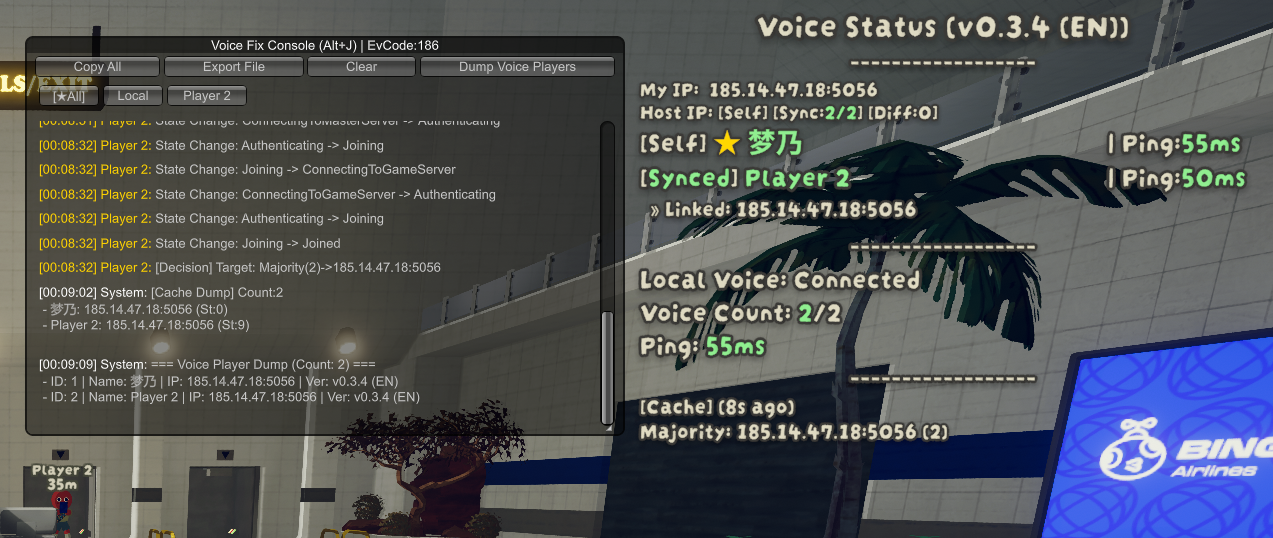
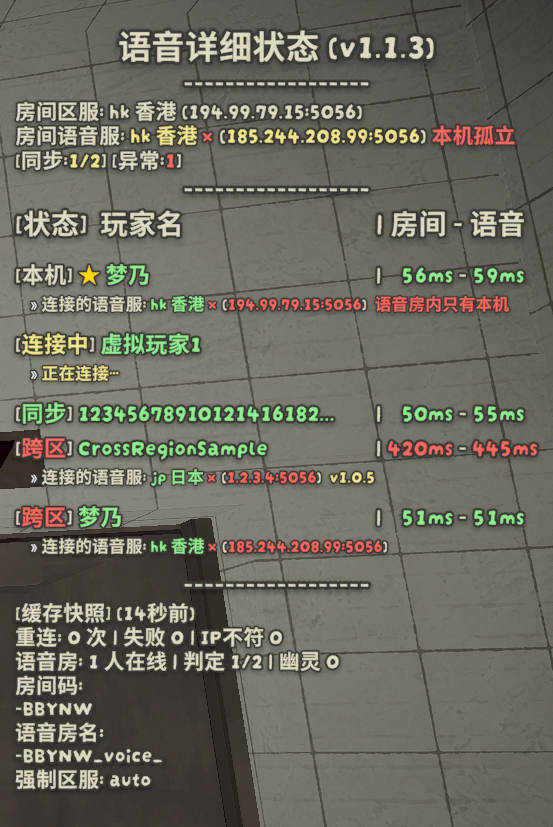
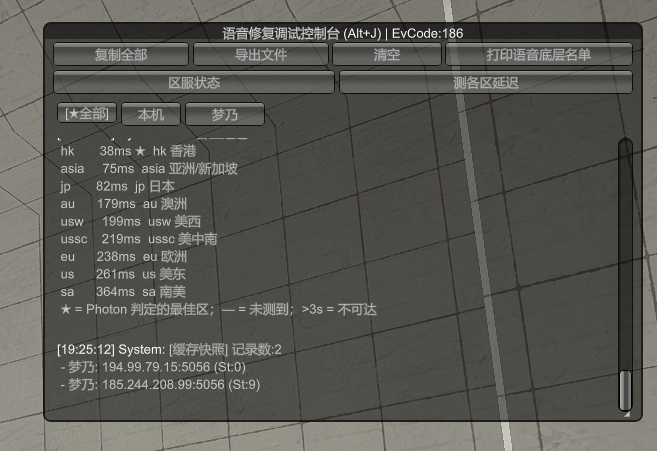
Status Overlay
Press J to cycle:
Off → Simple → Detail → Off
The detailed panel shows each player's status and:
Room - Voice
182ms - 179ms
The left value is game-room ping, and the right value is Photon Voice ping.
| Status | Meaning |
|---|---|
| [Local] | Your own player |
| [Synced] | The player has BVF and reports the same voice server as you |
| [Connected] | The player does not report BVF data, but is confirmed to be in the current voice room |
| [Mismatch] | The player is still in voice, but game and voice Actor IDs cannot be mapped cleanly; voice usually still works |
| [Connecting] | Voice is still connecting / authenticating, or the player is inside the join grace period |
| [Cross-server] | The player is on a different voice server and cannot normally communicate with you |
| [Disconnected] | The player is not currently detected in the voice room |
Cross-server is more accurate than the older Cross-region wording. Different regions are one cause, but an abnormal split can also happen inside the same region. The in-game UI may still use the older wording.
Players do not all need BetterPeakVoiceFix installed. Players with BVF can report richer voice information; players without it are detected from PEAK / Photon Voice data available locally.
Voice State Recovery
Sometimes a player is correctly connected to the voice room but still becomes inaudible because the local remote-player voice-state reference is invalid.
BetterPeakVoiceFix can detect and recover this state automatically.
- Works even while the overlay is hidden
- Does not change mute, block or communication-permission settings
- Does not require the host or other players to install BVF
- Does not depend on CrossplayStutterFix
A short Voice state recovered notice is shown after a successful recovery.
Manual Reconnect — Alt + K
Alt + K manually resets the Photon Voice connection.
It is mainly useful for occasional network glitches, a stuck Voice Client, or a one-off bad voice connection. It simply gives Photon Voice another chance to reconnect and enter the correct voice room.
For example:
HK: 400ms
EU: 200ms
If the game room is in HK, the correct voice connection still needs to use HK. Alt + K does not switch to EU just because EU has lower latency, and it does not improve the underlying network route.
Shortcuts
| Key | Action |
|---|---|
J |
Off → Simple → Detail → Off |
Alt + J |
Open / close the diagnostic console |
Alt + K |
Manually reset the voice connection |
The J key can be changed in the config.
Diagnostic Console
Alt + J opens the diagnostic console, which can show:
- Game / voice region
- Voice connection and server information
- Photon AppId status
- Region latency test
- Voice-room player list
- Diagnostic logs
Logs can also be copied or exported for troubleshooting.
Connection states, recovery actions and disconnect causes are also saved in BepInEx/LogOutput.log. A joined connection is only automatically reset for a confirmed region or room-name mismatch. Reported server addresses remain available for diagnostics.
Other Fixes
| Fix | Description |
|---|---|
| Photon AppId Guard | Restores PEAK's original Photon AppIds if another mod overwrites them |
| HK room codes | Recognizes PEAK 3.0.0 codes starting with P and supports legacy codes |
| Region-switch join | Refreshes cross-region authentication, then waits for the target master server |
| Steam invite retry | Retries the room-info handshake instead of silently getting stuck |
| UTF-8 room names | Correctly receives non-ASCII room names used by mods such as BetterRoomShare |
| Long room codes (optional, off by default) | Lets the manual join page accept BetterRoomShare's longer room codes, same rule as its EnableVariableRoomCodeLength |
Compatibility
| Mod / Situation | Notes |
|---|---|
| Players without BVF | Supported; local status detection still works, with less detailed information |
| CrossplayStutterFix | Can coexist; BVF voice-state recovery works independently |
| FixJoinRoomCode | Defers cross-region authentication to it when installed |
| BetterRoomShare | Compatible with related room-code, long room-code and UTF-8 invite handling |
| LocalMultiplayer | Photon AppId Guard helps prevent unintended AppId replacement |
Config
BepInEx/config/chuxiaaaa.Aiae.BetterPeakVoiceFix.cfg
Most users can keep the default settings.
See CHANGELOG.md for version history.
FAQ
Do I need to reconnect when I see [Mismatch]?
Usually no. It means the game-player and voice Actor IDs do not map cleanly; it does not necessarily mean voice is broken.
What does [Cross-server] mean?
That player is not on the same Photon Voice server / voice room as you. This can be caused by a different voice region or by an abnormal split inside the same region.
Can Alt + K reduce my ping?
No. It only restarts the voice connection and gives Photon another connection / allocation attempt.
Credits
Based on PEAK VOICE FIX by @chuxia.
BetterPeakVoiceFix extends it with a redesigned status overlay, improved player-state detection, voice-state recovery, region diagnostics, Photon AppId protection, and room-code / Steam invite fixes.
BetterPeakVoiceFix
当前版本 1.1.6 · 适配 PEAK 3.0.0。
English | 中文
PEAK 联机语音诊断与修复模组,基于 PEAK VOICE FIX 继续开发。
主要用于检测和处理语音连接异常、玩家进入不同语音服务器、重连后的 Actor ID 错位,以及本机远端玩家语音状态引用失效等问题。
面板中显示的 IP 均为 Photon 语音服务器地址,不是玩家真实 IP。
主要功能
| 功能 | 说明 |
|---|---|
| 语音状态监控 | 实时显示房间内每名玩家的语音连接状态 |
| 游戏 / 语音延迟 | 分别显示游戏房间 Ping 与 Photon Voice Ping |
| 跨服检测 | 检测玩家是否进入了不同的语音服务器 |
| 语音状态恢复 | 自动恢复本机失效的远端玩家 Voice State 引用 |
| 自动 / 手动重连 | 恢复断开或卡住的连接;连续失败时放慢重试后继续尝试 |
| Actor 错位识别 | 识别玩家重连后游戏与语音 Actor ID 不一致的情况 |
| 区服诊断 | 显示游戏区服、语音区服及各区域延迟 |
| Photon AppId 守卫 | 防止其他模组错误修改 PEAK 的 Photon AppId |
| 房间码修复 | 识别新版港服房间码,并在跨区加入前刷新认证 |
| Steam 邀请修复 | 增加邀请重试,并支持 UTF-8 中文房名 |
界面预览
状态面板
按 J 循环切换:
关闭 → 简易 → 详细 → 关闭
详细面板会显示每名玩家的状态,以及:
房间 - 语音
182ms - 179ms
左侧为 游戏房间延迟,右侧为 Photon Voice 延迟。
| 状态 | 含义 |
|---|---|
| [本机] | 当前玩家自己 |
| [同步] | 对方安装了 BVF,并上报与本机相同的语音服务器 |
| [已连接] | 对方未上报 BVF 数据,但已确认存在于当前语音房 |
| [错位] | 玩家仍在语音房,但游戏与语音 Actor 无法正常对应,通常不影响语音 |
| [连接中] | 正在连接 / 验证语音服务,或仍处于进房宽限期 |
| [跨服] | 对方与本机不在同一个语音服务器,无法正常互通语音 |
| [断开] | 当前未检测到该玩家进入语音房 |
跨服 比旧的 跨区 更准确:不同区服只是其中一种情况,同一区服内也可能因为异常分叉进入不同语音服务器。目前游戏内 UI 仍可能显示旧的“跨区”文字。
整个房间不需要所有人都安装 BetterPeakVoiceFix。安装 BVF 的玩家能上报更完整的语音信息;未安装的玩家则通过本机能够观察到的 PEAK / Photon Voice 数据进行判断。
语音状态自动恢复
有时玩家已经正常进入语音房,但本机保存的远端玩家语音状态引用失效,仍可能导致听不到对方。
BetterPeakVoiceFix 会自动检测并尝试恢复这类异常。
- 面板关闭时仍然运行
- 不修改静音、屏蔽或通信权限
- 不要求房主或队友安装 BVF
- 不依赖 CrossplayStutterFix
恢复成功后,面板会短暂显示 “语音状态已恢复”。
Alt + K 手动重连
Alt + K 用于手动重置 Photon Voice 连接。
它主要适合处理偶发网络波动、Voice Client 卡死或某一次语音错连。简单来说,就是让 Photon Voice 多一次重新连接、重新进入正确语音房的机会。
例如:
HK:400ms
EU:200ms
如果当前游戏房位于 HK,正确的语音连接仍然需要进入 HK。Alt + K 不会因为 EU 延迟更低就切到 EU,也不会把本身 400ms 的网络线路优化成 200ms。
快捷键
| 按键 | 功能 |
|---|---|
J |
关闭 → 简易 → 详细 → 关闭 |
Alt + J |
打开 / 关闭调试控制台 |
Alt + K |
手动重置语音连接 |
J 可以在配置文件中修改。
调试控制台
Alt + J 可以查看:
- 游戏 / 语音区服
- Voice 连接与服务器信息
- Photon AppId 状态
- 各区延迟测试
- 语音房玩家列表
- 诊断日志
日志支持直接复制或导出,方便排查多人房间中的语音问题。
连接状态、重连动作和真实断开原因也会保存到 BepInEx/LogOutput.log。已连接的语音只在区服或房间名确实不符时自动重置,服务器地址仍保留供诊断查看。
其他修复
| 修复 | 说明 |
|---|---|
| Photon AppId 守卫 | 其他模组改写 Photon AppId 时恢复 PEAK 原本的设置 |
| HK 房间码 | 识别 PEAK 3.0.0 的 P 开头港服房间码,并兼容旧版码 |
| 切区加入 | 刷新跨区认证,并等待目标主服务器就绪后再加入房间 |
| Steam 邀请重试 | 房间信息没有返回时自动重试,避免静默卡住 |
| UTF-8 房名 | 正确接收 BetterRoomShare 等模组使用的中文 / 非 ASCII 房名 |
| 超长房间码(可选,默认关闭) | 手动输入房间码页接受 BetterRoomShare 的超长房间码,规则与其 EnableVariableRoomCodeLength 一致 |
兼容性
| 模组 / 情况 | 说明 |
|---|---|
| 其他玩家未安装 BVF | 可以正常联机,本机仍可判断其基本语音状态,但信息较少 |
| CrossplayStutterFix | 可共存,BVF 的语音状态恢复独立运行 |
| FixJoinRoomCode | 检测到它时由它处理跨区认证,避免重复挂载同一修复 |
| BetterRoomShare | 兼容相关房间码、超长房间码与 UTF-8 邀请房名处理 |
| LocalMultiplayer | Photon AppId 守卫可避免意外改写 PEAK 的语音 AppId |
配置
BepInEx/config/chuxiaaaa.Aiae.BetterPeakVoiceFix.cfg
大多数玩家保持默认设置即可。
版本更新记录见 CHANGELOG.md。
FAQ
[错位] 需要重连吗?
一般不需要。它表示游戏玩家和语音 Actor 无法精确对应,并不等于语音已经断开。
[跨服] 是什么意思?
说明对方和你没有进入同一个 Photon Voice Server / Voice Room。可能是连接到了不同区服,也可能是在同一区服内发生异常分叉。
Alt + K 能降低延迟吗?
不能。它只是重新建立一次语音连接,给 Photon 多一次连接 / 分配机会。
Credits
基于 PEAK VOICE FIX by @chuxia 继续开发。
BetterPeakVoiceFix 在此基础上增加了新的状态面板、玩家状态识别、语音状态恢复、区服诊断、Photon AppId 保护,以及房间码 / Steam 邀请相关修复。