
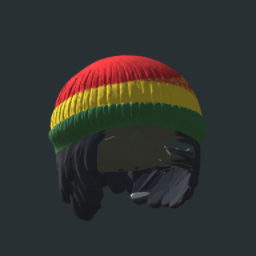
Rasta Chill
Cosmetic Rasta beanie and dreadlocks with a 3D hand roll, sleepy eyes and subtle under-eye redness. No gameplay changes.Rasta Chill
A cosmetic set for PEAK featuring a red, yellow, and green Rasta beanie, black dreadlocks, a 3D hand-rolled joint, and relaxed sleepy eyes.
Features
- Rasta Beanie & Dreadlocks: A logo-free beanie with black dreadlocks emerging from underneath the rim, covering the sides and back.
- 3D Hand-Rolled Joint: A stylized mouth-corner accessory included with the beanie.
- Sleepy Eyes: Relaxed, slightly squinted eyes with a subtle red detail along the lower eyelids.
- Clean-Shaven Look: No beard or mustache.
Cosmetic only. No gameplay changes, smoke effects, lights, or stat modifications.
Installation
- Open Thunderstore Mod Manager or r2modman.
- Select PEAK and open your preferred profile.
- Search for Rasta Chill by HeisenBerk in the online mod browser and install it.
- Allow the manager to install the required dependencies automatically.
- Launch PEAK using Start modded.
You can also open the Thunderstore page and select Install with Mod Manager.
If you previously imported a local copy, disable it before installing this version to avoid duplicate cosmetics.
Equipping the Set
Open your passport at the airport and select:
- Hat: Rasta Chill Beanie + Hand Roll
- Eyes: Rasta Chill Sleepy Eyes
- Accessory: Rasta Chill Subtle Red Detail
- Mouth: Rasta Chill Relaxed Smile
The beanie, dreadlocks, and joint share one hat selection. The red eye detail occupies the face accessory slot.
Multiplayer
For consistent appearance, all players should install Rasta Chill and use matching More Customizations versions and cosmetic mod lists.
Version 1.0.1
- Replaced the beanie and dreadlock model.
- Added rear hair coverage and improved head fit.
- Removed the peace symbol.
- Adjusted the beanie’s orientation.
- Preserved the hand-rolled joint and sleepy-eye appearance.
Compatibility
Tested with PEAK 3.0.1 and More Customizations 1.1.10. Multiplayer and extended climbing sessions have not been tested.
Removal
Switch to standard cosmetics in your passport, close the game, then disable or uninstall Rasta Chill through your mod manager.