
KikisAudioMenu
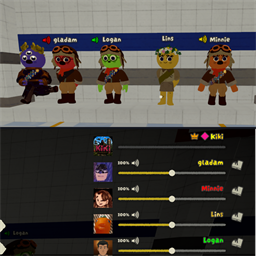
Pause-menu volume sliders with more room per row. Names in the menu and the speaker icon above the heads turn green / yellow / red while somebody talks. Client-side only.Kikis Audio Menu
A small client-side mod for the volume sliders in the pause menu (Esc) and the little speaker icon next to the names above the scouts.
What it does
- Speaking colors - while somebody talks, their name in the pause menu turns green (quiet), yellow (medium) or red (loud). When nobody talks the names keep the game's own colors.
- Row spacing - the slider rows get more room, so bigger lobbies stay readable. Default 80, 0 = the game's own layout.
- Overhead icon colors - the small speaker icon next to a scout's name above their head turns green / yellow / red too.
Works with colored names: while somebody talks, their name shows in the volume color, afterwards the colored name comes back.
Who needs it
Only you. Everything happens on your own screen, nothing is sent to other players.
Settings
In-game with ModConfig (optional) or in BepInEx/config/kikisaudiomenu.peak.kam.cfg.
- Spacing (80) - vertical distance between two player rows, 0 = game layout.
- SpeakingColors (on) - color the names in the pause menu while talking.
- OverheadIconColors (on) - color the speaker icon above the heads while talking.