

You are viewing a potentially older version of this package. View Latest Version
PlayersInfo
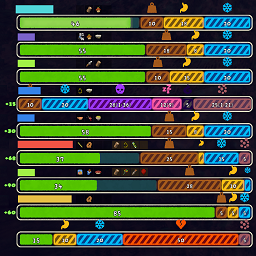
Show nearby teammates' stamina, temporary stamina, status, and inventory in a compact HUD.PlayersInfo 0.2.0
PlayersInfo gives you a teammate panel in PEAK. It shows nearby teammates' stamina, temporary stamina, status, distance, and inventory.
What's new in 0.2.0
- Default teammate HUD position is now the bottom-left corner.
- Existing 0.1.1 and earlier configurations using the old top-left position are migrated to bottom-left on upgrade; other anchor positions are preserved.
- Extra stamina now shows both current amount and the petrify-aware cap, such as
+45/70. - Added stable teammate bar ordering to prevent bars from moving up and down as teammates move. Distance ordering remains available in configuration.
- Updated PEAK 2.1.a compatibility.
- Fixed petrify value display and teammate inventory compatibility with the newer backpack API.
Installation
- Install BepInEx for PEAK.
- Put
PlayersInfo.dllintoBepInEx/plugins. - Start the game once to generate the configuration file.
Features
- Teammate stamina bars with numeric values.
- Temporary stamina display with current amount and cap.
- Petrify percentage display.
- Teammate inventory row: main slots, temp slot, backpack slot state, and backpack contents.
- Nearby teammate filtering by distance.
- Stable or distance-based teammate bar ordering.
- Optional Chinese ModConfig localization when PEAKLib.ModConfig is installed.
- Debug logging switch for troubleshooting.
Configuration
The configuration file is generated at:
BepInEx/config/com.players.info.cfg
| Section | Key | Default | Description |
|---|---|---|---|
| Display | Enabled | true | Master switch for the mod. |
| Display | EnableStaminaBar | true | Show teammate stamina bars. |
| Display | ShowStaminaValue | true | Show numeric stamina values. |
| Display | EnableInventoryRow | true | Show teammate inventory rows. |
| Display | RoundStaminaValue | true | Round stamina values to whole numbers. |
| Display | Anchor | BottomLeft | HUD anchor corner. |
| Display | OffsetX | 0 | Extra horizontal offset. |
| Display | OffsetY | 0 | Extra vertical offset. |
| Display | NearbyRange | 30 | Maximum teammate distance in meters. 0 means unlimited. |
| Display | MaxNearbyCount | 3 | Maximum number of nearest teammates shown. |
| Display | TeammateSortMode | Stable | Keep bar order stable, or use Distance. |
| Advanced | DebugLogging | false | Enable verbose diagnostic logs. |
Notes
- PlayersInfo only displays information. It does not change stamina, inventory, health, or teammate state.
- The mod is built against PEAK 2.1.a.
- In very large lobbies, lower
MaxNearbyCountorNearbyRangeto keep the HUD compact.