

You are viewing a potentially older version of this package. View Latest Version
PlayersInfo
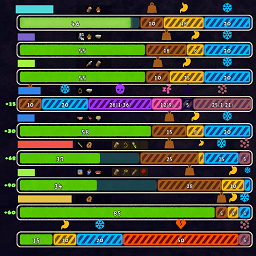
Show nearby teammates' stamina, status, inventory, item durability, backpack capacity, and optional jetpack fuel in a compact HUD.PlayersInfo 0.2.1
PlayersInfo adds a compact, read-only teammate HUD to PEAK. It shows nearby players' stamina, status, distance, and inventory without changing gameplay or sending gameplay RPCs.
What's new in 0.2.1
More stable teammate HUD
- Each HUD row stays bound to the same player, preventing bars and values from swapping or jumping when distance order changes.
- New bars immediately use the correct player's values instead of animating from another player's old state.
- Numeric and graphical updates are reduced when values have not changed, improving performance.
Better spectating
- Stamina, extra stamina, status values, and nearby-player detection now follow the observed player correctly.
SpectatorNearbyCenterlets you use either the local character or the observed character as the nearby-player center.
Stamina and status
- Added a local hunger countdown when an accurate value is available.
- Status text and countdown placement now adapts to the available width.
- The local extra-stamina bar keeps PEAK's original layout and shows its current value inside the fill.
- Teammate extra stamina is shown only as
current/capwithout a+. Its graphical extra bar and petrify cap segment are hidden to prevent overlap.
Inventory improvements
- Item durability is shown as a clear bar below the item icon.
- Cooked-food icons change color with cooking progress.
- Backpack contents follow the real backpack type: no inner slots, two slots for fanny packs, or four slots for normal backpacks.
- Inventory display now has three modes: hidden, contents only, or contents plus jetpack fuel.
- Jetpack fuel uses a wider bar beside the teammate inventory row.
Fixes
- Fixed teammate bars sometimes using the wrong player or displaying local values while spectating.
- Fixed teammate extra-stamina and petrify visuals overlapping the local HUD.
- Fixed cloned status components damaging the local PEAK HUD, which could make extra-stamina consumables finish their progress without taking effect.
- Fixed stale or overlapping values during death, revive, and spectator transitions.
Installation
- Install BepInEx for PEAK.
- Put
PlayersInfo.dllintoBepInEx/plugins. - Start the game once to generate the configuration file.
Configuration
The configuration file is generated at:
BepInEx/config/com.players.info.cfg
| Section | Key | Default | Description |
|---|---|---|---|
| Display | Enabled | true | Enable or disable all PlayersInfo features. |
| Display | EnableStaminaBar | true | Show teammate stamina and status rows. |
| Display | ShowStaminaValue | true | Show numeric stamina, status, and countdown values. |
| Display | EnableInventoryRow | ContentsOnly | Disabled, ContentsOnly, or ContentsAndJetpackFuel. |
| Display | Anchor | BottomLeft | HUD corner. |
| Display | OffsetX | 0 | Horizontal offset in pixels. |
| Display | OffsetY | 0 | Vertical offset in pixels. |
| Display | NearbyRange | 30 | Maximum teammate distance in metres. 0 means unlimited. |
| Display | MaxNearbyCount | 3 | Maximum number of nearby teammates shown. |
| Display | TeammateSortMode | Stable | Keep rows stable or order them by distance. |
| Display | SpectatorNearbyCenter | ObservedCharacter | Use the local or observed character as the spectator distance center. |
| Display | RoundStaminaValue | true | Show whole numbers instead of one decimal place. |
| Advanced | DebugLogging | false | Enable verbose troubleshooting logs. |
Old boolean EnableInventoryRow values migrate automatically: true becomes ContentsOnly, and false becomes Disabled.
Notes
- PlayersInfo is built for PEAK 2.1.a.
- PEAKLib.ModConfig is optional. When installed, PlayersInfo provides English and Chinese configuration labels.
- For large lobbies, reduce
MaxNearbyCountorNearbyRangeto keep the HUD compact.