


WhereIsThing
Locate selected items, luggage, hazards, and landmarks with local or host-shared presets.WhereIsThing
 WhereIsThing is an expanded successor to WhereIsMyAmulet. It can place location labels on items, luggage, hazards, and selected landmarks such as the Gloom Bell Tower.
The included fallback presets cover three common situations: emergency medical supplies, achievement targets, and the four Ascent 8 amulets.
For target suggestions or bug reports, contact WUYACHIYU in the PEAK modding community. I also use the name 乌鸦吃鱼 in several Chinese PEAK communities.
How to use
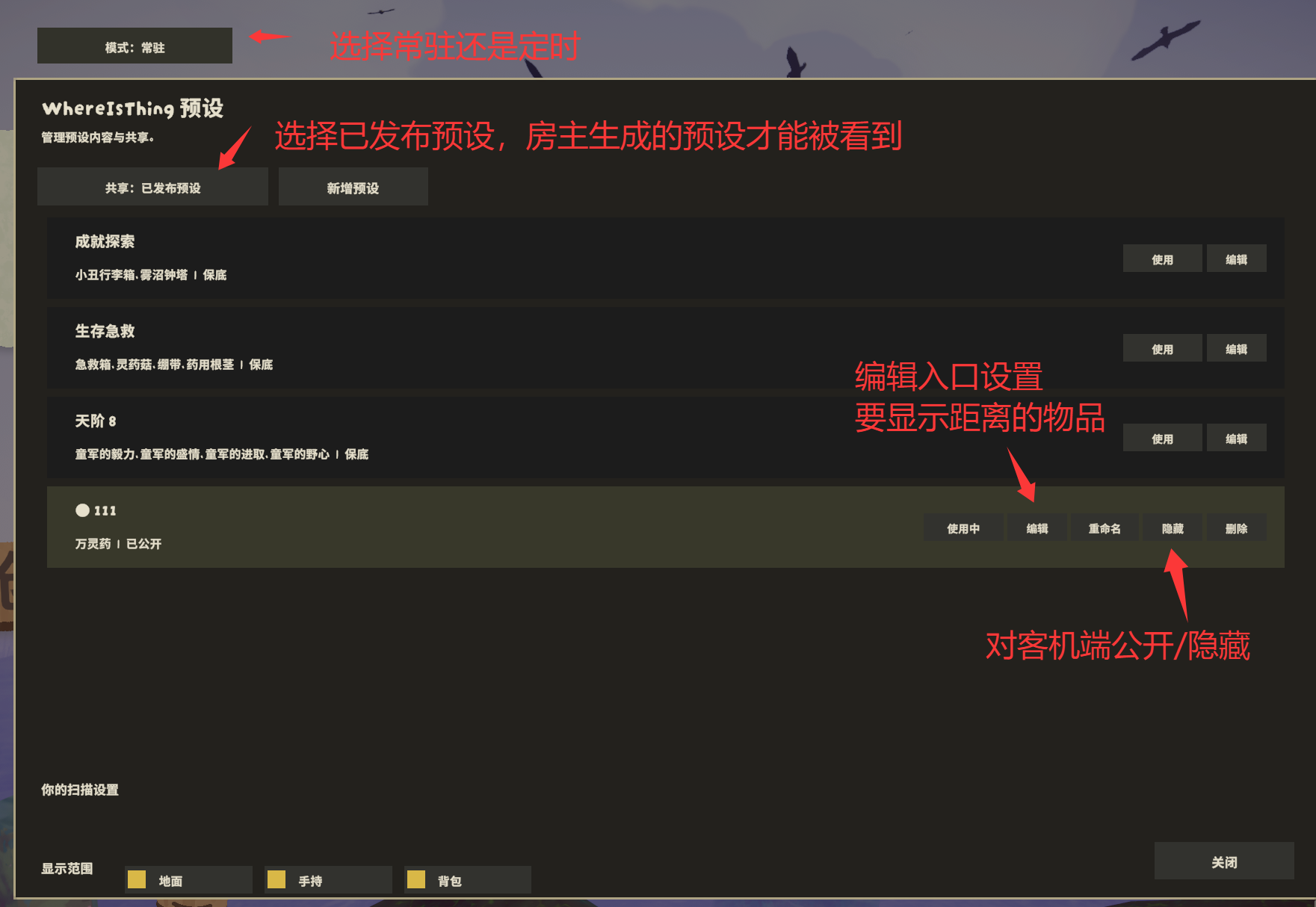
Press Alt+C to open the preset window, then click Use next to a preset. Once the button changes to Using, close the window and press C to display location labels for the selected targets.
The lower part of the preset window contains your personal scan settings:
- Locations: ground, held items, and backpacks
- Display mode: persistent or timed
- Timed display duration
Each player controls these settings independently. The host cannot override them.
Host and shared presets
The host controls preset contents and decides which custom presets are available to clients. Every player still chooses which preset to use and controls their own scan range, display mode, and duration.
The host can use the Alt+C window to:
- Create custom presets
- Edit the targets contained in a preset
- Rename custom presets using Chinese or English text
- Click
Publishto share a custom preset with clients; clickHideto stop sharing it - Switch the sharing mode between Off, Built-in Only, and Published Presets
For clients to receive the host's custom presets, the sharing mode in the upper-left corner must be set to Share: Published presets. When it is set to Share: Built-in only, clients only receive the three fallback presets.
Avoid putting every item in a single preset. Scanning and refreshing a very large number of labels can noticeably reduce the frame rate.
Editing a preset
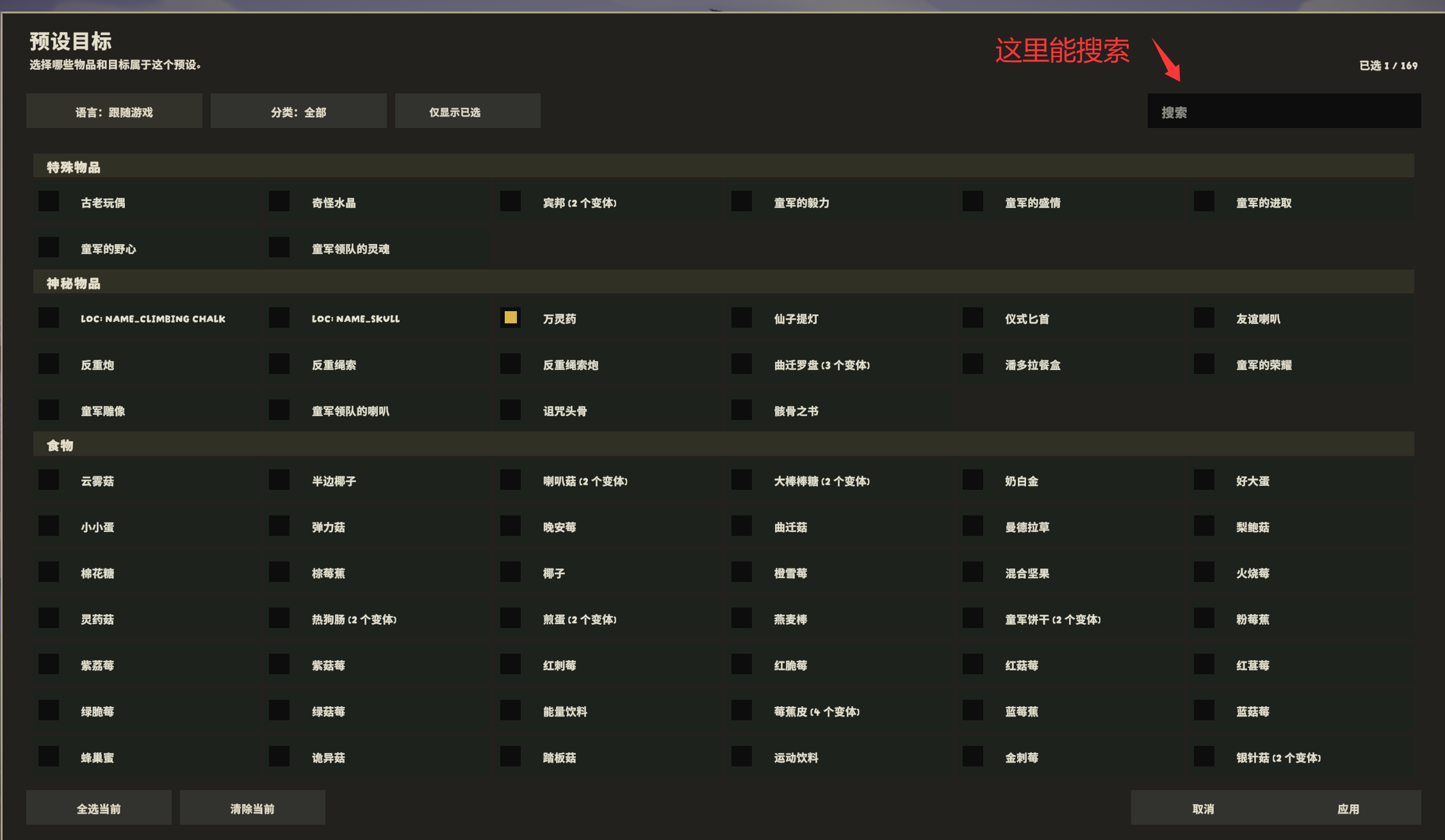
Click Edit next to a preset to choose its targets. The target window supports Chinese and English search, category filtering, a selected-only filter, selecting all visible results, and clearing visible results.
The list supports the mouse wheel and click-drag scrolling.
The three fallback presets cannot be deleted or hidden, but the host can edit their targets. Custom presets can be renamed, published, hidden, and deleted.
Fallback presets
Clients can use these three presets even when the host does not have WhereIsThing installed:
- Survival Medical: First Aid Kit, Bandages, Remedy Fungus, and Medicinal Root
- Achievement: Clown Luggage and the Gloom Bell Tower
- Ascent 8: Scout's Tenacity, Scout's Generosity, Scout's Initiative, and Scout's Ambition
In a solo game, the local player acts as the host and can edit and use local presets normally.
When the host leaves
After a master-client switch, WhereIsThing briefly keeps the previous host's shared presets while waiting for the new host:
- If the new host has the mod and publishes compatible presets, clients switch to the new host's presets.
- If the new host does not have the mod, disables sharing, or publishes no compatible data, clients fall back to the three built-in presets.
- If you become the new host, your local preset library is restored and published according to your own sharing mode.
Local presets and personal display settings are not overwritten when joining or leaving rooms or when the host changes.
ModConfig
ModConfig is optional. When installed, WhereIsThing provides localized English and Chinese setting names and descriptions. Serialized preset data, internal IDs, and compatibility settings are hidden from the ModConfig page.
Location-label appearance can also be configured in ModConfig. Label Font offers Auto, Game Default, Ascent Display, Daily Title, and TMP Default. Game Default is used initially. If the selected font cannot display Chinese, WhereIsThing automatically uses a Chinese-capable game font instead. Bold Labels is disabled by default, and the label outline uses a lighter four-direction shadow for a thinner appearance. Font, bold, size, and language changes are applied to existing labels without another scan.