


Hiking GPS
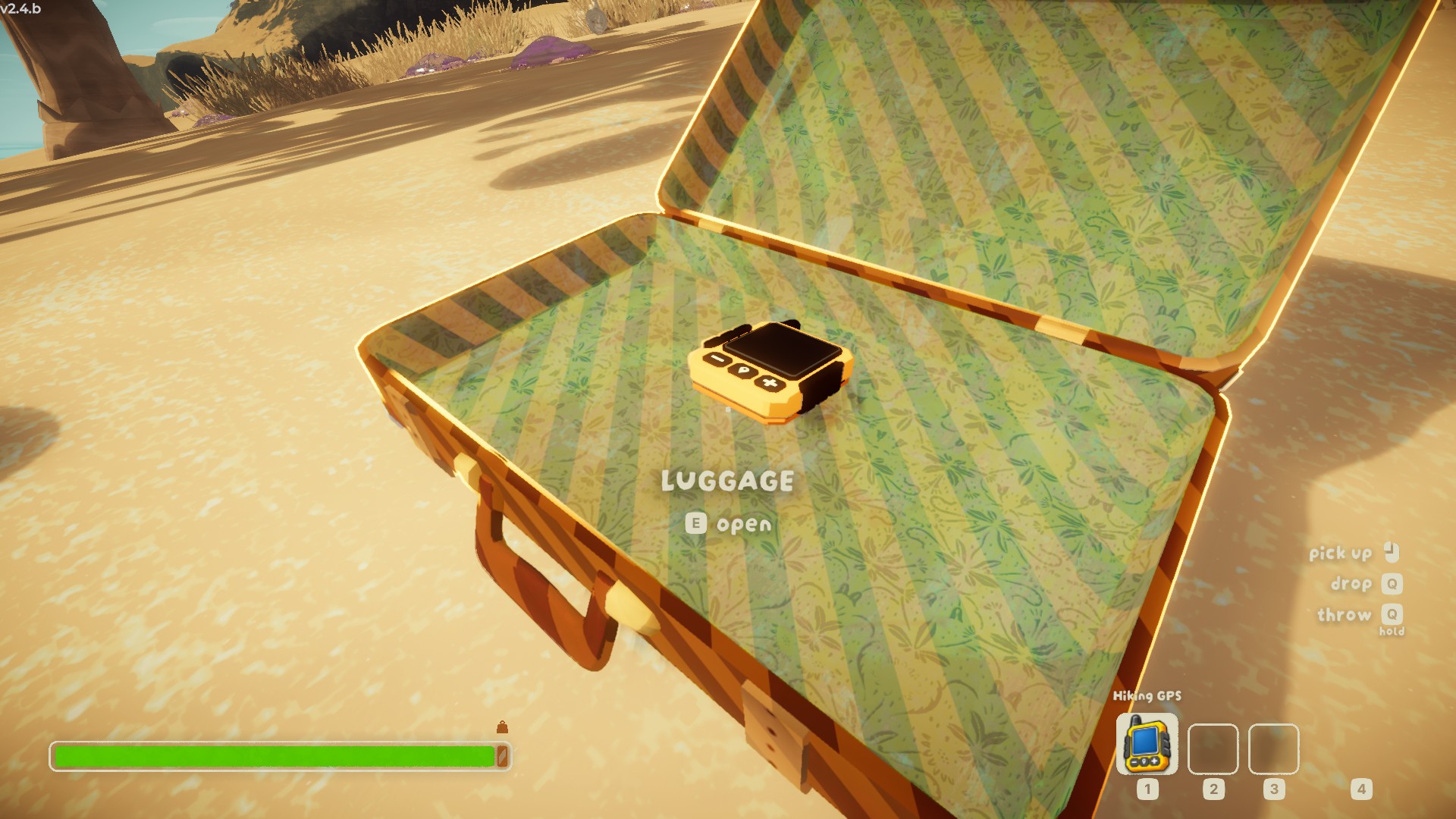
A handheld GPS you find in a suitcase and carry: a live map of the mountain on its screen, with markers for chests, campfires, statues and animals. Client side.Hiking GPS
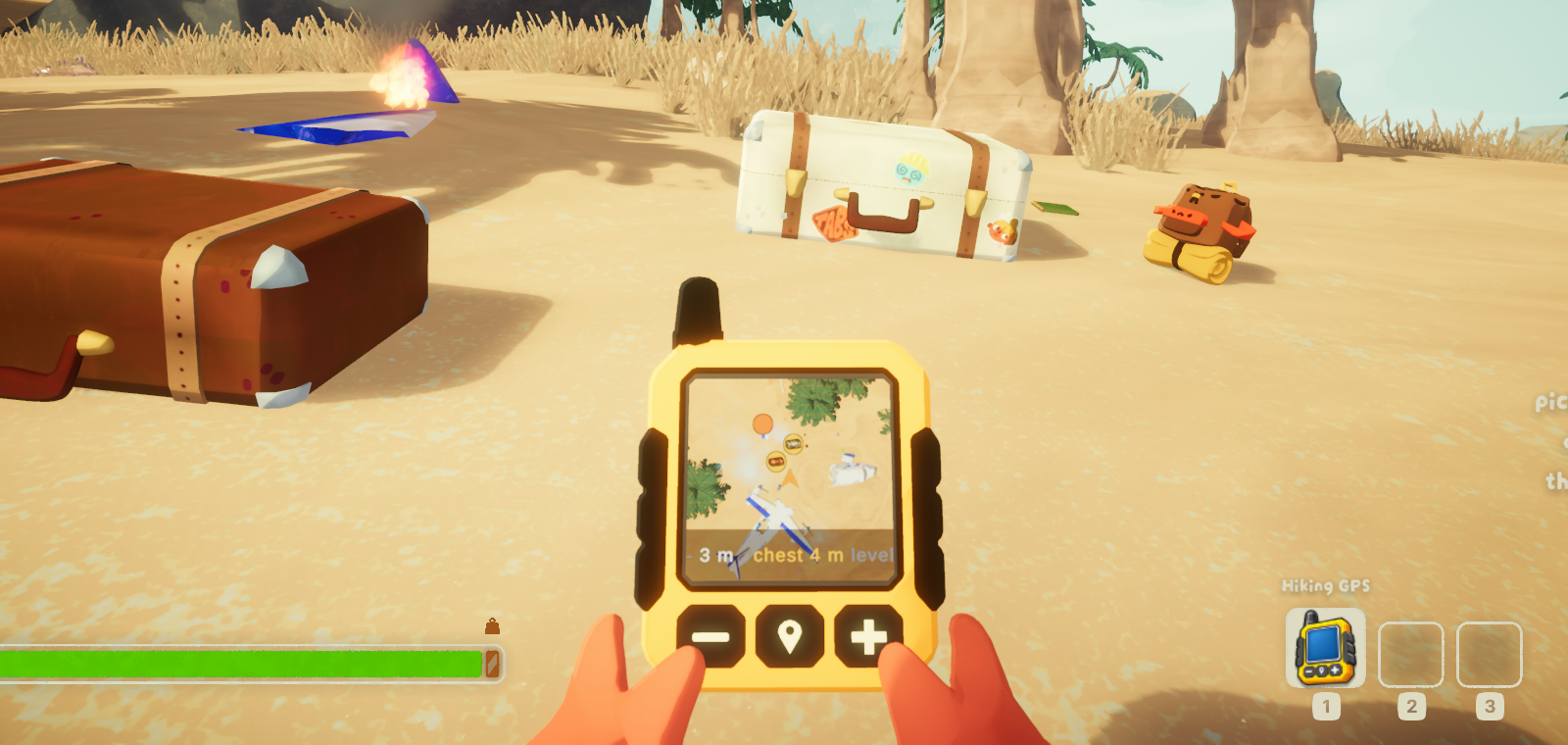
A handheld GPS for PEAK. Find it in a suitcase on the beach, hold it in both hands, and the mountain is on its screen — real terrain, drawn by the game itself, seen from above.
Client side. Only you install it. Nobody else in the lobby needs it, the host does not need it, and it changes nothing anyone else sees.
What it is
A real item. It turns up in beach luggage the way a rope or a compass does, it is picked up, carried, dropped, thrown, pocketed and hung on a backpack like anything else, and its screen is only on while it is in your hands. Put it away and it goes dark; take it out and it wakes where you left it, at the zoom you chose.
What it shows
- The real mountain. Not a redrawn diagram: a camera looking down at the world you are standing in, so what is on the screen is what is under you.
- Chests, campfires, statues, belltowers, capybaras and the scoutmaster, each drawn as a picture of itself rather than a coloured dot. Opened chests disappear, so the map only points at loot that is still there.
- Height, which is what PEAK is about. A marker grows and lightens above you and shrinks and darkens below — thirty metres sideways and thirty metres up are nothing alike on this mountain.
- Everyone else on the climb, at any distance.
- Your altitude and the distance to the nearest unopened chest.
No game assets ship with this mod
The device is modelled and drawn for the mod. Every marker icon is photographed from your own copy of the game, once, the first time you see that kind of thing — so the pictures always match the version you have, and nothing of PEAK's artwork travels.
Controls
| Key | |
|---|---|
= / - |
Zoom, in fixed steps from 20 m to 2000 m across |
N |
Tilt: straight down, 75°, 45° |
M |
Switch the device off and on while holding it |
The buttons on the device press when you do, and it clicks.
Install
Install it with a mod manager and the rest comes with it. By hand, it needs
BepInEx 5 (BepInExPack PEAK) and PEAKLib (PEAKLib_Items, which
brings PEAKLib_Core along) — put HikingGPS.dll into BepInEx/plugins/
beside them.
Without PEAKLib the mod still works: there is no item to find, and the same
map is pinned to a corner of the screen instead, shown with M once a run
starts. That is also what you get with Tracker/AsItem set to false.
Settings
Everything is in BepInEx/config/com.abra9987.hikinggps.cfg, written on first
launch. The ones worth knowing:
| Setting | |
|---|---|
Tracker/Rarity |
How often it turns up in luggage. Rare by default |
Tracker/SpawnPools |
Which luggage. The beach by default — a map is worth most before the climb |
Tracker/Scale |
How large the device is in the hands, as a multiple of its real size |
Tracker/MarkerScale |
How large the markers are on its screen |
Tracker/HoldX, HoldY, HoldZ, TiltDegrees |
Where it is held, relative to the head, and how far its screen leans back towards you |
Minimap/StartZoomStep |
Which zoom step it wakes on the first time |
Minimap/Icons |
Turn the photographed icons off, back to plain markers |
Sound/Volume |
The chirps and clicks; 0 for silence |
The Minimap/SizePixels, Corner and Margin settings size and place the
corner map, for when there is no item. Both top corners are clear of PEAK's own
HUD; the bottom two need MarginYPixels raised to about 95 bottom-left and 115
bottom-right.
Leave everything under Automation and Debug alone — they exist to develop
the mod, take the game over and can quit for you. All of it is off by default.
Notes
- Steam achievements keep working.
- If PEAK crashes on startup with BepInEx installed, launching with
-dx12is the usual fix. - Please do not report bugs to Aggro Crab or Landfall while running mods. Uninstall first, check the problem is still there, and only then report it.
Source and issues: github.com/abra9987/Peak-Hiking-GPS