

PeakChatTranslator
Translates PeakTextChat via Google Translate (primary) with MyMemory fallback. 100+ languages. /tr command sends only translation. /tr /w player msg for whispers.PeakChatTranslator
Português-BR | English
Automatic chat translation for PEAK (via PeakTextChat).
Screenshots
Incoming message translation
A player with Portuguese as native language receives an English message, with translation appearing below:
Settings used in screenshot:
- General → Target Language:
Portuguese (pt-BR)(your native language) - Other player writes in English → you see it translated to Portuguese automatically

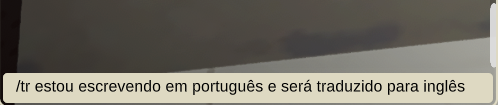
Outgoing translation (/tr command)
Type /tr followed by your message to send only the translated version:
Settings used in screenshot:
- General → Target Language:
Portuguese (pt-BR)(your native language — source) - Outgoing → Translate My Messages To:
English (en)(language others receive)
| Before (you type in your language) | After (sent to chat translated) |
|---|---|
 |
 |
How it works
Incoming messages (automatic)
- Every message from other players is automatically translated to your language
- Original message stays visible; translation appears below with
[TR-XX]prefix - Configure: General → Target Language = your native/preferred language
Outgoing messages (command /tr)
- Type
/tr your message→ sends only the translated version (original is blocked) - Source language = General → Target Language (your language)
- Target language = Outgoing → Translate My Messages To (what others receive)
- Works for any language pair supported by Google Translate/MyMemory
Whisper translation (TinyTweaks)
/tr /w player message→ sends only translated whisper to target- Purple formatting with
(secret msg for you)matching TinyTweaks style
Settings (Mod Config)
| Section | Option | Type | Default |
|---|---|---|---|
| General | Enabled | Toggle | On |
| General | Target Language | Dropdown (100+ langs) | English (en) |
| Display | Translation Prefix | String | TR |
| Display | Translation Color | Hex | #7FC8FF |
| Outgoing | Translate My Messages To | Dropdown (100+ langs) | English (en) |
Quick setup guide
- General → Target Language = the language YOU read/write in (your native language)
- Outgoing → Translate My Messages To = the language OTHERS should receive your messages in
- Use
/tr messageto send translated messages - Use
/tr /w player messagefor translated whispers
Features
- 100+ languages via Google Translate (primary) with MyMemory fallback (free, no API key)
- Automatic incoming translation + manual outgoing via
/tr - Whisper translation with TinyTweaks integration
- Double-translation prevention when both parties have the mod
- Asian language support: Korean, Japanese, Chinese, Russian, Arabic, Hindi, Thai, Vietnamese, etc.
Dependencies
- BepInExPack_PEAK
- PeakTextChat
- Optional: TinyTweaks (for
/wwhispers)
Installation
- Install dependencies above via Thunderstore/Gale
- Download
afxgg-PeakChatTranslator-0.2.5.zipfrom Thunderstore - Install via Gale or extract to
BepInEx/plugins/
Local Build
dotnet build -c Release
# DLL at artifacts/bin/PeakChatTranslator/release/Gordoni.PeakChatTranslator.dll
# Thunderstore package at artifacts/thunderstore/release/
Credits / AI Disclosure
This project was developed almost entirely with AI.
- Tool: opencode (software engineering CLI)
- Model: Nemotron 3 Ultra Free (NVIDIA)
- All C# code, Harmony patches, BepInEx/Photon integration, configs, ThunderPipe build/packaging, and documentation were generated/iterated via opencode prompts.
- AI analyzed base mods (PeakTextChat, TinyTweaks) to properly integrate via public APIs and Photon events.
Human contribution: requirements review, in-game testing, UX decisions (dropdowns, commands, colors), publishing.
License
GPLv3 — see LICENSE.