

BetterRagdollEnhanced
An enhanced continuation of BetterRagdoll: ragdoll on demand, hold to stay down, carry your momentum, and physically side-roll on the ground with mouse or controller.BetterRagdollEnhanced


Based on BetterRagdoll by Luluberlu.
English
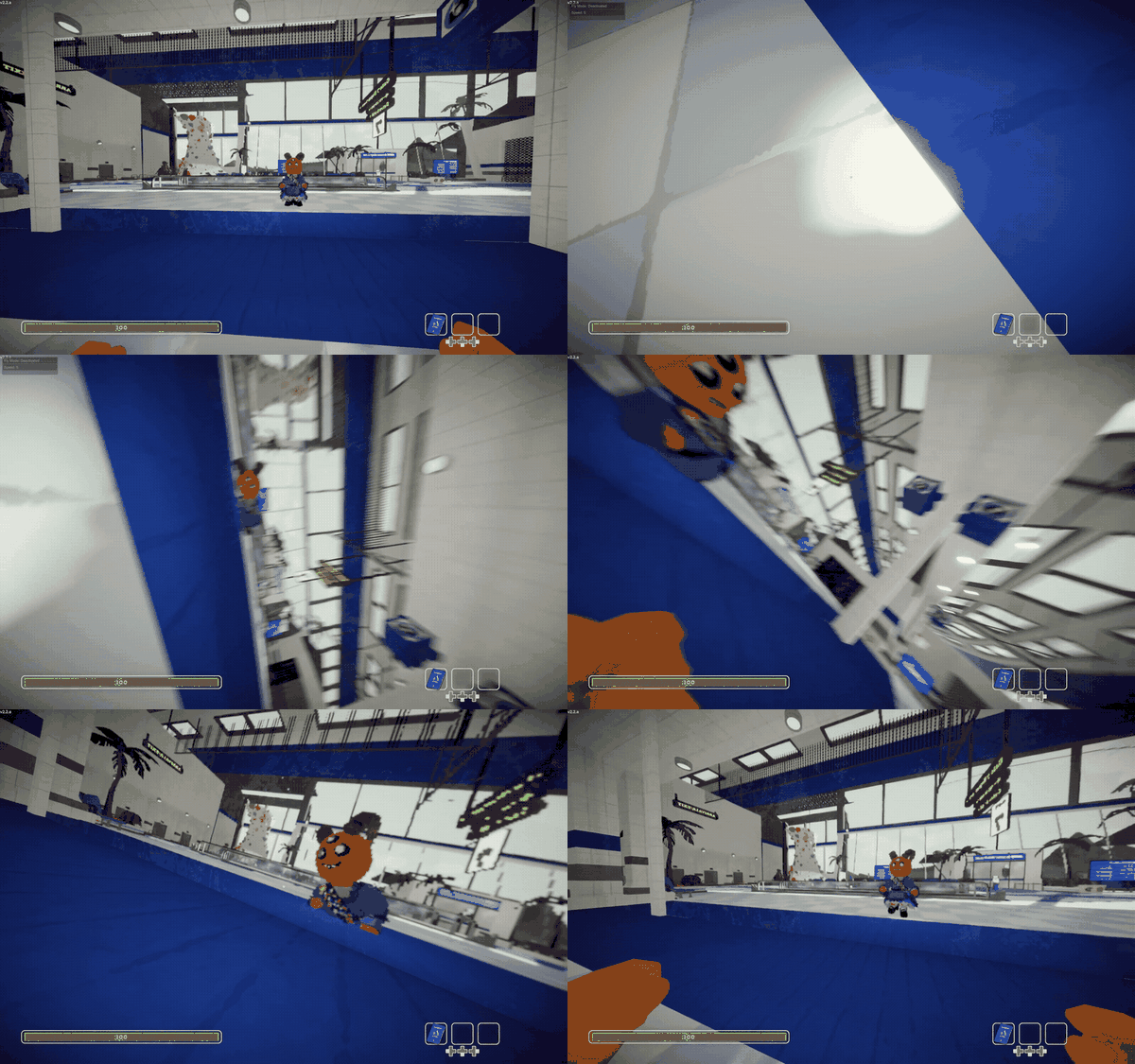
BetterRagdollEnhanced lets you press X on keyboard or LB on controller to ragdoll with a push in your current movement direction. Hold the button to stay ragdolled, move the mouse horizontally to roll, then release it to get back up.
The project originally aimed to provide more flexible movement while ragdolled, but stable physical control across different poses and ground contacts proved more complex than expected. For now, the scope is intentionally limited to grounded side rolling, with broader movement deferred.
Highlights
- Ragdoll on demand: Tap the configured key to enter a short, responsive ragdoll.
- Movement-based push: Moving characters receive a push in their current velocity direction.
- Hold to stay down: Keep holding the key to remain ragdolled without sending an RPC every frame.
- Physical side rolling: Move the mouse or right stick horizontally to roll the ragdoll clockwise or counterclockwise without restoring normal character control.
- Keyboard, mouse, and controller support: Uses PEAK's current Unity Input System with configurable X/LB defaults.
Installation
Install with Thunderstore Mod Manager or r2modman, or place BetterRagdollEnhanced.dll directly in PEAK's BepInEx/plugins/BetterRagdollEnhanced directory. BetterRagdollEnhanced requires BepInEx 5.
BetterRagdollEnhanced replaces the original BetterRagdoll. Remove BetterRagdoll.dll before installing; the two plugins are declared incompatible and should not be loaded together.
Controls
| Action | Keyboard | Controller |
|---|---|---|
| Trigger a short ragdoll | X |
LB |
| Stay ragdolled | Hold X |
Hold LB |
| Roll while ragdolled | Move mouse left / right | Right stick left / right |
The short-press behavior intentionally preserves the original feel: the fall lasts 0.5 seconds, the default push force is 322, and the push uses the character's full average velocity direction.
While grounded, move the mouse or right stick horizontally to roll toward the matching screen side. Direction stays stable as the body and camera turn. Rolling is available only during a ragdoll started by BetterRagdollEnhanced; ordinary falls, knockouts, death, and airborne movement remain uncontrolled.
Ragdoll input pauses while a menu or input wheel is open. If the key is held while input becomes blocked, release it before triggering ragdoll again.
Configuration
The config file is generated at BepInEx/config/com.github.lllei.BetterRagdollEnhanced.cfg.
| Key | Default | Description |
|---|---|---|
Settings.Ragdoll Force |
322 |
Push force applied when ragdoll starts while moving |
Settings.Keyboard Ragdoll Key |
<Keyboard>/x |
Input System control path for the keyboard or mouse trigger |
Settings.Gamepad Ragdoll Key |
<Gamepad>/leftShoulder |
Input System control path for the controller trigger (LB by default) |
Ragdoll Movement.Enabled |
true |
Enable grounded rolling during ragdolls triggered by this mod |
Ragdoll Movement.Roll Acceleration |
30 |
Maximum angular-speed change per second (0 to 200) |
Ragdoll Movement.Max Roll Speed |
4 |
Target side-roll speed in radians per second (0.1 to 15) |
Ragdoll Movement.Mouse Roll Sensitivity |
2 |
Horizontal mouse input scale (0 disables mouse rolling, up to 2) |
Ragdoll Movement.Mouse Roll Strength |
5 |
Mouse-only roll acceleration multiplier (0 disables mouse rolling, up to 10) |
Ragdoll Movement.Gamepad Roll Sensitivity |
1 |
Horizontal right-stick input scale (0 disables gamepad rolling, up to 2) |
Ragdoll Movement.Gamepad Roll Strength |
3 |
Right-stick roll acceleration multiplier (0 disables gamepad rolling, up to 10) |
Sensitivity controls how much mouse or right-stick movement reaches full roll input. Strength controls how quickly that device accelerates the ragdoll toward the configured roll speed. Both inputs are clamped to the same -1 to 1 range before reaching the motor, but mouse delta is an impulse while right-stick position is continuous, so their tuned values intentionally differ.
Common Input System paths are <Keyboard>/x, <Mouse>/backButton, <Mouse>/forwardButton, <Gamepad>/buttonSouth for A, <Gamepad>/buttonEast for B, <Gamepad>/buttonWest for X, <Gamepad>/buttonNorth for Y, <Gamepad>/leftShoulder for LB, and <Gamepad>/rightShoulder for RB.
Differences from BetterRagdoll
| Area | BetterRagdoll 1.0.7 | BetterRagdollEnhanced 1.2.0 |
|---|---|---|
| Current PEAK support | Uses the former one-argument fall RPC | Uses PEAK 2.2.a's current two-argument fall RPC |
| Hold behavior | Sends a fall RPC every frame after the hold delay | Renews only when the ragdoll timer is nearly expired |
| Game events | Calls the Photon RPC directly | Uses PEAK's normal fall entry point for the initial event |
| Logging | Writes detailed gameplay messages repeatedly | Logs startup and compatibility failures only |
| Ragdoll movement | No movement while forced ragdoll control is zero | Grounded mouse and right-stick side rolling with stable per-session direction |
The default initial force, short fall duration, movement threshold, configurable keys, and X/LB control scheme remain intentionally close to the original mod. Grounded side rolling adds only contact-coupled center and orbital velocity; the initial push, slopes, and collisions still contribute to translational motion.
Compatibility notes
Only the player using BetterRagdollEnhanced needs to install it. The mod uses PEAK's existing fall RPC and character synchronization rather than custom network messages. Other players can continue to observe the ragdoll through the game's normal networking.
The plugin fails closed when PEAK's UI input gate is unavailable, preventing accidental activation through menus after incompatible game updates. If the movement-force method changes, ragdoll still works but the initial push is disabled and an error is logged.
Building
Copy PeakGameDir.props.example to the gitignored PeakGameDir.props and set the PEAK directory, or set PEAK_GAME_DIR.
dotnet build BetterRagdollEnhanced.slnx -c Release
dotnet test BetterRagdollEnhanced.slnx -c Release
dotnet msbuild src\BetterRagdollEnhanced\BetterRagdollEnhanced.csproj -t:Deploy -p:Configuration=Debug
dotnet msbuild src\BetterRagdollEnhanced\BetterRagdollEnhanced.csproj -t:PackageThunderstore -p:Configuration=Release
dotnet msbuild src\BetterRagdollEnhanced\BetterRagdollEnhanced.csproj -t:PublishThunderstore -p:Configuration=Release
Normal builds never write to the game directory. Deploy and PublishThunderstore are explicit. Packaging writes artifacts/BetterRagdollEnhanced-<version>.zip and stops if manifest.json does not match the project version. Publishing restores the repository-local TCLI version and reads authentication from TCLI_AUTH_TOKEN. The BepInEx plugin version is generated from the project version during compilation.
Acknowledgements
The original BetterRagdoll concept and implementation were created by Luluberlu. BetterRagdollEnhanced maintains that experience for current PEAK versions and provides a clear foundation for further improvements.
中文
BetterRagdollEnhanced 允许你按下键盘 X 或手柄 LB 主动进入布娃娃状态,并沿当前移动方向获得一段推力。按住按键可以持续保持布娃娃状态,水平移动鼠标即可翻滚,松开后会自然起身。
本项目最初希望提供更灵活的布娃娃移动,但要在不同姿态和地面接触情况下保持稳定的物理控制,其复杂度超出了预期。因此当前版本暂时收敛到接地侧翻,其他移动方式留待后续再考虑。
功能亮点
- 随时主动倒地: 按下配置键即可进入短暂且响应迅速的布娃娃状态。
- 沿移动方向获得推力: 角色正在移动时,会沿当前平均速度方向获得推力。
- 按住保持倒地: 按住按键即可持续倒地,并且不会像原版一样每帧发送 RPC。
- 物理侧身翻滚: 水平移动鼠标或右摇杆,让布娃娃顺时针或逆时针翻滚,同时保持完整布娃娃状态。
- 支持键盘、鼠标和手柄: 使用 PEAK 当前的 Unity Input System,默认按键为 X 和 LB,也可以在配置中修改。
安装
可以通过 Thunderstore Mod Manager 或 r2modman 安装,也可以将 BetterRagdollEnhanced.dll 放入 PEAK 的 BepInEx/plugins/BetterRagdollEnhanced 目录。BetterRagdollEnhanced 需要 BepInEx 5。
BetterRagdollEnhanced 用于替代原版 BetterRagdoll。安装前请移除 BetterRagdoll.dll;两个插件已声明互不兼容,不应同时加载。
操作方法
| 操作 | 键盘 | 手柄 |
|---|---|---|
| 触发短暂倒地 | X |
LB |
| 持续保持倒地 | 按住 X |
按住 LB |
| 布娃娃期间翻滚 | 鼠标向左 / 向右移动 | 右摇杆向左 / 向右 |
短按手感有意保持原版设计:倒地持续 0.5 秒,默认推力为 322,推力方向使用角色完整的平均速度方向。
接地时,水平移动鼠标或右摇杆即可向画面对应方向翻滚;身体或相机转动后,翻滚方向仍会保持稳定。只有由 BetterRagdollEnhanced 主动触发的倒地可以控制,普通摔倒、昏迷、死亡和空中状态均不可控制。
菜单或操作轮盘打开时会暂停 BetterRagdollEnhanced 输入。如果按键在输入被阻止时仍处于按住状态,需要先松开才能再次触发。
配置
配置文件生成于 BepInEx/config/com.github.lllei.BetterRagdollEnhanced.cfg。
| 配置项 | 默认值 | 说明 |
|---|---|---|
Settings.Ragdoll Force |
322 |
开始倒地时沿移动方向施加的推力 |
Settings.Keyboard Ragdoll Key |
<Keyboard>/x |
用于键盘或鼠标触发的 Input System 控件路径 |
Settings.Gamepad Ragdoll Key |
<Gamepad>/leftShoulder |
用于手柄触发的 Input System 控件路径,默认对应 LB |
Ragdoll Movement.Enabled |
true |
是否允许在本 Mod 触发的倒地期间接地翻滚 |
Ragdoll Movement.Roll Acceleration |
30 |
每秒最大角速度变化量,范围 0 到 200 |
Ragdoll Movement.Max Roll Speed |
4 |
目标侧翻角速度,单位为弧度每秒,范围 0.1 到 15 |
Ragdoll Movement.Mouse Roll Sensitivity |
2 |
鼠标水平输入倍率,设为 0 可禁用,最大为 2 |
Ragdoll Movement.Mouse Roll Strength |
5 |
仅用于鼠标输入的翻滚加速度倍率,设为 0 可禁用,最大为 10 |
Ragdoll Movement.Gamepad Roll Sensitivity |
1 |
右摇杆水平输入倍率,设为 0 可禁用,最大为 2 |
Ragdoll Movement.Gamepad Roll Strength |
3 |
右摇杆翻滚加速度倍率,设为 0 可禁用,最大为 10 |
灵敏度决定移动多少鼠标或右摇杆会达到完整翻滚输入,强度决定该设备把布娃娃加速到目标翻滚速度的快慢。两路输入进入电机前都会限制在 -1 到 1,但鼠标 delta 是一次性脉冲、右摇杆位置是持续输入,因此两组调校值有意保持不同。
常见 Input System 路径:键盘 X 为 <Keyboard>/x,鼠标后退侧键为 <Mouse>/backButton,前进侧键为 <Mouse>/forwardButton;手柄 A 为 <Gamepad>/buttonSouth,B 为 <Gamepad>/buttonEast,X 为 <Gamepad>/buttonWest,Y 为 <Gamepad>/buttonNorth,LB 为 <Gamepad>/leftShoulder,RB 为 <Gamepad>/rightShoulder。
与原版 BetterRagdoll 的差别
| 对比项 | BetterRagdoll 1.0.7 | BetterRagdollEnhanced 1.2.0 |
|---|---|---|
| 当前 PEAK 支持 | 使用旧版单参数倒地 RPC | 使用 PEAK 2.2.a 当前的双参数倒地 RPC |
| 长按行为 | 超过长按延迟后每帧发送倒地 RPC | 仅在倒地计时即将结束时续期 |
| 游戏事件 | 直接调用 Photon RPC | 首次倒地通过 PEAK 正常入口触发 |
| 日志 | 重复输出详细游玩信息 | 只记录启动信息和兼容性错误 |
| 布娃娃移动 | 强制布娃娃控制为零时无法移动 | 接地时可通过鼠标或右摇杆稳定控制侧翻方向 |
默认初始推力、短按倒地时间、移动阈值、可配置按键以及 X/LB 操作方式均有意保持接近原版。接地侧翻只补充与接触点耦合的质心和轨道速度;初始推力、斜坡和碰撞仍会共同决定角色位移。
兼容性说明
只有使用者需要安装 BetterRagdollEnhanced。Mod 使用 PEAK 现有的倒地 RPC 和角色同步,不添加自定义网络消息,其他玩家仍可通过游戏正常网络同步看到布娃娃状态。
如果未来版本不再提供 PEAK 的 UI 输入 gate,插件会停止接受倒地输入,避免菜单误触发;如果移动推力方法发生变化,倒地功能仍可使用,但初始推力会被禁用并记录错误。
构建
把 PeakGameDir.props.example 复制为已被忽略的 PeakGameDir.props 并填写 PEAK 目录,或设置 PEAK_GAME_DIR。
dotnet build BetterRagdollEnhanced.slnx -c Release
dotnet test BetterRagdollEnhanced.slnx -c Release
dotnet msbuild src\BetterRagdollEnhanced\BetterRagdollEnhanced.csproj -t:Deploy -p:Configuration=Debug
dotnet msbuild src\BetterRagdollEnhanced\BetterRagdollEnhanced.csproj -t:PackageThunderstore -p:Configuration=Release
dotnet msbuild src\BetterRagdollEnhanced\BetterRagdollEnhanced.csproj -t:PublishThunderstore -p:Configuration=Release
普通构建不会覆盖游戏文件,只有显式调用 Deploy 或 PublishThunderstore 才会部署或发布。打包输出位于 artifacts/BetterRagdollEnhanced-<version>.zip,并会校验 manifest.json 与项目版本是否一致;发布时会还原仓库固定的 TCLI 版本,并从 TCLI_AUTH_TOKEN 读取认证令牌。BepInEx 插件版本会在编译时根据项目版本自动生成。
致谢
原版 BetterRagdoll 的创意和实现来自 Luluberlu。BetterRagdollEnhanced 用于在当前 PEAK 版本中维护这一体验,并为后续增强功能提供清晰基础。