

FreeGhost
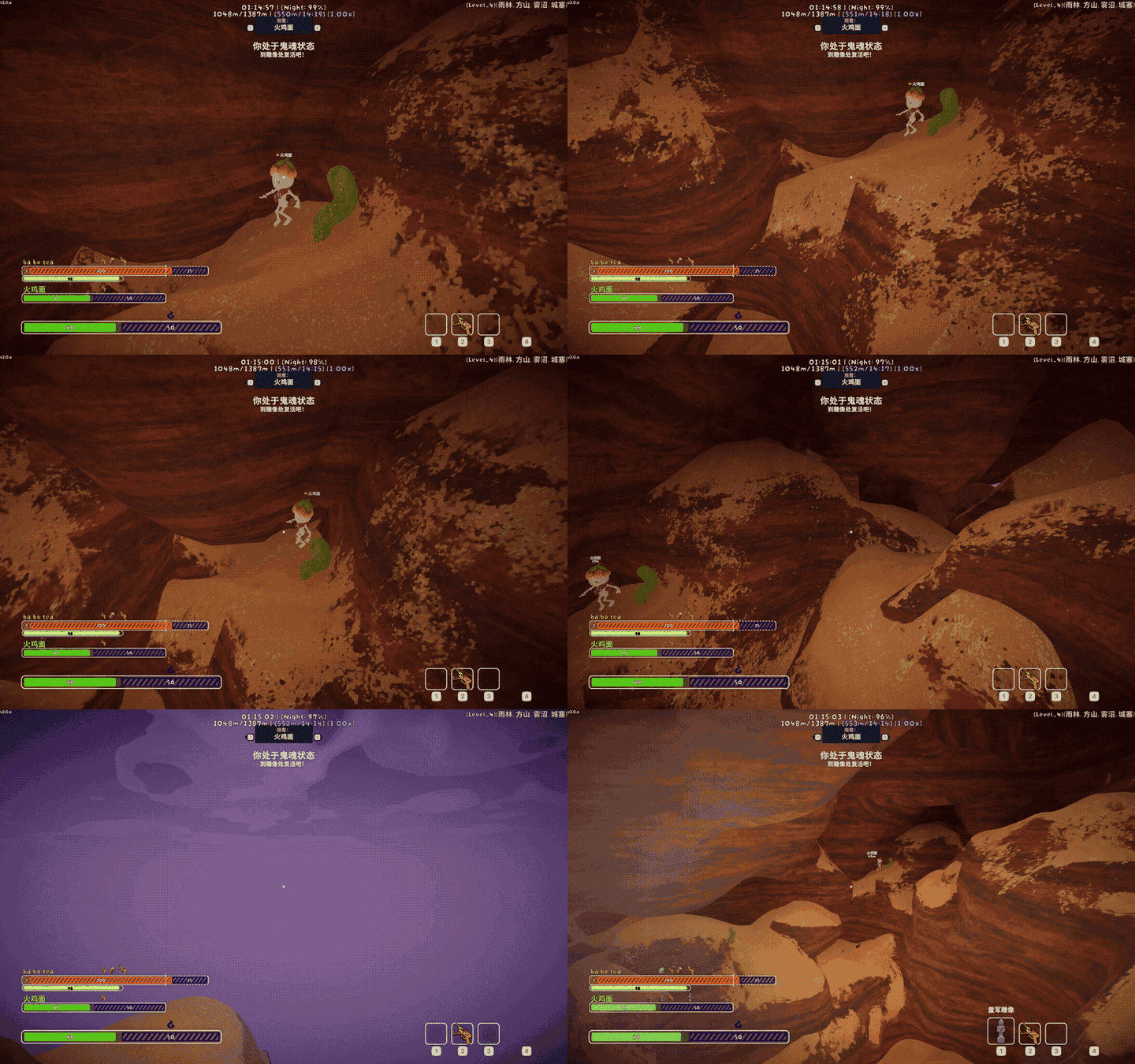
First-person free-flight ghost mode with vanilla-client position synchronization.FreeGhost


Recommended companion mod / 推荐搭配使用:EnhancedPing
English
FreeGhost turns PEAK's Ghost into a first-person free-flight mode after you die, while remaining fully client-side.
Highlights
- Fly freely after death: Explore the area in first person without collisions.
- Natural controls: Move, look, ascend, descend, and sprint using your current PEAK bindings.
- Switch anytime: Press
Ror the gamepad north face button to toggle between free flight and PEAK's normal spectate camera. - Visible to other players: Your Ghost position is synchronized using the game's existing networking.
- No team-wide install required: Only the player using FreeGhost needs the mod.
Installation
Install with Thunderstore Mod Manager or r2modman, or place FreeGhost.dll directly in PEAK's BepInEx/plugins directory. FreeGhost requires BepInEx 5.
Controls
| Action | Input |
|---|---|
| Move | PEAK's movement input |
| Look | PEAK's look input |
| Ascend | Jump |
| Descend | Crouch |
| Move faster | Sprint |
| Toggle free flight | R / gamepad north face button by default |
Movement follows the camera's horizontal direction. Looking up or down does not change the movement plane; use Jump and Crouch to control altitude. Your in-game keyboard, mouse, and controller bindings continue to work.
By default, each Ghost session starts with PEAK's normal spectate camera. Set General.Default Mode to Free to start in free-flight mode instead. In either case, press the toggle shortcut to switch modes without changing the current spectate target; entering free flight resumes from the current camera position.
Free flight is limited to a configurable radius around the position where you entered the mode. The default radius is 1 km. Movement and mode switching pause while a menu is open, the game is paused, or player input is otherwise blocked.
Configuration
The config file is generated at BepInEx/config/com.github.lllei.FreeGhost.cfg.
| Key | Default | Allowed range |
|---|---|---|
General.Enabled |
true |
boolean |
General.Default Mode |
Normal |
Free or Normal |
Movement.Base Speed |
8.0 |
0.1 to 1000 m/s |
Movement.Sprint Multiplier |
2.5 |
1 to 20 |
Movement.Max Distance |
1000 |
10 to 10000 m |
Movement.Mode Toggle Keyboard Path |
<Keyboard>/r |
Unity Input System button path |
Movement.Mode Toggle Gamepad Path |
<Gamepad>/buttonNorth |
Unity Input System button path |
Networking.Sync To Vanilla Clients |
true |
boolean |
Invalid numeric values are clamped or replaced with safe defaults at runtime. Both toggle bindings accept Unity Input System button paths. <Gamepad>/buttonNorth is Xbox Y, PlayStation Triangle, or Nintendo X.
Compatibility notes
Only the player using FreeGhost needs to install it. Other players can see the moving Ghost without installing the mod, and FreeGhost does not add custom network messages.
Building
Copy PeakGameDir.props.example to the gitignored PeakGameDir.props and set the PEAK directory, or set PEAK_GAME_DIR.
dotnet test tests\FreeGhost.Core.Tests\FreeGhost.Core.Tests.csproj -c Release
dotnet build FreeGhost.sln -c Release
dotnet msbuild src\FreeGhost\FreeGhost.csproj -t:Deploy -p:Configuration=Debug
dotnet msbuild src\FreeGhost\FreeGhost.csproj -t:PackageThunderstore -p:Configuration=Release
Normal builds never write to the game directory. Deploy is explicit. Packaging writes artifacts/lllei-FreeGhost-<version>.zip.
For a release, update Version in FreeGhost.csproj and version_number in manifest.json. Packaging stops if the manifest and compiled DLL versions do not agree.
中文
FreeGhost 会在你死亡后把 PEAK 的 Ghost 变成第一人称自由飞行模式,并且只需本地安装。
功能亮点
- 死亡后自由飞行: 以第一人称无碰撞探索周围区域。
- 沿用游戏操作: 移动、视角、升降和加速都使用 PEAK 当前的按键绑定。
- 随时切换: 按
R或手柄北侧面键即可在自由飞行和原版观战相机之间切换。 - 其他玩家可见: Ghost 位置通过游戏现有的网络同步显示给其他玩家。
- 无需全队安装: 只有使用 FreeGhost 的玩家需要安装本 Mod。
安装
可以通过 Thunderstore Mod Manager 或 r2modman 安装,也可以将 FreeGhost.dll 直接放入 PEAK 的 BepInEx/plugins 目录。FreeGhost 需要 BepInEx 5。
操作方法
| 操作 | 输入 |
|---|---|
| 移动 | PEAK 的移动输入 |
| 观察 | PEAK 的视角输入 |
| 上升 | 跳跃 |
| 下降 | 蹲下 |
| 加速 | 冲刺 |
| 切换自由飞行 | 默认 R / 手柄北侧面键 |
前后左右沿相机朝向的水平面移动;俯视和仰视不会改变移动平面,使用跳跃和蹲下来控制高度。重新绑定后的键盘、鼠标和手柄输入均可正常使用。
每次生成 Ghost 后默认进入 PEAK 原版观战模式。将 General.Default Mode 设为 Free 后,则会默认进入自由飞行。无论默认模式是哪一种,都可以按下切换键在两种模式之间切换,并保留当前观战目标;进入自由飞行时,会从当前相机位置开始移动。
自由飞行范围以每次进入该模式时的位置为中心,默认半径为 1 km,可以在配置中修改。菜单打开、游戏暂停或玩家输入被阻止时,移动和模式切换会暂停。
配置
配置文件生成于 BepInEx/config/com.github.lllei.FreeGhost.cfg。通过 General.Default Mode 可以选择死亡后默认进入 Free(自由飞行)或 Normal(原版观战)模式。Movement.Mode Toggle Keyboard Path 和 Movement.Mode Toggle Gamepad Path 使用 Unity Input System control path;默认手柄路径 <Gamepad>/buttonNorth 对应 Xbox Y、PlayStation 三角键或 Nintendo X。其他配置键、默认值和范围见英文表格。非法数值会在运行时钳制或回退到安全值。
兼容性说明
只有使用者需要安装 FreeGhost。其他玩家无需安装也能看到移动的 Ghost,并且 FreeGhost 不会添加自定义网络消息。
构建
把 PeakGameDir.props.example 复制为已被忽略的 PeakGameDir.props 并填写 PEAK 目录,或设置 PEAK_GAME_DIR。普通构建不会覆盖游戏文件,只有显式 Deploy 目标会部署。发布时同时更新 FreeGhost.csproj 的 Version 和 manifest.json 的 version_number;打包时会校验 manifest 与 DLL 版本是否一致。构建、部署和打包命令见英文构建章节。