PingItems
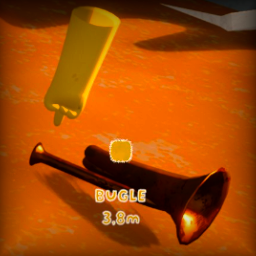
A mod for PEAK that adds visual i5. Content Display: Shows item name, distance, and uses proper localization
6. Event-driven Cleanup: Highlights automatically disappear instantly when items are picked up, consumed, or destroyed
7. Re-ping Support: Items can be pinged again after highlights expire or are removed
8. Real-time Distance Updates: Distance updates smoothly as you move around (configurable sensitivity)
9. Smooth Fade: Indicators smoothly fade out after the display durationators when pinging near items in the game world.
Features
- Visual Item Indicators: Colored reticles appear above items when pinged nearby
- Player Color Integration: Indicators use the pinging player's color
- Localized Item Names: Shows proper item names in your current language
- Distance Information: Displays distance to items
- Smooth Fade Effects: 5-second visibility with 1-second fade-out
- Configurable Settings: Customize detection radius, visual effects, and more
Installation
- Ensure you have BepInEx installed for PEAK
- Download the latest release of PingItems
- Extract
PingItems.dll to your BepInEx/plugins folder
- Launch PEAK
Configuration
The mod creates a configuration file at BepInEx/config/com.memiczny.peak.pingitems.cfg with the following options:
Display Settings
- Duration: How long indicators remain visible (default: 5.0 seconds)
- FadeOutDuration: Duration of fade-out animation (default: 1.0 seconds)
- ReticleScale: Size multiplier for reticles (default: 6.0x)
- LabelFontSize: Font size for item labels (default: 32)
Detection Settings
- Radius: Maximum distance to detect items from ping (default: 3.0 units)
- ShowDistance: Whether to show distance information (default: true)
- ShowItemNames: Whether to show localized item names (default: true)
- DistanceUpdateThreshold: Distance change threshold for updates (default: 0.1 meters, lower = more sensitive)
Visual Effects
- EnableOutlines: Enable outline effects on text and reticles (default: true)
- OutlineWidth: Width of text outline effect (default: 0.1)
Debug Options
- DebugDistanceUpdates: Enable debug logging for distance updates (default: false)
How It Works
- Ping Detection: When you or another player creates a ping, the mod automatically detects nearby items
- Visual Indicators: Indicators appear above detected items for the configured duration
- Player Colors: Indicators show the actual pinging player's color (works correctly in multiplayer!)
- Content Display: Shows item name, distance, and uses proper localization
- Event-driven Cleanup: Highlights automatically disappear instantly when items are picked up, consumed, or destroyed
- Re-ping Support: Items can be pinged again after highlights expire or are removed
- Smooth Fade: Indicators smoothly fade out after the display duration
Multiplayer Support
This mod is fully multiplayer compatible:
- ✅ All players with the mod see highlights when anyone pings near items
- ✅ Each highlight shows the correct color of the player who made the ping
- ✅ Works correctly across different network conditions
- ✅ No client-server desync issues
- ✅ Proper cleanup when players disconnect or items are moved
Performance Features
- Object Pooling: Reuses UI elements for optimal performance
- Event-driven Architecture: Immediate response to item state changes
- Optimized Detection: Efficient spatial queries and validation
- Memory Management: Automatic cleanup of orphaned highlights
- Configurable Settings: Adjust detection radius and visual effects as needed
Compatibility
- PEAK Version: Compatible with current PEAK versions
- Multiplayer: Fully supported - all players with the mod will see indicators in the correct pinging player's color
- Performance: Optimized with object pooling and efficient detection algorithms
Troubleshooting
Indicators Not Appearing
- Check that the detection radius is appropriate for your use case
- Ensure items are within the detection range when pinging
- Verify the mod is properly loaded in the BepInEx console
- Make sure items are on the ground (not in inventory or being held)
Can't Re-ping Items
- This should be fixed in the current version - items can be re-pinged after highlights expire
- If the issue persists, try picking up and dropping the item to reset its state
- Check the BepInEx console for any error messages
Visual Issues
- Try adjusting the ReticleScale and LabelFontSize settings
- Disable outlines if you experience rendering issues
- Check the BepInEx console for any error messages
Multiplayer Issues
- Ensure all players have the same version of the mod
- Check that player colors are displaying correctly
- Verify that highlights appear for all players when anyone pings
Performance Issues
- Reduce the detection radius if you experience lag
- Disable distance calculation or item names if needed
- Increase
DistanceUpdateThreshold to reduce update frequency (trades responsiveness for performance)
- The mod includes automatic cleanup of orphaned highlights
Distance Not Updating
- Try enabling
DebugDistanceUpdates in config to see if distance calculations are working
- The mod uses
Character.localCharacter for real-time position tracking
- Ensure you're moving far enough to trigger the threshold (default: 0.05 meters)
- Distance updates are change-detection based for optimal performance
Development
This mod is built using:
- BepInEx 5.x
- Harmony for runtime patching
- Unity UI system for visual elements
Building from Source
- Clone the repository
- Ensure you have the PEAK game references
- Build using .NET Standard 2.1
- The output DLL goes in
BepInEx/plugins
Support
For issues, suggestions, or contributions:
- Check the configuration options first
- Review the BepInEx console for error messages
- Ensure you're using compatible versions
License
This mod is released under the MIT License. See LICENSE file for details.
Changelog
Version 1.0.0
- Initial release
- Basic ping detection and highlighting
- Player color integration
- Configurable settings
- Fade-out effects
- Localized item names