PingItems
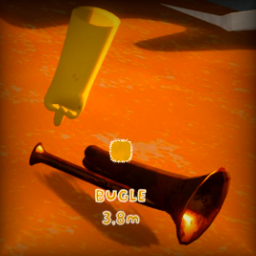
Ping items and luggage in PEAK! When you ping near items, colored indicators appear showing what's there. Perfect for pointing out loot to teammates or keeping track of items you spotted.
What it does
- Pinging: Automatically detects items near your ping location and shows visual indicators
- Ping Grouping: Groups nearby items of the same type together into single ping for cleaner display
- Player Names: See who pinged what (can be disabled)
- Item Distance: Shows how far away items are from you
- Multiplayer Ready: Everyone sees the pings with proper colors
Installation
- Install BepInEx for PEAK
- Download PingItems from releases
- Put
PingItems.dll in BepInEx/plugins
- Start the game
Configuration
Config file: BepInEx/config/com.memiczny.peak.pingitems.cfg
Main Settings
- EnableItemGrouping: Group multiple items of same type (default: true)
- GroupingRadius: How close items need to be to group together (default: 1.5m)
- ShowPlayerName: Show who made the ping (default: true)
- DetectionRadius: How far from ping to look for items (default: 1.2m)
- LuggageDetectionRadius: Detection range for luggage (default: 2.0m)
Display
- Duration: How long pings stay visible (default: 10s)
- ReticleScale: Size of the ping markers (default: 5x)
- ShowDistance: Show distance to items (default: true)
- ShowPlayerName: Show who made the ping (default: true)
- ShowItemNames: Show item names in ping markers (default: true)
How to use
Just ping normally! The mod automatically detects nearby items and shows indicators. No special controls needed.
Supported Items
- All pickup items (weapons, food, tools, etc.)
- Luggage containers
- Mirage luggage