

MintOverlay
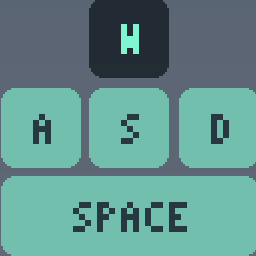
Minimal bottom-center key display with scroll wheel and labels that follow your binds, Vibecoded.MintOverlay
A minimal on-screen key display, centered at the bottom of the screen. Vibe coded. Works with AZERTY and QWERTY (VERSION: 2.1.0): pick one in the settings menu.
          \[W]
 \[SHFT]\[A]\[S]\[D]  \[^]
 \[CTRL]\[ SPACE  ]  \[v]
Soft mint keys with dark labels and rounded corners. By default the letter keys
and their labels follow your own key binds, so an AZERTY layout shows Z Q S D.
SHFT and CTRL light up for the physical keys and for whatever is bound to sprint /
crouch. The two slim keys on the right are the scroll wheel: the top one lights
up when you scroll up, the bottom one when you scroll down. Each shows how many
ticks you scrolled in a row (up to 99) and clears almost instantly after you stop
(keyoverlay\_scroll\_hold, default 0.1 seconds).
Client-side only: nobody else sees it and no server needs it.
Settings menu
Press INS in a match to open the menu, and press it again to close it. Every setting below is a row; the overlay stays visible behind the menu, so you see each change as you make it.
| Key | Does |
|---|---|
| UP / DOWN | Pick a row |
| LEFT / RIGHT | Change the value (hold to repeat on number rows) |
| ENTER | Same as RIGHT for on/off, choice and reset rows |
| INS | Open / close the menu |
The last row, RESET ALL, puts every setting back to its default.
No INS key? Bind another one in the console: bind F8 "toggle keyoverlay\_menu".
The menu is drawn by the mod itself. R5Flowstate does not let mods add pages to the game's own Settings screen, so it cannot live there.
Keyboard layout
The LAYOUT row (or keyoverlay\_layout) has three choices:
| Value | Name | Behaviour |
|---|---|---|
| 0 | AUTO | Follow your own key binds (the default, same as before) |
| 1 | QWERTY | Show W A S D and light up for those keys |
| 2 | AZERTY | Show Z Q S D and light up for those keys |
QWERTY and AZERTY ignore your binds for the four movement keys, so use AUTO if you moved to other keys.
Console variables
All of them can be changed from the menu.
| Variable | Default | What it does |
|---|---|---|
keyoverlay\_enabled |
1 | 1 = show, 0 = hide |
keyoverlay\_layout |
0 | 0 = auto (binds), 1 = QWERTY, 2 = AZERTY |
keyoverlay\_style |
0 | 0 = mint keys at rest, inverted while held. 1 = subtle dark keys, mint while held |
keyoverlay\_scale |
1.0 | Size multiplier |
keyoverlay\_xscale |
1.0 | Extra horizontal stretch (only if the keys look too wide or narrow) |
keyoverlay\_opacity |
1.0 | Overall opacity |
keyoverlay\_margin |
120 | Distance from the bottom edge (pixels at 1080p); the default sits just above the ultimate icon |
keyoverlay\_scroll\_hold |
0.1 | Seconds the scroll count stays visible after your last scroll tick |
keyoverlay\_debug |
0 | 1 = print screen sizes, key codes and presses to the console |
keyoverlay\_menu |
0 | 1 = open the settings menu, 0 = close it |
Install
Put the MintOverlay folder into mods/ in your R5Flowstate install, then
enable it in the launcher's Mods tab.
If you rename the mod id in mod.vdf, rename the entry point at the top of
cl\_keyoverlay.nut and the script folder to match
(ClientCodeCallback\_<id with dots as underscores>\_ModInit).