
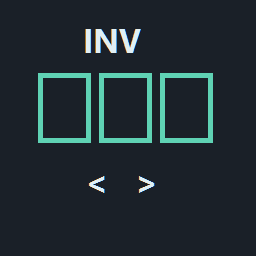
InventoryControls
Occupied-slot cycling, last-item re-equip, tap-to-store and hold-to-drop controls. Automatically supports SLRUpgradePack inventory slots when present.Inventory Controls 1.6.1
Author: ByteSizeMetal
A standalone R.E.P.O. inventory control mod. Requires BepInEx only. It works with the normal three inventory slots without SLRUpgradePack.
When SLRUpgradePack is detected, the included compatibility adapter automatically includes its unlocked extra inventory slots, up to nine total. No separate patch, toggle, or installation is needed. If SLR is absent, disabled or its optional API cannot be read, the base controls continue to work with vanilla slots.
Controls
| Action | Keyboard default | Controller default |
|---|---|---|
| Cycle Left | [ |
D-pad left |
| Cycle Right | ] |
D-pad right |
| Put Away | Backquote | D-pad down |
Remap in REPOConfig → Inventory Controls, under Bindings - Cycle Left, Bindings - Cycle Right, and Bindings - Put Away. Put Away is the unequip / re-equip action: tap to store what is in hand, tap with empty hands to re-equip the last used item, or hold to drop a held item.
Set General → Hold to drop seconds to adjust the hold threshold (default 0.4 seconds, range 0.1–2 seconds). A tap stores or re-equips on button release; a hold drops once when the threshold is reached. Releasing after a drop does nothing. Holding with empty hands does nothing. A mouse-wheel binding always acts as an immediate tap because a wheel pulse cannot be held.
Each action has these editable dropdowns:
- Keyboard / Mouse Key — choose a key, or Mouse0–Mouse4; None disables this binding.
- Keyboard Modifier and Keyboard Modifier 2 — optional held keys for a chord.
- Controller button — choose a D-pad direction, face button, shoulder, trigger or stick press.
- Controller modifier — optional controller button that must also be held.
- Mouse wheel — None, Up or Down.
Changes apply immediately. Controller face directions are South = Xbox A / PlayStation Cross, East = B / Circle, West = X / Square, North = Y / Triangle.
Version 1.1.1 uses enum settings because REPOConfig 1.2.7 does not display BepInEx KeyboardShortcut structs. Existing keyboard keys and the first two modifiers seed the new visible settings, while existing controller settings are preserved. The old Keyboard or mouse entry remains only for migration. REPOConfig is optional; the configuration file can also be edited while the game is closed.
- Both cycle directions skip empty slots and wrap around. With empty hands, cycling starts one occupied slot left or right of the re-equip position; it does not select the remembered item first. For example, if slot 2 is remembered and slots 1–3 are occupied, unarmed Cycle Right draws slot 3 and Cycle Left draws slot 1.
- Tap Put Away with empty hands to re-equip the last held inventory item, including items selected through normal vanilla/SLR slot keys. Memory follows the item's current slot if it is rearranged. If it was dropped, consumed, removed, locked or is still busy, another unlocked, settled hotbar item becomes the ready target: prefer the old position if occupied, then search right with wrapping. With no prior selection, the first ready occupied slot becomes the target. Unarmed cycling moves one occupied slot beyond this current target in the chosen direction.
- Tap Put Away to store a compatible held item in the first free unlocked slot, from left to right. First-time world pickups need no prior hotbar assignment; if the grab is still starting, storage waits for it to finish.
- Hold Put Away to release the held item normally, leaving it out of the hotbar. Stored items in other slots remain untouched. This also releases held objects that cannot be stored.
- Cycle switching returns the held item to its original slot when possible, waits for storage confirmation, then draws the next item. Repeated presses are queued.
- A full inventory or a held object that cannot go in inventory leaves the object in hand when tapping, cycling or pressing a slot key. Only an explicit hold requests a drop.
- Number and SLR slot keys swap items instead of dropping what you hold. It goes back to its slot, then the new item comes out. Turn this off with General → Never drop from slot keys.
- Letting go of grab, damage and physics still drop items as normal.
- Cycling a single already-held item leaves it held. With empty hands and just one stored item, cycling wraps back to that item.
- Menus, text entry, spectating, death, focus loss and disabled gameplay input cancel pending actions. A replaced held item or disconnected input device cancels the tap/hold gesture. Normal direct-slot commands remain available and cancel pending cycle commands.
When one of these actions fires, the mod suppresses vanilla/SLR direct-slot handling for that frame to avoid selecting twice on one press. Put Away also suppresses direct-slot handling during its hold and release. Other gameplay actions on the same physical button, such as an ability or item use, should be rebound separately if they conflict. Give Cycle Left and Cycle Right different bindings; assigning both to one button cancels cycling in both directions.
Main item and hotbar display
The mod maintains a ready recall target whenever an unlocked, settled inventory item is available. Dropping or using up the remembered item no longer leaves recall tied to a missing object. This only updates memory; items stay stored until you tap re-equip or cycle. Empty inventories have no ready target, and the game must finish any active inventory transaction before it can safely draw another item.
By default, the displayed slots rotate in circular order to keep the equipped / ready-to-re-equip slot in the middle. Odd slot counts have an exact middle; even counts use the left of the two middle positions. This permutes existing horizontal positions, keeping the native bar width and spacing. Items, slot IDs, key mappings and saves are unchanged. Binding labels travel with their slots, and SLR battery indicators follow the same movement. An equipped item can retain its highlighted origin position while the game shows that inventory spot as empty; a first-time world pickup gets its hotbar position after storage.
The main slot has a thick, bright green outline with a soft glow and contrasting inner edge. It follows native HUD visibility and does not receive mouse/controller input. The overlay stays outside slot templates so SLR upgrades cannot clone it into extra slots.
Configure these under REPOConfig → Inventory Controls → Hotbar:
- Center main item — enable/disable circular display rotation (default on).
- Highlight main item — enable/disable the green outline independently (default on).
- Outline thickness — 1–10 UI units (default 4).
- Outline padding — 0–12 extra UI units around the slot (default 4).
- Extra slot spacing — 0–24 extra UI units between slots, so key labels clear the outline (default 8). The bar narrows itself if it would run off screen.
Visual settings apply immediately. Turning centering off restores native positions. Rendering uses cached slot/battery references; hierarchy scans run when the HUD structure changes. Visual failures disable the presentation for that launch while inventory controls remain available.
Install
Use Import local mod in Thunderstore Mod Manager and select ByteSizeMetal-InventoryControls-1.6.1.zip, then restart normally. Alternatively, place InventoryControls.dll under the active profile's BepInEx/plugins.
Replace the earlier SLRInventoryControls package with this one. The plugin keeps the old internal identity so existing bindings survive, and BepInEx selects the newer version rather than running two input handlers. The configuration filename therefore remains BepInEx/config/local.SLRInventoryControls.cfg; the displayed mod name is Inventory Controls.
Only players wanting these controls need to install this mod. Its native inventory requests use the game's existing multiplayer validation. It changes no upgrade counts, saves, prices or network protocol.
Optional compatibility
SLRUpgradePack 0.6.0 is detected through an optional dependency and reflection; it is not a required DLL reference or package dependency. SLR support activates automatically, respects the inventory upgrade's enabled flag, and never exposes slots beyond the purchased count or active inventory objects. No Swap Drop is optional and no longer needed for slot keys, but it is safe to leave installed: this mod stores before drawing, so its swap/drop handling has nothing to do. Explicit hold-to-drop uses PhysGrabber.ReleaseObject instead of the RequestUnequip method that No Swap Drop intercepts. KeybindLib is not required.
Validation
Release build: zero warnings/errors. The release has 217 passing checks:
- 102 production policy/transaction/layout checks: vanilla and optional SLR capacity, occupied-slot wrapping, inventory safety, tap/store/drop behavior, manual selections, ready-target recovery, and circular visual mapping for one through nine slots.
- 40 production binding/gesture checks: remapping, modifiers, device disconnects, wheel input, migration, item replacement and one drop per hold.
- 25 production presentation checks against UI fixtures: centering and restoration, 100-frame drift prevention, battery alignment, independent toggles, visibility, cached lookups, SLR slot additions/replacements and actual green-border mesh geometry.
- 50 installed game/SLR API checks, including native layout offsets and HUD/battery metadata.
Live Unity/controller/multiplayer appearance and behavior still need confirmation after a normal restart. Test with SLR absent for the three normal slots, then with SLR and purchased extra slots; check the native slot labels, batteries and outline at your HUD scale. Source, build script and tests are provided separately. The build script does not install unless -Install is explicitly supplied.