

RepoStatsUI
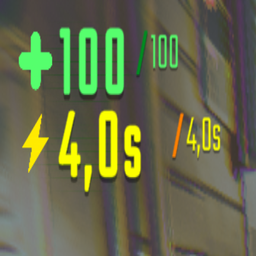
Stamina shown in seconds, upgrade tooltips and a TAB menu with Map Progress stats. Includes toggles to hide UI sections.Repo Stats UI v2.9.2
Mod that changes your stamina into seconds, adds a map progress tracker (that is toggleable) and shows you your upgrade's.
Features
- Replaces stamina points with sprint seconds.
- Upgrade Tooltips
- Map Progress
- Look at any upgrade in the shop to see exactly what you gain.
Map Progress
- TOTAL VALUE: The actual, current sum of all valuable items existing on the map.
- HAUL: Value already delivered to the extraction point.
- IN CARTS: Value of items currently placed in carts (Orange).
- ON GROUND: Value of everything still waiting to be found.
- GOAL (HUD): The target value required by the game to complete the round.
Configuration
Edit BepInEx/config/com.repo.statsui.cfg or use a Configuration Manager.
Config file:
- StaminaMultiplier -ClimbSecondsPerLevel -ShowAll
- OffsetX
- OffsetY
- AccentColor (HEX)
Installation
- Install BepInEx.
- Drop
RepoStatsUI.dllintoBepInEx/plugins/. - Launch the game — config is created automatically.
Changelog
2.9.3
- Edited the readme and manifest files
2.9.2
- Fix: Map Progress now uses Live Tracking. Total Value and On Ground stats now correctly update when items are destroyed, sold, or removed from the world.
- Logic: Switched from static round snapshots to real-time object scanning for 100% accuracy.
2.9.1
- Fix: Fixed cash tracking synchronization. Values in the TAB menu now perfectly match the HUD's Haul and Goal numbers.
- Improvement: Added logic to prevent double-counting items that are in carts but already inside the extraction zone.
2.9.0
- Rework: Simplified TAB menu to show only current values.
- New Logic: Strength displayed as a multiplier (e.g., 1.4X).
- Climb Stats: Added climbing duration in seconds.
- Shop Fix: Fixed missing Stamina Upgrade tooltip and added precise gain values for all store items.
2.7.0
- Initial Release: Added HUD seconds, TAB menu, and Map Progress tracking.