
Please disclose if any significant portion of your mod was created using AI tools by adding the 'AI Generated' category. Failing to do so may result in the mod being removed from Thunderstore.
Ping It
This is a mod that allows you to ping valuables, enemies, items, and more for you and your friends
By Eberk
| Date uploaded | a week ago |
| Version | 1.0.0 |
| Download link | Eberk-Ping_It-1.0.0.zip |
| Downloads | 10218 |
| Dependency string | Eberk-Ping_It-1.0.0 |
This mod requires the following mods to function

BepInEx-BepInExPack
BepInEx pack for Mono Unity games. Preconfigured and ready to use.
Preferred version: 5.4.2305
BULLETBOT-KeybindLib
A library that lets you add your own keybinds to the controls.
Preferred version: 1.0.6
README
Ping It!
A pinging mod for R.E.P.O. that lets you highlight valuables, items, enemies, C.A.R.T.s, Cosmetic Boxes and locations for you & your team. Will run client side but other players will also need it to see your pings.


Features
- Press Middle Mouse Button (configurable) to ping whatever you're looking at within range.
- Highlights Valuables, Items, C.A.R.T.s, Cosmetic Boxes and Enemies using custom ping graphics.
- Multiplayer support - pings are broadcast to all clients as long as they also have the mod
- Ping info - shows value/size for valuables, name/battery % for chargeable items, name/HP for enemies, item amount/value for C.A.R.T., rarity/health for cosmetic boxes, and distance for locations. Requires the Ping Info upgrade.
- Location pings - ping empty surfaces to drop a custom ping graphic visible through walls. Limited to 3 location pings per player. Requires the Ping Anywhere upgrade.
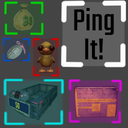
- Color Coded - Green = Valuable, Blue = Item, Red = Enemy, Cyan = C.A.R.T., Pink = Cosmetic Box, White = Location
Upgrades
Click to expand for the image

| Upgrade | Effect |
|---|---|
| Ping Anywhere | Unlocks location pings on empty surfaces |
 |
|
| Ping Info | Shows various different info on pings |
 |
Configuration
Keybind setting located under Controls, requires KeybindLib

Config file located at BepInEx/config/eberk30.pingit.cfg after first launch or in Mod menu if REPOConfig is installed.
| Key | Default | Description |
|---|---|---|
Keybind |
Middle Mouse Button |
Assign a key to use ping |
Range |
20 |
Max detection distance |
Cooldown |
0.5 |
Seconds between pings |
Highlight Duration |
8 |
How long the highlight stays visible |
Value Text Size |
0.85 |
Scale multiplier for ping info text |
Debug Logging |
Off |
Only used for debugging |
CHANGELOG
Changelog
New
- Fixed manifest again..
- Full release
Previous
- Fixed Upgrade stat name
- Fixed issue with dependencies
