

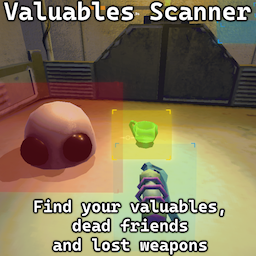
Valuables Scanner
Discovers nearby valuables, enemies, weapons/items, dead teammates and cosmetic boxes when a key is pressed (F by default). Multiplayer friendly and highly configurable.What does it do
You press a button (F by default), nearby valuable items & cosmetic boxes are discovered (and shown on screen). Already discovered items are shown a second time. There is an option to only scan already discovered valuables (disabled by default).
If Multiplayer RPC is enabled, items discovered for the first time with the scanner will appear on both your minimap and your friends', should you be playing multiplayer.
Also capable of discovering enemies, dead teammates and equippable items, although they will not appear on your teammates minimap, even if you enable Multiplayer RPC. All of this can be disabled (or enabled) by demand.
Has a cooldown of 10 seconds, tracked on the top of the screen. Said bar shouldn't appear by itself unless scanner is used.
You can switch between a new GUI version (the one where all screen effects are applied) and a legacy one (where it's as clear as possible). There's two versions because I liked the clear one and my friend liked the immersive one.
I believe that at this point the development of this mod is complete. Still feel free to contribute, report issues or add suggestions.
Configuring
Use your modinstaller, BepInEx's config or REPOConfig
You can change:
- Keybind for scanning (f by default)
- Global scan radius (10 by default)
- Cooldown (10 by default)
- Multiplayer RPC discovery (enabled by default)
- GUI (enabled by default)
- GUI version (new by default)
There are several configuration options for each category:
- Whether to scan at all (all). Enabled by default
- Override scan radius (all. 0 to use global radius). 0 by default
- Only scan already discovered items (valuables, cosmetics and custom only). Disabled by default
- Reveal scan results on other player's minimap (valuables, cosmetics and custom only). Disabled by default
- Color for both borders and (all except cosmetics and custom). Note that this will not override normal discovery. Matches normal ingame colors
- For how long the scan should keep lingering (all except cosmetics and custom). By default 4 seconds for enemies and 1.5 for everything else.
Installation
- Make sure you have BepInEx installed.
- Download the REPO Scanner Mod package.
- Extract the contents to the game's
BepInEx/pluginsdirectory.
How it looks ingame
Click to expand
New version of GUI

Legacy version of GUI

Feature overview

Enemies

Items

Cosmetic boxes (matches their normal color)

Known issues
- Enemy dimensions are currently broken, but their location is still accurately tracked.
- Game freaks out when the scan size is too big. Nothing I can do, make it smaller in config by yourself.
- Special mouse buttons, gamepad and special obscure keys cannot be used for keybinding. Will probably rework how keybinds work in the future.
- When scanning for cosmetic boxes they will blip for each box each time. It's more bearable with regular valuables, but may get really annoying later on.