EnemyTracker
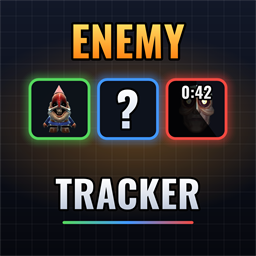
HUD overlay of all monsters on the level: discovery (?), danger-level frames, respawn clock, strength needed to lift, level timer, map loot value, your upgrades. In-game settings menu (F11). Host syncs state.EnemyTracker
A clean HUD overlay (top center of the screen) that shows every monster on the current level.
Features
- Monster tiles. Every monster on the level gets a tile. The frame color shows its danger level: green is 1, blue is 2, red is 3.
- Discovery. A monster stays a
?until someone actually encounters it. That happens when a player sees it, gets very close or gets chased. A Peeper staring at someone counts, and so does a Loom putting her hands on someone's screen. Until then you don't see whether it is alive or its timers. - Respawn clock. A despawned or killed monster is darkened, and its picture brightens clockwise while the timer counts down to the respawn. Kills triple the respawn time.
- Strength needed. The 💪 number under each monster is how many strength upgrades you need to lift it. It turns green when your strength is enough.
- Level header. Shows the level number, the time spent on the level, the map value (the total value of all loot still on the map) and the loss (money lost to damage and broken valuables).
- Your upgrades. All vanilla upgrades: Health, Stamina, Strength, Range, Sprint Speed, Extra Jump, Tumble Launch, Tumble Wings, Tumble Climb, Crouch Rest, Map Player Count and Death Head Battery. Upgrades you don't have yet are hidden.
- Grouping. Identical monsters (gnomes, ticks, bangers) share one tile with
xN. - Hides automatically while the map tablet is open.
- Multiplayer sync. The host's state (discovered monsters, alive/dead, timers) is sent to every player who has the mod. Clients report their own sightings back to the host.
Multiplayer
- The host must have the mod for the sync to work.
- Other players only need it if they want to see the overlay.
- Use the same version of the mod for every player.
Settings
Press F11 in game to open the settings menu. Everything can be changed there and is saved right away:
- General: hotkeys, language (ru/en), hide while the map tablet is open, reveal all monsters.
- Layout: screen anchor (top / bottom, left / center / right), offset, overall scale, opacity.
- Header: level, timer, MAP, LOST and upgrades can each be turned on or off. You can also hide upgrades you have 0 of and set how many upgrades fit in a row.
- Monsters: show or hide monsters and undiscovered ones (?), group identical monsters, xN count, tile size, monsters per row, strength needed, respawn timer, respawn shading, frame glow.
- Upgrades: turn each upgrade on or off.
The same options are in BepInEx/config/lakerok.repo.enemytracker.cfg. F10 shows or hides the overlay.
Custom monster pictures: put a PNG named after the monster into BepInEx/config/EnemyTracker/icons/, for example Reaper.png.
Credits and licenses
- Monster pictures, strength breakpoints and upgrade icons come from the R.E.P.O. Wiki on Fandom. Wiki content is CC BY-SA. The characters belong to semiwork.
- The font is Oswald, licensed under the SIL Open Font License 1.1 (see
LICENSE-Oswald-OFL.txt). - The 💪 emoji comes from Twemoji, licensed under CC BY 4.0.
Коротко по-русски
Это оверлей сверху по центру экрана (Position = BottomLeft переносит его в левый нижний угол).
- Мобы. Все мобы уровня показаны квадратиками. Цвет рамки показывает уровень моба: 1 зелёный, 2 синий, 3 красный.
- Обнаружение. Пока моба никто не встретил, на квадратике
?. - Респавн. У деспавненного или убитого моба на картинке идут «часы» с таймером до респавна.
- Сила. Под мобом 💪 и число: сколько апгрейдов силы нужно, чтобы его поднять. Число зелёное, если тебе хватает.
- Шапка. Номер уровня, время на уровне, «КАРТА» (сколько стоит весь лут на карте), «ПОТЕРЯ» (сколько денег потеряно на ударах и разбитом луте) и все твои апгрейды.
- Одинаковые мобы (гномы, тики, бэнгеры) показаны одним квадратиком с
xN. - F10 показывает и скрывает оверлей. F11 открывает меню настроек: там можно поменять положение, размеры, прозрачность и выключить любую часть оверлея.
- Мультиплеер. Хост рассылает состояние всем игрокам с модом, поэтому мод должен быть у хоста.