

You are viewing a potentially older version of this package. View Latest Version
UpgradeMenu
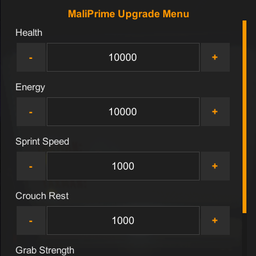
A simple in-game menu to easily adjust your upgrades.MaliPrime Upgrade Menu
A simple in-game menu to easily adjust your upgrades.
How to Use
-
Launch the game and either host a lobby or join a match.
-
Wait until you are fully spawned into the map and your character is playable. (The menu will not open in the main menu).
-
Press F2 to open or close the upgrade menu.
-
Use the interface to adjust your upgrade values on the fly.
Available Upgrades
You can modify the following upgrades through the menu:
-
Health
-
Energy
-
Sprint Speed
-
Crouch Rest
-
Strength
-
Range
-
Extra Jump
-
Tumble Wings
-
Tumble Launch
-
Tumble Climb
-
Death Head Battery
-
Map Player Count