

CosmeticTokenCountHUD
【Client MOD】Shows cosmetic token counts by rarity in the shop HUD.ショップ中、レアリティごとのコスメトークン所持数を表示しますCOMPATIBLE WITH COSMETICS UPDATE V0.4.0.
CosmeticTokenCountHUD
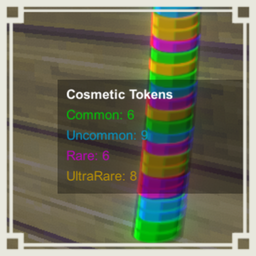
This mod is a client-only mod that shows your cosmetic token counts by rarity on the bottom-right of the shop screen.
It helps you quickly check how many Common, Uncommon, Rare, and UltraRare cosmetic tokens you currently have while using the cosmetic shop. The mod only reads your local cosmetic token list and does not change token gain, token consumption, reward selection, currency conversion, or host-side gameplay logic.
Main Features
- Shows cosmetic token counts by rarity while in the shop
- Hides automatically outside the shop
- Hides automatically when you have no cosmetic tokens, if enabled
- Updates after token gain, token consumption, shop initialization, and cosmetic machine usage
- Supports configurable HUD position, size, opacity, labels, display order, and rarity colors
- Uses the in-game token colors by default
- Runs as a local client-side HUD only
Installation
- Install BepInEx 5.
- Place
CosmeticTokenCountHUD.dllinto yourBepInEx/pluginsfolder. - Start the game once to generate the config file.
- Edit the config file if you want to change HUD position, colors, or text.
Notes
- This is a Client MOD.
- Other players do not need to install it.
- It does not modify the actual cosmetic token data.
- It does not control which token rarity is consumed.
- It does not affect the host or other players.
- The HUD is only created when needed and is destroyed when leaving the shop.
Config
General
| Setting | Description | Default | Minimum | Maximum |
|---|---|---|---|---|
| Enable | Enables the HUD display | true | false | true |
| ShowDebugLog | Shows debug logs | false | false | true |
| RefreshIntervalSeconds | Refresh interval in seconds | 0.35 | 0.10 | 2.00 |
Display
| Setting | Description | Default | Minimum | Maximum |
|---|---|---|---|---|
| ShowOnlyInShop | Shows the HUD only while you are in the shop | true | false | true |
| HideWhenNoToken | Hides the HUD when you have no cosmetic tokens | true | false | true |
| ShowZeroCountRarity | Shows rarity rows even when the count is zero | true | false | true |
| Anchor | HUD anchor position. Allowed values: TopLeft, TopRight, BottomLeft, BottomRight | BottomRight | Not applicable | Not applicable |
| OffsetX | Horizontal offset from the anchor | -40 | No fixed limit | No fixed limit |
| OffsetY | Vertical offset from the anchor | 160 | No fixed limit | No fixed limit |
| FontSize | Text font size | 18 | 8 | 48 |
| BackgroundOpacity | Background opacity | 0.35 | 0.00 | 1.00 |
| TextOpacity | Text opacity | 1.00 | 0.10 | 1.00 |
| SortingOrder | Canvas sorting order | 300 | 0 | 1000 |
Layout
| Setting | Description | Default | Minimum | Maximum |
|---|---|---|---|---|
| LineSpacing | Spacing between lines | 4 | 0 | 24 |
| PaddingX | Horizontal padding | 12 | 0 | 60 |
| PaddingY | Vertical padding | 10 | 0 | 60 |
| Width | HUD width | 260 | 120 | 800 |
| AutoResizeWidth | Automatically widens the HUD when text is long | true | false | true |
| TextAlign | Text alignment. Allowed values: Left, Center, Right | Left | Not applicable | Not applicable |
| DisplayOrder | Rarity display order. Allowed values: LowToHigh, HighToLow, Vanilla, Custom | LowToHigh | Not applicable | Not applicable |
| CustomDisplayOrder | Custom display order when DisplayOrder is Custom | Common,Uncommon,Rare,UltraRare | Not applicable | Not applicable |
Text
| Setting | Description | Default | Minimum | Maximum |
|---|---|---|---|---|
| TitleText | HUD title text | Cosmetic Tokens | Not applicable | Not applicable |
| CommonLabel | Common rarity label | Common | Not applicable | Not applicable |
| UncommonLabel | Uncommon rarity label | Uncommon | Not applicable | Not applicable |
| RareLabel | Rare rarity label | Rare | Not applicable | Not applicable |
| UltraRareLabel | UltraRare rarity label | UltraRare | Not applicable | Not applicable |
Color
| Setting | Description | Default | Minimum | Maximum |
|---|---|---|---|---|
| UseRarityTextColor | Uses different text colors for each rarity | true | false | true |
| CommonColor | Common text color in hex | #00C807 | Not applicable | Not applicable |
| UncommonColor | Uncommon text color in hex | #0398CB | Not applicable | Not applicable |
| RareColor | Rare text color in hex | #BD06BB | Not applicable | Not applicable |
| UltraRareColor | UltraRare text color in hex | #B89005 | Not applicable | Not applicable |
| BackgroundColor | Background color in hex | #000000 | Not applicable | Not applicable |
Compatibility
| Setting | Description | Default | Minimum | Maximum |
|---|---|---|---|---|
| RefreshOnCosmeticTokenUISetup | Refreshes when the vanilla CosmeticTokenUI is refreshed | false | false | true |
| RefreshOnCosmeticShopMachineInteract | Refreshes immediately when the cosmetic shop machine is used | true | false | true |
For Developers
The mod reads MetaManager.cosmeticTokens through reflection and counts the stored integer rarity values.
It does not directly reference game classes at compile time, which reduces build errors when the project setup does not expose game types such as MetaManager, CosmeticShopMachine, or CosmeticTokenUI.
The HUD update is event-assisted but still uses a light interval refresh as a fallback. This keeps the display accurate after cosmetic token gain, token consumption, cosmetic machine usage, or shop initialization without running expensive per-frame token scans.
The rarity values used by the HUD are:
| Rarity | Internal value |
|---|---|
| Common | 0 |
| Uncommon | 1 |
| Rare | 2 |
| UltraRare | 3 |
※Mod created by AI
COSMETICS UPDATE V0.4.0対応済み.
CosmeticTokenCountHUD
REPOが好きな日本人のための日本人のみのREPOのDiscordサーバーあります! 参加は以下のリンクから! https://discord.gg/h5ATY4m5bZ
このMODは、クライアント専用の、ショップ中に画面右下へレアリティごとのコスメトークン所持数を表示するMODです。
コスメショップを使う時に、Common、Uncommon、Rare、UltraRare のトークンをそれぞれ何枚持っているか確認しやすくします。 このMODはローカルのコスメトークン一覧を読み取るだけで、トークン獲得、トークン消費、報酬抽選、通貨変換、ホスト側のゲーム処理は変更しません。
主な機能
- ショップ中にコスメトークン所持数をレアリティ別に表示
- ショップ外では自動非表示
- トークンを持っていない時はConfigに応じて自動非表示
- トークン獲得、トークン消費、ショップ初期化、コスメショップマシン使用後に表示更新
- HUD位置、文字サイズ、透明度、ラベル、表示順、レアリティ色をConfigで変更可能
- 初期状態ではゲーム内トークンの色に合わせた文字色を使用
- ローカルのHUD表示のみで動作
導入方法
- BepInEx 5 を導入します。
CosmeticTokenCountHUD.dllをBepInEx/pluginsフォルダに配置します。- 一度ゲームを起動してConfigファイルを生成します。
- HUD位置、色、文字などを変更したい場合はConfigを編集します。
注意事項
- Client MODです
- 他プレイヤーの導入は不要です
- 実際のコスメトークンデータは変更しません
- どのレアリティのトークンが消費されるかは変更しません
- ホストや他プレイヤーには影響しません
- HUDは必要な時だけ生成され、ショップ退出時に破棄されます
設定項目
General
| 設定値名 | 設定内容 | 初期値 | 設定可能最小値 | 設定可能最大値 |
|---|---|---|---|---|
| Enable | HUD表示を有効化します | true | false | true |
| ShowDebugLog | デバッグログを表示します | false | false | true |
| RefreshIntervalSeconds | 表示更新間隔の秒数 | 0.35 | 0.10 | 2.00 |
Display
| 設定値名 | 設定内容 | 初期値 | 設定可能最小値 | 設定可能最大値 |
|---|---|---|---|---|
| ShowOnlyInShop | ショップ中のみHUDを表示します | true | false | true |
| HideWhenNoToken | コスメトークンを持っていない時にHUDを非表示にします | true | false | true |
| ShowZeroCountRarity | 0枚のレアリティも表示します | true | false | true |
| Anchor | HUDの基準位置。指定可能値: TopLeft, TopRight, BottomLeft, BottomRight | BottomRight | 該当なし | 該当なし |
| OffsetX | 基準位置からの横方向オフセット | -40 | 固定制限なし | 固定制限なし |
| OffsetY | 基準位置からの縦方向オフセット | 160 | 固定制限なし | 固定制限なし |
| FontSize | 文字サイズ | 18 | 8 | 48 |
| BackgroundOpacity | 背景の不透明度 | 0.35 | 0.00 | 1.00 |
| TextOpacity | 文字の不透明度 | 1.00 | 0.10 | 1.00 |
| SortingOrder | Canvasの描画順 | 300 | 0 | 1000 |
Layout
| 設定値名 | 設定内容 | 初期値 | 設定可能最小値 | 設定可能最大値 |
|---|---|---|---|---|
| LineSpacing | 行間 | 4 | 0 | 24 |
| PaddingX | 横方向の余白 | 12 | 0 | 60 |
| PaddingY | 縦方向の余白 | 10 | 0 | 60 |
| Width | HUDの横幅 | 260 | 120 | 800 |
| AutoResizeWidth | 文字が長い場合にHUDの横幅を自動調整します | true | false | true |
| TextAlign | 文字揃え。指定可能値: Left, Center, Right | Left | 該当なし | 該当なし |
| DisplayOrder | レアリティの表示順。指定可能値: LowToHigh, HighToLow, Vanilla, Custom | LowToHigh | 該当なし | 該当なし |
| CustomDisplayOrder | DisplayOrderがCustomの時の表示順 | Common,Uncommon,Rare,UltraRare | 該当なし | 該当なし |
Text
| 設定値名 | 設定内容 | 初期値 | 設定可能最小値 | 設定可能最大値 |
|---|---|---|---|---|
| TitleText | HUDタイトル文字列 | Cosmetic Tokens | 該当なし | 該当なし |
| CommonLabel | Commonレアリティの表示名 | Common | 該当なし | 該当なし |
| UncommonLabel | Uncommonレアリティの表示名 | Uncommon | 該当なし | 該当なし |
| RareLabel | Rareレアリティの表示名 | Rare | 該当なし | 該当なし |
| UltraRareLabel | UltraRareレアリティの表示名 | UltraRare | 該当なし | 該当なし |
Color
| 設定値名 | 設定内容 | 初期値 | 設定可能最小値 | 設定可能最大値 |
|---|---|---|---|---|
| UseRarityTextColor | レアリティごとに文字色を変えます | true | false | true |
| CommonColor | Common文字色の16進数指定 | #00C807 | 該当なし | 該当なし |
| UncommonColor | Uncommon文字色の16進数指定 | #0398CB | 該当なし | 該当なし |
| RareColor | Rare文字色の16進数指定 | #BD06BB | 該当なし | 該当なし |
| UltraRareColor | UltraRare文字色の16進数指定 | #B89005 | 該当なし | 該当なし |
| BackgroundColor | 背景色の16進数指定 | #000000 | 該当なし | 該当なし |
Compatibility
| 設定値名 | 設定内容 | 初期値 | 設定可能最小値 | 設定可能最大値 |
|---|---|---|---|---|
| RefreshOnCosmeticTokenUISetup | バニラのCosmeticTokenUI更新時にHUDも更新します | false | false | true |
| RefreshOnCosmeticShopMachineInteract | コスメショップマシン使用時に即時更新します | true | false | true |
開発者向け詳細
このMODは MetaManager.cosmeticTokens をReflectionで読み取り、保存されている整数のレアリティ値を集計します。
MetaManager、CosmeticShopMachine、CosmeticTokenUI などのゲーム内クラスをコンパイル時に直接参照しないため、ゲーム型がビルド環境で解決されない場合のエラーを避けやすい構成です。
HUD更新はイベント連動と軽量な間隔更新の併用です。 トークン獲得、トークン消費、コスメショップマシン使用、ショップ初期化後に表示を更新しつつ、毎フレーム重い集計処理を行わないようにしています。
HUDが使用するレアリティ値は以下です。
| レアリティ | 内部値 |
|---|---|
| Common | 0 |
| Uncommon | 1 |
| Rare | 2 |
| UltraRare | 3 |
※AI生成MOD