

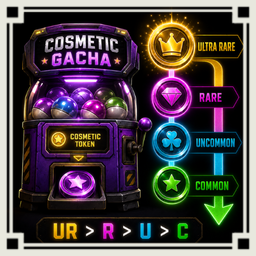
CosmeticTokenPriorityUse
【Client MOD】Uses cosmetic tokens from high rarity by default, or from low rarity while holding Shift.初期値では高レアリティからコスメトークンを使用し、Shiftキーを押しながら使用すると低レアリティから使用しますCOMPATIBLE WITH R.E.P.O. V0.4.4.
Cosmetic Token Priority Use
This mod is a client-only mod that lets you choose the cosmetic token consumption order and temporarily reverse it by holding Shift.
Overview
Vanilla R.E.P.O. uses the newest cosmetic token first because the gacha machine reads and removes the last token in the saved token list.
This mod changes the token used right before the gacha machine starts. It searches your owned tokens and moves the best eligible token to the end of the list so the vanilla gacha logic can consume it normally.
The token priority order can be changed from config.
Default order:
- UltraRare
- Rare
- Uncommon
- Common
Alternative order:
- Common
- Uncommon
- Rare
- UltraRare
If all cosmetics in a rarity are already unlocked, that rarity is skipped. For example, if the current order starts from UltraRare and you own an UltraRare token but all UltraRare cosmetics are already unlocked, the mod will try Rare next.
Shift reverse behavior
When you hold Shift while using the cosmetic gacha machine, the configured order is reversed only for that use.
HighRarityFirstnormally uses UltraRare, Rare, Uncommon, Common.HighRarityFirstwith Shift uses Common, Uncommon, Rare, UltraRare.LowRarityFirstnormally uses Common, Uncommon, Rare, UltraRare.LowRarityFirstwith Shift uses UltraRare, Rare, Uncommon, Common.
This is useful when you normally want to spend high rarity tokens first, but temporarily want to spend lower rarity tokens without changing the config.
Behavior
- Only affects the player who installed the mod.
- Does not change gacha animation, reward unlock logic, save logic, RPC logic, or vanilla token removal logic.
- Does not permanently sort all tokens.
- Only moves one selected token to the end of the list when the gacha machine is used.
- Keeps the remaining token order as close to vanilla as possible.
- Uses the same configured order for both normal locked-cosmetic selection and all-unlocked fallback selection.
When all cosmetics are unlocked
When all valid cosmetics are already unlocked, the mod cannot select a token based on locked cosmetics.
In that case, the mod uses the same General.TokenUseOrder config.
Holding Shift also reverses this fallback order.
Multiplayer
This is a client-only mod.
Each player has their own local cosmetic tokens and cosmetic unlock data. Because of that, the host cannot control another player's token consumption order with a host-only mod.
If every player wants this behavior, every player needs to install the mod.
Configuration
General.Enabled
Enables this mod.
- Default:
true - Minimum:
false - Maximum:
true
General.TokenUseOrder
Token priority order used when selecting the next cosmetic token.
- Default:
HighRarityFirst - Valid values:
HighRarityFirst,LowRarityFirst HighRarityFirst: UltraRare, Rare, Uncommon, CommonLowRarityFirst: Common, Uncommon, Rare, UltraRare
General.RefreshTokenUIAfterReorder
Updates the token UI after internally moving the selected token.
- Default:
true - Minimum:
false - Maximum:
true
Debug.DebugLogSelectedToken
Outputs the selected token rarity, selection reason, and Shift reverse state to the BepInEx log.
- Default:
false - Minimum:
false - Maximum:
true
Upgrade notes
General.AllCosmeticsUnlockedOrder from v4.0.0 is no longer used.
The new General.TokenUseOrder config controls both normal token selection and all-unlocked fallback selection.
If the old config remains in your config file, it can be ignored or deleted manually.
Notes for developers
The mod patches CosmeticShopMachine.Interact() with a Harmony Prefix.
It does not skip the original method.
Instead, it prepares MetaManager.cosmeticTokens before vanilla code reads cosmeticTokens[cosmeticTokens.Count - 1].
The selected token is moved to the end of the list so vanilla CosmeticTokenRemove() still removes the correct token.
This avoids rewriting the reward, unlock, save, and RPC flow.
The Shift key state is checked only at the moment the gacha machine interaction starts. The mod does not run a continuous input monitoring loop.
※Mod created by AI
R.E.P.O. V0.4.4対応済み.
Cosmetic Token Priority Use
REPOが好きな日本人のための日本人のみのREPOのDiscordサーバーあります! 参加は以下のリンクから! https://discord.gg/h5ATY4m5bZ
このMODは、クライアント専用の、コスメトークンの使用順をConfigで選択し、Shift押下で一時的に逆順使用できるMODです。
概要
バニラのR.E.P.O.では、コスメガチャ使用時に一番新しく取得したコスメトークンが使用されます。 これは、ガチャ処理が保存済みトークンリストの最後のトークンを参照し、そのまま最後のトークンを削除するためです。
このMODでは、ガチャ開始直前に使用すべきトークンを選択し、そのトークンだけをリスト末尾へ移動します。 そのため、ガチャ本体の処理はバニラのまま安全に動作します。
トークンの優先順位はConfigから変更できます。
初期状態の順番は以下です。
- ウルトラレア
- レア
- アンコモン
- コモン
逆順設定時の順番は以下です。
- コモン
- アンコモン
- レア
- ウルトラレア
対象レアリティのコスメをすべて所持している場合、そのレアリティはスキップされます。 例えば、ウルトラレア優先設定でウルトラレアトークンを持っていても、ウルトラレアコスメをすべて所持している場合は次にレアトークンの使用を試みます。
Shift逆順使用
コスメガチャ使用時にShiftを押している場合、その1回だけConfig設定とは逆の順番でトークンを使用します。
HighRarityFirstは通常、ウルトラレア、レア、アンコモン、コモンの順で使用HighRarityFirstでShift押下時は、コモン、アンコモン、レア、ウルトラレアの順で使用LowRarityFirstは通常、コモン、アンコモン、レア、ウルトラレアの順で使用LowRarityFirstでShift押下時は、ウルトラレア、レア、アンコモン、コモンの順で使用
普段は高レアリティ優先で使いつつ、一時的に低レアリティから使いたい場合などに使えます。
動作内容
- 導入した本人のガチャだけに反映
- ガチャ演出、報酬解放、セーブ、RPC、バニラのトークン削除処理は変更しない
- 所持トークン全体を常時ソートしない
- ガチャ使用時だけ、選択された1枚のトークンを末尾へ移動
- 残りのトークン順は可能な限りバニラのまま維持
- 未所持コスメがある場合も、全コスメ所持済み時も、同じConfig設定の順番を使用
全コスメ所持済み時
すべての有効なコスメを所持済みの場合、未所持コスメを基準にした選択ができません。
その場合も General.TokenUseOrder の設定順でトークンを使用します。
Shiftを押している場合、この全所持済み時の順番も逆になります。
マルチプレイ
このMODはクライアント専用MODです。
コスメトークンとコスメ解放状況は各プレイヤーのローカルデータとして管理されています。 そのため、ホスト専用MODとして参加者のトークン使用順を制御することはできません。
全員に同じ挙動を適用したい場合は、各プレイヤーが導入してください。
設定項目
General.Enabled
このMODを有効化します。
- 初期値:
true - 設定可能最小値:
false - 設定可能最大値:
true
General.TokenUseOrder
次に使用するコスメトークンの優先順位です。
- 初期値:
HighRarityFirst - 設定可能値:
HighRarityFirst,LowRarityFirst HighRarityFirst: ウルトラレア、レア、アンコモン、コモンLowRarityFirst: コモン、アンコモン、レア、ウルトラレア
General.RefreshTokenUIAfterReorder
選択トークンを内部移動した後にトークンUIを更新します。
- 初期値:
true - 設定可能最小値:
false - 設定可能最大値:
true
Debug.DebugLogSelectedToken
選択されたトークンのレアリティ、選択理由、Shift逆順状態をBepInExログに出力します。
- 初期値:
false - 設定可能最小値:
false - 設定可能最大値:
true
アップグレード時の注意
v4.0.0の General.AllCosmeticsUnlockedOrder は使用されなくなりました。
新しい General.TokenUseOrder が、通常時のトークン選択と全コスメ所持済み時の代替選択の両方を制御します。
古いConfigがConfigファイルに残っていても無視されます。
不要な場合は手動で削除してください。
開発者向け詳細
このMODは CosmeticShopMachine.Interact() にHarmony Prefixを当てます。
Prefixでは元処理を止めません。
バニラ処理が cosmeticTokens[cosmeticTokens.Count - 1] を読む直前に、使用対象トークンを MetaManager.cosmeticTokens の末尾へ移動します。
その結果、バニラの CosmeticTokenRemove() がそのまま正しいトークンを削除します。
これにより、報酬解放、保存、RPCなどの処理を書き換えずに済みます。
Shiftキー状態は、ガチャマシンとのインタラクト開始時だけ確認します。 常時入力監視ループは使用しません。
※AI生成MOD