

HideUnusedButtons
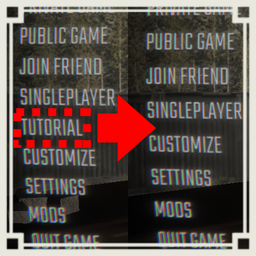
【Client MOD】Hides the Tutorial button on the main menu and the Quit Game button on the Escape menu.メインメニューのTutorialボタンと、Escape画面のQuit Gameボタンを非表示にします。HideUnusedButtons
This mod is a client-only mod that hides and disables unused menu buttons in R.E.P.O.
Overview
This mod hides the Tutorial button on the main menu and the Quit Game button on the Escape menu. It also blocks the related button events, so the actions are prevented even if another UI path or another mod calls the original methods directly.
Quit To Menu is not hidden or disabled. Only the Quit Game button on the Escape menu is targeted.
Features
- Hide the Tutorial button from the main menu.
- Block the Tutorial button event.
- Hide the Quit Game button from the Escape menu.
- Block the Quit Game button event.
- Keep Quit To Menu available.
- No gameplay, Photon, lobby, or save-data changes.
Configuration
The config file is generated after launching the game once with the mod installed.
General.Enabled
- Description: Enables this mod.
- Default:
true - Minimum:
false - Maximum:
true
Main Menu Tutorial.HideTutorialButton
- Description: Hides the Tutorial button from the main menu.
- Default:
true - Minimum:
false - Maximum:
true
Main Menu Tutorial.DisableTutorialButtonEvent
- Description: Blocks the Tutorial button event even if it is called directly.
- Default:
true - Minimum:
false - Maximum:
true
Escape Menu Quit Game.HideQuitGameButton
- Description: Hides the Quit Game button from the Escape menu.
- Default:
true - Minimum:
false - Maximum:
true
Escape Menu Quit Game.DisableQuitGameButtonEvent
- Description: Blocks the Quit Game button event even if it is called directly.
- Default:
true - Minimum:
false - Maximum:
true
Debug.LogBlockedActions
- Description: Logs when a blocked button event is called.
- Default:
false - Minimum:
false - Maximum:
true
Installation
- Install BepInEx.
- Place the mod DLL in the
BepInEx/pluginsfolder. - Launch the game.
- Edit the generated config file if needed.
Notes
This mod only changes local menu UI behavior. Other players do not need to install it.
※Mod created by AI
HideUnusedButtons 日本語説明
REPOが好きな日本人のための日本人のみのREPOのDiscordサーバーあります! 参加は以下のリンクから! https://discord.gg/h5ATY4m5bZ
このMODは、クライアント専用の、R.E.P.O.内の使わないメニューボタンを非表示・無効化するMODです。
概要
メインメニューのTutorialボタンと、Escape画面のQuit Gameボタンを非表示にします。 また、対象ボタンの処理自体もブロックするため、別のUI経路や他MODから元のメソッドが直接呼ばれても実行されません。
Quit To Menu は非表示・無効化しません。 対象はEscape画面のQuit Gameボタンのみです。
機能
- メインメニューのTutorialボタンを非表示
- Tutorialボタン処理をブロック
- Escape画面のQuit Gameボタンを非表示
- Quit Gameボタン処理をブロック
- Quit To Menu は使用可能なまま維持
- ゲーム本編、Photon、ロビー、セーブデータへの変更なし
設定項目
Configファイルは、MODを導入した状態でゲームを1回起動すると生成されます。
General.Enabled
- 設定内容: このMODを有効化します。
- 初期値:
true - 設定可能最小値:
false - 設定可能最大値:
true
Main Menu Tutorial.HideTutorialButton
- 設定内容: メインメニューのTutorialボタンを非表示にします。
- 初期値:
true - 設定可能最小値:
false - 設定可能最大値:
true
Main Menu Tutorial.DisableTutorialButtonEvent
- 設定内容: Tutorialボタン処理が直接呼ばれてもチュートリアル開始をブロックします。
- 初期値:
true - 設定可能最小値:
false - 設定可能最大値:
true
Escape Menu Quit Game.HideQuitGameButton
- 設定内容: Escape画面のQuit Gameボタンを非表示にします。
- 初期値:
true - 設定可能最小値:
false - 設定可能最大値:
true
Escape Menu Quit Game.DisableQuitGameButtonEvent
- 設定内容: Escape画面のQuit Game処理が直接呼ばれてもゲーム終了をブロックします。
- 初期値:
true - 設定可能最小値:
false - 設定可能最大値:
true
Debug.LogBlockedActions
- 設定内容: ブロックしたボタン処理が呼ばれた時にログを出力します。
- 初期値:
false - 設定可能最小値:
false - 設定可能最大値:
true
導入方法
- BepInExを導入します。
- MODのDLLを
BepInEx/pluginsフォルダに配置します。 - ゲームを起動します。
- 必要に応じて生成されたConfigを編集します。
注意事項
このMODはローカルのメニューUI挙動のみを変更します。 他プレイヤーが導入する必要はありません。
※AI生成MOD