
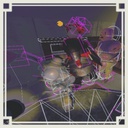
HitboxWireframeVisualizer
Overlay wireframe hitboxes for nearby objects (enemies, players, room modules, items) and optionally make the underlying models transparent.近距離の敵/プレイヤー/部屋モジュール/アイテムの当たり判定を表示
By REPO_JP
| Last updated | 2 days ago |
| Total downloads | 86 |
| Total rating | 1 |
| Categories | Mods Tools Client-side |
| Dependency string | REPO_JP-HitboxWireframeVisualizer-1.0.0 |
| Dependants | 0 other packages depend on this package |
This mod requires the following mods to function

BepInEx-BepInExPack
BepInEx pack for Mono Unity games. Preconfigured and ready to use.
Preferred version: 5.4.2100README
HitboxWireframeVisualizer
Overview
HitboxWireframeVisualizer draws a wireframe overlay for nearby hitboxes (colliders) in real time. It supports enemies, players, room modules, and items, and can optionally make the underlying models transparent so small or tight colliders remain visible.
Features
- Wireframe hitbox overlay for nearby colliders
- BoxCollider / SphereCollider / CapsuleCollider
- MeshCollider optional (drawn as bounds box)
- Category filters (toggle per genre)
- Enemy / Player / RoomModule / Item
- Color rules
- Triggers use a dedicated color
- Non-triggers use a layer-name based color map
- Optional translucent fill rendering
- Optional grid sample points inside the selected/nearest shape (heavy)
- Optional model transparency
- Per-genre alpha percent (0–100)
- Uses MaterialPropertyBlock by default to avoid material instancing
- Config hot-reload
- Automatically reloads when the config file is modified
- Physics trace (optional)
- Visualize Raycast / OverlapBox / OverlapSphere calls via Harmony patches
- Target lock and export
- Target lock toggles a “locked root” selection
- Export selected target collider summary as JSON to clipboard
Default Keys
- F1: Toggle mod enable
- F4: Toggle target lock
- F5: Toggle draw-through-walls (ZTestAlways)
- F6: Toggle fill mode
- F7: Toggle grid sampling
- F8: Toggle physics trace
- F9: Toggle freeze (stop collecting, keep drawing)
- F10: Export selection JSON to clipboard
Configuration
Config file is generated by BepInEx after first launch. Key settings:
- Genres
- ShowEnemy / ShowPlayer / ShowRoomModule / ShowItem
- Transparency
- AlphaEnemyPct / AlphaPlayerPct / AlphaRoomModulePct / AlphaItemPct (0–100)
- EnableModelTransparency
- UseMaterialPropertyBlock
- ForceFallbackShader
- Performance / stability
- MaxCollidersPerCollect
- EnemyPriority
- CacheExpireFrames
- NearestFirst
- OverlapBufferMax
- EnemyLayerNameFallback
- Rendering
- ZTestAlways
- FillMode / FillAlpha
- ThickWireEnable (heavy), WireWidthWorld, WireWidthDistanceScale
- SphereSegments
- Debug/extra
- ShowPhysicsTrace
- GridSampleEnable (heavy), GridPitchMeters, GridMaxPoints
Technical Details
- Collection pipeline
- Uses Physics.OverlapSphereNonAlloc centered on the current camera position
- Classifies colliders into enemy-like and others, optionally sorting by distance to prefer nearby objects
- Applies a per-collect processing cap (MaxCollidersPerCollect) to control CPU cost
- Ownership and genre resolution
- Attempts to resolve a logical “root” GameObject for each collider
- Prioritizes EnemyParent/Enemy for enemy detection
- Supports fallback “Enemy” layer-name classification if enabled
- Rendering
- Uses GL.LINES for wireframes, and optional triangle fill approximation
- Uses Hidden/Internal-Colored (or a fallback shader) for overlay materials
- Transparency
- Uses MaterialPropertyBlock to change _Color/_BaseColor alpha without duplicating materials
- Tracks per-root alpha and only reapplies MPB when alpha changes
- Restores original sharedMaterials and property blocks when targets leave the visible set
- Config hot reload
- Polls config file timestamp and calls Config.Reload() on change
- Physics trace
- Optional Harmony patches to log/visualize Physics Raycast/Overlap calls in-world
Installation
- Install BepInEx for R.E.P.O.
- Place the mod DLL into:
BepInEx/plugins/
- Launch the game once to generate the config:
BepInEx/config/REPOJP.HitboxWireframeVisualizer.cfg
- Edit the config and save to apply changes (auto-reload)
Notes
- Enabling ThickWireEnable, GridSampleEnable, or MeshCollider rendering can significantly increase CPU/GPU load
- If you only need enemy hitboxes, disable other genres to reduce overhead
- This mod is intended as a debugging/visualization tool
HitboxWireframeVisualizer
概要
HitboxWireframeVisualizer は、近距離に存在する当たり判定をリアルタイムにワイヤーフレームで表示します。 敵/プレイヤー/部屋モジュール/アイテムに対応し、当たり判定が小さい場合でも見えるように対象モデルを透明化することもできます
機能
- 近距離Colliderのワイヤーフレーム表示
- BoxCollider / SphereCollider / CapsuleCollider
- MeshColliderは任意で有効化(Bounds箱で近似表示)
- ジャンル別フィルタ(ON/OFF)
- Enemy / Player / RoomModule / Item
- 色のルール
- Triggerは専用色
- Trigger以外はLayer名ベースの色マップ
- 半透明の面表示(任意)
- グリッドサンプル点表示(重い)
- モデル透明化(任意)
- ジャンルごとに透明度0~100%
- 既定はMaterialPropertyBlockで高速適用(マテリアル複製を避ける)
- Config自動リロード
- Configファイル保存で自動反映
- Physicsトレース(任意)
- HarmonyでRaycast/OverlapBox/OverlapSphereを可視化
- ターゲットロックとエクスポート
- 対象Rootをロックして安定表示
- 選択対象のCollider情報をJSONとしてクリップボードに出力
既定キー
- F1: MOD有効切替
- F4: ターゲットロック切替
- F5: 壁越し表示切替(ZTestAlways)
- F6: 面表示切替
- F7: グリッド切替
- F8: Physicsトレース切替
- F9: 凍結切替(収集停止、描画継続)
- F10: 選択対象JSONをクリップボードへ出力
設定
BepInExにより初回起動後にConfigが生成されます 主な項目:
- Genres
- ShowEnemy / ShowPlayer / ShowRoomModule / ShowItem
- Transparency
- AlphaEnemyPct / AlphaPlayerPct / AlphaRoomModulePct / AlphaItemPct (0–100)
- EnableModelTransparency
- UseMaterialPropertyBlock
- ForceFallbackShader
- Performance / stability
- MaxCollidersPerCollect
- EnemyPriority
- CacheExpireFrames
- NearestFirst
- OverlapBufferMax
- EnemyLayerNameFallback
- Rendering
- ZTestAlways
- FillMode / FillAlpha
- ThickWireEnable(重い), WireWidthWorld, WireWidthDistanceScale
- SphereSegments
- Debug/extra
- ShowPhysicsTrace
- GridSampleEnable(重い), GridPitchMeters, GridMaxPoints
技術詳細
- 収集処理
- カメラ位置を中心に Physics.OverlapSphereNonAlloc で近距離Colliderを収集
- 敵候補とそれ以外に分類し、必要に応じて距離ソートで近距離を優先
- 収集1回あたりの処理上限(MaxCollidersPerCollect)で負荷を抑制
- Root/ジャンル判定
- Colliderから論理的なRoot GameObjectを解決
- 敵判定はEnemyParent/Enemyを優先
- 必要に応じてLayer名「Enemy」を敵扱いするフォールバックあり
- 描画
- GL.LINESでワイヤーフレーム描画
- 任意で三角形近似の面描画
- Hidden/Internal-Colored(見つからない場合は代替)を使用
- 透明化
- MaterialPropertyBlockで _Color/_BaseColor のalphaを設定しmaterials複製を回避
- Root単位でalphaをキャッシュし、値が変わったときだけ再適用
- 対象外になったRendererはPropertyBlockとsharedMaterialsを復元
- Config自動反映
- ファイル更新時刻を監視して Config.Reload() を実行
- Physicsトレース
- 任意でPhysics系APIにHarmonyを当て、簡易表示用のバッファに記録
インストール
- R.E.P.O. にBepInExを導入
- DLLを配置
BepInEx/plugins/
- ゲーム起動でConfig生成
BepInEx/config/REPOJP.HitboxWireframeVisualizer.cfg
- Config編集して保存すると自動反映
注意
- ThickWireEnable / GridSampleEnable / MeshCollider表示は負荷が増えます
- 敵だけ必要なら他ジャンルをOffにすると軽くなります
- デバッグ/可視化用途のMODです
