

LevelChanger
Jump to any level via a clean in-game GUI. Host-synced, hotkey configurable via REPOConfig.LevelChanger
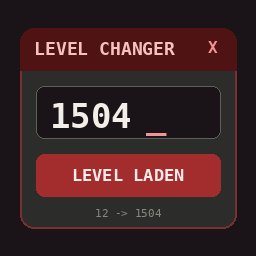
Jump to any level in R.E.P.O. with a clean in-game GUI. Type 1504, hit LEVEL LADEN — and the game reloads straight into that level with the matching difficulty scaling.
⚠ Be careful — it only gets harder from here.
Features
- 🎛️ In-game GUI overlay (default hotkey:
F6, fully rebindable) - 🔢 Type any target level or use the
+1 / +10 / +100 / RSTquick buttons - 🌐 Multiplayer-safe: only the host can change the level, clients sync automatically
- ⚙️ Configurable via REPOConfig (hotkey, default level, warning toggle)
- 🧠 Reflection-based — no game files are modified, survives most game updates
Usage
- Start or join a mission (you must be the host in multiplayer).
- Press
F6(or your configured key) to open the GUI. - Type the target level — e.g.
1504— or use the quick buttons. - Hit LEVEL LADEN. The game reloads into the chosen level.
The footer always shows Current level → Target level so you know where you are.
Configuration
All settings appear automatically in REPOConfig (Mods menu), or edit
BepInEx/config/paul.repo.levelchanger.cfg:
| Setting | Default | Description |
|---|---|---|
| Toggle Key | F6 |
Key to open/close the GUI |
| Default Level | 1 |
Pre-filled level when opening the GUI |
| Show Warning | true |
Show the "be careful" hint |
Notes
- Changing the level sets the run's
levelsCompletedcounter, so enemy difficulty, extraction values and scaling all match the chosen level. - Clients in multiplayer cannot trigger a level change — the button is blocked with a hint.
- This mod does not touch your save files or game installation.
Credits
Made by Paul. Built with BepInEx 5.