

LateJoinPlus
BETA for game build v0.5.0. Late join with no invisible rooms, and only the host needs it. New: the Admin panel (F8), with spawning, healing, upgrades, God mode and world switches. Moderators, private calls, 8 languages. Lobbies up to 20.LateJoinPlus
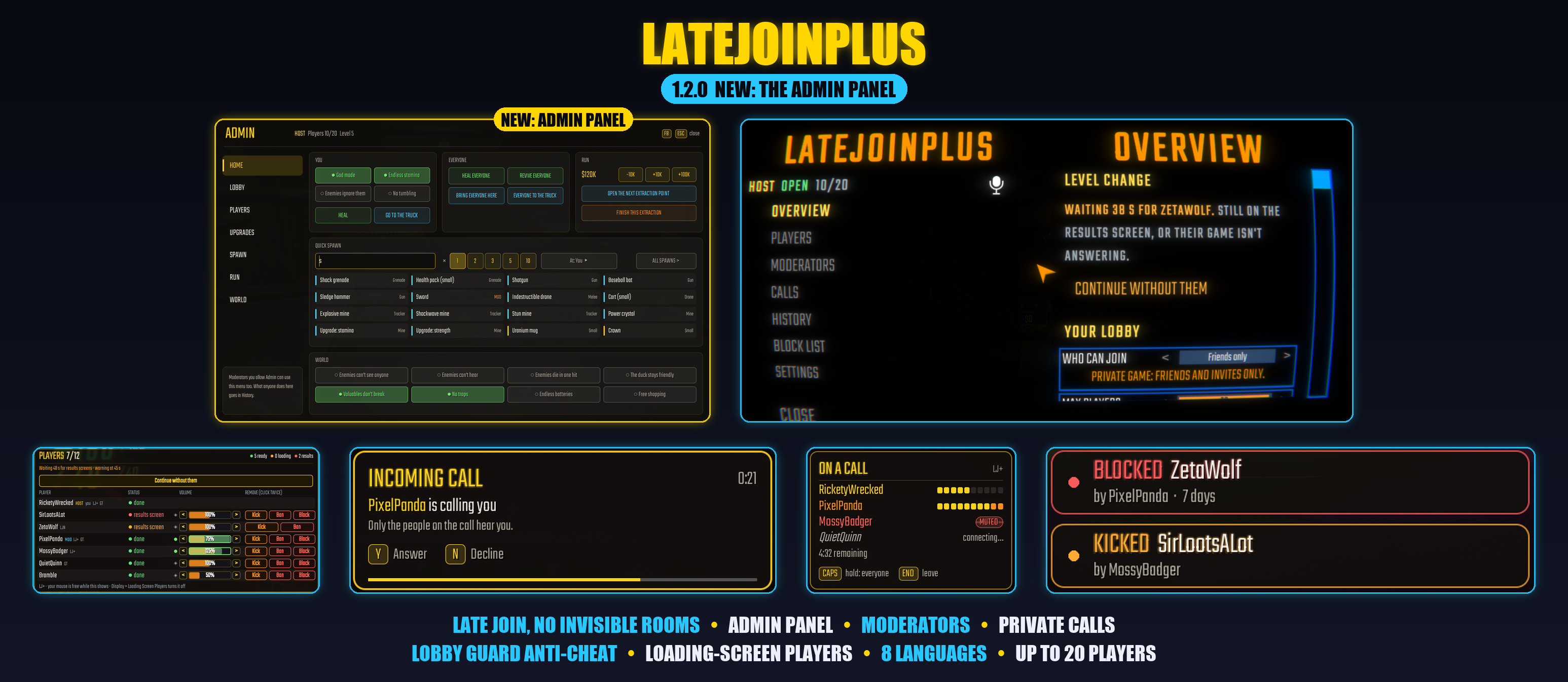
Late join for R.E.P.O without the invisible rooms, plus a full set of tools for running your lobby. Friends can hop in whenever they want, even mid-level, and only the host needs the mod installed.
BETA for R.E.P.O v0.5.0. The game's big Sunstone update, and its move to Unity 6, changed a lot under the hood. This version runs on it, but expect some errors while everything settles. If something goes wrong, please open the LJ+ menu (F6) > Overview > Problems? > Send a bug report. It shows you exactly what will be sent before anything goes out, and it gets me the logs I need to fix it. LateJoinPlus's menus and the Admin panel need a mouse and keyboard for now; the game's new controller support doesn't reach them yet.
New in 1.2.0: the Admin panel. Hit F8 to bring up a panel with everything you need to run a lobby: heal, revive, teleport, spawn anything, change upgrades, money or levels, toggle God mode, and flip world switches like no traps or endless batteries. It's built right into LateJoinPlus, works on players who don't have mods, and your moderators can use it too. Also added in 1.2.0: 简体中文 and 繁體中文.
New in 1.2.0: the Admin panel
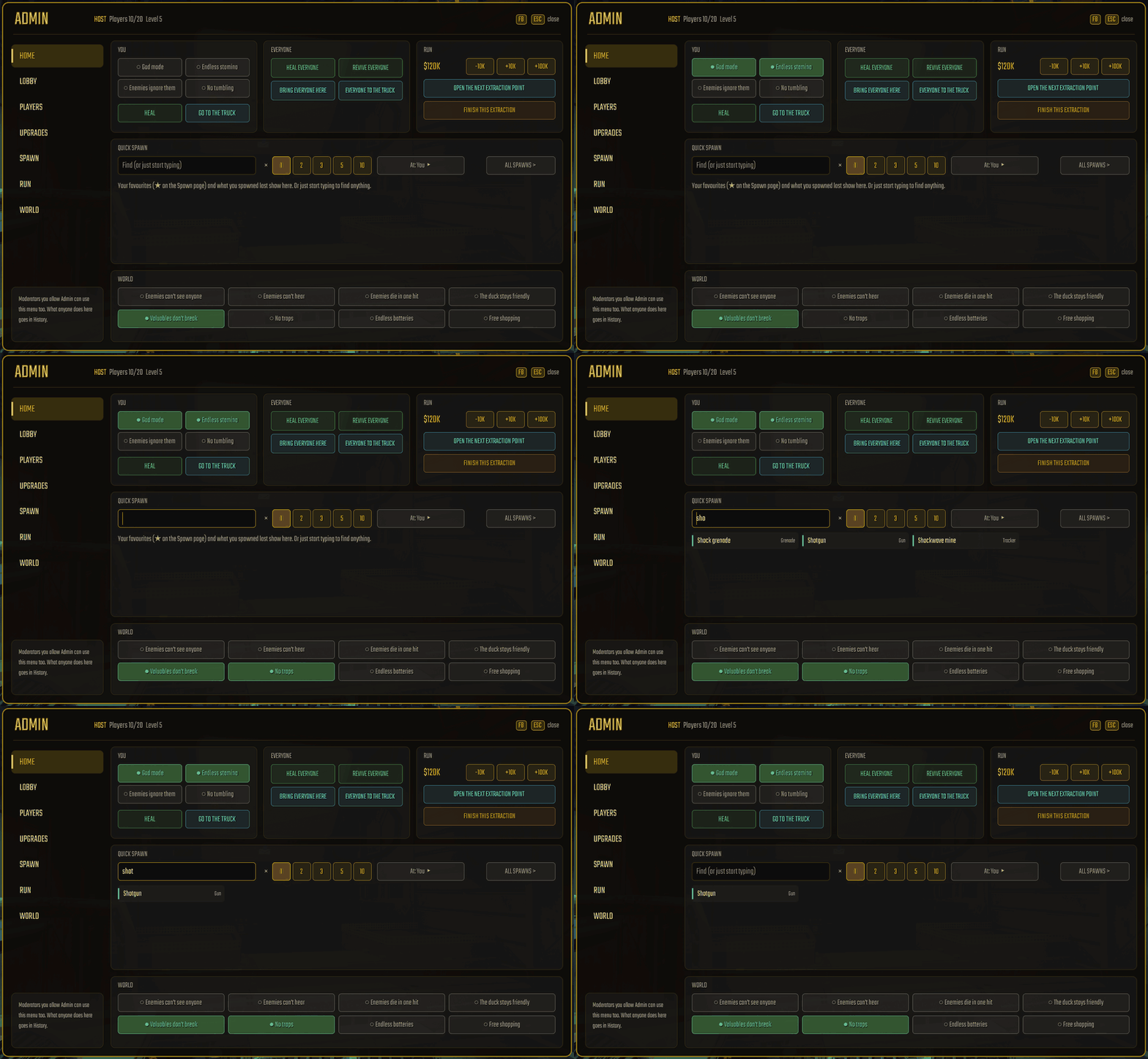
You can open it with F8 or the ADMIN button in the pause menu. It pops up in the middle of your screen with tabs down the left side, sized so you never have to scroll.
- Home puts the stuff you use most on one page: your own God mode, Endless stamina, Enemies ignore them and No tumbling, buttons to heal or revive everyone, bring everyone to you or send them to the truck, money and extraction controls, quick spawn, and all the world switches.
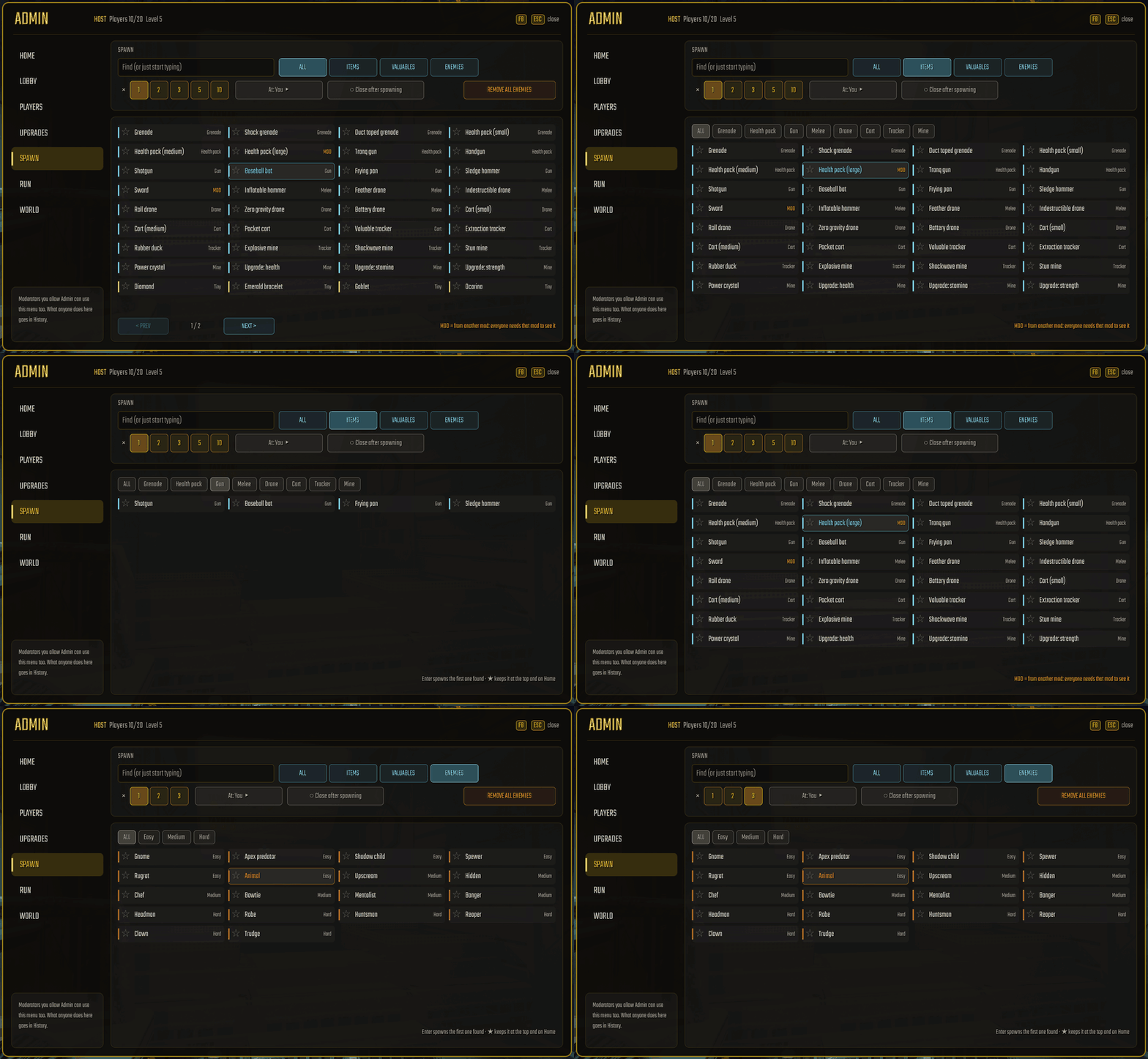
- Spawn has every item, valuable and enemy in the game, including ones from other mods (marked MOD). Just start typing to filter the list and press Enter to spawn. If you star your favourites, they stay pinned to the top and show up on Home. You can spawn 1 to 10 at a time, either in front of you or on any player.
- Players shows everyone's health at a glance. Click a player to heal or revive them, teleport to them, bring them to you, send them to the truck, knock them over, hand them the crown, kill, kick, ban or block them, or toggle their powers.
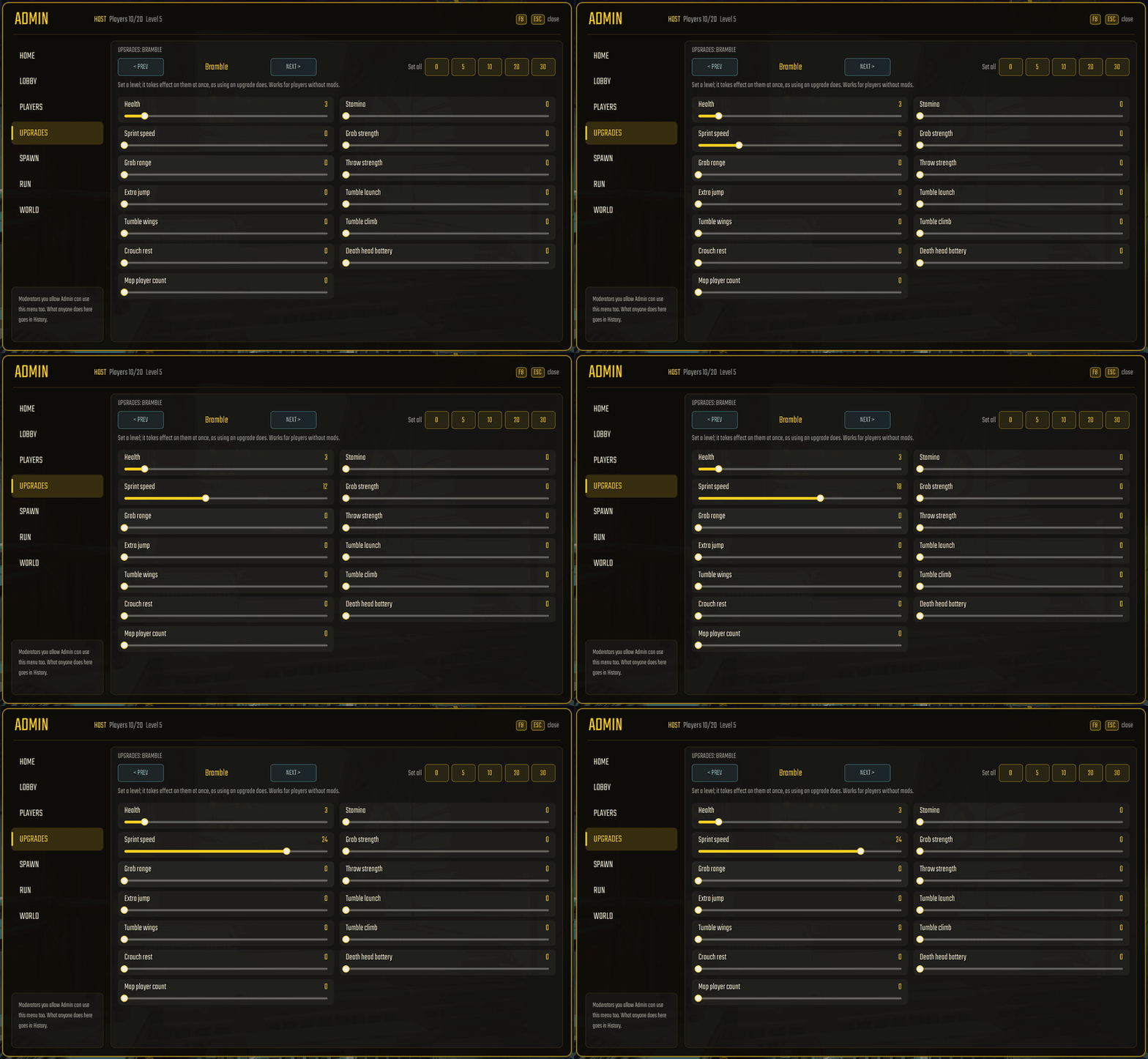
- Upgrades gives you sliders showing what each player actually has, or lets you set them all at once. This works on unmodded players too.
- Run lets you edit money or the current level number, open or finish an extraction, or jump straight to the shop or another level.
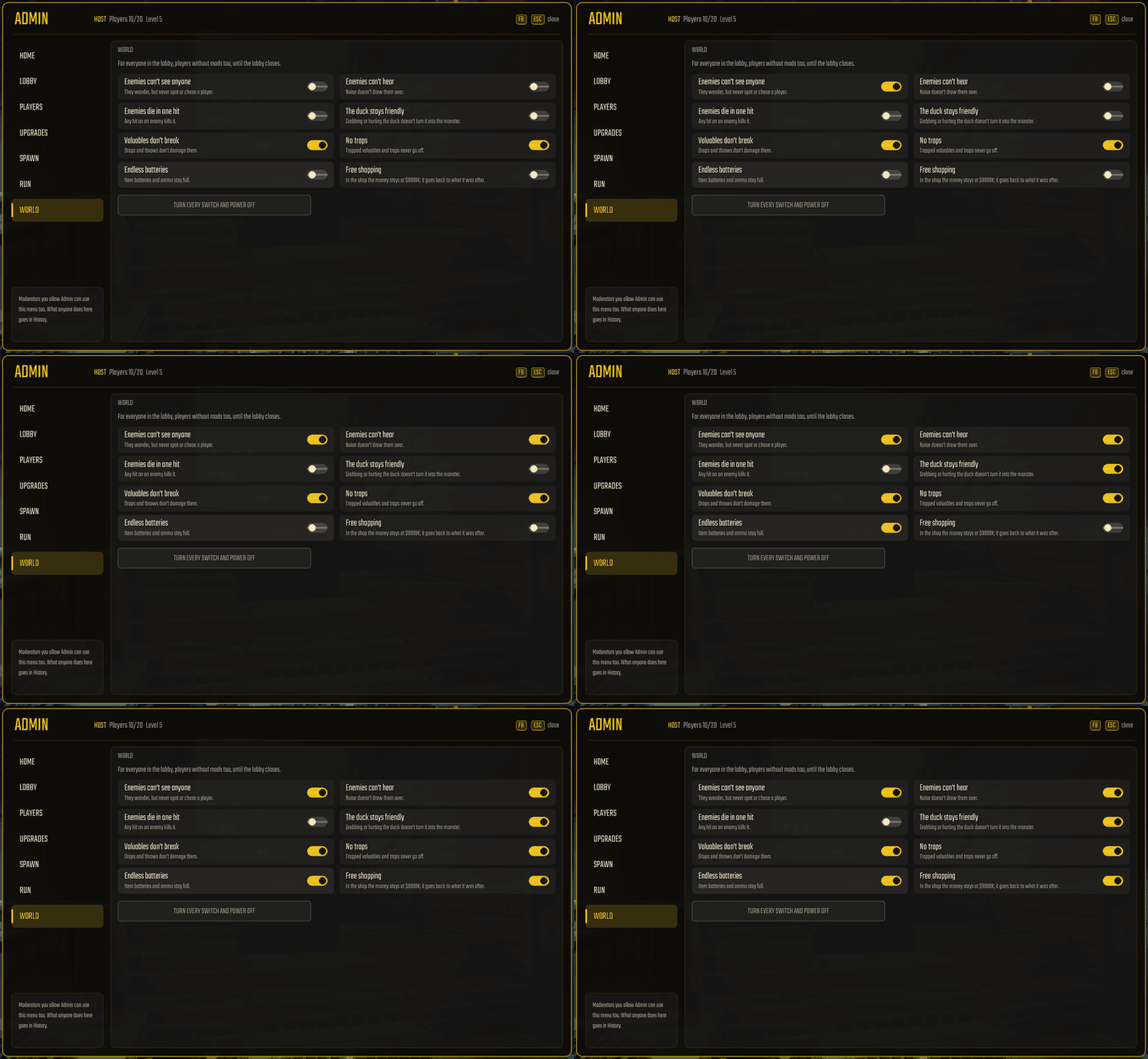
- World has toggles so enemies can't see or hear, enemies die in one hit, the duck stays friendly, valuables don't break, traps turn off, batteries and ammo never run out, and the shop is free.
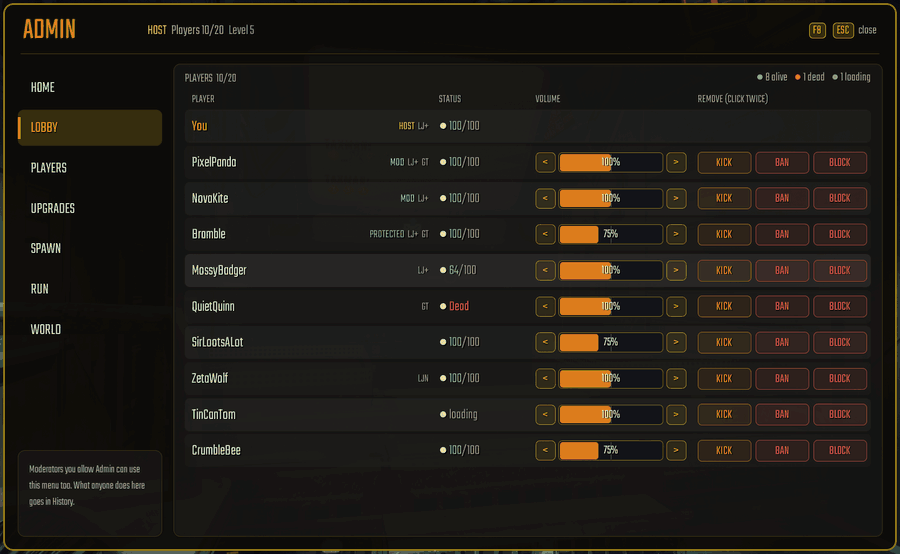
- Lobby is the same player list you get on loading screens, showing how everyone is doing, their volume, and kick, ban or block buttons.
- Anything you can't undo asks you to confirm once (SURE?). While the panel is open, your mouse cursor is free and the game ignores movement keys, though push-to-talk still works.
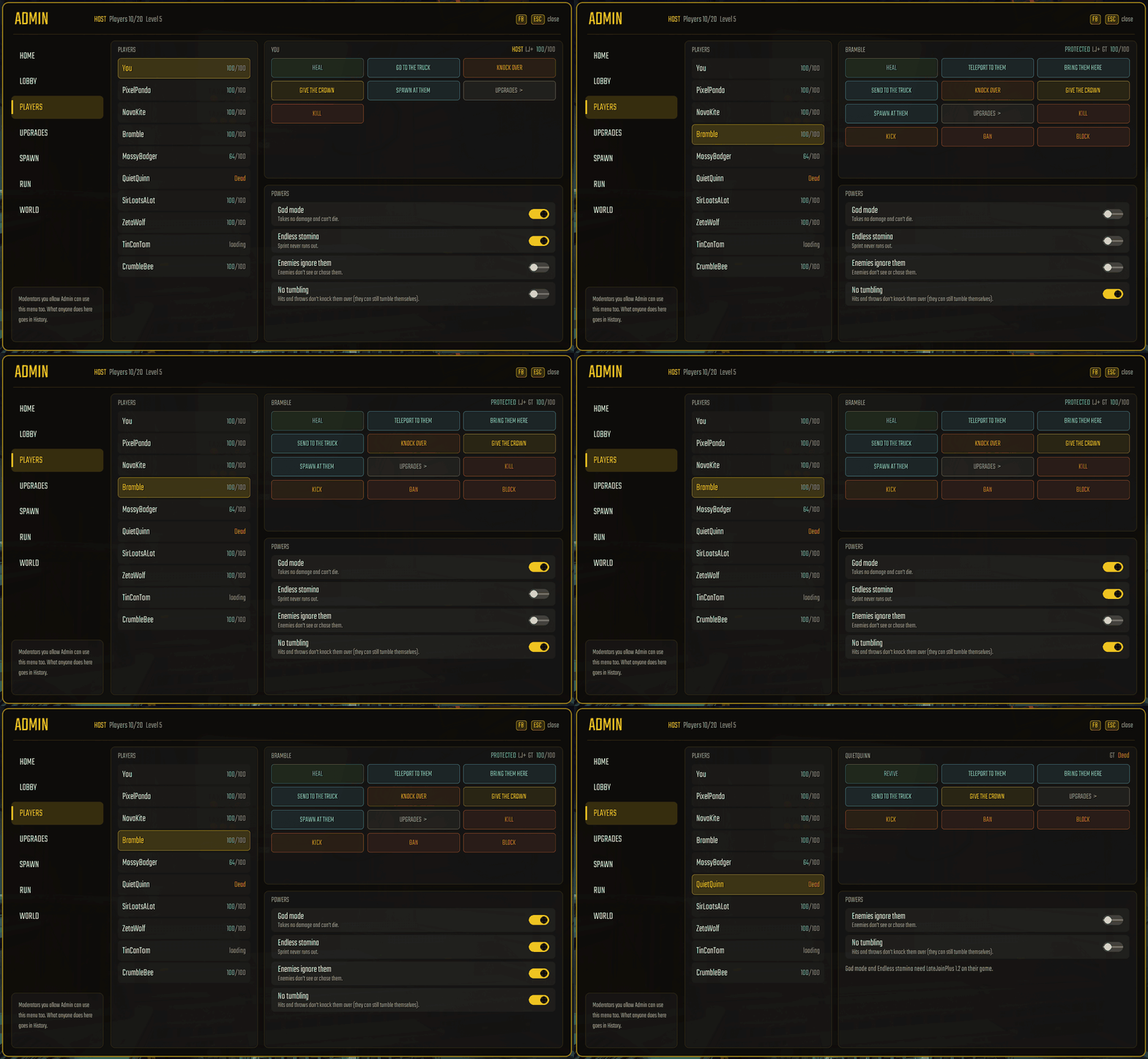
If you give a moderator the Admin permission, they get the same panel. Your game runs whatever they click and writes it down in History. They can't target you or other moderators, they're capped at 10 actions every 10 seconds, and they can spawn at most 5 things at a time (Admin → Moderator Spawn Max). If you don't want them changing levels, you can turn that off under Admin → Moderators May Change Level.
Because all of this runs on the host's game, players without mods still get healed, moved and upgraded, and they see everything you spawn. Only God mode and Endless stamina require LateJoinPlus 1.2 on that player's own PC.
You don't need RepoAdminMenu or Admin Menu Button Position Fix anymore, so feel free to uninstall both. If RepoAdminMenu is still installed and using the same key, LateJoinPlus will let you know.
Also new in 1.2.0
- Added Simplified and Traditional Chinese (简体中文 and 繁體中文). R.E.P.O's default fonts don't have Chinese characters, so LateJoinPlus pulls in the Chinese font Windows already has installed. If your Windows is set to Chinese, it picks this automatically.
- Added a Truck & extract option (Lobby Guard → Only Staff Start) so only you and the moderators you choose can start the truck, use the shop checkout, or hit BigFriendlyButton's extraction button if you use it. It's off by default, and anyone can still open extraction points.
- Added Lock GameTools under Lobby Guard, which turns off other players' GameTools in your lobby as long as you aren't using GameTools yourself.
- Added a truck heal backup. Some players' games skip the end-of-level heal in the truck (we've seen it with GameTools), so your game now heals them a few seconds later.
- Moderators with Run control can now press START in the lobby.
- Big lobbies now fit on the lobby screen. Up to 6 players the list looks just like the game's; from 7 players it goes into columns (as many as gives the biggest rows), keeping each row's look and proportions (ping on the left, name and head on the right) on screen above the CUSTOMIZE and START GAME buttons. Quiet players' names are a little brighter in columns because the text is smaller, while talking and dead players keep their usual difference. It works in every language and only changes your own screen (players without the mod see their normal list).
- Added Send a bug report under LJ+ → Overview → Problems?. Pick what went wrong, optionally describe it (up to 500 characters; links are removed), preview everything that will be sent, and press Send to post it to a public GitHub page (
RicketyWrecked-reports) and get a link. Nothing is sent by itself or until you press Send (one report every 5 minutes; if LateJoinPlus hits an error it suggests sending one once per session under Bug reports → Offer After Error, and you can switch bug reports off under Bug reports → Enabled). - Menu rows that don't fit (very long names or translations) now end in "…" instead of running off the panel, with the full text on the row's own page. The game's lobby screen and main menu were also checked in every language with LateJoinPlus's parts on them.
1.1.5: calls fixed, moderator access kept
- Fixed a bug where the other person on a call couldn't hear you, and another where the lobby couldn't hear you after hanging up until you re-picked your mic in settings. Voice now resets cleanly whenever you join or leave a call (or hold the talk-to-everyone key), so everyone hears you properly, modded or not.
- Your moderator access, player notes, name colours and protected players now live in one shared folder across all your mod profiles (
%LOCALAPPDATA%\LateJoinPlus\Shared). Switching profiles or updating won't wipe your moderator status anymore. It's still kept outside the profile folder itself, so sharing a profile code with a friend won't hand over your keys or notes. - Outside Call Volume now defaults to 15% instead of 0%, so you can still hear the rest of the lobby faintly while on a call. You can change this anytime in LJ+ → Calls.
- Pressing F6 to open the menu no longer puts harmless error lines in the log.
New in 1.1.4: LateJoinPlus in your language
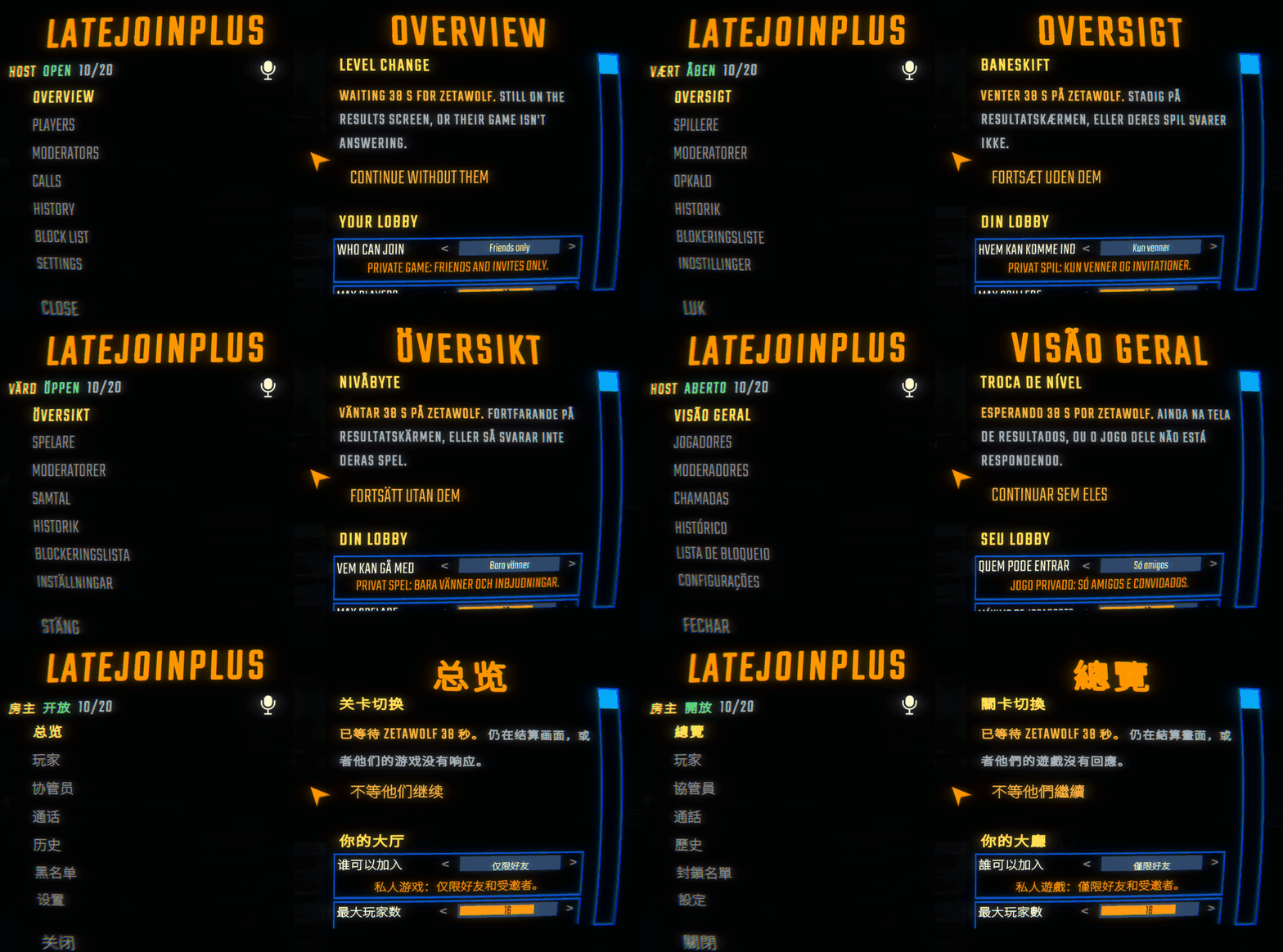
- Translated into English, Dansk (Danish), Suomi (Finnish), Svenska (Swedish), Português (Brasil) and Português (Portugal). That covers the LJ+ menu, all settings and hints, moderator pop-ups, the call panel, the loading-screen player panel, and on-screen messages.
- If you change your language in R.E.P.O's settings, LateJoinPlus switches right along with it without needing a restart. You can also pick a language yourself at the top of LJ+ → Settings.
- Messages that LateJoinPlus sends across the network stay in English on the wire (so people on older versions or other languages still get them) and translate into each player's own language when they arrive.
- If you want to tweak a translation yourself, drop a modified file into
BepInEx/config/LateJoinPlus-lang/and the mod will use your wording over the built-in one right away. - You can now press F6 to open and close the LJ+ menu from anywhere (if you're in a level, it opens the pause menu with LJ+ on top). A small LJ+ [F6] prompt in the bottom-left corner reminds you it's there, and you can change the key at the top of LJ+ → Settings.
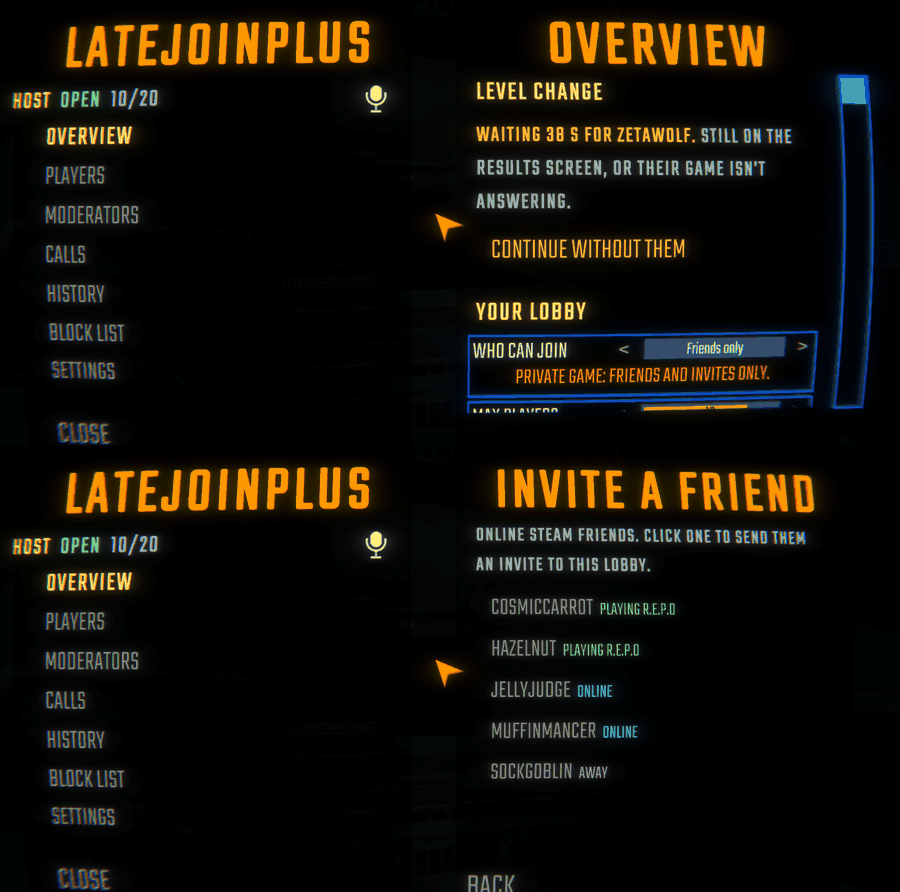
- Added Invites only under Who Can Join. This hides your lobby from the server list and only lets people in if you invite them, even if they're on your Steam friends list. Because Steam's own friends list doesn't let you send invites to hidden lobbies like this, invite people from inside the game instead: use the pause menu's INVITE button, or Invite a friend in LJ+ → Overview, which puts friends currently playing R.E.P.O at the top for one-click invites.
- Checked every page in every language so long translations shrink to fit their rows instead of running off the edge.
Update 1.1.0: tools to run your lobby
Version 1.1.0 turned LateJoinPlus into a full lobby toolkit with moderators, private calls, history and notes, and a player panel on loading screens. Everything sits in one menu, with the same late-join code underneath so players without mods can still join and play like normal.
What came in 1.1.0
Moderators
- You can make trusted friends moderators from their player page and pick what each one is allowed to do: Kick, Ban, Block, Notes, Calls, Run control and Admin. You can take moderator away anytime, even when they're offline.
- Everything a moderator does actually runs on your game after checking their permissions. They can never kick or ban you, another moderator, or anyone you protect. Their moderator key is saved privately on their own PC outside their mod profile, so sharing a profile won't leak it and a fake lobby can't steal or reuse it.
- Moderators with Admin can spawn things, teleport, summon, heal, revive, and change upgrades or money, all handled by the host's game and logged in History. It's capped at 10 actions every 10 seconds so nobody can flood the lobby. (Since 1.2.0, this uses LateJoinPlus's built-in Admin panel.)
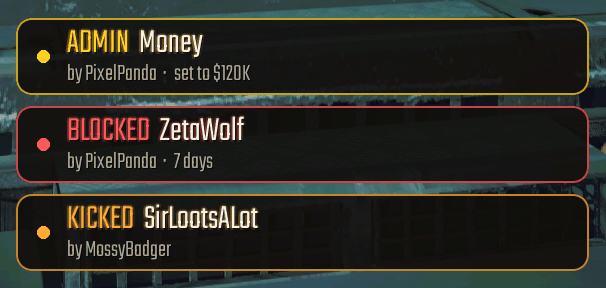
- When a moderator kicks, bans, blocks, writes a note, uses Admin or starts the run, a pop-up card appears in the middle of your screen just above your inventory slots showing what happened, to whom, and who did it.
- With Run control, moderators can start the run, cancel the start countdown, or send the group back to the lobby.
History, notes and bans
- History keeps track of every kick, ban, block, unblock, moderator change, note, call and Lobby Guard block. You can search and filter it, export it to a text file, or share it with your moderators. If someone already left the game, you can still block them straight from their history entry.
- You can leave notes on players by Steam ID, which show up for you and your moderators whenever that player joins again.
- Bans can be set for the current lobby only, 1 day, 7 days, 30 days, or permanently. Timed blocks expire on their own.
- When you remove someone who has LateJoinPlus installed, it tells them why and how long the ban lasts.
Private calls
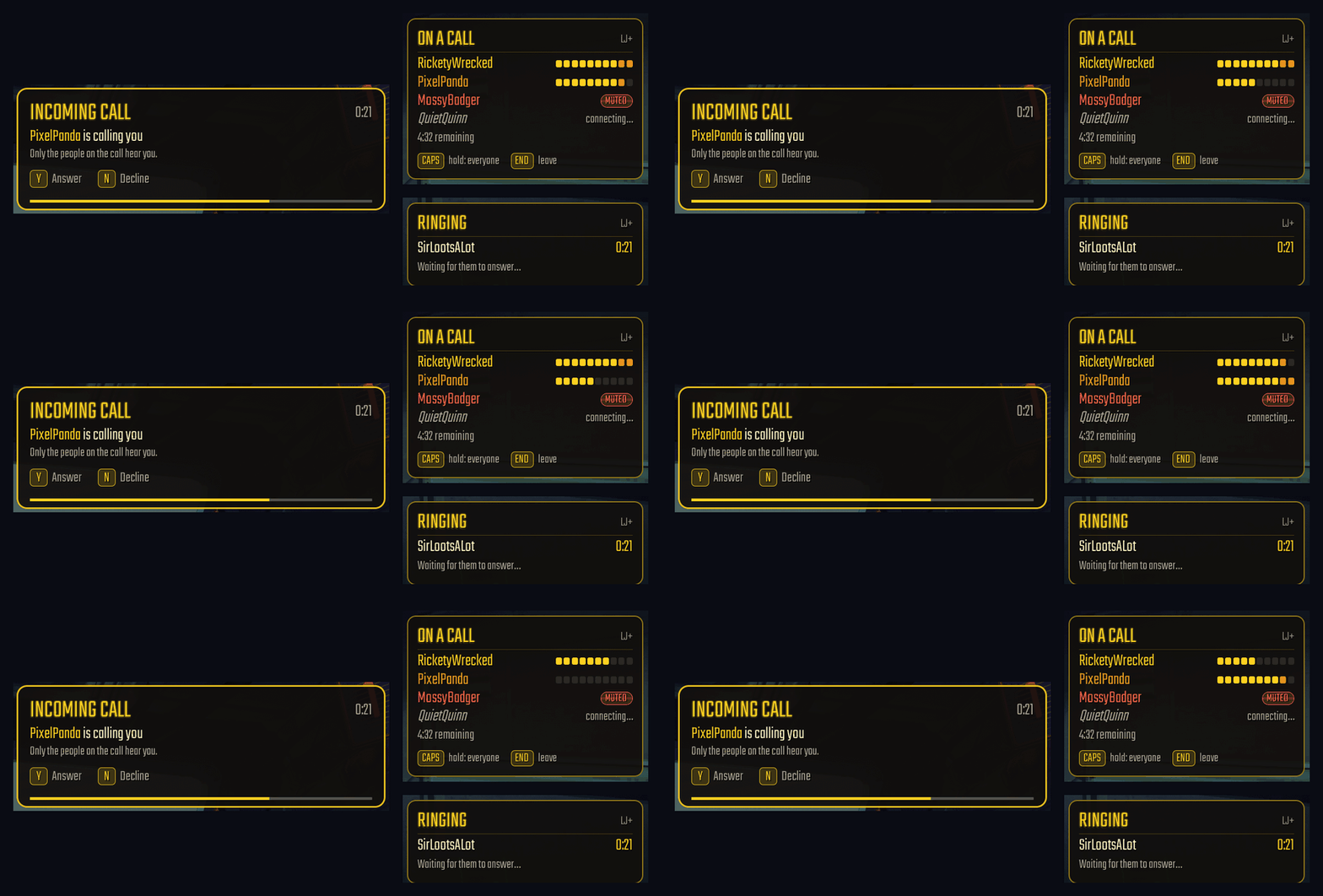
- Ring individual players who have LateJoinPlus, or start a team call with all of your moderators. Answer with Y, decline with N and hang up with End (all three keys can be changed). Players can also send a call request to the host.
- People on a call can hear each other across the whole map, through walls, and even while dead. Nobody outside the call hears you, including unmodded players, and talking on a call won't attract monsters.
- Hold Caps Lock during a call when you want to talk to the whole lobby at once. Everyone in the lobby hears you, the call still hears you, and you keep hearing the call. You can bind this to any key, including mouse side buttons.
- Volume sliders let you adjust call volume, outside lobby volume (0–100%), and your own mic boost live during a call.
- A call panel sits in whichever screen corner you pick, showing who's on the call, live mic bars for everyone (including you), who's muted or connecting, and any time limit. It tucks out of the way whenever you open a menu.
- As host, you can set a max duration and a cooldown timer for calls started by moderators.
Loading screens and level changes
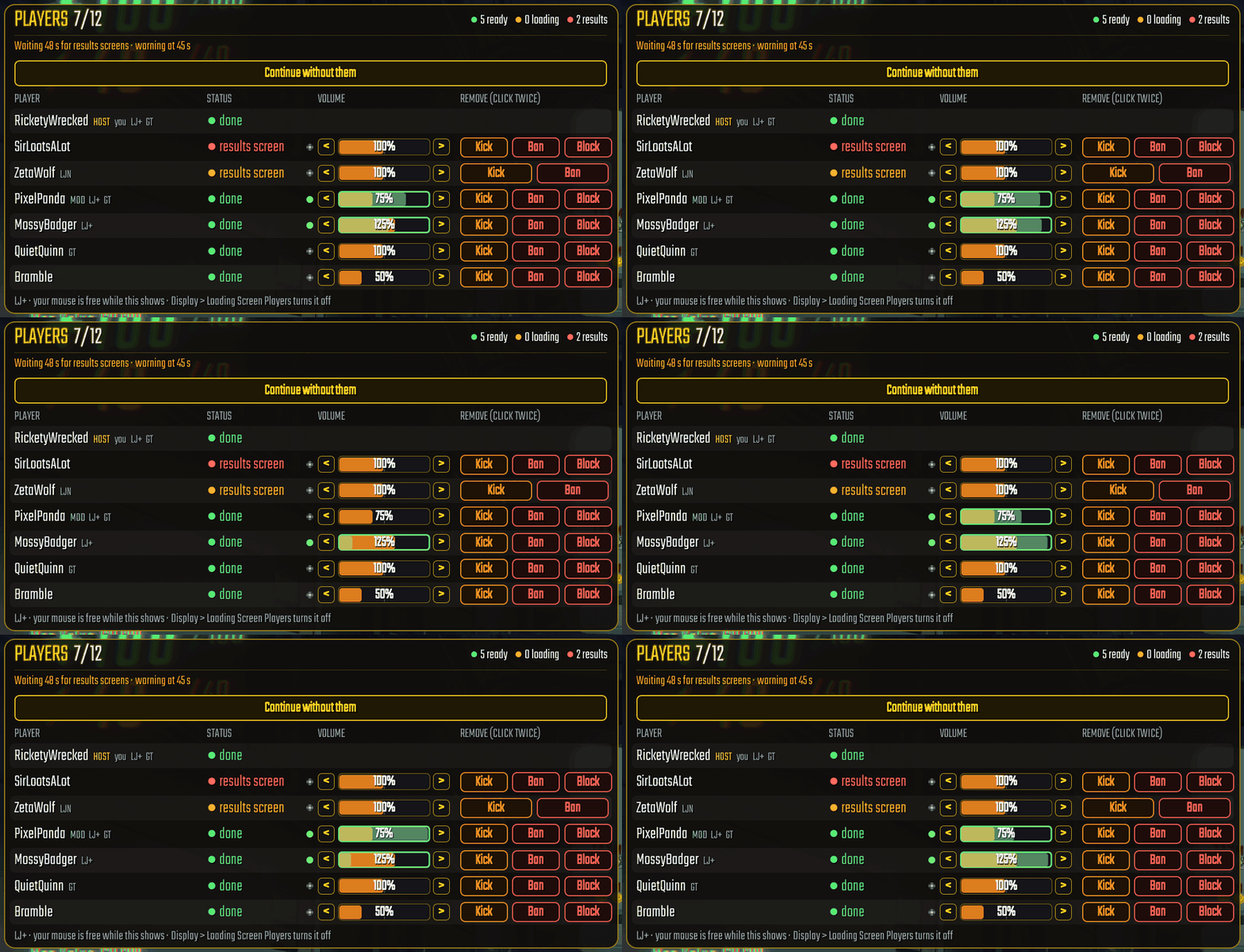
- The host and moderators get a player panel on loading screens showing everyone in the lobby, with the people holding up the load listed at the top. You can see each player's state (on the results screen, loading and for how long, loaded, or ready) and use the Kick / Ban / Block buttons (click twice to confirm). Your mouse cursor is unlocked while the panel is up.
- Added in 1.1.3: you can adjust any player's volume right on the loading screen (
<>or click the bar, 0–200%), with a green light and level bar showing who is talking. - After 45 seconds on a loading screen (you can change the timer), a slow player warning tells you who the game is waiting on. If they're stuck on the results screen, click Continue without them. Any level change that hangs for 2 minutes will also move on by itself.
- Ghost alerts let you know if a player still has no character a minute after joining.
Your lobby
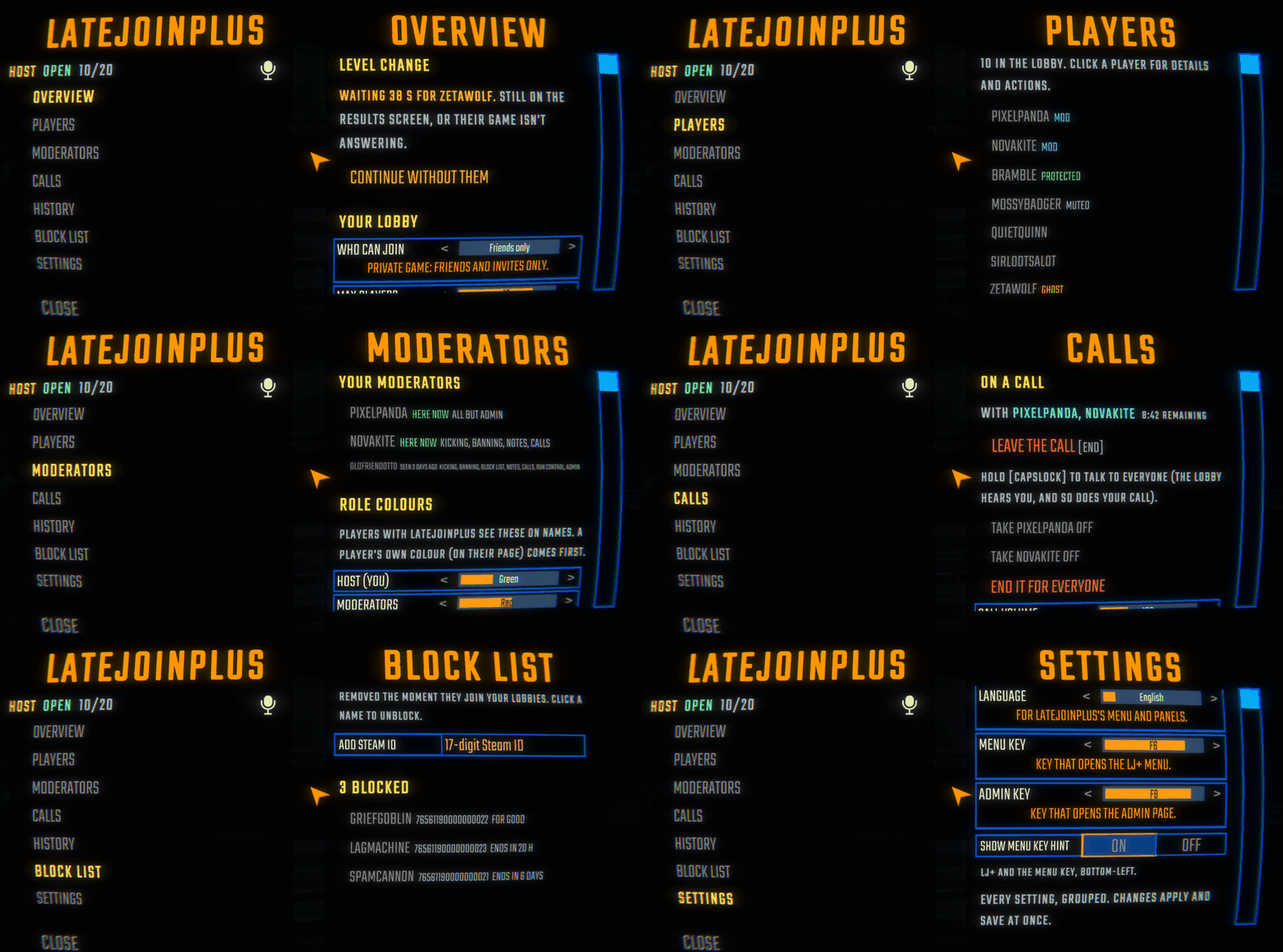
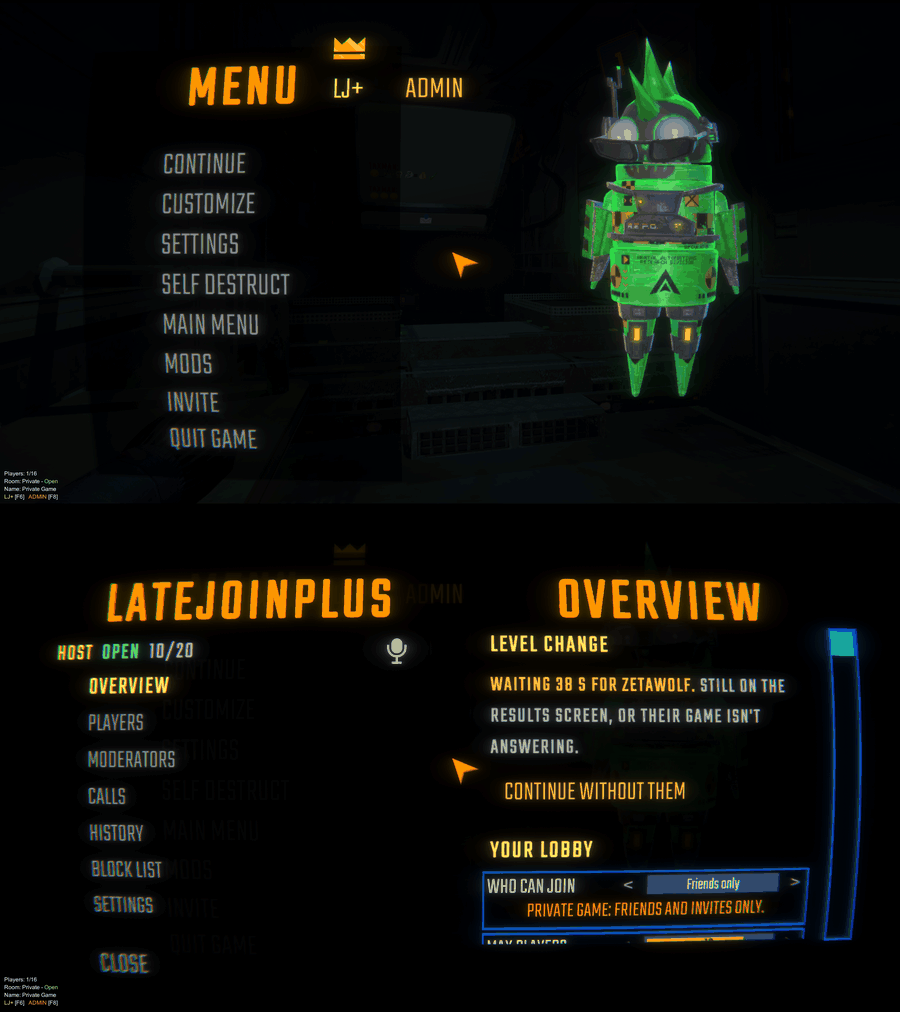
- The LJ+ menu is built to match R.E.P.O's own UI. The left side has Overview, Players, Moderators, Calls, History, Block List, Settings, and the right side shows the page along with a status line for whether you're hosting, whether the lobby is open, and how many players are in. There's a mic button to jump straight to Calls, and hitting Escape once closes the whole menu.
- You'll find the LJ+ button next to the title in the pause menu (right under the game's crown) and on the lobby screen.
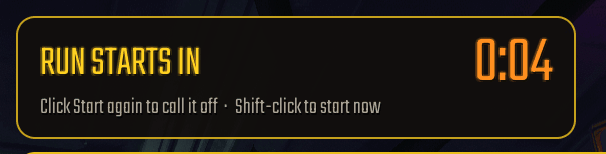
- Pressing Start begins a short countdown before the run launches so everyone has a moment to get ready. Shift-click Start to go right away, or click again to cancel.
- Pick custom name colours for yourself, your moderators or any player. Anyone with LateJoinPlus sees them above players' heads, in the lobby list and in the pause menu.
- Lobbies running LateJoinPlus are sorted to the top of the server list with a gold tag.
- In big lobbies with 18 or more players, the pause menu rows tighten up and shrink so every name stays on screen, keeping names and tags (HOST, MOD, MUTED, LJ+, LJN, GT) on a single line.
Fixes and quality of life
- When someone leaves, gets kicked or gets banned, their items drop right where they were standing instead of teleporting to the truck or jumping into the host's hands.
- If a rejoining player's inventory slot isn't ready yet, the item drops at their feet with a note explaining why instead of vanishing.
- Players who join mid-level now get cosmetic box tokens properly.
- Fixed Lobby Guard mistakenly blocking the host of a lobby you joined after another player left.
- Other late-join mods and moderation mods are automatically turned off while LateJoinPlus is running so they don't fight over your lobby. You can uninstall the old ones.
- Moderators, history and calls still work even if you turn late joining off.
- Installs REPO Fixes+ 1.3.4 as a dependency. (1.1.0 also installed RepoAdminMenu and Admin Menu Button Position Fix, which 1.2.0 no longer needs.)
Moderators and people joining private calls need LateJoinPlus 1.1.0 or newer. Regular players joining your lobby don't need any mods.
What LateJoinPlus does
With most late-join mods, friends who join mid-level end up falling through missing floors or walking into rooms with no walls, because those rooms never reached their game. LateJoinPlus sends every room of the level to each person who joins, so the map looks and works the same for them as it does for you.
Your friends can join at any point: while you're in the truck, shopping, or already halfway through a level. Only the host needs the mod installed. People joining you can play completely unmodded.
Main features
- Press F8 for the built-in Admin panel to heal, revive, teleport, spawn anything, change upgrades, money or levels, toggle God mode, and flip world switches. It works on players without mods too.
- Translated into all of R.E.P.O's languages (English, Dansk, Suomi, Svenska, Português (Brasil), Português (Portugal)) plus 简体中文 and 繁體中文, matching whatever language your game is set to.
- Make trusted friends moderators so they can kick, ban, block, keep notes, start the run and use the Admin panel, with only the permissions you choose to give them.
- Start private calls with individual players or your whole mod team. You can hear each other anywhere on the map, and hold Caps Lock whenever you want to talk to the whole lobby.
- Searchable history and player notes that record every kick, ban, block and note, shared with your moderators.
- A player panel on loading screens shows who is holding up a level change (with a warning after 45 seconds) and lets you remove them if they're stuck.
- The LJ+ menu puts everything in one spot next to the title in the pause menu and on the lobby screen, including a start countdown and custom name colours.
- Friends can join while you're in the truck, in the shop, or in the middle of a level.
- Every room loads properly for late joiners, with no missing floors or walls.
- Joiners don't need to install anything. They load in caught up with the current run.
- People who join late can play right away: voice chat works both ways, and they can pick up items, use their inventory slots and extract like normal.
- Late joiners won't accidentally lock extraction points for the rest of the level.
- Host bigger lobbies of up to 20 players (10 by default, set in the LJ+ menu) without needing MorePlayers, even for unmodded joiners.
- Players who leave and rejoin the same run get their upgrades back right away instead of waiting for the next level.
- Rooms your team has already walked through show up on a joiner's map.
- Joiners spawn safely by the truck (or next to you), never inside a wall or over a pit, and without teleporting anyone else.
- Syncing a new player is spread out over a moment so your game doesn't freeze when someone joins.
- Open or close your lobby on the fly, even mid-level:
- Everyone: open to the public and listed in the server list.
- Friends only: hidden from the server list; only your Steam friends and people you invite can get in.
- Invites only: hidden from the server list; only people you specifically invite can join, even if they're on your friends list. Invite them with INVITE or LJ+ → Overview → Invite a friend.
- Nobody: closed to new players until you open it back up.
- Anyone in your lobby can send Steam invites, not just the host, including players without mods.
- Lobby Guard blocks common griefing (fake kicks, host stealing, voice takeovers, cheat menus), auto-bans anyone on your block list, and keeps other players' mods from spamming your log with errors.
- Kick, ban (for a set time or permanently) or block players from the pause menu, the LJ+ menu, or the loading-screen panel.
Getting started
- Install LateJoinPlus with r2modman or the Thunderstore app. It automatically grabs what it needs: MenuLib and REPO Fixes+ (multiplayer bug fixes). The Admin panel is already built in.
- Host a game like you normally do.
- That's it. People can now join your lobby at any time, up to 10 players by default (you can raise it up to 20 in LJ+ → Overview → Max Players). Use the INVITE button in the pause menu to invite friends, or let people find you in the server list where your lobby shows a
[LateJoinPlus]tag.
You don't have to touch any settings if you just want to play. When you do want to tweak things, press F6, click LATE JOIN on the main menu, or click LJ+ in the pause menu or lobby screen. F8 opens the Admin panel. Everything uses your in-game language automatically. For instance, you can set Who Can Join to Friends only while you wait for your group, or Nobody once you're full. To make a friend a moderator, make sure they have LateJoinPlus, pick them under Players, and click Make moderator.
Who needs it
| Player | Needs LateJoinPlus? |
|---|---|
| Host | Yes. It runs late join, catches joiners up, and handles the moderation tools. |
| Players joining | No. Unmodded players can join and play normally. |
| Moderators, and players you call | Yes, 1.1.0 or later (1.2.0 for the Admin panel). |
| Players you give God mode or Endless stamina | Yes, 1.2.0. Everything else on the Admin panel works on players without mods. |
| Anyone who wants Lobby Guard protection | Yes. Your copy of the mod can only protect your own game. |
Friends who do install LateJoinPlus get a few nice extras when joining you: the exact list of explored rooms, their game version shown in your player list, custom name colours, the start countdown, and a message explaining why if they ever get removed.
What a joiner gets
When someone hops in mid-run, the host's game sends them everything they need to catch up:
- the level layout (rooms, doors, lights), all set up properly;
- every item's name, value, battery charge, and who is holding it;
- run stats, the current haul total, and extraction goals;
- everyone's upgrades, including their own if they were in the run earlier;
- extraction point states, so open and finished ones show up right;
- working voice chat in both directions;
- the explored map;
- Birthday Boy's balloons, plus the map's guide line back to extraction.
A small tracker in the bottom-left corner shows each person joining: Connecting, Loading, Joined (or Left). [O] means they have LateJoinPlus installed, and [X] means they don't (which is fine).
The LJ+ menu
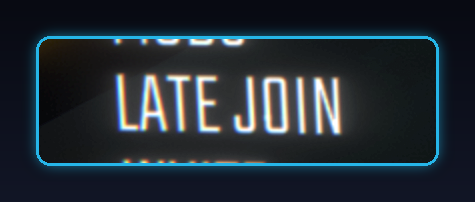
Open it any time with F6 (you can change the key), the LATE JOIN button on the main menu right above Quit, or the LJ+ button next to the title in the pause menu and lobby screen (for the host and moderators). Tabs are on the left, and the page is on the right:
- Overview has Who Can Join (Everyone, Friends only, Invites only, Nobody) and Max Players, both applied live, along with run controls (start countdown, return to lobby, force-continue a stuck level load) and Invite a friend.
- Players lists everyone with their Steam profile, role, late-join mod, GameTools status, game version, volume, notes and name colour, plus buttons to Kick, Ban (with a timer), Block, Make moderator and Protect. All of those ask you to confirm first.
- Moderators shows all your moderators, whether they're online or offline, and what each one can do.
- Calls shows your current call (who's in it, time left, volume sliders, Leave button), who you can ring, and Call settings.
- History has a searchable log of everything that happened in your lobbies, with an option to export it.
- Block List shows everyone you've blocked and how long is left on their ban, and lets you add a Steam ID or unblock someone.
- Settings puts Language and Menu Key right at the top, followed by every other setting sorted by category.
In the pause menu's player list, each name shows short tags: HOST or MOD, MUTED (if their in-game mute is on), CHEAT (if caught cheating), which late-join mod they have (LJ+, LJN, LR, LJ), GT for GameTools, and their game version if it doesn't match yours. When you're hosting (or a moderator with kick permissions), clicking Kick in the pause menu lets you pick between Kick, Ban or Block. Vanilla R.E.P.O's "kick" is actually a ban, so this gives you a real choice.
Any changes you make save and apply right away.
Lobby Guard
Lobby Guard keeps griefers and cheat menus from wrecking your runs.
| Problem | What Lobby Guard does |
|---|---|
| Fake kicks (everyone sent back to the main menu) | Ignored. Only the real host can kick. |
| Host stealing (someone makes themselves host) | You keep your lobby, take host back, and they get banned. |
| Deleting or stealing everything | Only allowed from the host or the item's owner. |
| Voice takeover or voice spam | Blocked. |
| Messages for mods you don't have (another player's mods) | Let through once, then ignored quietly instead of spamming errors in your log. |
| Fake revives (only the host can revive; other mods like GameTools sometimes spam them) | Dropped before any mod reacts so they can't lag your game. Not treated as cheating. |
| Cheat menus (e.g. heal-everyone spam) | The cheat is ignored and you get a message on screen. It doesn't auto-kick them, leaving that up to you. |
| Known cheaters | Add their Steam ID to your block list. When you host, they get banned the second they join. |
Anyone caught sending network actions that a normal game would never send gets blocked on your side. If you're hosting, they're also banned and added to your block list automatically.
Settings
You can change these in LJ+ → Settings (the easiest way), in REPOConfig, or by editing BepInEx/config/ricketywrecked.repo.latejoinplus.cfg.
| Setting | Default | What it does |
|---|---|---|
Late Join.Enabled |
on | Turn late join on or off. |
Late Join.Truck / Shop / Level |
on | Which stages players are allowed to join in. |
Late Join.JoinSpawn |
Truck | Where joiners spawn: by the Truck, or next to the Host. |
Late Join.RevealMapForJoiners |
on | Fill in explored rooms on a joiner's map, including for players without mods. |
Late Join.SlotsForJoinersWithoutMod |
on | Let unmodded joiners use their inventory slots as soon as they load in (off = from the next level). If a slot fails, the item drops at their feet instead of disappearing. |
Late Join.TruckHealBackup |
on | Heal players whose game skipped the truck's end-of-level heal (seen with GameTools). |
Late Join.OtherLateJoinMods |
on | Turn off other late-join mods (LateJoinNow, LateRepo, LateJoin…) so only LateJoinPlus handles joining. |
Map Sync.Enabled |
on | Send the exact explored rooms to joiners who also have LateJoinPlus (and receive them when you join someone else). |
Map Sync.RevealAllRoomsWhenHostHasNoMod |
off | Fill in the whole map when you join a host who doesn't have the mod to send their explored rooms. |
Lobby Guard.Enabled |
on | Turn Lobby Guard on or off. |
Lobby Guard.BlockHostHijack |
on | Stop other players from stealing host. |
Lobby Guard.VoiceGuard |
on | Block voice takeovers and voice spam. |
Lobby Guard.RevealSteamIds |
on | Record each player's real Steam ID when you host. |
Lobby Guard.AutoBan |
on | Automatically ban players on your block list when they join your lobby. |
Lobby Guard.AutoAddToBlockList |
on | Add players caught attacking the lobby to your block list. |
Lobby Guard.BlockedSteamIds |
empty | Steam IDs to block (17 digits each, separated by commas). |
Lobby Guard.EnforceHeuristics |
off | Also block players on suspicion alone (message floods, invisible players). Leaving it off is safer: it can't block a real player by mistake. |
Lobby Guard.FloodMessagesPerSecond |
500 | How many messages per second count as a flood. |
Lobby Guard.GhostSeconds |
90 | Seconds without a character before a player counts as invisible. |
Lobby Guard.LockGameTools |
off | Turn off other players' GameTools in your lobby (only works if you don't use GameTools yourself). |
Lobby Guard.OnlyStaffStart |
off | Only let you and moderators with Truck & extract start the truck, use the shop checkout and press BigFriendlyButton's extraction button, if you use it. |
Lobby.StartCountdownSeconds |
5 | Countdown in seconds after pressing Start (0 = none, up to 5 minutes). Shift-click Start to launch right away. |
Lobby.WarnSlowPlayersSeconds |
45 | How long to wait on a loading screen before showing who is holding things up. |
Lobby.ContinueStuckLevelChangeSeconds |
120 | Move on without a player if their game stops responding during a level change for this long. |
Lobby.ShowNameColors |
on | Show the custom name colours picked by the host. |
Lobby.HighlightLateJoinPlusLobbies |
on | Put LateJoinPlus lobbies at the top of the server list with a gold tag. |
Calls.AnswerKey / DeclineKey / LeaveKey |
Y / N / End | Keys to answer, decline and leave a call. |
Calls.TalkToEveryoneHoldKey |
Caps Lock | Hold during a call to talk to the whole lobby too. None = off. |
Calls.CallVolumePercent |
100 | Volume of the other people on your call (20–300%). |
Calls.OutsideCallVolume |
15 | Volume of players outside your call while you're on one (0–100%). |
Calls.CallMicBoost |
100 | Your own mic volume on calls (50–200%). |
Calls.ShowCallPanel / CallPanelCorner |
on / Top Right | Show the call panel and pick which corner it sits in. |
Calls.RingSound |
on | Play a short ringtone when someone calls you. |
Calls.AllowCallRequests |
on | Let players ask you (as host) for a 1-on-1 call. |
Calls.MaxCallMinutes / MinutesBetweenCalls |
0 / 0 | Host limits on calls started by moderators (0 = no limit). |
Display.Language |
auto | Language for LateJoinPlus's menus and panels. auto = matches the game's language setting (or Chinese on a Chinese Windows). |
Display.MenuKey |
F6 | Key to open and close the LJ+ menu from anywhere. None = no key. |
Display.AdminKey |
F8 | Key to open and close the Admin panel (for the host and moderators with Admin). None = no key. |
Display.ShowMenuKeyHint |
on | Show a small LJ+ [F6] reminder in the bottom-left corner when the key can be used. |
Display.ShowJoinStatus |
on | Show the joiner progress list in the bottom-left corner. |
Display.LoadingScreenPlayers |
on | Show the player panel on loading screens (for the host and moderators). |
Display.ShowModeratorActions |
on | Show pop-ups above your inventory slots when a moderator does something. |
Display.ShowStatus |
off | Show the player count and lobby open/closed status in the bottom-left corner. |
Display.InviteButton |
on | Show the INVITE button in the pause menu. |
Display.MissingRoomWarning |
on | Warn you on screen if you join someone else's game mid-level and rooms are missing. |
Players.MaxPlayersEnabled / MaxPlayers |
on / 10 | Allow bigger lobbies (2 to 20 players), overriding MorePlayers and RoboUnion's limit. Off = vanilla limit (6). Full lobbies hide from the server list, and the mod tells you when this setting is why. |
Admin.ModeratorSpawnMax |
5 | The most things a moderator can spawn at once (you can spawn up to 10, or 3 for enemies). |
Admin.ModeratorsMayChangeLevel |
on | Let moderators with Admin send the lobby to another level or the shop. |
Debug.DebugLogging |
off | Write detailed steps to the log for bug reports. |
Whenever late join is enabled, your lobby name in the server list starts with [LateJoinPlus] so people browsing know they can hop in mid-run.
Questions
Do my friends need to install anything? Nope. Only the host needs LateJoinPlus. The only people who need it installed are your moderators and anyone you want to bring into a private call (1.1.0 or newer).
I was a moderator, but after switching mod profiles I lost it?
Before 1.1.5, each mod profile kept its own moderator key, and since a host only keeps one active key for you at a time, getting modded on a second profile broke the first one. Starting in 1.1.5, all profiles share the same folder (%LOCALAPPDATA%\LateJoinPlus\Shared), so that won't happen anymore. If you already ran into this, just ask your host to click Make moderator on you one last time.
Which languages does LateJoinPlus support?
English, Dansk, Suomi, Svenska, Português (Brasil), Português (Portugal), 简体中文 and 繁體中文. R.E.P.O v0.5.0 added more languages to the game; LateJoinPlus isn't translated into those yet, so they show in English for now. It follows your in-game language automatically, or you can pick one at the top of LJ+ → Settings. If you spot a weird translation, let me know on Discord, or fix it locally by putting a file in BepInEx/config/LateJoinPlus-lang/.
When I use Invites only, Steam's friends list doesn't have an invite button. That's a quirk with how Steam handles hidden invite-only lobbies. Use the in-game invite tools instead: either the INVITE button in the pause menu, or LJ+ → Overview → Invite a friend.
Do I still need RepoAdminMenu? No. LateJoinPlus has its own Admin panel on F8 now, so you can uninstall both RepoAdminMenu and Admin Menu Button Position Fix. Any moderators you already gave Admin permission to will keep it.
Does the Admin panel work on players without mods? Yes. Healing, reviving, teleporting, upgrades, spawning and world switches all run through the host's game, so unmodded players get all of it. Only God mode and Endless stamina require LateJoinPlus 1.2 on that player's PC.
How do I make someone a moderator? Make sure they have LateJoinPlus 1.1.0 or newer installed. While you're hosting, go to LJ+ → Players, click their name, hit Make moderator, and check the boxes for what you want them to be able to do. The game remembers them in future lobbies you host, and you can take their access away anytime, even when they're offline.
Can a moderator kick me or take over my lobby? No. Your game checks their permissions before running anything they click, and it never lets a moderator remove you, another moderator, or a player you've marked as protected.
Can I remove someone while stuck on a loading screen?
Yes. On loading screens, the host and moderators with kick permissions get a player panel with the mouse cursor unlocked. It puts the people holding up the load at the top, shows where they're stuck, and gives you Kick, Ban and Block buttons (click twice). After Lobby.WarnSlowPlayersSeconds (45 s), it warns you who the holdup is. If someone is stuck on the results screen, click Continue without them. You can turn this panel off with Display.LoadingScreenPlayers.
Can people outside my private call hear me? Not unless you hold down your talk-to-everyone key (Caps Lock by default). While you hold that key, both the lobby and your call can hear you.
Do I still need MorePlayers? No, LateJoinPlus handles player limits up to 20 on its own (under Max Players in the LJ+ menu). If you still have MorePlayers installed, LateJoinPlus disables it and takes over the cap, so you can uninstall it. If you use RoboUnion, it keeps its other features while LateJoinPlus manages the player limit.
Can I run this alongside LateJoinNow or another late-join mod?
You shouldn't need to. Having two late-join mods active makes them fight over the lobby, so if LateJoinPlus detects LateJoinNow, LateRepo, LateJoin or another late-join mod, it turns the other one off and handles joining itself. It's best to uninstall the other one. (If you really want to force it on anyway, set OtherLateJoinMods to false, though I don't recommend it.)
What if I have another moderation mod installed? LateJoinPlus turns it off while running so the two don't clash over kicks, bans, calls or the start countdown. You can safely uninstall the old mod.
What about SharePermissions? LateJoinPlus has its own moderators and calls, and switches SharePermissions off while it runs. It can still stop your game answering a host's moderator check, so please uninstall it if you use LateJoinPlus.
What about ShowMoreLobbyPlayers? LateJoinPlus fits big lobbies on the lobby screen itself: from 7 players the list goes into columns that stay on screen and above the buttons. Two mods moving the same rows fight, so LateJoinPlus turns ShowMoreLobbyPlayers off while running. You can safely uninstall it.
I used to have standalone Lobby Guard or Map Sync Fix installed. Both are built into LateJoinPlus now, so you can uninstall the standalone versions. If they're still installed, LateJoinPlus disables them and imports your old block list automatically.
I joined someone else's lobby mid-level and rooms are missing floors or walls. That means the host is using a different late-join mod that didn't send those rooms to you, and there's no way for your client to invent rooms the host never sent. LateJoinPlus will pop up a notice on screen when it sees this happen. Once you load into the next level, everything will work normally.
How do I report a bug?
In the game, open LJ+ → Overview → Problems? → Send a bug report, pick what went wrong, and optionally describe it (up to 500 characters; links are removed). You can preview everything before anything is sent, and pressing Send posts it to a public GitHub page (RicketyWrecked-reports) where anyone can read it and gives you a link to the report. It never includes chat, voice, other players' names or Steam IDs, your own name (unless you tick "Include my name"), your block list, history or notes, or any other file. For questions, use the Discord.
What does a bug report send? Included:
- LateJoinPlus and game versions
- Whether you're host or client, the level, the number of players, and your language
- Your mod list
- LateJoinPlus's settings (on/off switches and numbers only)
- LateJoinPlus's log lines and errors from that session
Never included:
- Chat or voice
- Other players' names or Steam IDs (they become "Player 2", "Player 3"…)
- Your own name, unless you tick "Include my name"
- Your block list, history, or notes
- Any other file
Support
All my mods are free and always will be. If this one made your nights on R.E.P.O a bit smoother, a tip on Ko-fi helps me keep fixing bugs and building new stuff. Thanks!
License
Copyright (c) 2026 RicketyWrecked. All rights reserved. You may download and play with this mod, and list it as a dependency in your own Thunderstore modpack. You may not copy, modify, decompile, reuse or re-upload any of it. The source code is not shared and is not available on request. See the included LICENSE file, which also has the MIT notice for the parts of the Admin panel that build on RepoAdminMenu.
Credits
Made by RicketyWrecked. Not affiliated with the R.E.P.O developers.
The Admin panel builds on RepoAdminMenu by Brent Profera (proferabg), used under the MIT License; its notice is in the LICENSE file.
Special thanks to Mama_Panda0729 💛, who tested the 1.1.0 update across lobby after lobby, hunting down bugs and pitching ideas. Moderators, calls and the loading-screen panel turned out the way they did thanks to her.
Bug reports: Discord. The Discord is strictly for bug reports (please include your BepInEx/LogOutput.log); requests for the source code or permission to reuse any part of the mod will be declined.