


MicVisual
Shows your in-game Microphone volume on your screen.Mic Visual
I'm back with a new mod ! :D
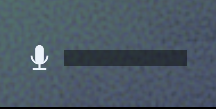
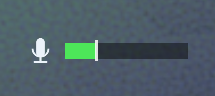
This mod consists of a volume bar at the bottom of your screen, so that you can know how loud your mic is. It should be pretty discrete so that should be right !
There is no delay, since it follows the same logic as the head movement of the character.
Features
- Mic icon
- Volume bar (dynamic)
- config available to change many different parameters (stick to default for a better experience)
Usage
No need to set up anything, the overlay should appear when launching a game.
And the volume bar is dynamic : it fills up depending on how loud your microphone is in game.
FAQ
- Can I use this mod in multiplayer ?
Yes, it is a client side mod, meaning it only impacts you, and not the other players.
- Do I need to install plugins for it to work ?
The only plugin you need is included in the downloaded when downloaded from thunderstore app. If not, you may need to install BepInEx (5.4.2304)
- Can I use this with other mods ?
Of course ! It shouldn't conflict with them, if it does, please contact me and I'll work on a fix.
- Can I include it in my modpack ?
Absolutely, I am happy that you can share this mod :)
For my technical fellas out there
It's easier than you'd think.
take the file : \plugins\MicVisual.dll from the downloaded files.
drop the file in : \steam\steamapps\common\REPO\BepInEx\plugins\
Notes
The volume shown is the one that the GAME RECEIVES, so it fully reflects what the ennemies will hear.
Contact us / feedback
You can contact me at : [email protected]
Check out my website ! My website is here
Any suggestion or mod ideas ? feel free to reach me :)
Have fun !