
Please disclose if any significant portion of your mod was created using AI tools by adding the 'AI Generated' category. Failing to do so may result in the mod being removed from Thunderstore.

LevelScaling
Highly configurable mod to adjust difficulty progression all-around. Includes challenge levels and run modifiers to spice up your games, and stats tracking for individual levels, whole saves, and globally across lobbies.
| Date uploaded | a week ago |
| Version | 1.3.3 |
| Download link | Swaggies-LevelScaling-1.3.3.zip |
| Downloads | 3528 |
| Dependency string | Swaggies-LevelScaling-1.3.3 |
This mod requires the following mods to function

BepInEx-BepInExPack
BepInEx pack for Mono Unity games. Preconfigured and ready to use.
Preferred version: 5.4.2304
README
Level Scaling
Level Scaling is a R.E.P.O. mod that allows you to fully customize your difficulty progression and scaling, additionally including statistics for your levels, entire runs, and globally across lobbies. Also includes Level 'Challenges' and Run 'Malfunctions' if you'd like to add some spice!
Notable Features
- Any of the following can adjusted based on level number:
- Map size
- Number of extraction points
- Total map value
- Quota difficulty
- Number of tier 1/tier 2/tier 3 enemies
- Enemy health multiplier
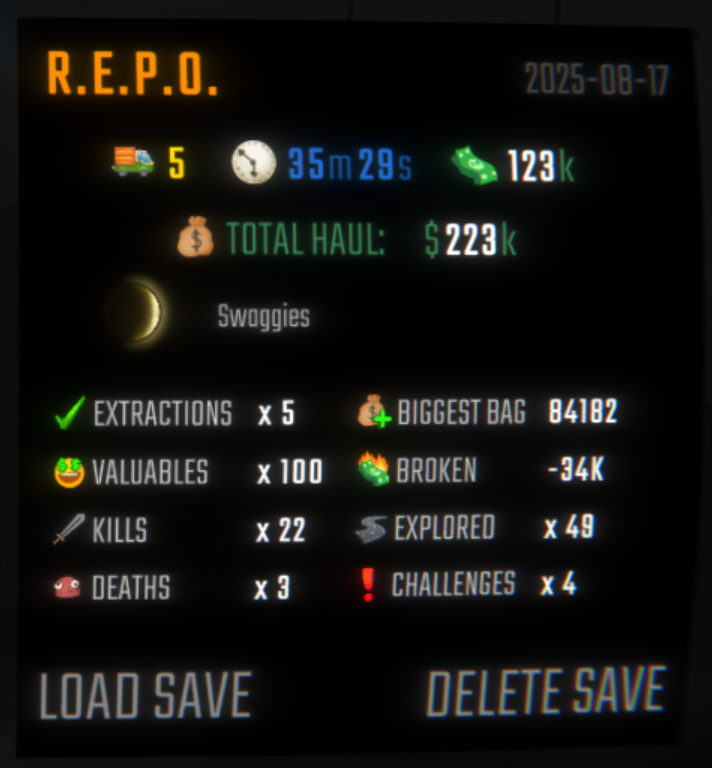
- Realtime in-game level stats, run stats on the save file selection screen, and global stats that persist across all runs and lobbies.
- 12 types of Challenges that may appear in your levels
- 9 types of custom "Malfunctions" that apply to entire runs
- Level Simulation menu to know what to expect on a certain level number (& helps with configuration testing)
- Everything above can be configured/adjusted/disabled using your mod manager. You may also use REPOConfig. Be sure to read config descriptions.
Notices
- ALL clients require this mod for Challenge Levels and Malfunctions to work. Otherwise, feel free to use in vanilla lobbies in compatibility mode (available in config).
- MenuLib is not required, but the Level Scaling menu will not be accessible without it (and by extension Malfunctions)
How To Configure Difficulty Scaling / Difficulty Configuration Rules
- Each configurable section has a field where you can type a list of level/value pairs, something like this:
1:2,4:6,10:15. These are formatted asLEVEL:VALUE, so4:6for example would indicate the value6at Level 4. These pairs of values are separated by commas (,). - For example, if you wanted to have a map value of $300K at level 5, you would include
5:300in the Total Map Values section. You can use the existing default values as a reference point for making your own configuration. - If you leave a gap in between levels (example:
1:2,5:10), levels in-between will be interpolated. For example, when using1:2,5:10, Level 3 would have the value of6(being the midpoint between 2 and 10, like how Lv3 is the midpoint between Lv1 and Lv5). - Spaces will be removed when processing, so you can use them if you'd like. Keep the level numbers in order and don't use duplicates or they will be skipped over.
- Keep in mind that values will be capped if they are too high or too low. If this occurs it will be displayed in your log.
- If anything goes wrong in configuration or processing, LevelScaling will log a warning to your console.
Feel free to join the discord server for updates, and to make any bug reports or give suggestions! (Alternatively you can just add me - @swaggies)
Previews


Incompatibilities
- SpawnConfig (minor) - prevents Level Scaling from changing enemy counts. Some Challenges and Malfunctions will be blacklisted if SpawnConfig is installed, everything else should work fine.
Challenge Details
All Challenge Levels (SPOILERS!)
Each challenge level has a set chance to appear and can only start appearing after a certain level. Challenges come with a major downside to hinder players, and a minor upside to assist them. These are included in each of the notes below, so spoilers ahead!
Lights Out (Level 3)
"The level's lights have stopped working - you'll be stuck in the dark."-
Base Chance: 30
-
Downside: All lights in the level will be permanently deactivated (similarly to final extraction).
-
Upside: Player walking speed is increased by 20%. Sprint/crouch speed unaffected.
Increased Damage (Level 5)
"All incoming damage for both Semibots and enemies will be greatly increased. Be careful."-
Base Chance: 30
-
Downside: All damage to players is doubled.
-
Upsides: All sources of healing are doubled; enemies take 33% more damage.
Overtime (Level 7)
"Taxman is requiring extra effort for this level - Your quotas will be significantly higher."-
Base Chance: 50
-
Downside: Each extraction's quota difficulty will be significantly higher, making potential softlocks due to too much valuable damage easier.
-
Upside: Up to 40% more valuables will spawn, players will earn more money than they normally would.
Broken Map (Level 7)
"Your map is disabled, however Semibots will naturally regenerate health slowly; up to the health they started the level with."-
Base Chance: 40
-
Downside: Players are unable to use their map for the duration of the level.
-
Upsides: Map is up to 10% smaller; players will slowly regenerate health up to the health they started the level with. Healing via health packs or other players will increase their max regeneration limit. Regeneration is slower with more players alive, as follows:
- 1 player: +1 HP per 3.0 sec
- 2 players: +1 HP per 4.0 sec
- 3 players: +1 HP per 5.0 sec
- 4 players: +1 HP per 5.5 sec
- 5 players: +1 HP per 6.0 sec
- 6+ players: +1 HP per 6.5 sec
Over-Overcharge (Level 10)
"Overcharge will build up from holding valuables too - Pay close attention and don't explode yourself."-
Base Chance: 50
-
Downside: Valuables will cause overcharge to build up, heavier valuables will build overcharge quicker, similarly to enemies. Feather drone will counter Over-Overcharge. Over-Overcharge buildup is 10% slower in duo runs, and 40% slower in solo runs, and not affected by moon phases.
-
Upsides: Overcharge will decay at an extra 3% per second, even with enemies; overcharge decay cooldown is 10% shorter.
Enemy Rush (Level 10)
"There are many more enemies than usual on this level, but enemies are lighter, and have significantly reduced health."-
Base Chance: 35
-
Downside: Number of enemies on the level is greatly increased. About 60-80% more tier 1s, about 30-40% more tier 2s, about 10-20% more tier 3s.
-
Upsides: All enemies will have halved health; enemies require 25% less grab force to grabstun; overcharge decays an extra 6% per second during decay cooldown, and an extra 8% per second outside of decay cooldown; overcharge decay cooldown is 50% shorter.
Hidden Information (Level 10)
"This level's size and length are randomized, and some important information will be obstructed for the duration of the level."-
Base Chance: 15
-
Downside: Player health, stamina, and current quota progress will be hidden for the duration of the level. Players can still see the health bars of other players to determine their health.
-
Upside: The level size and number of extractions are randomized (between 5 and 8 modules, between 2 and 4 extractions, independent of config). Map value is unaffected.
Enlarged Level (Level 12)
"This level's layout is much larger than normal - Remember to use your map."-
Base Chance: 20
-
Downside: The level size is roughly 40% larger.
-
Upside: Stamina will regenerate 2x quicker.
Dense Fog (Level 15)
"There's lots of heavy fog on this level - Visibility will be low, tread carefully."-
Base Chance: 20
-
Downside: Fog distance is reduced by 60%, players will barely be able to see a few feet in front of them.
-
Upside: Map size is about 55% smaller; players take 20% less damage overall.
Fragile Valuables (Level 15)
"All valuables are very fragile, regardless of how they look on the outside. Each valuable will be priced slightly higher."-
Base Chance: 50
-
Downside: All valuables will be extremely fragile.
-
Upside: Each valuable's value is increased, as follows:
- Originally $1.000 or less: +75% value
- Originally $1.100 to $5.000: +45% value
- Originally $5.100 to $10.000: +25% value
- Originally $10.100 or more: +13% value
Danger Zone (Level 5)
"Semibots will take damage over time, gradually speeding up the longer you spend on the level. Damaging enemies heals all Semibots."-
Base Chance: 20
-
Downside: All players constantly take damage every few seconds. The rate starts at once every 4 seconds, then decreases by 0.1 sec. per minute spent in the level, up to 30 minutes where it'll stop at once per second. Rate is halved if the player is at 10 HP or less.
-
Upsides: 50% of damage dealt to enemies is healed to players, evenly split across all alive players; enemies dying will revive all dead players (but not heal them).
Shared Durability (Level 12)
"A portion of damage valuables take is instead given to Semibots. More value lost, more damage given. Extractions will heal Semibots based on value extracted."-
Base Chance: 15
-
Downside: Damage to valuables will damage players holding the valuable, up to 100 HP (combined) for $5.000 lost. Damage is split between players holding the valuable. If no one's holding the valuable, all players take damage. Players do not take damage from valuables that have yet to be grabbed for the first time.
-
Upsides: Valuables take 72% less damage to their value; valuables extracted will heal 1 HP per $1K extracted to all alive players.
levelscaling version 1.3.3
repo version 0.4.1
CHANGELOG
1.3.7
- Fixed error spam if dictionary configs had one key-value pair
1.3.6
- Fixed an issue where client-side mode was not being checked for calculating quotas. (if
Modify Haul Goalwas enabled while client-side mode was active, the quota would be whatever the map value is)
1.3.5
- Fixed "Current Moon" text not being hidden on save file UI
1.3.4
- Reworked Level Stats UI's structure a bit
- You can now choose to show or hide the total values for stats that have them (such as map value for Extracted, total valuables for Found, or total modules for Explored)
- If the total is hidden, the value color will not turn yellow or green to indicate completion
- You can now choose to show player deaths in levels too (will stay shop only by default)
- Added a new "Cosmetics" stat that tracks how many cosmetics boxes spawn in a level, and how many you've extracted (disabled by default)
- You can now choose to show or hide the total values for stats that have them (such as map value for Extracted, total valuables for Found, or total modules for Explored)
- Changes to Formidable:
- Level 1 will now have zero enemies
- 1 enemy of each tier will now be added every 2nd level (starting at Lv2, then 4, then 6, etc)
- Will still cap at 10 enemies per tier (which now happens at Level 20)
- Moneybags will now always count as extracted value upon spawn (instead of only when spawned via an extraction point - fixes gambit's moneybag reward)
- Fixed an issue where extracting a cosmetic box would double-count the value of the first valuable object in the extraction point as extracted value
- Fixed issues where Level Stats UI would show in the shop, even if it was disabled in the config
- Fixed Challenges not appearing during Malfunctions
1.3.3
- Fixed an issue where total map value on the Level Stats UI would be doubled for the host
- Fixed an error that Level Stats UI would throw
- Fixed moon phase icon being centered on the save select screen
1.3.2
:(
1.3.1
- Fixed an issue where valuables spawned after a level was loaded would not count towards map value in stats for the host
- im dumb and accidentally included the PSD for the icon in the release of last update, oops!
1.3.0
- Reworked how players can configure general level scaling - switched from sliders at predetermined breakpoints to allowing the player to choose their own breakpoints and values
- All default values will now be the same as it would be in vanilla. Please reconfigure LevelScaling to customize difficulty.
- Keep in mind that all values will retain their original caps, even if you put in a larger or smaller number than the caps
- Please refer to the README for details on how the new configuration system works
- Updated for v0.4.0
- No longer has a hard dependency on MenuLib, but it's still very recommended and will be listed as a dependency on Thunderstore
- Level Stats UI is now smaller to take up less screen space. Will also disable the vanilla Level Number that shows when opening the map, can be configured (or you can adjust the level number's X and Y offset if you want both)
- Reduced the valuable cap from 900 to 750 to prevent photon views reaching their 1000 limit even more
- Some fixes and code cleanup and internal changes (i didnt write them down)
1.2.3
- hotfix for number of enemies being incorrect after level 10
_amountSpawneddictionary is now preloaded in caseValuableDirector.SetupHostis skipped for some reason (valuables spawning before SetupHost is ran will no longer softlock loading screens)
1.2.2
- Fixed an issue where the soul revival mechanic was present outside of Soulstealers (don't ask.)
1.2.1
- Fixed an issue where loading the game with Compatibility Mode set to something other than "None" would reset your Best Level records for Malfunctions
1.2.0
- New Malfunction - "Soulstealers"! Shift your entire focus to only defeating enemies using some "very normal" valuables. The modifiers are as follows:
- All valuables are worth $30 or less, and explode when they are broken
- Heavier valuables will have a larger explosion radius and deal more damage to players and enemies
- The three-orb limit for enemies is completely removed
- The value of enemy orbs is increased by 50%
- All enemies will drop orbs, even if they usually don't (like gnomes & bangers)
- Enemies will respawn 5 times faster than usual
- Enemies will immediately respawn after each completed extraction point
- Enemies get +10% to their max health every 5 levels (up to +100% at level 50)
- Players can now ONLY be revived by the energy of soul orbs
- Bring a player's death head near a soul orb to revive them
- The larger the orb, the bigger the radius, and the shorter the respawn time
- The respawn will be cancelled if the orb is broken early
- If the respawn completes, the soul orb is then destroyed
- Players will be invincible for a brief moment after respawning
- Extraction points will NOT revive players (unless it's the shop)
- Changed the "disable server-side syncing" config option to a "compatibility mode" option. In addition to disabling networking, you may now also disable all host-controlled features of LevelScaling (such as modifying module count or map value), without needing to turn each of them off manually when playing LevelScaling (as a host) in a vanilla setting.
- Level Stats UI will no longer be always shown by default
- Removed some client-side UI config options as they will be moved to PlayerTweaks
- Fixed an issue in the Formidable Malfunction where Gnomes and Bangers could not be grabstunned
- although it was a mechanic that enemies can't be grabstunned, applying that to Gnomes and Bangers was too much.
- Fixed an issue where saves without a Malfunction active would show "Malfunction: ????????" on the file page
- other fixes i forgot to write down
1.1.0
- Malfunctions - a new way to challenge your team with unique run modifiers, different to Challenge Levels. The host of your lobbies can enable them from the Level Scaling menu (either on the game's main menu or in the multiplayer lobby menu).
- Malfunctions apply to the entire run. You cannot change them once you've selected it!
- Saves with a Malfunction will show them on the save file selection screen
- Lobby members are notified of the current Malfunction if it's changed in the lobby menu
- Personal best levels are saved! See them from the Level Scaling menu. Reaching high levels gives a little badge next to your personal best.
- Server-side features of Level Scaling CANNOT be configured when using Malfunctions! All default config values are used if a Malfunction is active (unless the Malfunction changes them). Client-sided configs (like level stats ui) are not affected.
- Good luck!
- Added a config option to display details when loading a new level. The loading screen will show exactly what the game is currently doing. (this is mostly for the host, clients will only see "waiting for other players" most of the time)
- Adjusted some min & max & default values for some config options
- Deaths that occur outside of a level (such as the shop or truck lobby) will no longer increment the death counter for run stats
- Significantly reduced the max possible map value and valuable caps. Photon has a limit of 1000 views, having too many valuables would exceed this limit and cause people to get stuck in loading, oops!
- Certain stats on the Stats UI will now flash if their value changes (to pop out more); can be disabled
- Fixed an issue where levels weren't being counted as completed for non-hosts
- Fixed an issue where leaving the game during a Challenge Level would reset the number of cleared challenges on your global stats for that level
- Fixed an issue where extracting a valuable that had not been discovered would not decrease the "total possible found objects" counter (mainly an issue when killing enemies using an extraction point and not being able to discover their orb before it gets extracted)
- Fixed an issue where, in some situations when playing multiplayer, enemies would be counted as killed when taking damage, even if they were alive
- other fixes that i kinda forgot to write down

1.0.2
- adjusted how the number of enemy spawns is modified to improve compatibility
- note: SpawnConfig will have priority over Level Scaling's enemy configuration. if SpawnConfig is installed, Enemy Rush will be blacklisted from challenges.
- raised the cap for valuable volumes to raise the chances that the configured map value can be reached more consistently if set to a high amount
- for Tiny objects, this is 6.0x higher
- for Small objects, this is 4.0x higher
- for Medium objects, this is 3.0x higher
- for Big objects, this is 2.0x higher
- for Wide objects, this is 1.5x higher
- for Tall objects, this is 1.25x higher
- for Very Tall objects, this is 1.1x higher
- for the total object cap, this is 20.0x higher
- you can now adjust how configuration values are rounded when interpolated between level numbers
- fixed an issue with Shared Durability where players who got damaged due to value loss were completely deleted from the universe (in simple terms)
- this caused a lot of issues, mainly one where players were permanently unable to be revived
1.0.1
- hotfix for level stats UI not hiding when disabled
1.0.0 (release!!!!! :D)
good enough to call this fully released now.
- New Level Scaling Menu - see a few extra features from a new in-game menu. Can be accessed from the main menu, the lobby menu, or the pause menu. Can also be disabled in the config.
- Global Stats - you can now track your stats across every run, hosted by you or not. Global stats are client-sided and locally saved. A backup is made every time the game launches, and you can reset your global stats by deleting your global stats save (of course).
- Level Simulation - see the specifics of each level from 1 to 100 in this menu. Displays the approximate number of extraction points, modules, map value, quota difficulty, challenge chances, number of enemies, and enemy health multipliers. Useful for knowing if you've tweaked your settings juust right. (this menu can be disabled in the config)
- Credits - the special list of special people who've helped me along the way.
- you can now modify the number of enemies (for each tier) in the config. this is enabled by default! level scaling has its own default balancing for this.
- you can now modify the enemy health percentage in the config. this is disabled by default (i think its out of the scope for the games balance), but feel free to mess around with it!
- you can now turn off challenge tutorials in the config (this is client-sided)
- you can now adjust the Y offset of the level stats UI
- removed the completion indicator (value text turning green) from the Orb Drops stat temporarily. it wasn't working for non-hosts, i'll find a workaround later.
- custom value ui - if a valuable's value reaches $0, the ui will instantly update to show $0 instead of interpolating
- level scaling's current version will now be shown on the main menu (can be disabled)
- fixed an issue where the "Added Per Player" config option for Total Map Value was not adding the correct amount of map value
- fixed an issue where enemy despawn timers were unintentionally affected by Enemy Rush
- no longer depends on repolib, but now depends on menulib

0.10.0
- Adjustable Challenge Starting Levels: choose when challenges can start to appear from the config.
- Client-side mode: (off by default) - disables challenge levels in exchange for vanilla compatibility, and the ability to use Level Scaling independently of REPOLib.
- Custom Value UI: (on by default) - when holding a valuable, the text colour will fade from green to red depending on current value compared to original value. (just something i thought would be nice for the mod, idk why)

- Alternate Stamina UI: (off by default) - displays stamina starting at 100 instead of 40, each upgrade adding 25 instead of 10. helps stamina feel more consistent with health. stamina will functionally remain the same as vanilla, just have its display multiplied.
- Broken Map: map will now be usable, but the screen will be blank.
- some general fixes and adjustments.
- stats are no longer synced as they don't really need to be, and will be handled by each client on their own.
- the "Found" stat will now take into account if a valuable has broken before it was found by a player. it will function similarly to the "Extracted" stat if a valuable were to be damaged. you can change how this displays in the config.
- by default, the "extracted display option" and "found display option" will now be set to Alternate in the config
- fixed an issue where challenges could appear even if the chance multiplier was set to 0
- fixed an issue where loading a save without level scaling data would sometimes just not work
0.9.4
- Updated for v0.3.0
- Enlarged Level will now always spawn one extra extraction point
- Dense Fog fog distance reduction will now constantly oscillate between -70% and -45% throughout the whole level (originally just -62%)
- Level timer will no longer stop during "destroying slackers", only when the engine starts
- Fixed an issue where surplus valuables (the tax return bag) were being affected by Fragile Valuables - it's not supposed to be
- Fixed an issue where enemy strength breakpoints were not reverted when Enemy Rush occurs
0.9.2 - 0.9.3
- Added a config option to disable the level minimums for each challenge type (allowing any challenge to appear on any level number)
- (0.9.3 hotfix - fixed this being enabled by default, it's not supposed to be)
- Changes to Danger Zone:
- Time before passive damage begins: 5s -> 10s
- Time between damage is now doubled when at 10 HP or below
- Damage is now completely paused while there are no enemies spawned on the map, and will resume 7.5 seconds after one respawns
- The spawn cap for valuable types is now based on the configured total map value (partially fixes an issue where setting a super high map value on early levels wouldn't spawn enough valuables due to the limit - the cap will be raised up to 10 times its original value, but the map value may still be below what's set in the config)
- Fixed an issue where challenges weren't counted to the counter for run stats
- Fixed an issue where run stats would persist between runs
- Fixed an issue where deaths in the Disposal Arena would count towards the death counter
- Updated the README to show exact information about challenge levels (rather than being vague)
0.9.1
- Fixed an issue where completed extractions weren't being counted if a moneybag was extracted
- Swapped the starting levels of Danger Zone (now lv 5) and Shared Durability (now lv 12)
- Danger Zone and Shared Durability's gimmicks are now disabled if the truck is in its leaving state (either "destroying slackers" or "starting engine")
0.9.0
- Run Stats - alongside level stats, LevelScaling will now record stats for the entire run; these stats will be displayed on the save file in the main menu. When loading a save without run stats, they will be automatically created for that save. Run stats will be deleted if a save is deleted, even if LevelScaling is not installed when deleting the save.
- New challenge level: "Shared Durability" - appears starting level 5
- When "guaranteed challenges" is enabled, you may now have the same challenge type appear consecutively
- this fixes an issue where guaranteed challenges would not occur if only one challenge type was enabled in the config
- Dense Fog: player damage is now reduced by 20%
- Enemy Rush: the camera glitch effect that plays when healing will now be omitted for small heals that occur in quick succession (to hopefully prevent your screen from flashing a lot)
- Over-Overcharge: will no longer occur earlier than level 10; overcharge speed will no longer be affected by moon phases
- Fixed an issue where the progress bar would not display when challenge tutorials are shown at the start of a level
0.8.1
Some small balance changes to challenges
- Dense Fog: reverted the visibility change, made level size even smaller than previously (by about 17%)
- Lights Out: lowered the visibility further by about 5%, increased walk speed by about 5%
- Enlarged Level: increased size by about 10%, increased stamina regen speed by 33%
- Danger Zone: revivals no longer put you at 11 hp, extra damage via Increased Damage is no longer accounted for (although at the moment challenges cannot be combined... yet!)
- Fragile Valuables: increased fragility and reduced durability by 10%, increased average value by 10%, made values round to 100 after applying the multiplier
- Overtime: increased total map value by 7%
- Broken Map: level is now 10% smaller
0.8.0
- You are now able to configure most changes that Level Scaling previously made. The list is as follows:
- For module count: base amount, randomness, per-player scaling, and map-specific multipliers.
- For extraction count and total map value: base amount, randomness, and per-player scaling.
- For haul goal (quota): base difficulty, extraction point scaling, and rounding (eg. to hundreds or to thousands)
- For challenges: you can now guarantee challenges on each level should you wish, and re-enable the possibility for challenges to occur on levels where the moon phase switches
- Note that when challenges are guaranteed, the level requirements for each challenge are ignored
- New challenge level: "Danger Zone" - appears starting level 12
- Slightly reduced visibility during Foggy Level and Lights Out challenges
- Increased the rate at which overcharge discharges during Enemy Rush and Over-Overcharge
- Level stats will now be hidden during a challenge tutorial popup
- Hopefully fixed an issue where challenge levels could happen on the disposal arena
- Hopefully fixed an issue where items falling in pits might incorrectly increment the Broken value stat
0.7.0
- You can now configure if Level Scaling modifies the base game scaling, including module counts, extraction counts, quota scaling, and total map value scaling. (all host only)
- If any Challenge Level types modify these values, the modifications will adjust accordingly to the vanilla amount or Level Scaling amount, whichever is selected in the config
- You can now configure the individual weights of each challenge level type (all host only)
- You can now toggle each individual statistic on the level stats UI (client-side)
0.6.4
- Updated for 0.1.2.47_beta
- You can now choose how the Extracted value displays on the stats UI - original total map value, current remaining map value, or alternate between the two (see config)
- Challenge levels will now be impossible on Levels 5, 10, 15, 20, and 25
- Some balancing changes to the Enemy Rush challenge to account for the new moon phases
0.6.3
- Updated for 0.1.2.37_beta
0.6.2
- Added configuration options for hiding the level stats UI under certain conditions
- Added a configuration option to hide the legacy overcharge UI
- Added a configuration option to multiply the chances of or disable Challenge Levels altogether
