
You are viewing a potentially older version of this package.
View all versions.
PlayerTweaks
Customize most of the HUD's colors! (and more)
| Date uploaded | a week ago |
| Version | 0.3.1 |
| Download link | Swaggies-PlayerTweaks-0.3.1.zip |
| Downloads | 2522 |
| Dependency string | Swaggies-PlayerTweaks-0.3.1 |
This mod requires the following mods to function

BepInEx-BepInExPack
BepInEx pack for Mono Unity games. Preconfigured and ready to use.
Preferred version: 5.4.2304README
PlayerTweaks
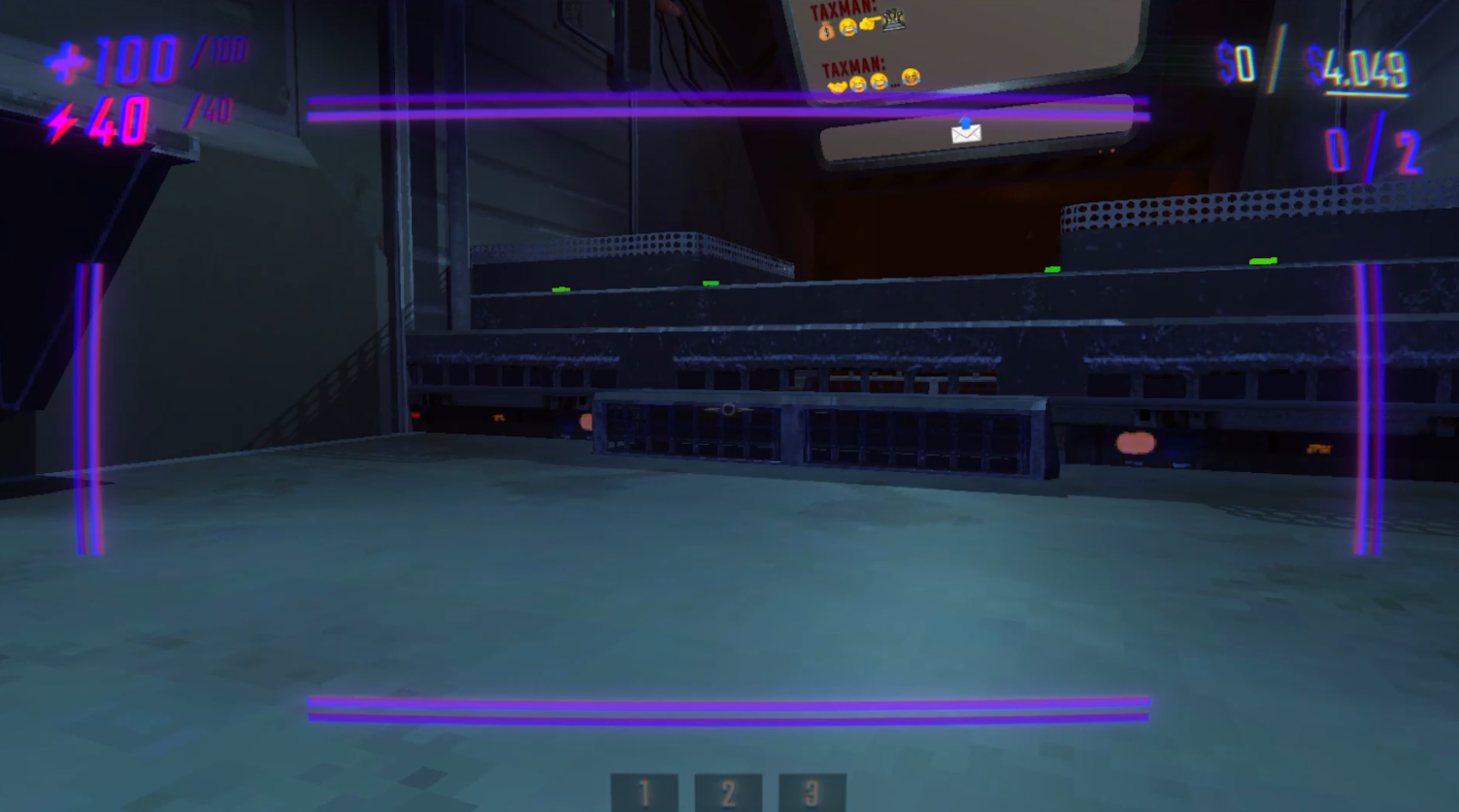
Small mod to swap (almost) ALL the colors on the UI! Completely client-sided, completely compatible with vanilla and modded clients. I will add more customization for other UI elements in the future, this is an early release! Here's an example of my very purple UI :3
Feel free to join my discord server or add me @swaggies for anything relating to my mods.
Details
As of right now, you can customize the colors of:
- The health icon, number, and max number
- The stamina icon, number, and max number
- The haul goal's dollar sign color, number color, and slash's color
- The extraction counter's color and slash's color
- The tumble UI's colors, both when stunned and when you're able to get up
- Every crosshair color (such as idle, hovering over an object, holding an object, etc)
- The hurt vignette's color
- The color of valuable values (& shop item costs)
- The color of valuable damage popups
- The color of the Overcharge ring
- The gradient of the Item Info UI (the thing that shows the names of shop items at the bottom)
You can also:
- Make the health & stamina icons visually deplete relative to your current health & stamina (enabled by default)
- Make the hurt vignette appear at all times, and scale with how damaged you are (& adjust its scaling, and even make it appear while you're dead!)
- Adjust the text size and display time for valuable damage popups (at predefined breakpoints), and display these popups when a valuable is instantly destroyed (eg by an extraction point or a pit)
- Make valuables show their names at the bottom of your screen when you hold them
- Enable the old Overcharge UI at the top left of your screen (shows overcharge as a number like health & stamina)
- Enable these certain tweaks to player controls (all of which are disabled by default):
- Ability for WASD to instantly exit a tumble instead of waiting for your Semibot to stop moving
- Ability for jumping to instantly uncrouch you (if you're using toggle crouch)
- Ability for sprinting to instantly uncrouch you (if you're using toggle crouch)
- (tbh i just added these in cuz i feel like theyre super necessary and i personally use them :3)
playertweaks version 0.3.1
repo version 0.3.2+
CHANGELOG
0.4.0
- Added configuration options for the Map. You can change the colors for the following:
- Walls and floors
- Walls and floors for active, inactive, and completed extraction points
- Walls and floors for the truck
- Outline and area shading for unexplored rooms, along with the "?" symbol
- Stairs and doors
- Valuable objects and shop items
- Player death heads and the main player arrow
- The "backtrack" path that displays dots to the current extraction point (or truck), & the ability to make it crossfade colors as it gets further away from the player arrow
0.3.1
- Fixed Item Info UI showing the names of valuables being held by other players
0.3.0
- Added configuration options for the Tumble Wings UI
- You can change the colors of the wings, the bar holder, and the bar itself.
- You can have two different colors for when the bar is empty and full. The bar's color will smoothly transition between the two as the timer runs out.
- These will not affect the wings that appear on the Semibots themselves, only the UI on-screen.
- Added configuration options for the Overcharge UI
- You can change the color of the circle bar
- You can toggle displaying the Legacy Overcharge UI seen in old semiwork devlogs (where the overcharge was a number at the top left, like health and stamina)
- You can configure the Legacy Overcharge UI in the same ways as health and stamina
- Added configuration options for the Item Info UI
- You can change the gradient colors for the standard gradient (grabbing a shop item) and the enemy gradient (grabbing an enemy)
- You can enable showing the names of valuables when grabbing them as well (works the same as shop items) - will only show when grabbing, not hovering
- Added a toggle for displaying the hurt vignette at max health
- Fixed an issue where a valuable broken for $0 will use the max value lost setting instead of the minimum
- Fixed an issue where the stamina icon meter was a little offset visually
- Fixed an issue where disabling the "use icon as a health/stamina bar" option would pause it at whatever state it was in, instead of being set back to max for vanilla behaviour
0.2.0
- Added configuration options for the Value UI that displays when you pick up a valuable or pick up/hover over a shop item
- this uses the same logic that LevelScaling's custom value UI had
- you can customize its colors and count-up/down animation, and the color of the cost for shop items
- Added configuration options for the Value Lost UI that appears when a valuable takes damage
- you can customize its colors, text sizes, and display times at certain breakpoints (0/1000/5000/10000/50000), and if the colors/text sizes/display times should interpolate between the breakpoints or not
- you can also toggle if these value lost UIs should always appear if a valuable is instantly destroyed (eg by extraction point or pit) - by default (and in vanilla) it doesn't
0.1.1
- Adjusted the logic for initializing the UI tweaks to maximize compatibility (hopefully...)
- ..also fixed an issue with WalkieTalkies where the energy icon would be copied over due to the mod only removing one image on initialization instead of all of them
