

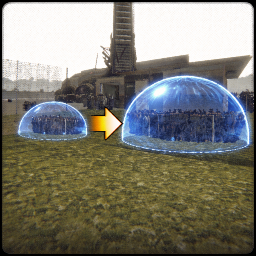
AdjustableZeroGravityOrb
You can now make the whole map zero gravity by adjusting the size of the zero gravity orb radius very funAdjustableZeroGravityOrb
Important
- https://thunderstore.io/c/repo/p/nickklmao/REPOConfig/ — this mod is optional, but adds in-game config menu to adjust the zero gravity orb radius. Very useful
Notes
-
I am not responsible if you mess around and it breaks your game. I have done testing and it works fine. Also this mod should effect nearby items players and monsters.
-
If there is any issues feal free to write your problem here (https://discord.com/channels/1344557689979670578/1490728259690959125) on the repo modding discord server
Changelog
- No changes yet
First version
- Version 1.0.0
Installing mod
This is the recommended way.
- Download and install Thunderstore Mod Manager or another compatible mod manager. Click Install with Mod Manager button on top of the page.
2. Run the game via the mod manager.
3. Look in the bepinex loader window and see if the AdjustableZeroGravityOrb mod has loaded or not
Or do it manually (not recommended)
- place the AdjustableZeroGravityOrb.dll file into the bepinex/plugins folder