

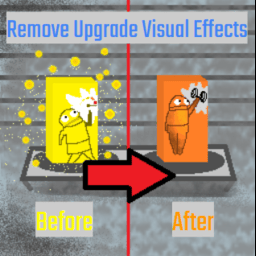
RemoveUpgradeVisualEffects
This mod removes the black haze camera glitch and upgrade box particles effect when using an upgrade. This mod was a suggestion from someone on the REPO modding discord server.RemoveUpgradeVisualEffects
- This mod removes the black haze and upgrade box particles effect when a player uses a upgrade box. This mod was a suggestion from someone on the REPO modding discord server. also if another player in the game uses a upgrade the visual effects from them using the upgrade specifically the box particles do not show up on your screen unless enabled in the config.
Credits
Endershade for helping test the mod
Yueho for the idea
One of my best friends for helping with the Icon art
Important
- https://thunderstore.io/c/repo/p/nickklmao/REPOConfig/ — this REPOConfig mod by nickklmao is optional, but adds in-game config menu to enable the upgrade visual effects on or off. Very useful
Notes
-
I am not responsible if you mess around and it breaks your game. I have done testing and it works fine.
-
If there is any issues feal free to write your problem here (https://discord.com/channels/1344557689979670578/1506781971672731729) on the repo modding discord server
Installing the mod
This is the recommended way (using a mod manager).
- Download and install Thunderstore Mod Manager or another compatible mod manager. Click Install with Mod Manager button on top of the page.
2. Run the game via the mod manager.
3. Look in the bepinex loader window and see if the RemoveUpgradeVisualEffects mod/plugin has loaded or not
Or install it manually (not recommended way if new to modding and not sure what to do)
- place the RemoveUpgradeVisualEffects.dll file into the bepinex/plugins folder