
Please disclose if any significant portion of your mod was created using AI tools by adding the 'AI Generated' category. Failing to do so may result in the mod being removed from Thunderstore.

REPOFidelity
HD graphics + ultrawide + FOV. DLSS, FSR, SMAA, FOV slider, 21:9 / 32:9 ultra-wide support, aspect-ratio fix, shadow control, auto-benchmark. Drop-in REPO HD replacement. Auto-tuned presets, CPU/GPU-aware.
| Date uploaded | a day ago |
| Version | 1.6.0 |
| Download link | Vippy-REPOFidelity-1.6.0.zip |
| Downloads | 1793 |
| Dependency string | Vippy-REPOFidelity-1.6.0 |
This mod requires the following mods to function

BepInEx-BepInExPack
BepInEx pack for Mono Unity games. Preconfigured and ready to use.
Preferred version: 5.4.2305
README
REPO Fidelity — HD Graphics & Performance Mod for R.E.P.O.
Better than REPO HD. Better than vanilla. Graphics overhaul that goes both ways — squeeze more FPS on potato PCs or push visuals on high-end rigs. Auto-detects your hardware and picks the best settings. Full in-game settings menu. DLSS, FSR, SMAA, shadow control, 21:9 / 32:9 ultrawide support, FOV slider, the works.
Replaces REPO HD. Everything it does, plus DLSS, auto-benchmark, CPU/GPU-aware tuning, performance optimizations, ultrawide / aspect-ratio fixes, and way more control. If you have REPO HD installed, remove it.
Vanilla vs REPO Fidelity
Environment
| Vanilla | REPO Fidelity |
 |
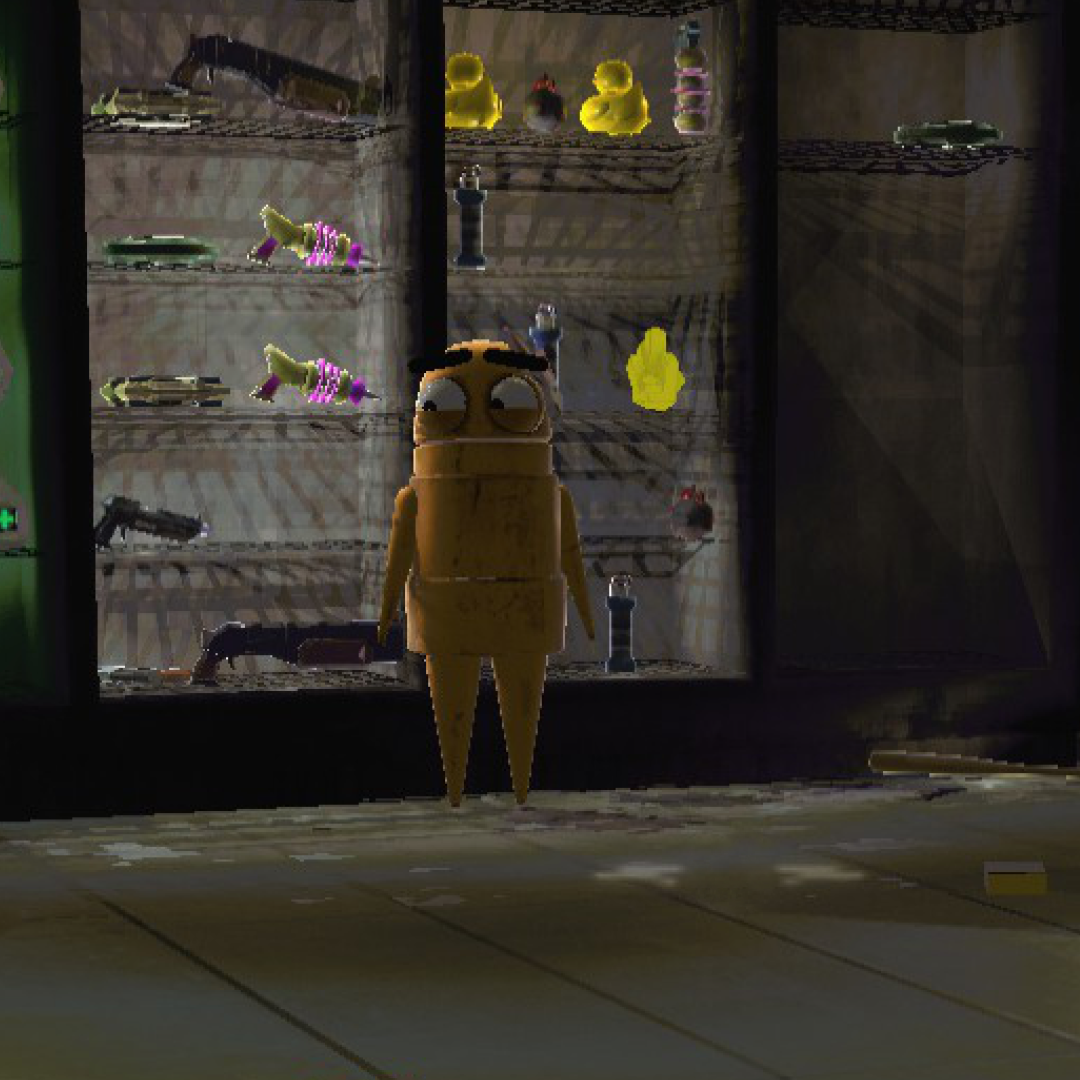 |
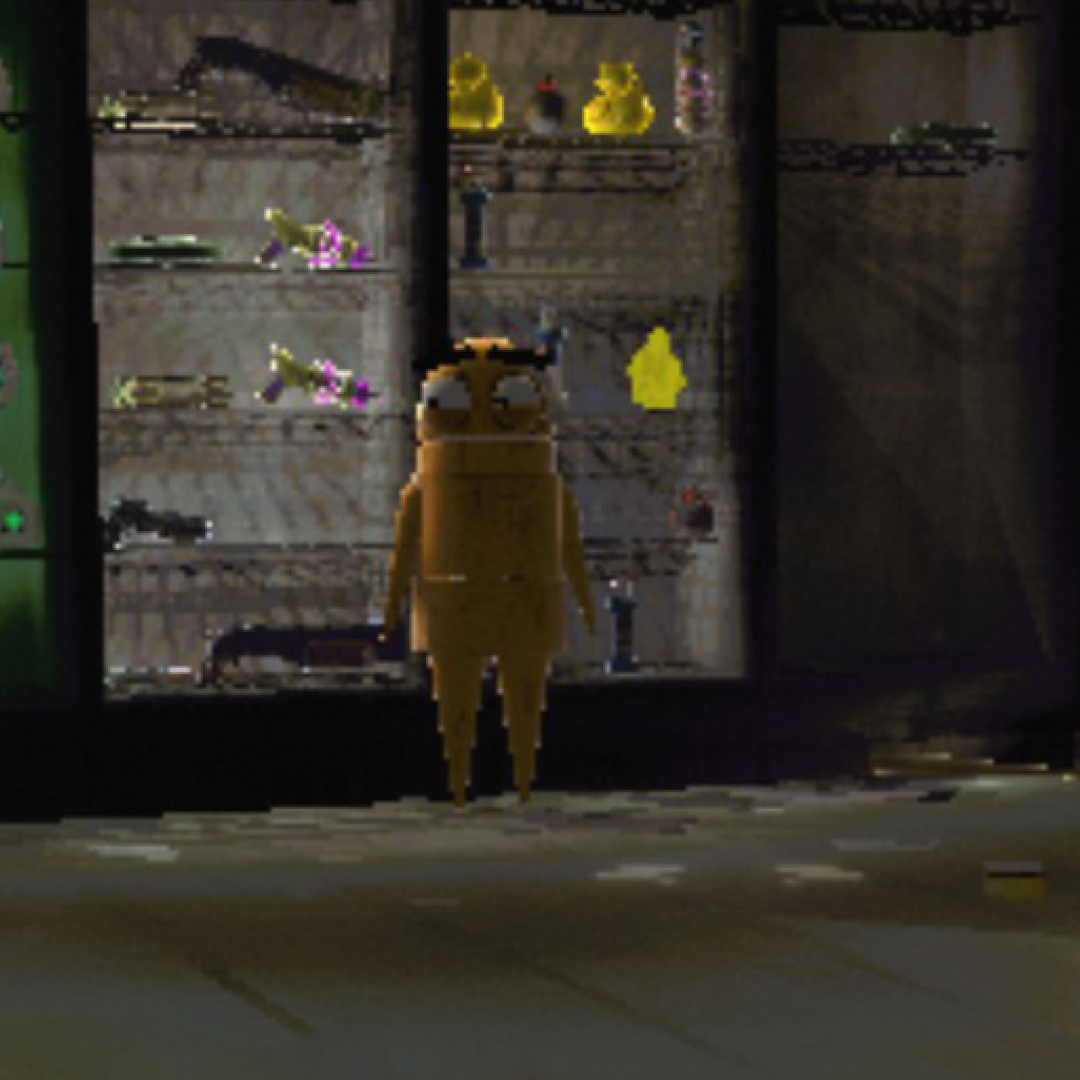
Cleaner edges, better shadow quality, no more pixelated mess. Notice the grating detail and wall panels.
Up Close — Edges & Text
| Vanilla | REPO Fidelity |
 |
 |
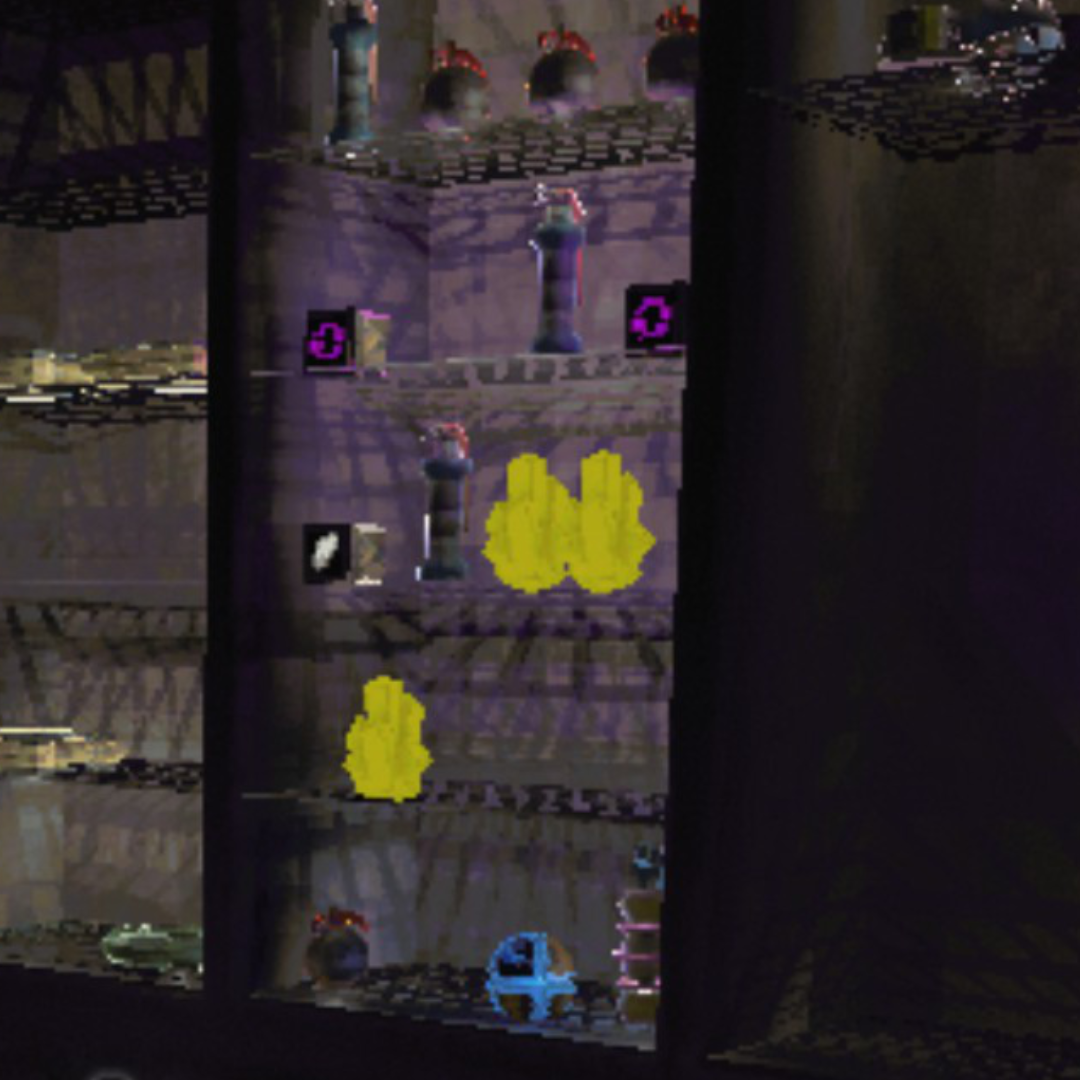
| Vanilla | REPO Fidelity |
 |
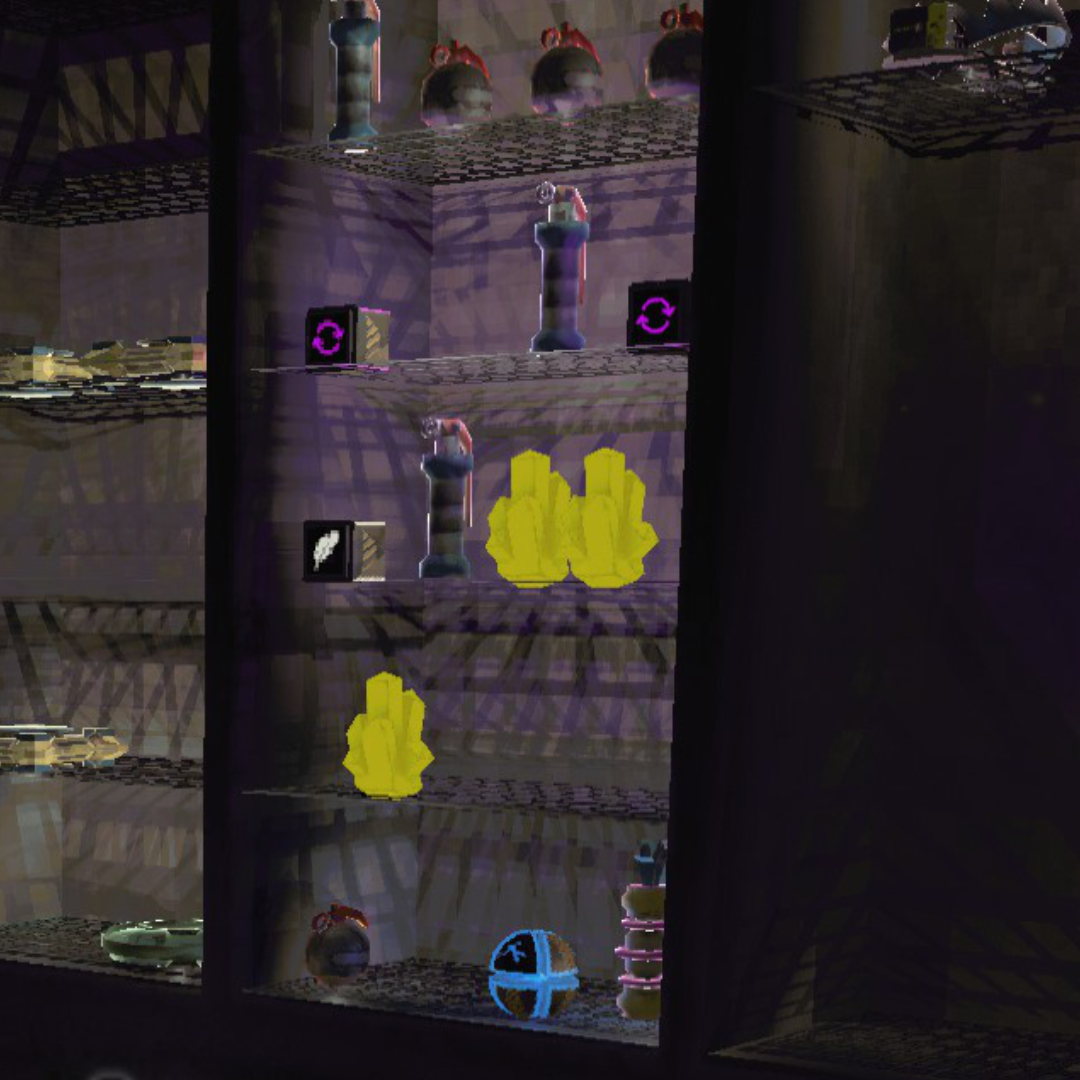 |
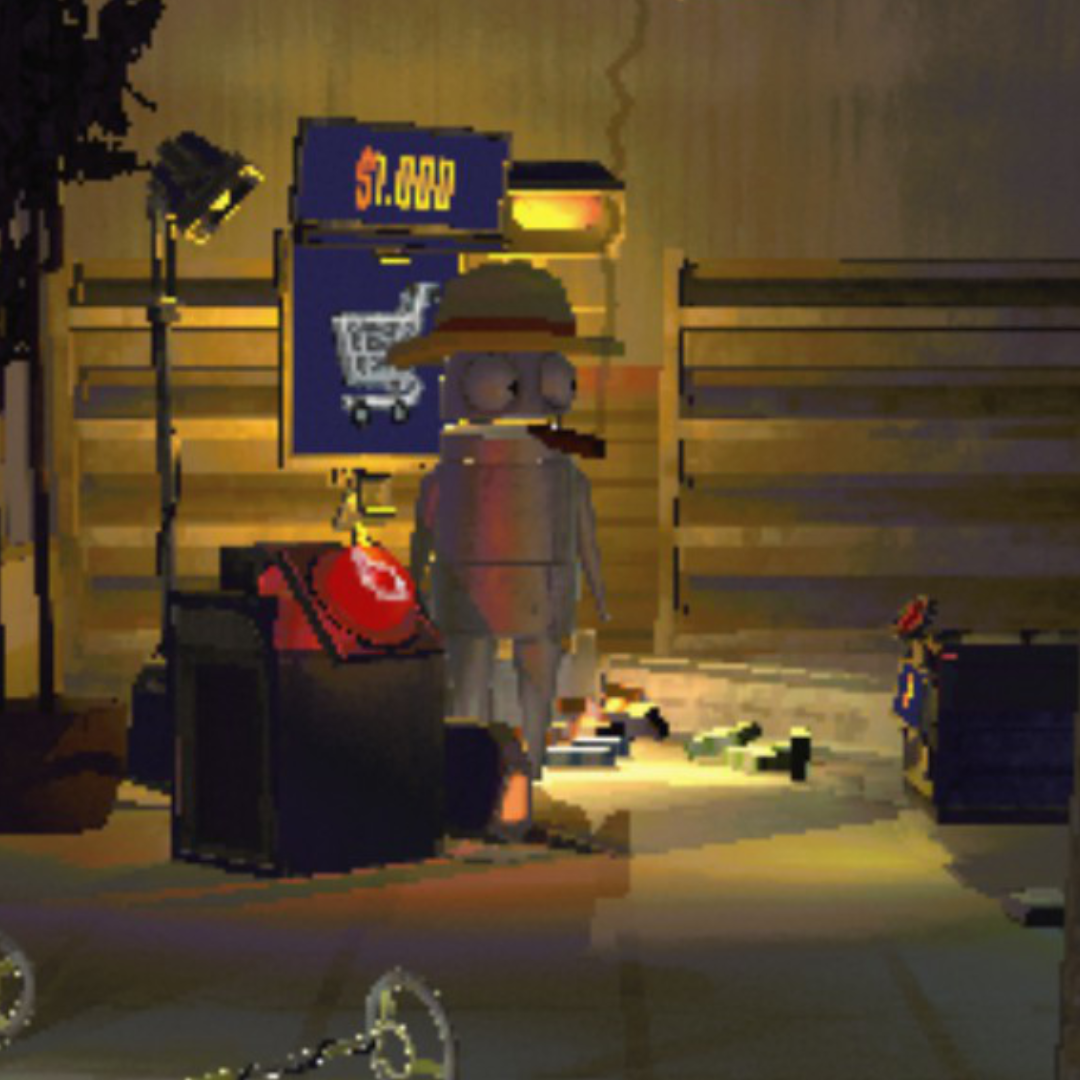
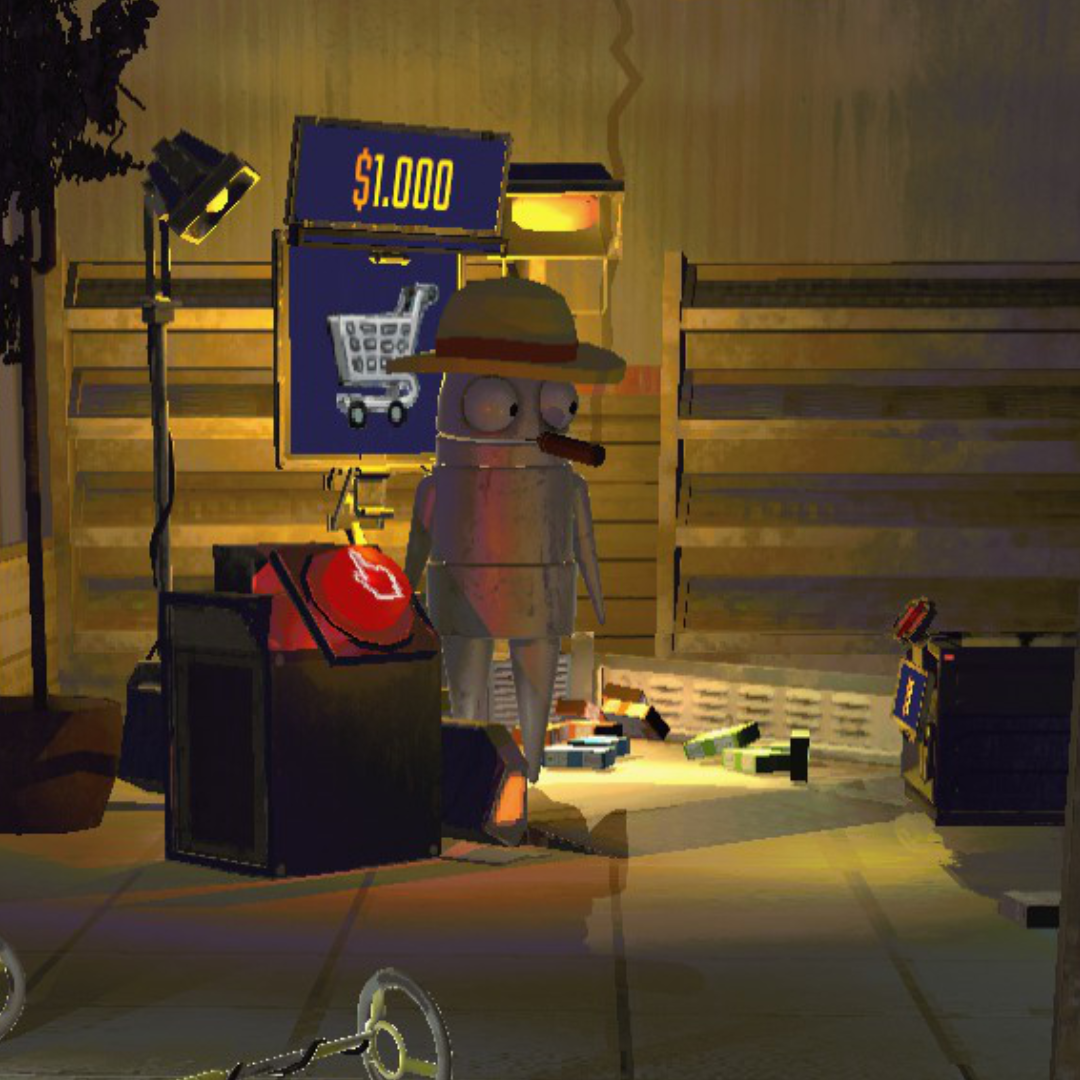
Hazard stripes, text, and fine geometry all render without the jagged staircase edges.
Lighting & Textures
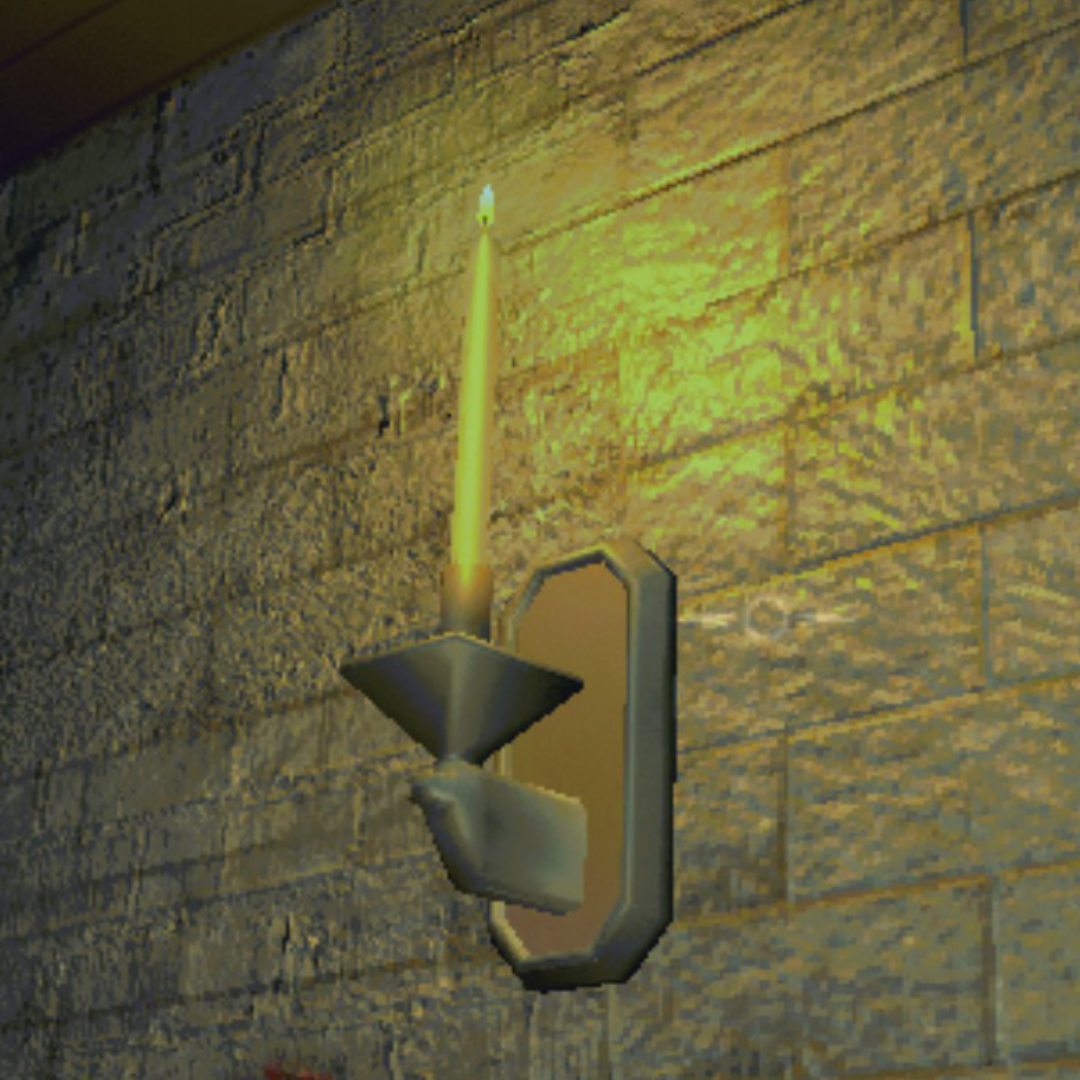
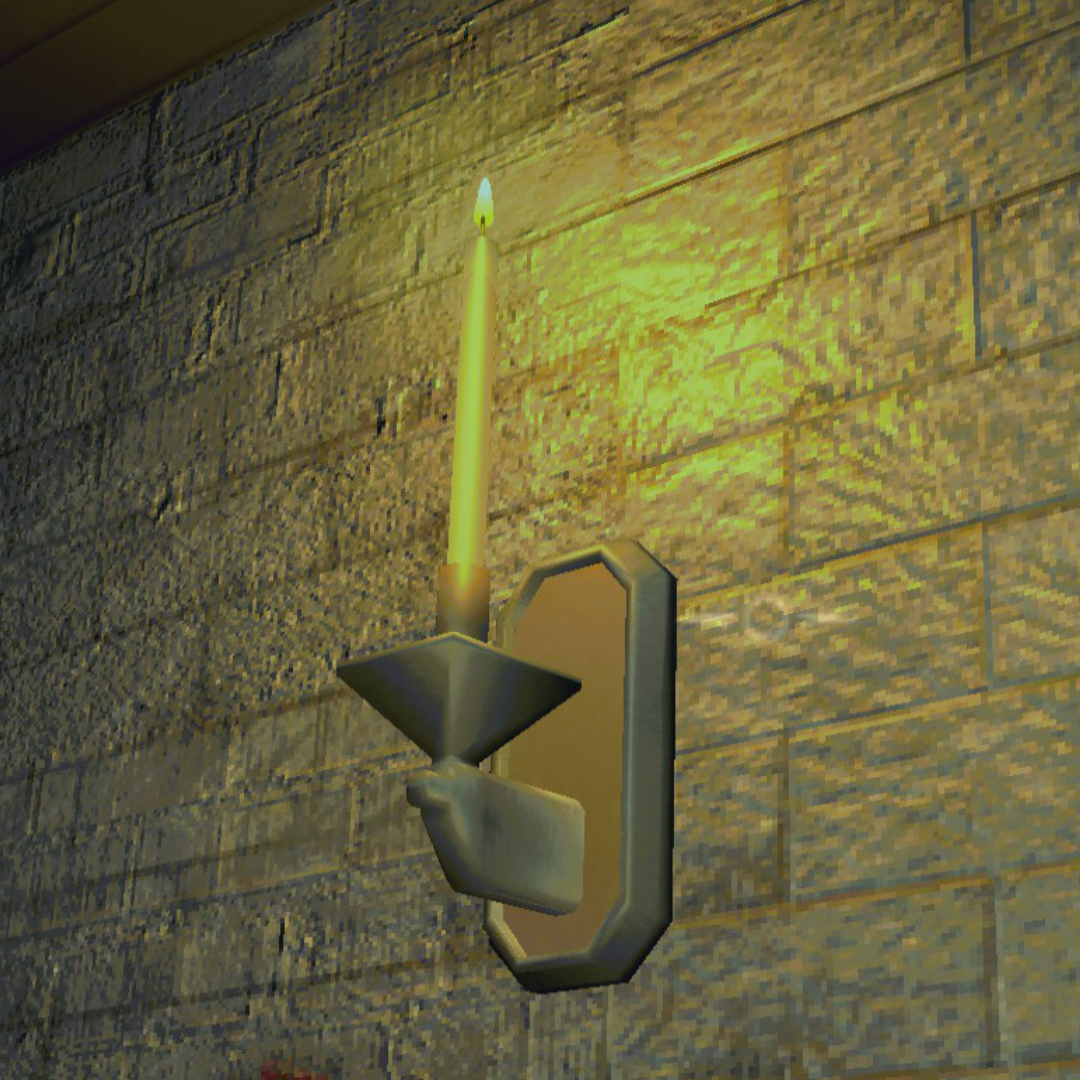
| Vanilla | REPO Fidelity |
 |
 |
| Vanilla | REPO Fidelity |
 |
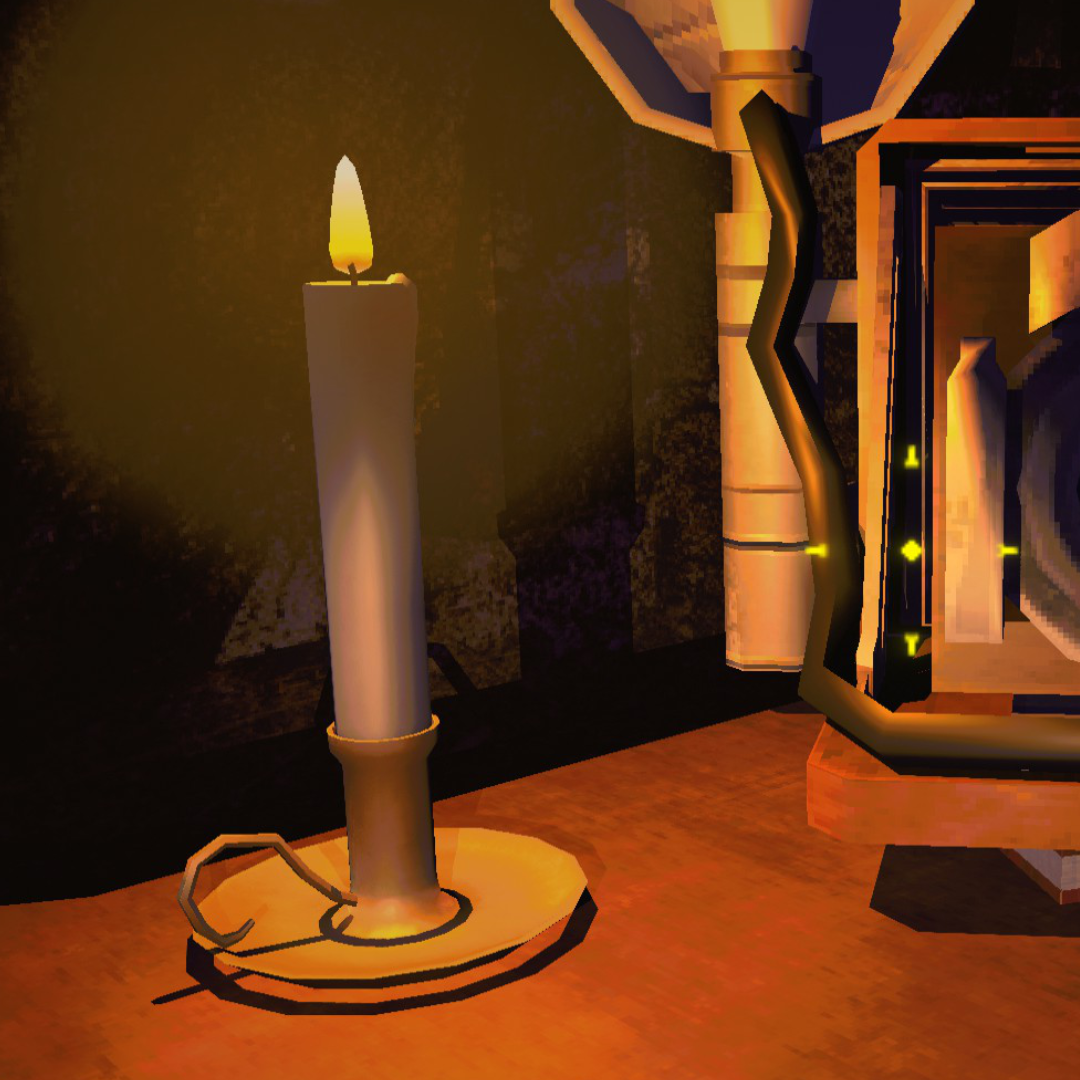 |
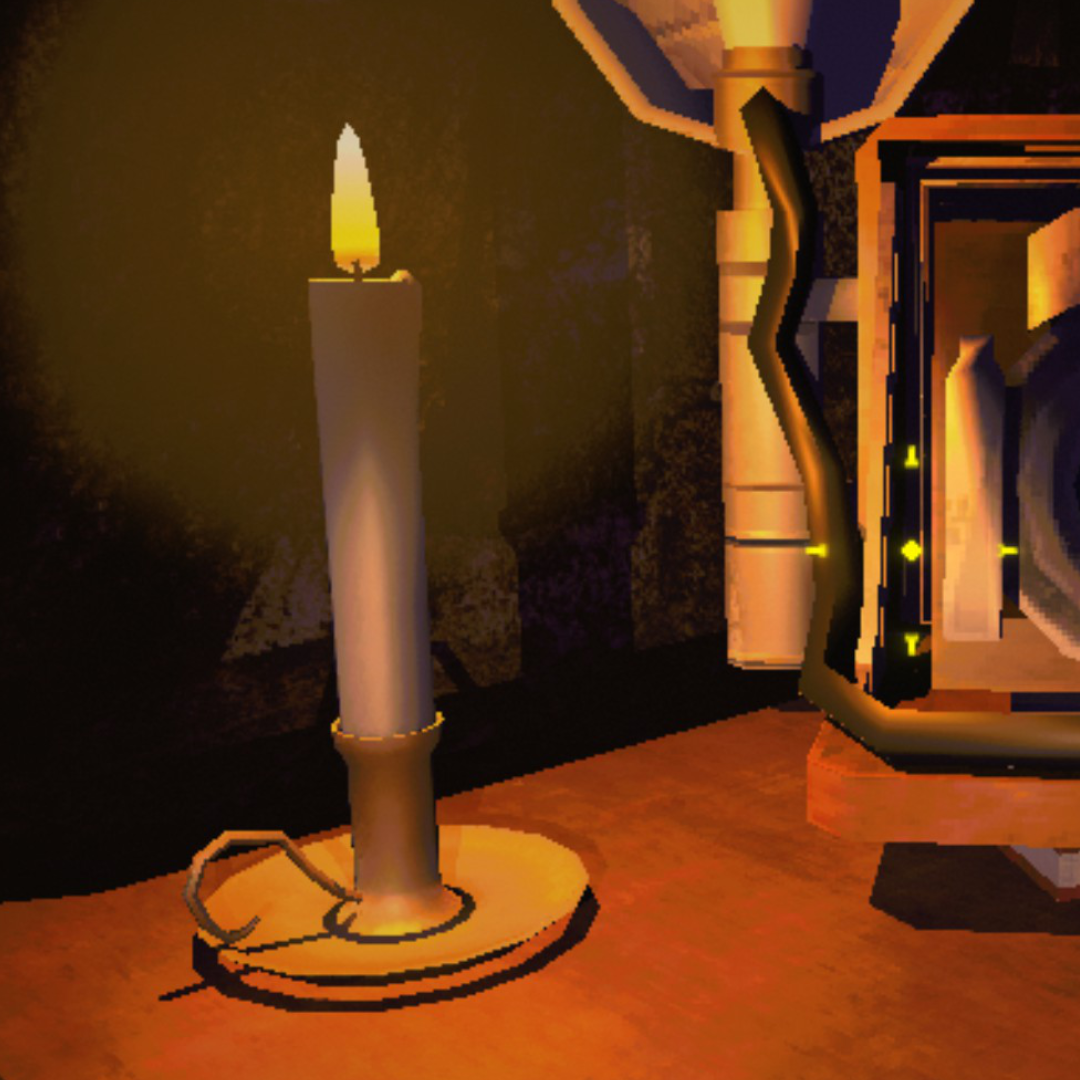
Brickwork, candlelight, and shadow edges all sharpen up. Look at the wall texture and the base of the candle.
Object Detail
| Vanilla | REPO Fidelity |
 |
 |
| Vanilla | REPO Fidelity |
 |
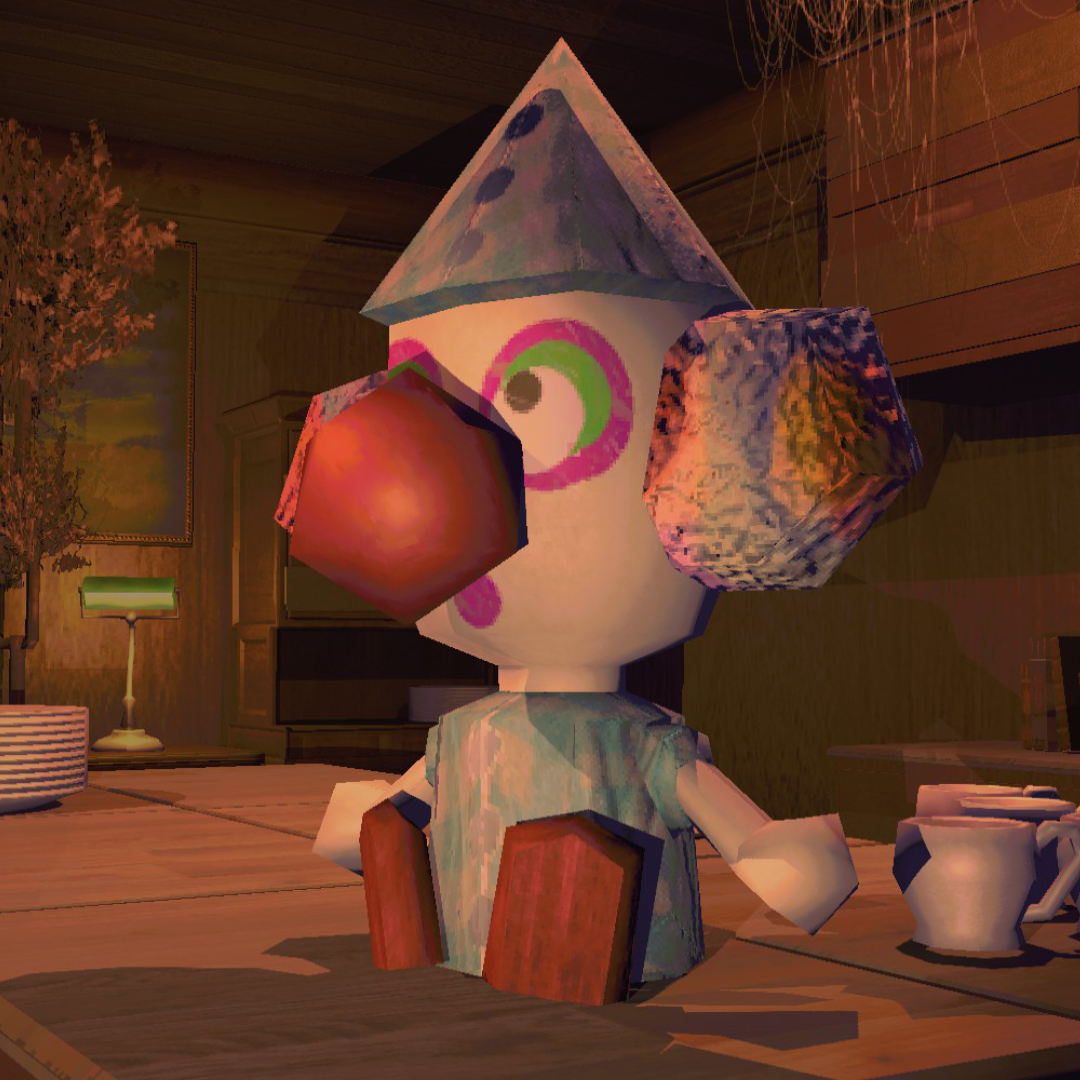 |
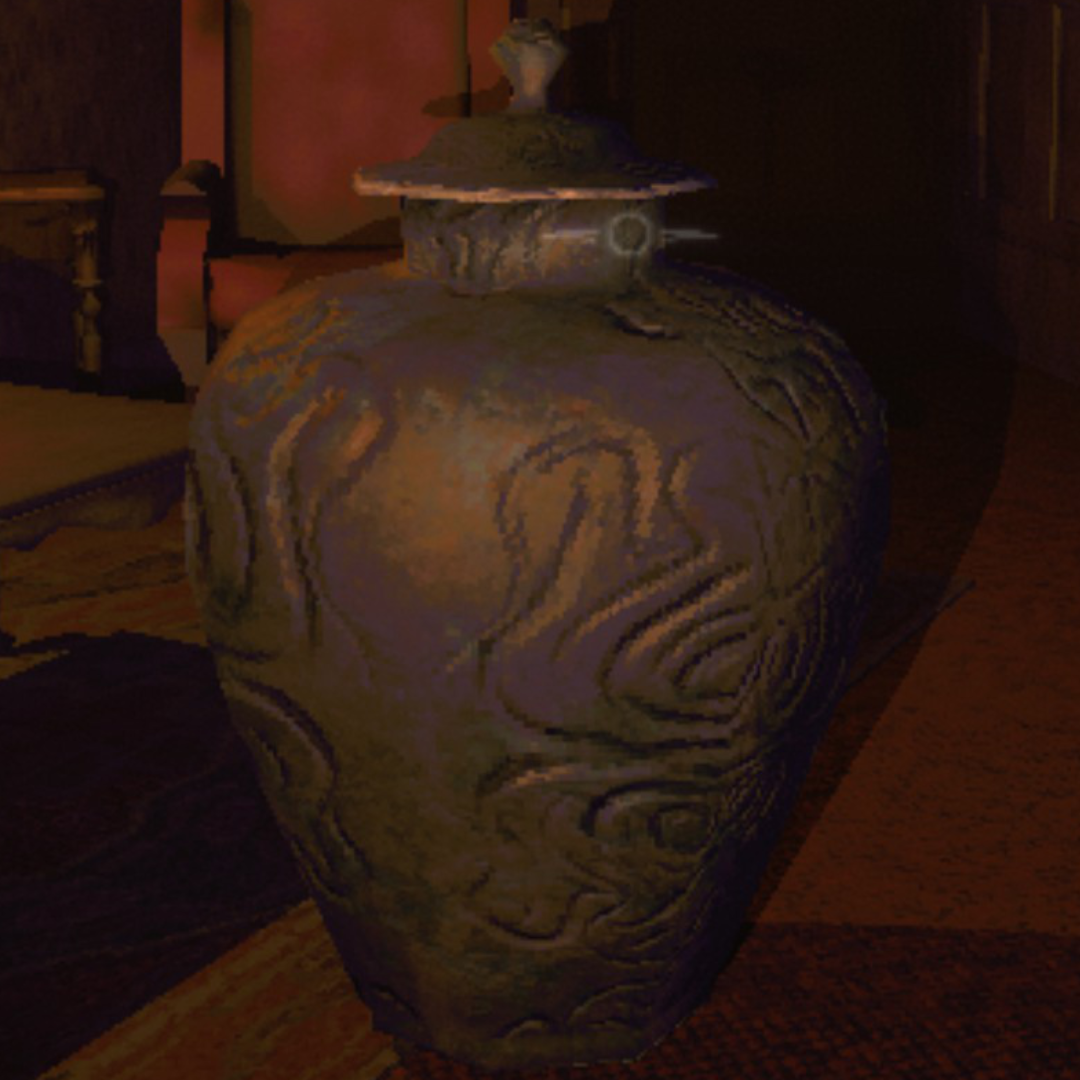
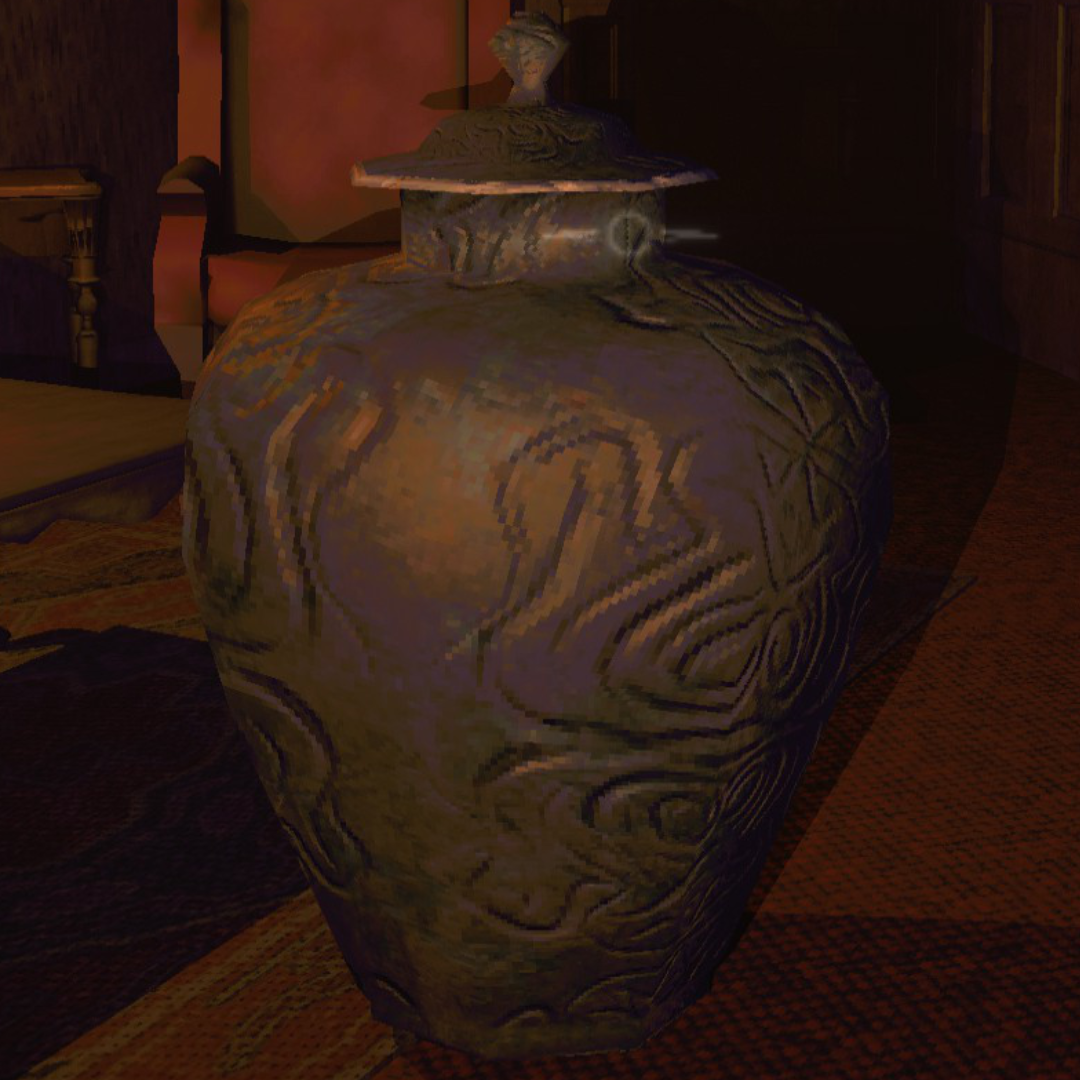
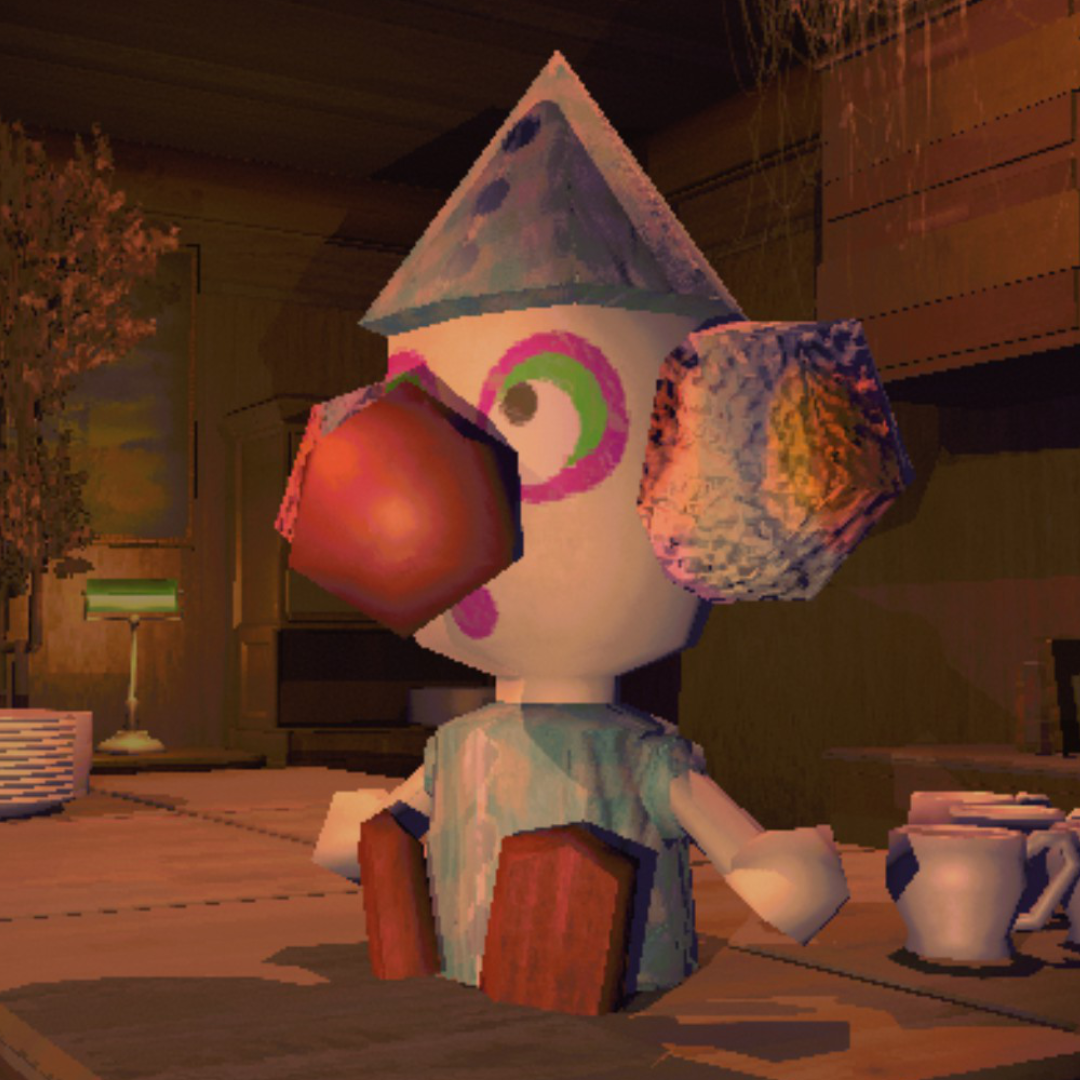
Surface detail on the vase and sharper edges on the clown figure. Shadows render properly instead of blocky artifacts.
Features
Upscaling & Anti-Aliasing
- DLSS — NVIDIA AI upscaling. At 100% render scale, runs as DLAA (native-res AA)
- FSR — AMD temporal upscaling, works on any GPU including Linux/Proton
- SMAA — sharp edge-based AA, no ghosting, works everywhere
- CAS sharpening — adjustable post-upscale sharpening
Quality Settings
- Shadow quality (Low through Ultra) and shadow distance (5–200m)
- Light render distance (vanilla caps around 30m)
- LOD bias, anisotropic filtering, texture quality
- Pixel light count (1–16 per object)
- Fog distance, draw distance
- Post-processing toggles (motion blur, chromatic aberration, lens distortion, film grain, bloom)
Performance Optimizations
- Shadow budget — limits nearby shadow casters by distance, with smooth fade transitions. Prevents item-heavy scenes from tanking FPS
- Tiered shadow resolution — scales shadow map size by light importance instead of one-size-fits-all 4K maps
- Shadow cascades for directional lights — proper cascade distribution instead of a single shadow map stretched over the full distance
- Kills shadows on zero-intensity lights (free FPS, zero visual impact)
- GPU instancing on all materials (fewer draw calls)
- Cached physics queries (less garbage collection pressure)
- Disables unnecessary shadows on explosions, particle effects, animated lights
- CPU patches: EnemyDirector loop throttling, NonAlloc physics replacements, SemiFunc result caching, PhysGrabObject iteration fix, LightManager allocation-free cleanup
- CPU patches auto-enable based on frame time — active when your system needs them, dormant when it doesn't
- All optimizations scale with preset — Ultra keeps full visual quality
Ultrawide & Field of View
- 21:9 / 32:9 ultrawide support — world view fills the full screen instead of being squashed into a centered 16:9 box, post-processing (vignette, bloom, screen flashes) extends across the full aspect, HUD positioning untouched so other mods that hook the UI hierarchy still work
- Aspect-aware default FOV — 16:9 stays at vanilla, 21:9 lerps up to ~80°, 32:9 hits 90°. Slider override (0–110°) wins when set
- Vertical FOV slider with smooth animation between values
- Title-screen polish on ultrawide — menu camera narrows to hide the world edge past the truck, fog tightens to keep distant scene assets fading inside fog rather than popping at the rolling-treadmill despawn line
- F10 vanilla 16:9 compare view for side-by-side comparison without losing your saved resolution
- Resolution dropdown lists native-aspect modes plus synthesized 50/67/75/83% downscales so 21:9 / 32:9 panels aren't stuck with two or three Windows-reported entries
Smart Auto-Benchmark
- Runs on first launch, stores results in
autotune.json— separate from your settings - Re-runs automatically when the mod updates or your hardware/resolution changes
- Detects CPU vs GPU bottleneck — won't waste visual quality on settings that can't help
- "Auto" preset uses the benchmarked profile. Other presets are never touched by auto-tune.
- Re-run manually anytime from the settings menu
Presets
All presets adapt to your hardware. CPU-bound machines keep 100% render scale since dropping resolution wouldn't help FPS anyway. Potato through Medium use the game's native render system with zero pipeline overhead — upscalers only activate at High and above.
| Preset | Render Scale | AA | Shadows | Target |
|---|---|---|---|---|
| Auto | Benchmarked | Benchmarked | Benchmarked | Auto-tuned for your hardware. Re-runs on mod update or hardware change |
| Potato | 50% | Off | Low / 10m | Faster than vanilla. Cuts everything for max FPS |
| Low | 50% | SMAA | Low / 20m | Near-vanilla FPS with cleaner image |
| Medium | 75% | SMAA | Med / 30m | Big visual upgrade, no upscaler overhead |
| High | 75–100% | DLSS/FSR | High / 85m | Premium. Upscaler handles AA |
| Ultra | 100% | DLAA/FSR | Ultra / 150m | Maxed everything |
| Custom | Any | Any | Any | Tweak individually. Per-setting perf toggles |
Settings
Replaces the game's Graphics page. All vanilla display settings (window mode, VSync, max FPS, gamma) plus every mod setting. Preset selector or go Custom.
| Setting | Range | Default | Description |
|---|---|---|---|
| Preset | Auto–Custom | Auto | Quality level. Auto uses benchmarked profile |
| Upscaler | DLSS / FSR / Off | Auto | DLSS on NVIDIA, FSR on AMD/Intel, Off if CPU-bound |
| Resolution | Monitor-specific | Native | Output resolution. Filtered to your aspect ratio |
| Render Scale | 33–100% | 100% | Internal resolution before upscaling to selected resolution |
| Anti-Aliasing | SMAA / FXAA / Off | SMAA | Post-process AA (disabled when upscaler provides AA) |
| Shadow Quality | Off / Low / Med / High / Ultra | Varies | Shadow map resolution |
| Shadow Distance | 5–200m | Varies | Max shadow render distance |
| Shadow Limit | 0–50 | Varies | Max nearby shadows. 0 = unlimited. Closest lights get priority |
| Pixel Lights | 1–16 | Varies | Per-object dynamic lights |
| LOD Bias | 0.5–4.0 | Varies | Level of detail distance |
| Texture Quality | Full | Full | Locked to full — R.E.P.O.'s textures are too small for mip reduction to matter |
| Anisotropic Filtering | Off / 4x / 8x / 16x | 8x | Texture sharpness at angles |
| Light Distance | 10–100m | 50m | Max light render range |
| Fog Distance | 0.3–1.1x | 1.0x | Fog end distance multiplier. Below 1.0x pulls the fog wall in for extra savings |
| Vertical FOV | 0–110° | 0 (auto) | Camera FOV. 0 picks an aspect-aware default (vanilla on 16:9, ~80° on 21:9, 90° on 32:9). Any non-zero value overrides |
| Ultra-Wide UI Fix | On / Off | On | Fills the screen with the world view on aspects above 16:9. Toggle off to keep vanilla 16:9 letterbox |
| Mod Toggle Key | F5–F10 | F10 | Disables mod entirely for vanilla comparison |
F10 (configurable) toggles the entire mod off for vanilla comparison — everything reverts including performance optimizations.
F11 toggles the performance optimization layer on and off. Unlike F10, the visual layer (upscaler, AA, shadow quality) stays active — only the per-frame hacks (tiny renderer culls, shadow budget, CPU patches, etc.) revert to vanilla.
F9 runs the cost probe — a ~90s sweep that measures per-marker frame cost, per-camera render time, scene composition, and a preset × fog × upscaler comparison matrix normalized to Ultra + DLAA + fog 1.0×. Writes frame_cost.txt and copies the report to the clipboard. Off by default — enable F9 Cost Probe in the Graphics menu to arm it.
Installation
- Install BepInEx 5
- Install MenuLib for the settings UI
- Drop this mod in
BepInEx/plugins/ - Launch — benchmark runs automatically on first level
DLSS DLL is bundled. No extra downloads.
Coming from REPO HD?
Remove it. REPO Fidelity does everything REPO HD does:
- Removes pixelation / upscales to native
- Anti-aliasing (SMAA, plus DLSS/DLAA for NVIDIA)
- Extraction point flicker fix
- Plus: DLSS upscaling, auto-benchmark, CPU-aware tuning, shadow optimization, full settings menu, performance presets, 15+ configurable quality settings
Compatibility
- Works alongside most mods — only conflicts with other render pipeline mods
- MenuLib required for settings UI (soft dependency — mod works without it)
- Singleplayer and multiplayer
- Windows and Linux (Proton)
Known Issues
- Switching presets rapidly can briefly flash a black frame
Report bugs on GitHub.
Contact
| Purpose | Where |
|---|---|
| Bug reports & suggestions | GitHub Issues |
| R.E.P.O. Modding community | Discord |

CHANGELOG
1.6.0
- Ultra-wide support (21:9, 32:9, anything above 16:9). Vanilla on a 21:9 panel renders the world at HOR+ camera aspect into the game's fixed 750×418 (16:9)
Render Texture MainRawImage, so the world image is squashed horizontally and the screen sides are filled with a full-screen blackBackgroundimage. The mod adds a separatesortOrder=0Canvas with a full-screen RawImage bound to the same world RT, hides the game'sBackgroundandRender Texture Mainso they don't overdraw, and mirrors the post-processing pass (Render Texture Overlay) onto a sibling RawImage at full-screen size so vignette / bloom / screen flashes cover the full aspect. Game's UI canvas (HUD, buttons, menus) is left untouched atsortOrder=1and renders on top — mods that hook those by GameObject path or component continue to find their targets unchanged - Aspect-aware default vertical FOV. 16:9 stays at vanilla, 21:9 lerps up to ~80°, 32:9 = 90°. Lerps linearly inside each band. Slider override (any value > 0) wins over the aspect default. FOV slider also animates smoothly now via a 0.25s SmoothStep coroutine — previously sat frozen until a sprint or tumble event ticked the game's zoom curve
- Menu / title-screen camera narrows on wide aspects to hide the world edge that wider FOV reveals past the truck. Strength scales: 0 at 16:9, ~0.51 at 21:9, 1.0 at 32:9 (full VERT- math). Hooked on
CameraNoPlayerTarget.Awake - Main-menu fog tightens to 0.60× of vanilla on ultra-wide aspects only. The truck scene is a rolling treadmill — assets despawn at fixed boundaries, not at camera distance, so far-clip / lod-bias / cull-distance overrides do nothing for the popping. Stronger fog moves the visible fade ahead of the despawn point so the disappearance happens behind opaque fog. Self-gated on
MenuLevel()+UltrawideUiFix+ aspect > 16:9, with a 30-frame stabilization delay so we don't sample fog while the scene's lighting is still mid-load (would write fog × 0.60 = 0 = fog-colour screen flood). Restored when transitioning out of the menu — but never written into gameplay'sRenderSettings.fog, since the main menu shares its Unity scene with gameplay and a vanilla restore would bleed menu values onto the level - F10 ("vanilla 16:9 compare") for ultra-wide users. Toggles
UltrawideUiFixoff (so the game'sBackgroundre-letterboxes the sides) and forces every camera's aspect to 16:9 (so world content renders un-squashed into the 16:9 mainImage box). Restored on next F10. Per-frame enforcement of camera aspect because game scripts can write it fromScreen.aspect - Persisted resolution validated against the current monitor at startup. Catches "saved 16:9 mode on a 21:9 panel and now we're back on a 16:9 panel that can't deliver", and "stale 720p fallback from a previous bad mode-set". On mismatch (>5% aspect difference, or persisted pixel count < 50% of monitor native) the saved values reset to
Display.main.systemWidth/Height. Resolution dropdown also reads native fromDisplay.maininstead ofScreen.currentResolutionso the dropdown can list the actual native even when the game is currently running below it - Auto-benchmark no longer auto-fires on resolution change. New
AutoTuneNeedsInitialBenchmarkchecks revision + GPU but not screen size, so swapping resolutions doesn't trigger a 90-second benchmark every time. Resolution-driven staleness is silent until the user manually re-runs from the menu. Auto-benchmark is also gated onModEnabledso an F10-disable + resolution swap can't re-poke the upscaler while it's torn down (the old "black screen after F10" failure mode) - F10 keypress blocked while the mod's graphics popup is open. Prevented half-applied UI state when F10 fired with a settings sub-page in the way
OnSettingsChangedhandler wraps each refresh call in try/catch. A single bad frame in the canvas pipeline used to silently kill the FOV slider when the canvas walker hit a destroyed Graphic — now each refresh is independent
1.5.3
- Distance shadow cull threshold for small props (
bounds.size.magnitude < 3m, or 5m on Potato) wasResolvedShadowDistance × 0.7f— butSettings.ApplyFogClampsalready pullsResolvedShadowDistancedown tofogEnd × 1.1, so the cull point landed at ~0.77 ×fogEnd. On levels with a typical fog config (start ~50% of end), that's dead in the middle of the visible fog fade-in band — small props lost their shadows where you could still see them. Threshold now usesfogEnd × 1.1fto match the player-avatar / point-light / flashlight-budget paths in the same file (Potato pulls atfogEnd × 1.0ffor the extra savings) RoomVolumeCheck.CheckSetreplacement: overlap + swept-path + sticky + rest-skip. Vanilla samplesPhysics.OverlapBoxat a single point at 10Hz, so fast movement (tumble wings, fly) can skip a whole room between ticks. The miss reads as a false "not in any room" state: breaks per-room ambience / reverb, flickers truck-safety and enemy-AI room awareness, and costs the player the scouting-points credit when the game eventually adds that. Replaced with a four-tier check — rest-skip when the player is stationary,OverlapBoxNonAllocfor the common case,BoxCastNonAllocsweep from last position to catch seam crossings, and sticky carry-over for brief coverage gaps where the player flies above the room's collider ceiling (the sweep can't catch those because Unity's cast APIs skip the starting collider). Ungated — rest-skip makes the common case strictly cheaper than vanilla, so the patch now runs regardless of frame time. Over a 26-minute play session the old NonAlloc-only patch would have had 4022 false-empty ticks; the new patch had zero. Per-tick CPU average on a 5090 dropped from 3.26 µs (vanilla allocating path) to 0.57 µs (new authoritative path), and theCollider[]allocation on every call is gone
1.5.2
- Shadow-budget tick was calling
Object.FindObjectsOfType<Light>()every 100ms — same pattern as the 1.5.1 flashlight-controller scan. Cached the item-glow list on scene load alongside the other watchlists; per-tick scan gone - Fixed: menu/preview avatars (pause-menu portrait, expression wheel) had their cosmetic Updates (PlayerExpression, PlayerAvatarEyelids, AnimNoise, FlashlightLightAim/Tilt, PlayerDeathEffects, PlayerReviveEffects, OverchargeVisuals) incorrectly throttled by the per-player fog-distance gate from 1.4.0. Preview avatars sit at world positions like
(0,0,-2000)— far enough fromCamera.mainthat the gate flagged them past-fog and skipped their Updates, freezing the preview's expressions / eyelids / bone poses. Surfaced as a regression at low framerate (where the cpuPatches auto-gate flips on most often). Throttle now early-bails for any transform without aPlayerAvatarin its parent chain - PhysGrabObjectGrabArea.Update was calling
playerGrabbers.ToList()every frame even when nothing was actively grabbing the object — that's an empty List per instance per frame, all gen0 garbage. Added a fast-path that skips the entire Update when bothplayerGrabbingandlistOfAllGrabbersare empty. Per-call cost dropped from ~0.6 µs to ~0.2 µs - AudioListenerFollow.Update was rebuilding
LayerMask.GetMask(new string[] { "LowPassTrigger" })and allocating a Collider[] from OverlapSphere on every 15Hz tick. Layer mask cached statically, OverlapSphere swapped to NonAlloc
1.5.1
- Flashlight shadow budget tick was calling
Object.FindObjectsOfType<FlashlightController>()every 100ms — on a 7000+ object scene that's ~9ms per tick and the source of a lot of 0.1% low spikes. Cached the controller list on scene load / player spawn; per-tick cost dropped from 0.93ms/frame amortized to 0.001ms/frame on a large map. Worst-frame times dropped ~15ms in testing - Distance shadow cull pass now processes a 1000-renderer slice per tick instead of scanning all 5000+ entries every 100ms. Full watchlist re-evaluated every ~500ms. Per-tick cost dropped from 2.3ms to 0.5ms. The 10% hysteresis band absorbs any latency from chunking at the boundary
- Auto preset on CPU-bound systems now unlocks all 7 perf optimizations instead of just 2. Autotune was saving
perfLevel=0for CPU-bound users where "0" meant "Ultra visual tier" in the autotune code but "don't cut anything" in the perf-opt gating — the two fields had opposite semantics. Now forcesperfLevel=3whencpuBoundregardless of shadow tier, unlocking Explosion / Item / Animated / Particle / TinyRenderer shadow culling on Auto for weak-CPU users - Point Light Shadows perf opt (new): distant point lights past fog + their own light range get their shadow casting killed, restored when the player comes back in range. Gated at Medium preset and above. Worth it in lights-heavy scenes where 8+ point-shadow lights mean 48+ cubemap passes per frame
- Autotune upscaler pick: CPU-bound non-NVIDIA systems with headroom (≥1.10× above target refresh) now pick FSR Temporal over SMAA — better edge AA at ~0.5-1ms CPU cost the user can afford when they're above target. Tight-budget CPU-bound stays on SMAA
- Switching preset from Custom to Auto no longer reverts to Custom on the next launch. The probe's sweep was mutating individual settings (upscaler mode, fog) which triggered
OnSettingTweaked's "tweak → Custom" fallback. Probe now brackets sweep + restore in a preset-revert suppression counter - F9 Cost Probe: sweep cells run uncapped (VSync off + no target frame rate) so sweep numbers reflect real hardware cost instead of collapsing onto the user's FPS cap. Baseline still runs at the user's actual settings. Restored on natural exit, abort, or exception
- F9 Cost Probe: added
Autoas the first sweep cell so users see autotune's exact resolved config in the current scene instead of interpolating between the discrete Potato / Low / Med / High / Ultra cells - F9 Cost Probe: added a
Mod-internal costsection with Stopwatch-measured spans around the mod's hot paths (per-tick shadow passes, camera hooks, LateUpdate, ApplyCAS, SceneOptimizer.Apply). Surfaces where the mod's per-frame cost actually lives — caught the flashlight-budget 9ms tick above - F9 Cost Probe: report now appends
autotune.jsonandsettings.jsonat the tail so one clipboard paste gives full diagnostic context instead of three separate file requests - F9 Cost Probe: waits for autotune to complete before starting its own sweep — a mistimed F9 press used to collide with autotune's phase 0 CPU-ceiling test
- F9 Cost Probe: clipboard copy verifies via round-trip and falls back to
wl-copy/xclip/xselon native Linux when Unity'ssystemCopyBuffersilently no-ops. Log line andDonestatus reflect actual outcome - F9 Cost Probe: Vanilla (F10) sweep cell now resets
RenderSettings.fogStartDistance/fogEndDistanceviaRestoreVanillaQuality. Previously inherited the 0.3× fog from the preceding fog-matrix cell, so the vanilla sample ran at sub-vanilla fog and looked wrong on-screen - F9 Cost Probe and optimizer benchmark progress bars interpolate wall-clock between milestones instead of jumping per-phase
1.5.0
- Fixed flashlight shadow disappearing on Medium and below, and persisting dead through preset changes. Three systems were fighting over
spotlight.shadows— theFlashlightController.StartHarmony patch, the flashlight foreach inSetItemLightShadows, andApplyZeroIntensityShadowscatching the flashlight during the pause-menu Hidden state. Plus a duplicate unsaved zap inQualityPatch.ApplyRangeTieredLightShadowsthat never restored. Consolidated ownership toUpdateFlashlightShadowBudget. Potato drops the flashlight shadow entirely (it's the "cut everything" preset); every other preset keeps the 4 closest - Fixed Ultra's
shadowDistance=150m/lightDistance=75mclamping to ~5m after a Custom-preset fog-slider session.ApplyFogClampswas reading a staleResolvedEffectiveFogEndleft behind by the previous preset's multiplier — now recomputes from the captured vanilla baseline on every call - Custom-preset per-feature toggles (Explosion Shadows, Item Light Shadows, Animated Light Shadows, Particle Shadows, Small Object Shadows, Distance Shadow Culling, Flashlight Shadow Budget) apply immediately instead of sitting silent until the next preset swap or level load. The seven
PerfXxxsetters saved to disk but never calledNotifyChanged(), soPerfSettingsWatchernever saw the flip - F9 Cost Probe is a toggle in the mod menu now, next to Debug Overlay. Previously you had to hand-edit
diagnosticsEnabledinsettings.json— fine for me, not fine for testers - Item Light Shadows toggle description corrected — after the flashlight refactor it only affects handheld glow props, so the description no longer claims it hits flashlights
- Off-screen shadow caster reduction: distance-cull watchlist bounds bumped from 2m to 3m (5m on Potato), permanent tiny-renderer kill from 0.3m to 0.5m (1m on Potato). Potato also cuts shadows at 50% of shadow distance instead of 70%. Pulls more mid-sized props into the cull pool without touching architectural geometry
- F9 Cost Probe: baseline now forces mod on so the breakdown reflects gameplay-with-mod cost instead of duplicating the Vanilla sweep cell when the user pressed F10 before F9. User's actual
ModEnabledstate is restored on exit — previously hardcoded totrue, which silently switched the mod back on for users who wanted it off - F9 Cost Probe: replaced
mesh.triangles.LongLengthwithmesh.GetIndexCountfor the scene triangle count. Game assets ship withisReadable=falseso the array path threw hundreds of "Not allowed to access triangles/indices" Unity errors per probe run. GPU metadata path gives the same number without the readability requirement - Log cleanup: seventeen spammy LogInfo lines dropped to LogDebug (DLSS re-init chatter, shader bundle load, NGX bridge callback, DLSS eval-OK success logging, per-preset scene-optimizer breakdowns, avatar-preview setup, fog apply, shadow-res tiered). Retained LogInfo on milestones:
Mod ENABLED/DISABLED, preset resolve summary,Upscaler active, restore-state diagnostics, benchmark results, probe output - F9 is now an opt-in diagnostic. Off by default — flip
diagnosticsEnabledtotruevia the new menu toggle (or insettings.json), load a save, press F9 and the full probe runs (~90s), copying a report to the clipboard when it finishes. Built for sending me "here's what's going on with my machine" data when someone needs support - Probe baseline now samples your real settings (preset, upscaler, fog, AA — whatever you play with) so the profiler markers / per-camera timings / script cost rankings reflect actual frame time at actual settings. The preset × fog × upscaler sweep that comes after still normalizes to Ultra + DLAA + fog 1.0× so the individual cells compare cleanly across users and builds
- Report header grew to include GPU VRAM + graphics API, system memory, OS, monitor refresh rate, and mod flag state (
modEnabled,optEnabled,cpuPatches) — should be enough for one-shot diagnosis without needing follow-up questions - Multiplayer breakdown section: per-PlayerAvatar distance from main camera, shadow-casting renderer count, flashlight budget state (within / culled / past fog), and the cosmetic-component totals that get throttled past fog. Tells you at a glance whether a busy lobby is hitting the budget caps or the cosmetic throttle is kicking in
- Player input is locked for the duration of the probe (~90s) so movement / look / grab can't perturb the measurement. F9 to abort still works because it bypasses the game's input-disable flag. Probe only starts in a gameplay level — pressing F9 in the main menu does nothing
- Cosmetic throttle expanded: AnimNoise, FlashlightLightAim, FlashlightTilt, PlayerDeathEffects, PlayerReviveEffects now skip their Update when the player is past fog end. Scales with player count — a 20-player lobby with 18 past-fog players saves on the order of 0.1 ms per frame on the list together. Deliberately excluded: PlayerHealthGrab / PlayerDeathHead / PlayerTumble (fire RPCs and mutate gameplay state) and FlashlightBob / FlashlightSprint (already early-return for remote players)
- F9 report gained GC tracking: gen0 / gen1 collection counts over the sample window plus the Mono heap delta, plus the worst single-frame time in ms. Gives a direct line on whether 0.1% lows are GC pauses vs. steady-state cost
1.4.0
- Shadow and light distance now clamp to fog end instead of being independent per-preset values. Ultra's 150m shadows behind a 40m fog wall was pure waste — the geometry's invisible anyway. Shadow caps at fog × 1.1, light at fog × 1.2, the overshoot keeps casters right at the fog line from popping as you walk past
- Fog slider lower bound opened to 0.3× — 1.3.0's changelog claimed this already happened but the setter clamp was still blocking it, and the fog apply path had a
> 1fgate that silently ignored anything under vanilla. Presets and auto-tune stay above 0.5× ("playable floor") so dragging fog into your face stays a deliberate choice - Potato preset defaults to fog 0.85× — small atmospheric reduction, small extra savings on top of the distance cascade
- Small renderers (bounds < 2m) stop casting shadows past 70% of effective shadow distance, re-enable when closer, 10% hysteresis band kills flicker at the boundary. Cuts off-screen shadow-map work that the game pays for on distant props
- Per-light shadow map resolution is bucketed by range across every preset: <5m → 256, 5-10m → 512, 10-20m → 1024, >20m → 2048. Flashlight keeps 4096 on Ultra only. Potato caps at 1024. No more 4K shadow maps on 3m Button Lights
- ParticleSystem.cullingMode set to Automatic on every system so off-screen and non-emitting systems skip their per-frame update. A typical level registers 230+ systems with 1 actively emitting — the other 229 were ticking for nothing
- F11 toggles the optimization layer. Unlike F10 (which cuts the whole mod, including DLSS / SMAA), F11 leaves the visual features on but reverts every shadow / physics / render hack to vanilla. On-screen note reads "OPTIMIZATIONS OFF (F11)" while active
- F10 (mod off) now returns to true vanilla state. Tiny-renderer culling, animated-light shadows, zero-intensity lights, GPU instancing, particle culling mode, and per-range shadow resolution all save their original state and restore it on disable — previously most of those were one-way. A
restore-statelog line printsOKorLEAKon every F10 so any regression is obvious - Pause-menu avatar preview gets the treatment it was missing. The 320×320 / 209×418 render texture the game hands it bumps to 1024×(matching aspect) with 4× MSAA and SMAA via PostProcessLayer — vanilla's jagged edges come from rendering the avatar at native RT resolution with no AA. The camera is gated on the hosting MenuPage being active so it costs zero frame time when you're not looking at it. Expression / icon-maker / world-avatar variants stay vanilla (they exist during gameplay, one per player in some cases, and menu-grade rendering on them is pure waste)
- CPU-bound Auto now trims its shadow budget by 7 (Ultra 25 → 18, etc.). The preset budget was sized for GPU-bound systems with headroom; on CPU-bound Auto it was throwing ~10 extra shadow draws a frame at a scene already choking on them
PhysGrabObject.Updateskips entirely when the Rigidbody's sleeping and the object isn't being grabbed — 40+ idle objects in a typical scene used to pay for a full Update tick each frame for nothing. Grab-list bookkeeping still runs when grabbed- Concurrent flashlight shadow maps now capped at the 4 closest to the main camera. 20 flashlights × 2048² shadow maps is 80 MP/frame of pure rasterization — bigger than a 4K framebuffer — and was wrecking mid-range GPUs in busy lobbies. Distant flashlights keep their lit cone; only the shadow casting goes dark past the budget. Flashlights past fog end skip shadow rendering entirely and don't count against the budget, since their shadows would be invisible anyway
- Avatar preview RT bump is skipped when there's more than one non-expression PlayerAvatarMenu in the scene. The truck lobby with 8 players used to bump every preview RT, multiplying render cost linearly with lobby size for icons the user barely looks at. Single-player pause menu still gets the sharp preview
- Player avatar renderers now stop casting shadows past fog × 1.1, same pattern as the small-prop distance cull. 20 skinned-mesh avatars contributing to the directional shadow map adds up fast on weak GPUs, and the contribution is invisible when the avatar is behind fog anyway
- Forced
updateWhenOffscreen = falseon every player avatar's SkinnedMeshRenderer. Unity only skips bone matrix updates when this is false — vanilla left it true on some avatars, paying for off-screen player animations every frame PlayerAvatarEyelids.Update,PlayerExpression.Update, andPlayerAvatarOverchargeVisuals.Updateskip entirely when the player is past fog end. The blendshape spring math is the most expensive of the three — three players past fog used to pay for it three times a frame for visuals nobody could see
1.3.0
- DLSS evaluation now runs on a private D3D12 device with D3D11↔D3D12 shared-texture interop, working around the D3D11 DLSS path being blocked by the driver on RTX 50-series (Blackwell). Existing RTX 20/30/40 cards use the same code path
- DLSS gets projection-matrix jitter the same way FSR Temporal does — sub-pixel accumulation now functions, which is the whole point of a temporal upscaler
- DLSS now requests Preset E (CNN) instead of the transformer default — more forgiving of Unity's built-in-RP motion vectors which aren't perfectly jitter-clean
- Fixed DLSS output flashing white the first frame after enable (output RT was undefined until DLSS wrote the first frame over it)
- Fixed DLSS staying black when a scale change caused Unity to recycle an RT's native pointer into a new texture — shared-handle cache now cleared on re-init
- Sharpening slider no longer rebuilds the whole upscaler pipeline every tick, since it's a per-frame shader uniform
- Shadow budget system — caps how many small point lights cast shadows at once, closest to camera get priority. Fades shadow strength in/out for smooth transitions instead of pop-in. Configurable per preset (Potato=5, Ultra=25) or manually via Shadow Limit slider (0=unlimited)
- Tiered shadow map resolution — directional lights use global resolution with cascades instead of a forced custom value, small decorative lights get 512 instead of 4096, infrastructure lights cap at 2048. Massive shadow cost reduction with no visible quality loss
- Shadow cascades — Low/1, Medium/2, High+Ultra/4. Fixes directional light shadow quality (window lighting, outdoor shadows) which was previously stuck at 1 cascade
- Disabled shadows on zero-intensity lights — mines and other inactive light sources were generating shadow maps for nothing
- FSR Temporal now jitters the projection matrix for proper sub-pixel accumulation — sharper edges and better temporal stability
- Fixed FXAA darkening the image — keepAlpha wasn't set, so luminance was bleeding into the alpha channel during compositing
- Max FPS is now a smooth slider (30–360 + Unlimited) instead of preset options — set exact values for adaptive sync
- Performance toggle labels changed from Off/On to Keep/Disable for clarity
- Auto-tune now weights 1% and 0.1% lows into its decision (50% avg + 30% 1%-low + 20% 0.1%-low). Stuttery systems actually step down now instead of sliding by on a good average
- Auto-tune targets monitor refresh rate directly — the old
refresh × 1.05padding was fighting the 1%-low safety the benchmark was already applying, which is how a 5090 on 240Hz ended up with LOD 2 and 8x AF - Fixed CPU-bound stepdown using GPU-cost predictions to size CPU savings. New ladder only touches the knobs that actually reduce draw-call count (shadow distance, light count, light distance) and leaves shadow quality / LOD / AF at Ultra where they belong. Strong-CPU systems now also get a bonus tier that raises sharpness, LOD, and shadow distance above vanilla Ultra when benchmark headroom allows
- Scene-complexity factor — benchmark accounts for sparse scenes (menu, small rooms) vs. packed ones so real gameplay doesn't blow the budget
- Intel Arc iGPU (Meteor Lake / Lunar Lake "Intel Arc Graphics") is now detected as integrated. Discrete Arc A380/A750/A770/B580 still come through as regular dGPUs and get FSR
- Live status line at the top of the graphics menu — CPU-bound/GPU-bound tag, frame time, fps, render resolution, upscaler. Updates 4×/sec while the menu's open
- Auto-Tune button label now tells you what clicking will actually do (
AUTO-TUNE BENCHMARK (15s)in-game,AUTO-TUNE — WILL QUEUE (START A GAME)in the menu,AUTO-TUNE QUEUED (WILL RUN ON NEXT LEVEL)after queuing). Tap while queued to cancel - Shadow Limit and Draw Distance sliders moved the "0 = unlimited" / "0 = auto" hint into the label instead of burying it in the description
- Fog Distance slider opened up below 1.0× so it's actually a performance knob — upper bound stays at 1.1× because anything farther would give a gameplay advantage
- Pixelation moved from the Upscaling group to Post Processing, which is what it actually is
- Potato preset now always runs at 50% render scale (matches vanilla Potato) instead of flipping to 100% on CPU-bound systems
1.2.0
- Added CPU optimization patches — EnemyDirector loop throttling, RoomVolumeCheck NonAlloc, SemiFunc result caching, PhysGrabObject list iteration bugfix, LightManager allocation-free cleanup
- CPU patches auto-enable based on frame time — active when needed (>8ms), dormant on fast systems where Harmony overhead would cost more than the savings
- Added F11 optimizer benchmark — measures vanilla vs GPU/GC vs all optimizations with 2-pass averaging, writes
optimizer_benchmark.txt - Fixed auto-tune misclassifying high-FPS systems as CPU-bound — threshold now 95% above 120fps, 85% below
- Fixed auto-tune on Proton/DXVK — detects when CPU ceiling is below target refresh regardless of ratio
- Fixed CPU-bound auto-tune maxing GPU settings on weak GPUs — stepdown cascade now applies to both CPU and GPU settings when budget is tight
- Fixed divide-by-zero in CPU patch gate during scene transitions
- CPU-impacting settings step down before pure-GPU settings (fog, AF) in the auto-tune ladder
- Auto-tune unlocks FPS cap during measurement and restores it after
- Fixed DLSS motion vector warning on F10 toggle — upscaler disposed before camera depth mode restore
- F10 now restores vanilla pixelated resolution correctly
- F10/F11/auto-tune transitions use the game's glitch effect to mask settings switching
- Overlay rewritten — native HUD text with scanlines when in-game, OnGUI fallback in menus. Bottom-left, slide-up animation, smoothed FPS counter
- Added CPU and system info to startup log and benchmark results
1.1.2
- Rewrote CPU/GPU bottleneck detection — old method didn't work on D3D11, so every system was incorrectly tagged as GPU-bound. Now runs a two-phase benchmark to measure the actual bottleneck
- Fixed CPU-bound auto-tune trashing shadow quality for no gain — shadow resolution is GPU-only, so the CPU-bound ladder no longer touches it. Only reduces shadow distance and light count, and never below vanilla defaults
- Benchmark now shows a progress bar with percentage instead of raw frame counts
- Fixed DLSS not loading on some NVIDIA systems (driver store folder naming mismatch)
- Fixed DLSS showing as available on non-RTX GPUs (Quadro P4000, GTX series)
- Fixed items dropping when pulled from inventory with auto-hold enabled
1.1.1
- Fixed Auto preset stripping flashlight/explosion/particle shadows on high-end hardware — shadow optimizations now only kick in when the benchmark shows the PC actually needs them
- Fixed DLSS not loading on some NVIDIA systems (driver store folder naming mismatch)
- Fixed DLSS showing as available on non-RTX GPUs (Quadro P4000, GTX series)
- Fixed items dropping when pulled from inventory with auto-hold enabled
1.1.0
- Added resolution selector — shows resolutions matching your monitor's aspect ratio, from 720p up to native. Render scale works relative to this.
- Added "Auto" preset — runs a benchmark and stores results in
autotune.json, separate from your settings. Other presets are never touched. Re-benchmarks on mod updates or hardware changes. - Reworked presets — Potato and Low run at 50% through the game's native scaling (no render pipeline overhead, should beat vanilla FPS). Medium at 75% with SMAA. Upscalers only at High+.
- Fixed iGPU getting broken auto-tune results (upscaler Off + 50% was running through the full custom pipeline for no reason)
- Cut the upscaler path from 3 render textures down to 1. Non-upscaler presets use zero.
- Depth texture only generated when DLSS/FSR needs it — frees up bandwidth on iGPUs
- Fixed DLSS render scale slider locking to 100% after a preset switch
- Textures locked to Full — lowering them doesn't help in R.E.P.O., the textures are tiny
- FSR minimum raised to 50% (below that it falls apart)
- Debug overlay scales with resolution instead of using fixed pixel sizes
- Auto-tune button now sets preset to Auto automatically
- FPS counter skipped when debug overlay is off
1.0.0
- DLSS 4 Super Resolution + DLAA support (NVIDIA RTX, DLL bundled)
- FSR Temporal upscaling for any GPU (AMD, Intel, NVIDIA)
- CAS sharpening pass
- Anti-aliasing options — SMAA and FXAA (removed TAA to avoid temporal conflicts)
- Quality presets — Potato, Low, Medium, High, Ultra, Custom
- Auto-benchmark on first launch, targets monitor refresh rate
- CPU vs GPU bottleneck detection — adjusts the right settings for each
- Full graphics settings menu (replaces vanilla Graphics page)
- Shadow quality, shadow distance, LOD bias, texture filtering, texture quality
- Light distance, fog distance, draw distance controls
- Post-processing toggles (motion blur, chromatic aberration, lens distortion, grain)
- Per-layer fog culling for GPU savings
- CPU performance optimizations — NonAlloc physics, cached components, GC reduction
- GPU auto-detection (NVIDIA/AMD/Intel, VRAM, performance tier)
- F10 toggle for vanilla comparison (fully reverts all mod changes)
- Auto-tune can be triggered from the pause menu
- Vanilla display settings (window mode, vsync, fps, gamma) preserved in menu
- Fixed extraction point flicker
- Fixed black screen when switching presets mid-level
- Fixed flashlight shadows not disabling on Potato preset
- Fixed AA not applying correctly on preset switch
- Fixed auto-benchmark running during loading screens and main menu
