

This package has been deprecated and may no longer be maintained. We recommend looking for an alternative.
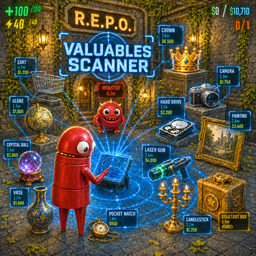
ValuablesScanner
Client-side scanner for R.E.P.O. that highlights valuables, gear, enemies, decor boxes, and carts with configurable labels, distance, and proximity reveal behavior.Valuables Scanner
已支持最新 v0.4 版本。
REPO 游戏交流 QQ 群:824639225
Valuables Scanner 是一个客户端单独安装即可生效的 R.E.P.O. 贵重品、装备、怪物与装饰箱扫描显示模组。
功能简介
按下扫描按键后,会显示附近的贵重品、装备武器、购物车、装饰箱和怪物,持续 5 秒。怪物靠近时也可以自动显示。
功能特点
- 客户端单独安装即可生效,不需要主机安装
- 按键扫描固定显示 5 秒
- 支持贵重品、装备武器、购物车、装饰箱和怪物显示
- 扫描探索模式默认关闭;关闭时直接显示名称,开启后贵重品 4 米内、其他扫描目标 6 米内、怪物 20 米内前统一显示
? - 怪物支持靠近自动显示
- 贵重品和装饰箱可以同步给队友,且只同步本次实际显示出来、已解除
?、并且距离自己不超过15m的目标 - 贵重品、装备武器、购物车、装饰箱和怪物共用扫描按键;字体大小和米数开关统一受 B.扫描设置 控制
- 装饰箱颜色跟随游戏内显示,贵重品价格显示当前价值
- 购物车区分大小,带总开关,默认关闭购物车显示
- 放入购物车或提取点的物品和装饰箱不会重复显示
- 死亡、观战或禁用状态下不会响应扫描,也不会继续显示标签
- 怪物范围判定按本地玩家真实位置计算
- 支持中文和英文切换
- 支持常用按键切换
运行优化
- 大部分对象会直接记录,不需要反复整图查找
- 常用数据会缓存,减少重复计算
- 同一帧里的重复处理已经尽量合并
- 怪物同步、靠近检测和标签刷新做了限频处理
配置项
| 分类 | 配置项 | 说明 | 默认 |
|---|---|---|---|
| A.全局设置 | 模组启用 | 总开关,关闭后所有功能失效 | 开启 |
| A.全局设置 | 语言/Language | 中文或英文 | 中文 |
| A.全局设置 | 敌人名字优化 | 怪物显示社区昵称 | 开启 |
| B.扫描设置 | 启用 | 扫描总开关 | 开启 |
| B.扫描设置 | 信息共享队友 | 仅同步本次实际显示到、且距离自己不超过 15m 的贵重品和装饰箱;若开启扫描探索模式,需先解除 ? 后才会同步一次 |
开启 |
| B.扫描设置 | 扫描探索模式 | 关闭时直接显示;开启后贵重品 4 米、其他扫描目标 6 米、怪物 20 米内后恢复正常名称、价格和米数 | 关闭 |
| B.扫描设置 | 显示米数 | 物品、贵重品、装饰箱、购物车和怪物扫描标签是否显示距离 | 关闭 |
| B.扫描设置 | 字体大小 | 物品和怪物扫描标签字体 | 26 |
| B.扫描设置 | 扫描按键 | 物品和怪物共用按键,按下后固定显示 5 秒 | F |
| B.扫描设置 | 扫描冷却/秒 | 两次扫描冷却时间,1-5,每次+1 | 1 |
| B.扫描设置 | 扫描距离/米 | 物品和怪物最大扫描范围,1-100,每次+1 | 15 |
| B1.贵重品扫描 | 启用 | 显示贵重品 | 开启 |
| B1.贵重品扫描 | 显示名称 | 显示物品名称 | 开启 |
| B1.贵重品扫描 | 显示价格 | 显示当前价格 | 关闭 |
| B2.装备武器扫描 | 启用 | 显示装备武器 | 开启 |
| B2.装备武器扫描 | 显示名称 | 显示名称 | 开启 |
| B3.装饰箱扫描 | 启用 | 显示装饰箱 | 开启 |
| B4.购物车扫描 | 启用 | 购物车扫描总开关 | 关闭 |
| B4.购物车扫描 | 显示大购物车 | 显示大购物车 | 开启 |
| B4.购物车扫描 | 显示小购物车 | 显示小购物车 | 开启 |
| B5.怪物扫描 | 启用 | 怪物显示总开关,按键、距离、字体和米数同步扫描设置 | 开启 |
| B5.怪物扫描 | 启用靠近自动显示 | 怪物靠近时自动显示,独立于扫描距离 | 开启 |
| B5.怪物扫描 | 靠近自动显示距离/米 | 多少米内触发,可独立大于扫描距离 | 30 |
English
Supports the latest v0.4 version.
Valuables Scanner is a client-side scanner for R.E.P.O. that shows valuables, gear, enemies, carts, and decor boxes.
Highlights
- Client-side only, host installation is not required
- Shared scan key shows nearby labels for 5 seconds
- Supports valuables, gear, carts, decor boxes, and enemies
- Explore mode is off by default; when enabled it shows
?until valuables get within 4m, other scan targets within 6m, and enemies within 20m - Enemy labels can auto-show when close
- Valuables and decor boxes can be shared with teammates only after they are actually shown, revealed from
?, and within15mof the local player - Team sharing is on by default, but only applies to valuables and decor boxes revealed by your own scan within
15m - Valuables, gear, carts, decor boxes, and enemies share the scan key; font size and distance display are controlled together in B.Scan Settings
- Carts have a master toggle plus separate big/small cart switches
- Scanning is blocked while dead, spectating, or disabled
- Enemy range checks use the real local player position
- Common data is cached to reduce repeated work
Config
| Section | Setting | Description | Default |
|---|---|---|---|
| A.Global | Mod Enabled | Master toggle | On |
| A.Global | Language | Chinese or English | Chinese |
| A.Global | Enemy Nickname | Community nicknames | On |
| B.Scan Settings | Enabled | Master scan toggle | On |
| B.Scan Settings | Share With Team | Only share valuables and decor boxes actually shown by the current scan within 15m; when explore mode is on, sharing waits until the target is revealed from ? |
On |
| B.Scan Settings | Explore Mode | Off by default; when enabled, reveal the normal label after valuables get within 4m, other scan targets within 6m, and enemies within 20m | Off |
| B.Scan Settings | Show Distance | Show distance meters on labels | Off |
| B.Scan Settings | Font Size | Item/enemy label font size | 26 |
| B.Scan Settings | Scan Key | Shared item/enemy scan key; each scan lasts 5 seconds | F |
| B.Scan Settings | Cooldown (s) | Scan cooldown | 1 |
| B.Scan Settings | Scan Distance (m) | Item/enemy max range | 15 |
| B1.Valuables | Enabled | Show valuables | On |
| B1.Valuables | Show Name | Show item name | On |
| B1.Valuables | Show Price | Show price | Off |
| B2.Gear | Enabled | Show weapons/gear | On |
| B2.Gear | Show Name | Show name | On |
| B3.Decor Boxes | Enabled | Show decor boxes | On |
| B4.Carts | Enabled | Master cart toggle | Off |
| B4.Carts | Show Big Cart | Show big carts | On |
| B4.Carts | Show Small Cart | Show small carts | On |
| B5.Enemy Scan | Enabled | Enemy labels use the same key, range, font size, and distance setting as B.Scan Settings | On |
| B5.Enemy Scan | Proximity Auto-Show | Auto-show when enemies get close, independent from scan distance | On |
| B5.Enemy Scan | Proximity Range (m) | Trigger distance, can be larger than scan distance | 30 |