

PhotonRedirector
Redirects Photon PUN 2 traffic for Mono Unity gamesPhoton Redirector
Redirects Photon PUN 2 traffic in Unity Mono games
For support or questions, join the Discord.
🛠️ Installation
- Download the latest release: Releases.
- Drop the
BepInEx-Photon.dllfile into yourBepInEx/pluginsfolder. - Run the game once to generate
photon-redirect.cfg. - Open the config file (
BepInEx/config/photon-redirect.cfg) and paste in your Photon AppID.
All players must use the same AppID to connect and play together.
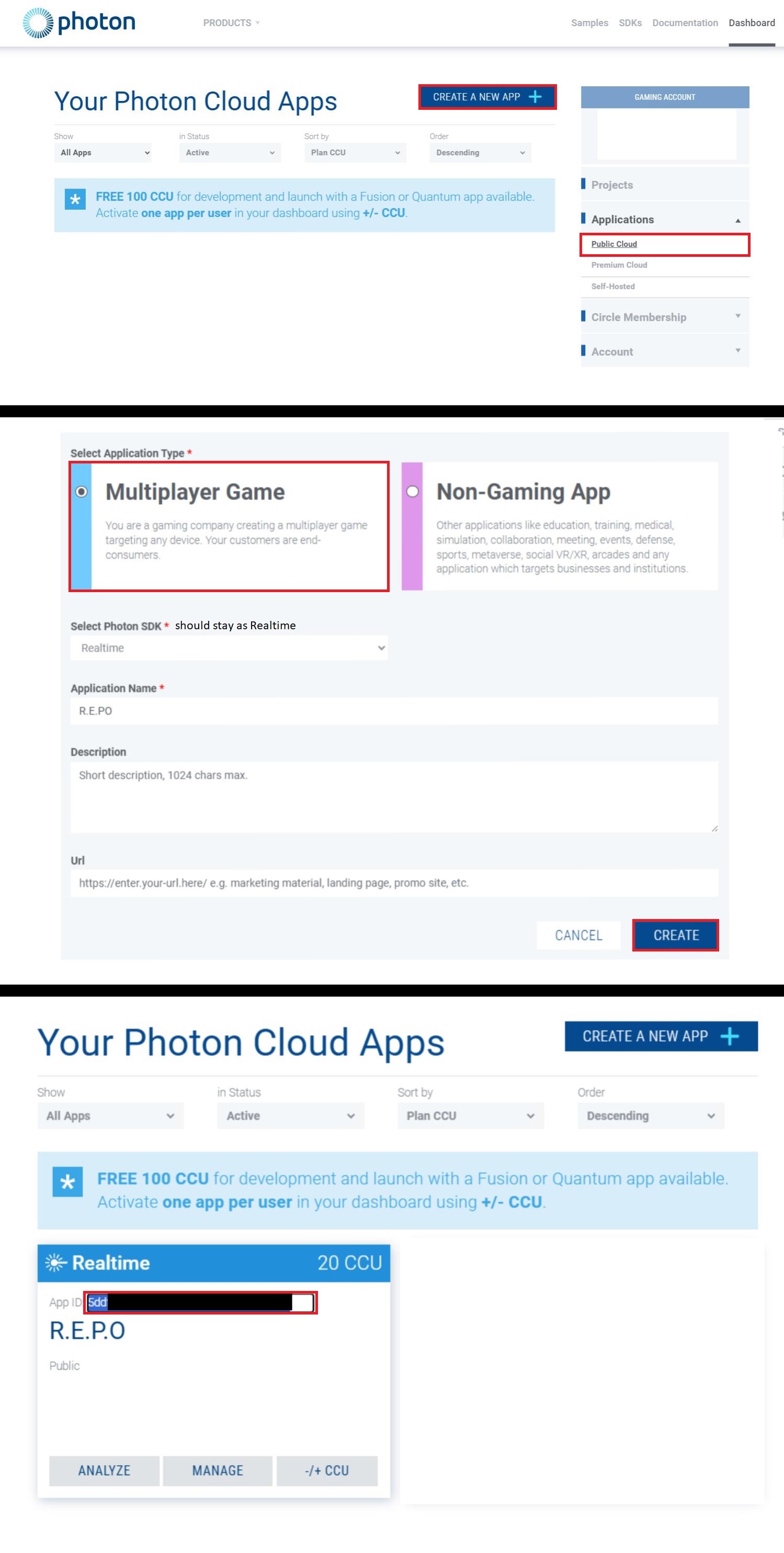
🔑 How to Get a Photon AppID
-
Go to Photon Engine
-
Log in or create an account.
-
Open the Photon Dashboard
-
Create a new app:
- Application Type: Multiplayer Game
- Photon SDK: Realtime
- Click Create
-
Copy your AppID and paste it into
photon-redirect.cfg.
🔧 Build from Source
Requirements: .NET SDK
git clone https://github.com/awc21/BepInEx-PhotonRedir.git
cd BepInEx-PhotonRedir/src
dotnet build -c Release -o out