


Player Tracker
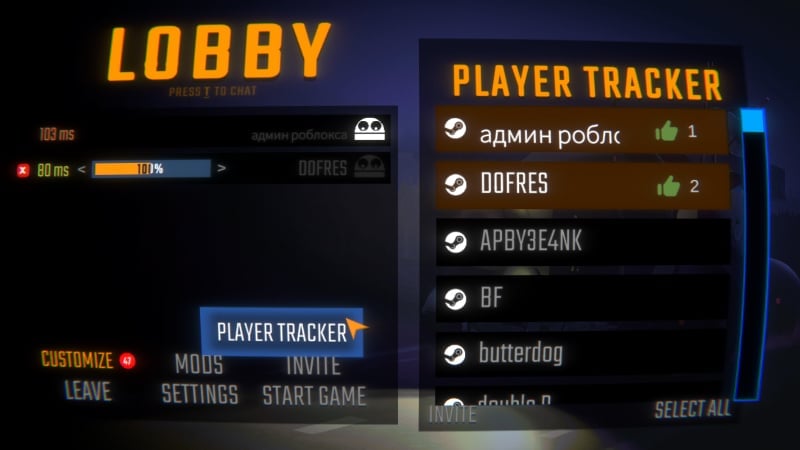
View player history, invite recent players, open Steam profiles, and like playersPlayer Tracker
View player history, invite recent players, open Steam profiles, and like players. Player Tracker expands the original Invite Recent Players mod idea with player likes and Steam profile buttons.
- Leave likes for players you enjoyed playing with and build reputation between mod users. Other mod users can also see player likes.
Features
- shows recent players list in the lobby
- lets you re-invite players from previous lobbies
- open Steam profiles if you forgot to add someone as a friend
- leave likes for players and see who earned the most likes
Configuration
This mod includes configurable options.
- File Location:
BepInEx/config/denis.repo.player-tracker.cfg
| Setting | Default | What it changes |
|---|---|---|
Recent Players Count |
20 |
Shows this many recent players, clamped to 20..40 |
Save Non-Friends |
true |
When enabled (default), saves all players. When disabled, only Steam friends are saved |
Multiplayer scope
- Player history is saved locally on your PC
- Steam invites work even if other players do not have the mod installed
- Player likes sync between mod users in the current lobby
- No data is sent to third-party servers
Dependencies
- Requires BepInEx and MenuLib
Version History
- 1.0.1: Non-friend players are now hidden instantly when Save Non-Friends is disabled
- 1.0.0: Initial release
Credits
- Special thanks to DOFRES for inspiring this mod
Developer Contact
- Discord:
disabro - Steam: админ роблокса
