

PlayerCountFixed
Lightweight REPO lobby player counter that shows Photon current/max players with configurable UI position and font size.PlayerCountFixed
PlayerCountFixed is a lightweight BepInEx plugin for R.E.P.O. that adds a clean lobby player counter showing:
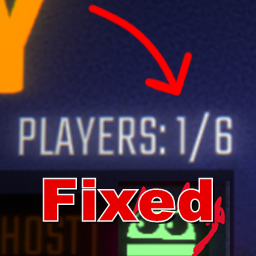
Players: current/max
It is designed for players who want a simple, reliable player-count display for normal or expanded lobbies.
What it does
PlayerCountFixed displays the number of players currently in the room and the room's maximum player count on the lobby screen using the current Photon room state.
Example:
Players: 3/17
The counter appears in the lobby page using a compact yellow TextMeshPro label.
Expanded-lobby compatibility
Expanded-lobby mods are not required. PlayerCountFixed works with expanded-lobby mods that set the Photon room max player count correctly.
How it works
PlayerCountFixed follows a conservative runtime flow:
- When the lobby page opens, it attaches one TextMeshPro label to the lobby UI.
- The label refreshes every 0.25 seconds instead of every frame.
- Text is only written when the displayed value changes.
- The display uses Photon room state:
Players: PhotonNetwork.CurrentRoom.PlayerCount/PhotonNetwork.CurrentRoom.MaxPlayers. - Errors are guarded and logged at most once to avoid console spam.
This means the plugin does not perform repeated global Resources.FindObjectsOfTypeAll scans and does not continuously rewrite UI text every frame.
UI configuration
PlayerCountFixed creates these BepInEx config entries:
UI / Position X (1080p)— default240.UI / Position Y (1080p)— default30.UI / Font Size— default22.UI / Color Mode— defaultnew; valuesneworold.newcolors current/slash/max and turns current red when full;olduses plain all-yellowPlayers: current/max.
Position values are direct RectTransform anchored-position UI units relative to the top-left anchor and are clamped to safe non-negative ranges. The game/Unity UI hierarchy handles final screen scaling. Font size is clamped to a safe positive range. Runtime config changes or explicit config reloads update while the lobby counter exists; plain external .cfg file edits require a config reload or game restart.
Installation
Install with Thunderstore Mod Manager / r2modman, or manually copy:
BepInEx/plugins/PlayerCountFixed.dll
into your game's BepInEx plugins folder.
Compatibility notes
- Requires BepInEx 5.
- Works without any expanded-lobby mod installed.
- Works with expanded-lobby mods that correctly set Photon room max players.