
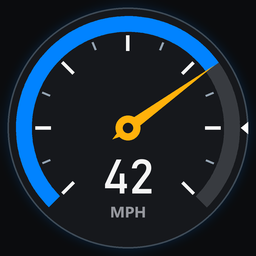
Speedometer
A speedometer in a corner of the screen while you skate: a dial or digital, four color schemes, mph or km/h, top speed, four corners and three sizes. A ReSkate plugin.Changelog
1.1.0
The settings page needs ReSkate 2.1.4 or newer; the dial works as before on older versions.
- A new settings page built with ReSkate 2.1.4's page widgets, with nothing hidden in a dropdown:
- On/off, units and size are small buttons side by side, the one in use lit.
- The corner is picked from four buttons laid out like the screen: top left and right above, bottom left and right below. Units and size each have their own card.
- Your top speed sits on the TOP SPEED card, with a small reset button under it.
- Each setting's help is written on the page, instead of showing only when you hover over it.
- A Digital style beside the dial: your speed in big figures over a bar of segments that fills along the scale and changes color near the top, with your top speed marked on it.
- Color schemes for either style: Classic (as before), Retro (a cream face in a chrome rim, black and red), Neon (magenta and cyan) and Green (green figures on black glass).
- Pick them on the page's STYLE and COLORS cards, or with
speedometer dial|digitalandspeedometer classic|retro|neon|green. - The dial stays up while its own settings page shows, so you see where it sits and how big it is as you change them.
- The dial hides under the pause menu.
1.0.0
The first release: a speedometer dial in a corner of the screen, in mph or km/h, with your top speed, four corners and three sizes.